
Sleek · Launch Video Breakdown: Hook, Pacing & Motion Design
A skill that makes agents better at mobile app design.
Scene-by-scene timeline & spoken transcript
The Hook
AI-Powered Mobile App Design Generation
“(No spoken dialogue — The track begins with a sustained, evolving pad sound, creating an atmospheric and slightly mysterious tone. At 00:04, a subtle, high-frequency sweep begins to build, leading into a significant sub-bass drop/impact at 00:05.)”
- On screen
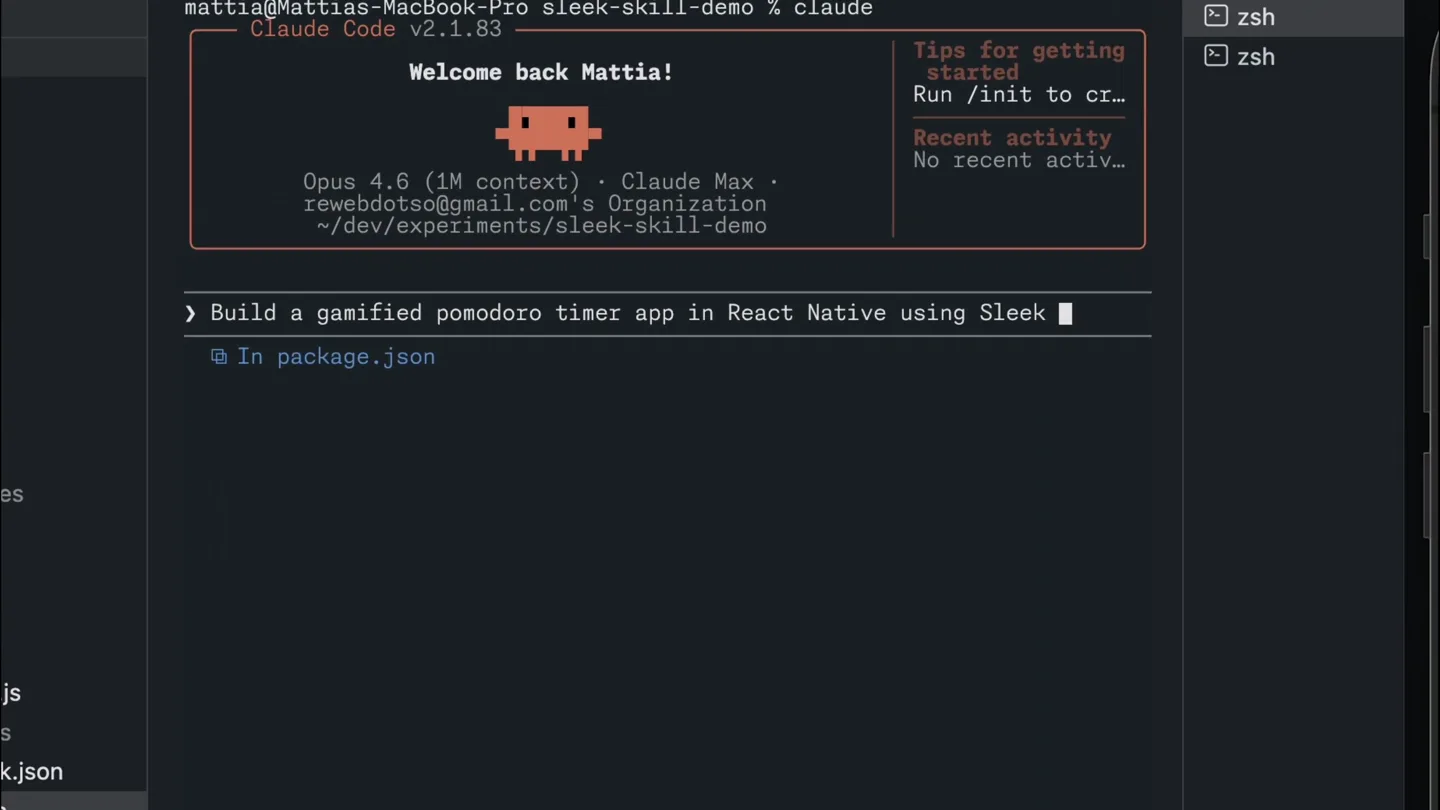
- Problems Output Debug Console Terminal Ports GitLens mattia@Mattias-MacBook-Pro sleek-skill-demo % claude Claude Code v2.1.83 Welcome back Mattia! Tips for getting started Run /init to cr_ Recent activity No recent activ_ Opus 4.6 (1M context) Claude Max rewhebdotsq@gmail.com's Organization ~/dev/experiments/sleek-skill-demo > Build a gamified In package.json medium /effort > Build a gamified pomodoro timer app in React Native using Sleek skill for the design Undulating... esc to interrupt Skill(sleek-design-mobile-apps) Successfully loaded skill I'll design the app with Sleek first, then implement it in React Native. Let me start by creating a project and sending the design request. Bash(echo "$SLEEK_API_KEY is set: ${[-n "$SLEEK_API_KEY"] && echo 'yes' || echo 'no'}") SLEEK_API_KEY is set: yes Bash(curl -s -X POST https://sleek.design/api/v1/projects \ -H "Authorization: Bearer $SLEEK_API_KEY" \...) { "data": { "id": "uRt6sftw19y", ... +6 lines (ctrl+o to expand) Undulating... (thinking)
- Camera
- Static wide shot of a VS Code terminal, with a slight zoom-in on the terminal content.
- Motion
- Rapid text typing animation within the terminal, simulating real-time coding and AI interaction. Subtle cursor movement.
Product Reveal
Instant Design Asset Generation
“(No spoken dialogue — A rhythmic, arpeggiated synth pattern introduces a sense of motion. Another high-energy riser starts around 00:10, culminating in a more pronounced sub-bass impact at 00:11, accompanied by a bright, percussive synth element.)”
- On screen
- ... +6 lines (ctrl+o to expand) Project created. Now let me send the design request to Sleek. Bash(curl -s -X POST https://sleek.design/api/v1/projects/uRt6sftw19y/ chat/messages?wait=true' \ -H "Authorization: Bearer $SLEEK_API_KEY" \...) { "data": { "runId": "Fv7EBzdPTh6", ... +40 lines (ctrl+o to expand) (timeout 5m 20s) All 5 screens designed. Let me take screenshots and fetch the component HTML code in parallel. Bash(mkdir -p /users/mattia/dev/experiments/sleek-skill-demo/design) Done Bash(# Individual screenshots for each screen for id_name in "PZHRAnZ6jHB:timer" "XLLdyfyaHc:break" "E390paXut8t:tasks" "VBStS2Xsqd:stats" "VFW6H8C1DB:settings";...) Running... Bash(# Combined screenshot of all screens curl -s -X POST https://sleek.design/api/v1/screenshots \...) Waiting... (Ctrl+b to run in background) Undulating... (3m 14s 990 tokens thinking) Tip: Use /btw to ask a quick side question without interrupting Claude's current work esc to interrupt Launchpad sleek-skill-demo 0 0 0 Cursor Tab .agents .claude .expo .vscode app assets components constants design all-screens.png home.html home.png stats.html stats.png timer.html timer.png dist hooks node_modules scripts .env.local .gitignore app.json eslint.config.js TS expo-env.d.ts package-lock.json design > all-screens.png Your Progress WEEKLY AVERAGE 4.2 HRS +12% from last week Focus Hours WEEK MONTH 24 SESSIONS THIS WEEK 8d PERSONAL BEST Recent Sessions VIEW ALL Design Workshop TODAY, 10:30 AM Deep Work YESTERDAY, 09:50 AM Sketching session YESTERDAY, 4:15 PM Reading time YESTERDAY, 2:30 PM Terminal Problems Output Debug Console Saved timer.html Saved home.html Let me view the screenshots and HTML code to understand the designs. Terminal Ports GitLens zsh zsh 17:40 Welcom Step 1: Try it Edit app/(tabs)/in cmd + d to open Step 2: Exploi Tap the Explore tab included in this st Step 3: Get a When you're read get a fresh app d current app to ap
- Camera
- The camera pans right, revealing a file explorer with newly generated design assets, then zooms into a multi-screen mobile app design preview.
- Motion
- Smooth camera pan and zoom, combined with a 'reveal' animation for the generated design files and a quick transition to the full app design preview.
Feature Teaser
Interactive App Demo & Data Visualization
“(No spoken dialogue — A sustained, airy pad then takes over, with subtle, shimmering effects.)”
- On screen
- iPhone 15 Pro Max 100 26.2 18:18 3 DAY STREAK Focus Break 25 00 START FOCUS HOME STATS PROFILE WORK SESSION REMAINING 24 59 PAUSE STOP Extend work +5m Rain Lullaby Your Progress WEEKLY AVERAGE 4.2 HRS +12% from last week Focus Hours WEEK MONTH M T W T F S S 24 SESSIONS THIS WEEK 8d PERSONAL BEST Recent Sessions VIEW ALL Design Workshop TODAY, 10:30 AM Deep Work YESTERDAY, 09:50 AM Sketching session YESTERDAY, 4:15 PM Reading time YESTERDAY, 2:30 PM
- Camera
- Close-up on a simulated iPhone screen, showcasing interactive elements and screen transitions within the app.
- Motion
- Simulated finger taps and swipes on the mobile app, demonstrating functionality. Smooth transitions between app screens (e.g., timer to stats).
Call to Action
Seamless Integration & Final Product View
“(No spoken dialogue — A final, more intense riser begins at 00:27, leading to a powerful sub-bass drop/impact at 00:29, which then fades out with a lingering, resonant tail.)”
- On screen
- iPhone 15 Pro Max 100 26.2 18:18 3 DAY STREAK Focus Break 25 00 START FOCUS HOME STATS PROFILE
- Camera
- Returns to a full view of the mobile app, then fades to black.
- Motion
- Quick, decisive screen transitions within the app, followed by a smooth fade-out to black, emphasizing the final product.
Motion design primitives
Synthesizable in Remotion · key components of the ai-dev-to-app-launch template.
TerminalTypewriter
Text appears character by character in a terminal interface, simulating real-time typing, often with a blinking cursor. Commands and outputs are revealed sequentially.
+ Code construction recipe
Use Remotion's `Sequence` and `spring` or `interpolate` for character opacity and position. Implement a `useCurrentFrame` hook to control the typing speed and cursor blink animation. Text content can be passed as a prop.
FileExplorerReveal
File and folder icons animate into view, expanding from a central point or sliding in from the side, often accompanied by a subtle glow or highlight.
+ Code construction recipe
Utilize `spring` for the scale and opacity of individual file/folder elements. Animate their `x` and `y` positions to create a staggered reveal effect. SVG icons can be used for crisp visuals.
MobileAppInteraction
Simulated finger taps and swipes trigger smooth transitions between different screens or states within a mobile application, showcasing its functionality.
+ Code construction recipe
Employ `interpolate` for `translateX`, `translateY`, and `opacity` to create screen transitions. Use `spring` for button press feedback and cursor animations. The mobile device frame can be a static SVG or image.
Style DNA & aesthetic system
Visual aesthetic
Typography
Motion
Special effects
Pacing & rhythm
Conceptual story rhythm
- 1
The AI Prompt
Purpose. Introduce the core problem and the AI's capability to solve it through a direct command.
Execution. A developer types a prompt into a terminal, showcasing the AI's ability to understand and act on complex requests.
- 2
Automated Design Generation
Purpose. Demonstrate the AI's efficiency in generating design assets and code.
Execution. The terminal rapidly outputs commands and results, culminating in the reveal of a file explorer populated with design files and a multi-screen app preview.
- 3
Interactive Product Showcase
Purpose. Highlight the functionality and user experience of the generated mobile app.
Execution. A simulated user interacts with the mobile app, tapping buttons, navigating screens, and viewing data visualizations.
- 4
Seamless Integration & Outcome
Purpose. Conclude by showing the final, polished product and the ease of its creation.
Execution. The mobile app is shown in full, demonstrating its complete functionality, followed by a clean fade-out.
Remix in Animatiq Studio
Master remix prompt · agent-ready
Sample remix
Objective
An AI-powered financial analysis tool called 'QuantIQ'.How the recipe adapts
The TerminalTypewriter primitive will be used to show the user prompting QuantIQ for financial analysis. The FileExplorerReveal will showcase generated reports and data visualizations. The MobileAppInteraction primitive will be adapted to a DesktopDashboardInteraction, demonstrating filtering and drill-down on interactive charts within the QuantIQ web interface. The color palette will shift to a more corporate blue and green, while maintaining the clean, modern aesthetic.Remix blueprint · ai-dev-to-app-launch
Scene durations (4 scenes, 32s)
Key Remotion components
Related Consumer & Apps Product Launches
Explore all Consumer & Apps launches →
Grand Theft Auto VI: An Extended Look premieres on Netflix Thursday, August 27.
Polymarket Perps is live with up to 20x leverage on crypto, stocks, commodities, and more. Long BTC, predict the Fed, or short the S&P reaction.

Pump.fun launches GO, a marketplace for posting and completing paid bounties for any task.