
Space · Launch Video Breakdown: Hook, Pacing & Motion Design
Space is a cloud filesystem for work. You mount one persistent drive for yourself and your agents, work in the cloud like local, stream only the bytes you need, and skip compression.
Scene-by-scene timeline & spoken transcript
The Hook
Agitating the Pain of Slow Cloud Storage
“(No spoken dialogue — The track opens with a sustained, evolving pad synth, creating an atmospheric and ethereal soundscape. A subtle sub-bass drone underpins the melody.)”
- On screen
- tired of dropbox?
- Camera
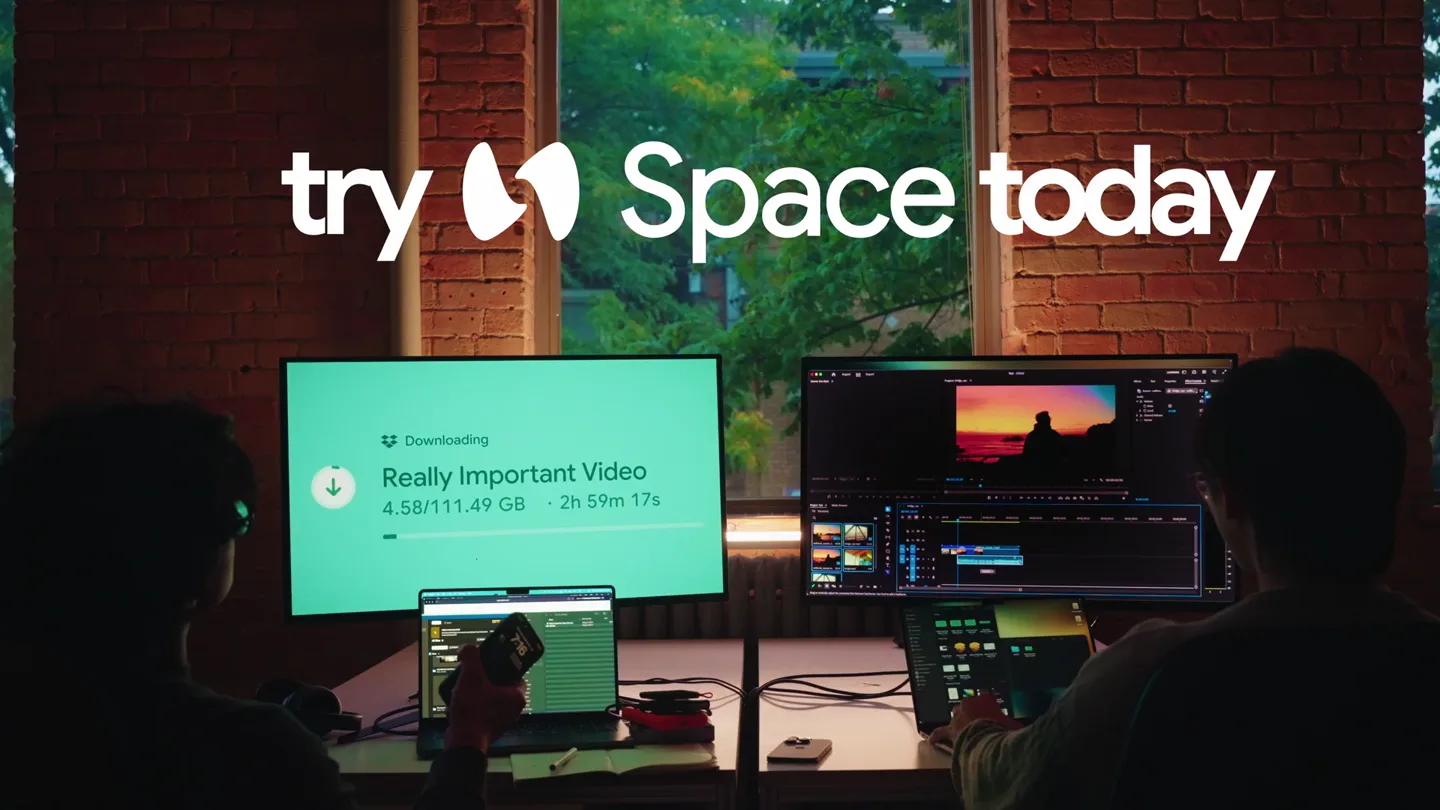
- Static, wide shot of two individuals working at computers, framed through a large window. The camera maintains a fixed, slightly elevated perspective.
- Motion
- Rapid text replacement animation, where 'dropbox?' is quickly swapped for 'google drive?' and 'icloud?' to highlight common pain points.
Problem Agitation
Highlighting the Universal Frustration of Waiting
“(No spoken dialogue — The sustained pad synth continues, maintaining the calm, contemplative atmosphere.)”
- On screen
- tired of google drive?
- Camera
- Static, wide shot of two individuals working at computers, framed through a large window. The camera maintains a fixed, slightly elevated perspective.
- Motion
- Continued rapid text replacement, transitioning from specific cloud services to the general pain point of 'waiting?'. The downloading progress bar on the left monitor visually reinforces the 'waiting' problem.
Product Reveal
Introducing Space as the Solution
“(No spoken dialogue — At 00:08, a high-frequency synth melody enters, characterized by a plucked, almost pizzicato-like texture, which then transitions into a sustained, bowed string-like synth sound at 00:10.)”
- On screen
- tired of waiting?
- Camera
- Static, wide shot of two individuals working at computers, framed through a large window. The camera maintains a fixed, slightly elevated perspective.
- Motion
- The question 'waiting?' is replaced by the call to action 'try Space today', with the Space logo appearing. This is a direct, impactful reveal with a subtle scale-up animation on the new text.
Call to Action
Reinforcing the Solution and Call to Action
“(No spoken dialogue — The sustained, bowed string-like synth sound continues, maintaining a calm and contemplative feel with gradual melodic complexity.)”
- On screen
- try Space today
- Camera
- Static, wide shot of two individuals working at computers, framed through a large window. The camera maintains a fixed, slightly elevated perspective.
- Motion
- The 'try Space today' text remains on screen, subtly pulsing or breathing, while the downloading progress bar on the left monitor continues to show the 'Really Important Video' downloading, emphasizing the ongoing problem Space aims to solve.
Motion design primitives
Synthesizable in Remotion · key components of the static-scene-pain-point-solution template.
RapidTextSwap
A single word or phrase is rapidly replaced by another, creating a quick succession of ideas or comparisons. The text appears to 'pop' into existence.
+ Code construction recipe
Use Remotion's <Sequence> and <AbsoluteFill> components. Animate opacity and a slight scale (e.g., from 0.9 to 1.0) for each text element using `interpolate` with a `spring` curve for a snappy feel. Control timing precisely with `durationInFrames` and `from` props.
SubtleTextPulse
On-screen text subtly scales up and down or changes opacity in a gentle, rhythmic manner, drawing attention without being distracting.
+ Code construction recipe
Apply a `spring` animation to the `scale` or `opacity` CSS property of the text component. Use `loop` to create a continuous, breathing effect. Adjust `damping` and `stiffness` for desired subtlety.
PersistentUIOverlay
A static or subtly animated UI element (like a downloading progress bar) remains visible throughout a scene, providing context or reinforcing a narrative point.
+ Code construction recipe
Render the UI element as a static image or SVG within a <AbsoluteFill> or positioned <View>. If animated, use `interpolate` for progress bar filling or simple `spring` for subtle icon bounces, ensuring it doesn't distract from primary text.
Style DNA & aesthetic system
Visual aesthetic
Typography
Motion
Special effects
Pacing & rhythm
Conceptual story rhythm
- 1
The Pain Point Carousel
Purpose. Quickly establish and agitate common frustrations with existing solutions, making the audience feel understood.
Execution. Rapidly cycling through competitor names ('dropbox?', 'google drive?', 'icloud?') using text replacement, culminating in the universal 'waiting?'.
- 2
The Lingering Problem
Purpose. Visually reinforce the core problem (slow downloads/waiting) to build empathy and urgency for a solution.
Execution. A persistent, slow-moving download progress bar on one of the monitors, showing a 'Really Important Video' with a long estimated time.
- 3
The Direct Solution
Purpose. Introduce the product as the clear, concise answer to the agitated problem.
Execution. A direct, impactful text reveal: 'try Space today' with the product logo, replacing the 'waiting?' question.
- 4
The Call to Action Hold
Purpose. Allow the audience to absorb the product name and call to action, letting the message sink in.
Execution. The 'try Space today' text remains on screen, subtly animated, while the background scene continues to show the problem (slow download) as a persistent reminder.
Remix in Animatiq Studio
Master remix prompt · agent-ready
Sample remix
Objective
Launch a new AI-powered code refactoring tool called 'RefactorFlow'.How the recipe adapts
The static wide shot would feature a developer's desk with multiple monitors displaying messy code. The rapid text swap would cycle through 'tired of spaghetti code?', 'tired of manual refactors?', 'tired of tech debt?'. The persistent background element would be a complex, unoptimized code file. The product reveal would be 'try RefactorFlow today', with the RefactorFlow logo, using the same clean sans-serif typography and subtle spring animation.Remix blueprint · static-scene-pain-point-solution
Scene durations (4 scenes, 19.7s)
Key Remotion components
Related Productivity Product Launches
Explore all Productivity launches →
Don't type, just speak. Flawless voice-to-text across every app at 240 WPM.

One workspace for knowledge scattered across Slack, email, Docs, and Notion. Connect your tools and build apps and agents that stay live with your data.

Notion positions itself as the backbone of your dock — a brand film of the Notion icon among everyday apps, ending on “Works with everything.”