
Space · Launch Video Breakdown: Hook, Pacing & Motion Design
Space expands your computer's storage with the cloud while keeping every file instantly accessible to the whole team — its virtual drive lets every app, agent and workflow work natively as if files were local.
Scene-by-scene timeline & spoken transcript
The Hook
Reinventing Cloud Storage
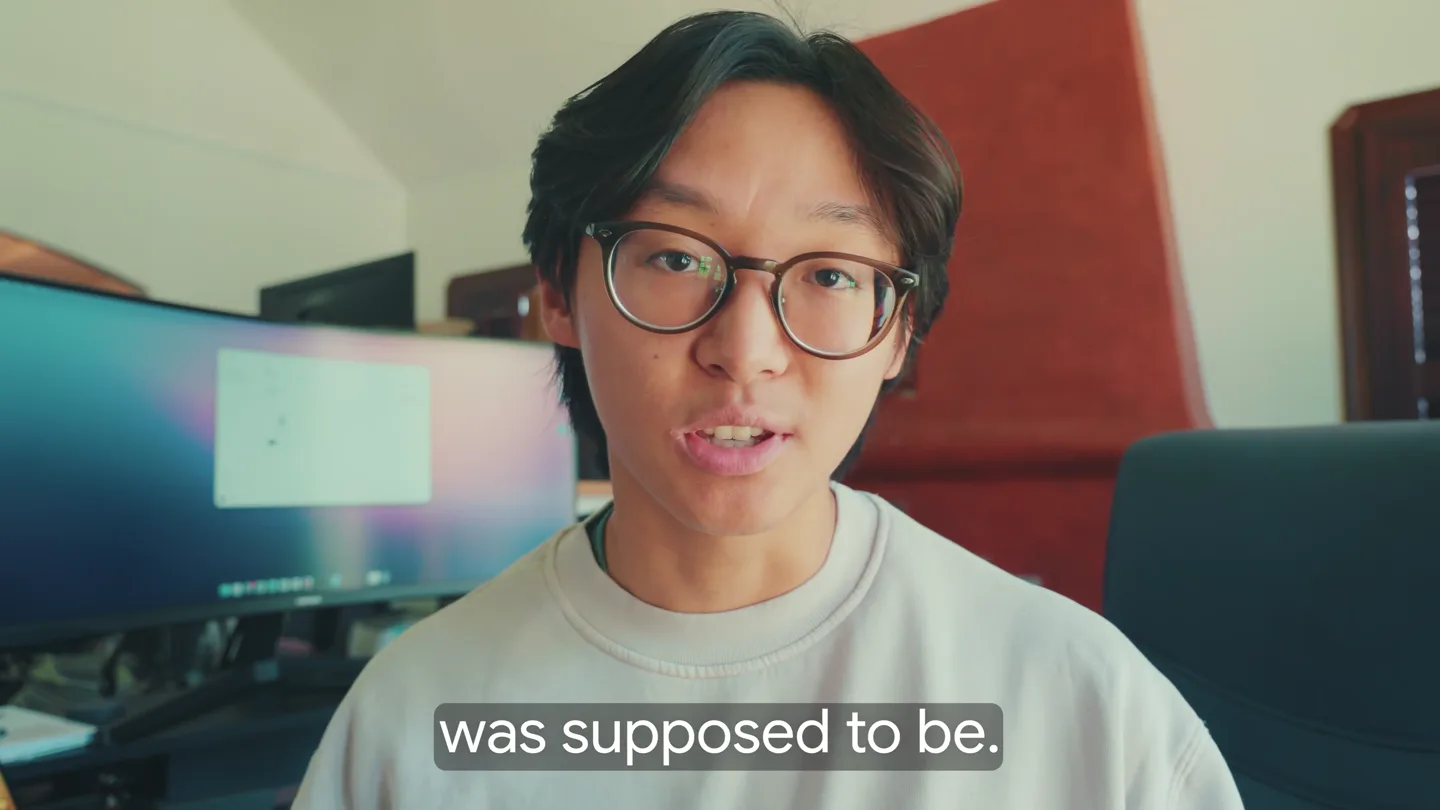
“Hey everyone, so we just built what cloud storage was supposed to be. A simple way for you to store data in the cloud, but still access everything as if it were local. So check this out.”
- On screen
- so we just built what cloud storage was supposed to be. A simple way to store data in the cloud access everything as if it were local. So check this out.
- Camera
- Static talking-head medium close-up, cutting to UI overview.
- Motion
- Direct cut to clean UI screenshot with cursor hover.
Problem Agitation
MacBook Storage Full
“For the past 2 months, my MacBook storage has actually been completely filled, but I never really noticed because I've been using our product Space, and I even was able to put out a YouTube video this week that was like 200 gigs.”
- On screen
- Storage Macintosh HD 909.18 GB of 994.66 GB used
- Camera
- Screen capture recording with founder PiP in bottom-left corner.
- Motion
- Spotlight zoom on macOS Storage settings displaying maxed-out red capacity bar.
Product Reveal
One-Click Drive Mount & Quick Look
“One click, you mount the drive, you can then view all of your files within Finder because we mount it right into the sidebar, just like you would any other file system. But the cool thing that we actually shipped this week is you can view all of your files directly within Space. So I'm going to navigate to where all my footage is, and you see these files literally don't exist on this computer, but even then, the moment I hit spacebar, they're here and they're playing.”
- On screen
- Drives Aug 5th, 2026 Mount Show in Finder Vlog
- Camera
- Clean digital desktop pan and click navigation.
- Motion
- Cursor click triggers drive mounting, sidebar integration, and zero-latency spacebar video playback.
Feature Teaser
Full 200GB NLE Cloud Workflow
“So what I've been doing is dumping my SD card footage directly onto Space, and then creating the project, doing the entire edit, all within Space. So the cool thing is that all of these video files, all this footage, even the Premiere project itself, none of it lives on this computer. It's all cloud storage, and Space is intelligently streaming it back to my computer so I don't have to download or hold anything on this computer itself. So what this means is that even though I don't have any additional storage left on this computer, I can still edit an entire 200 gigabyte video project without any problems.”
- On screen
- my_vlog.prproj Opening project: my_vlog A productive day in my life building a startup in my 20s
- Camera
- Screen capture showing Adobe Premiere timeline editing.
- Motion
- Smooth scrubbing across multi-track 4K video clips streaming dynamically from the cloud.
Feature Teaser
Zero-Download Team Collaboration
“Now I want to show you a couple more interesting use cases for Space. Say you're working with a team, maybe an assistant editor, or you're just sharing files across an entire organization. Everyone else you invite to your Space gets the exact same benefits without having to download any of the files just to access the project. So I'll quickly share this drive with my Mac mini here. Because Space is mounted directly into your file explorer, every video, PDF, image that needs to be shared can be used directly within existing workflows without any sort of integrations.”
- On screen
- Share 'Aug 5th, 2026' admin@getspace.so Shared with me
- Camera
- Desk camera B-roll of secondary ultrawide monitor setup.
- Motion
- Modal share interaction switching to remote machine instantly mounting the shared volume.
Call to Action
Company Server in One Minute
“It's like a company server that every human and agent can work off of, but it only takes a minute to set up, and you can try it for yourself today.”
- On screen
- Space
- Camera
- Talking-head close-up cutting to centered minimalist logo lockup.
- Motion
- Minimal black logo spring reveal on solid white background.
Motion design primitives
Synthesizable in Remotion · key components of the founder-screen-demo-pip template.
PiPWebcamOverlay
Rounded rectangle webcam bubble fixed to the bottom-left corner over screen recordings.
+ Code construction recipe
Use AbsoluteFill with absolute positioning, border radius of 20px, subtle dropshadow, and synchronised Video source.
CursorWorkflowGuide
Simulated smooth cursor tracking that navigates between macOS modals, buttons, and Finder folders.
+ Code construction recipe
Interpolate cursor coordinates using spring physics and trigger scale pulse on click keyframes.
MinimalLogoReveal
Clean dual-shape logo glyph popping in followed by tracking text fade.
+ Code construction recipe
Use Remotion spring for glyph scale from 0.8 to 1 with concurrent opacity ramp on the wordmark.
Style DNA & aesthetic system
Visual aesthetic
Typography
Motion
Special effects
Pacing & rhythm
Conceptual story rhythm
- 1
Hook & Value Prop
Purpose. Define the vision of seamless cloud storage functioning like local drives.
Execution. Founder address cut quickly to clean Space drive dashboard.
- 2
The Proof (Stress Test)
Purpose. Show real proof with a maxed-out hard drive and 200GB editing project.
Execution. Storage settings bar followed by live Premiere Pro scrubbing.
- 3
Multiplayer Utility
Purpose. Demonstrate effortless sharing across team members without downloads.
Execution. UI permission modal cut to secondary studio monitor opening identical files.
- 4
Closing CTA
Purpose. Call users to action with quick setup promise.
Execution. Direct-to-camera founder wrap-up leading to minimal logo lockup.
Remix in Animatiq Studio
Master remix prompt · agent-ready
Sample remix
Objective
Launch video for a cloud-based AI code workspace that mounts remote GPUs locally.How the recipe adapts
Founder addresses local hardware limits for AI models, shows local IDE running 70B parameter models streamed from the cloud, demonstrates sharing the development environment with a teammate, and ends on clean brand branding.Remix blueprint · founder-screen-demo-pip
Scene durations (6 scenes, 104s)
Key Remotion components
Related Productivity Product Launches
Explore all Productivity launches →
Anthropic introduces Cowork, which brings the Claude Code way of delegating tasks to everyday, non-technical work.

Don't type, just speak. Flawless voice-to-text across every app at 240 WPM.

One workspace for knowledge scattered across Slack, email, Docs, and Notion. Connect your tools and build apps and agents that stay live with your data.