
SpareDisk · Launch Video Breakdown: Hook, Pacing & Motion Design
SpareDisk is a Diskbuddy alternative built for speed, privacy, and security. Apple sandboxed, notarized, and in review for the Mac App Store.
Scene-by-scene timeline & spoken transcript
The Hook
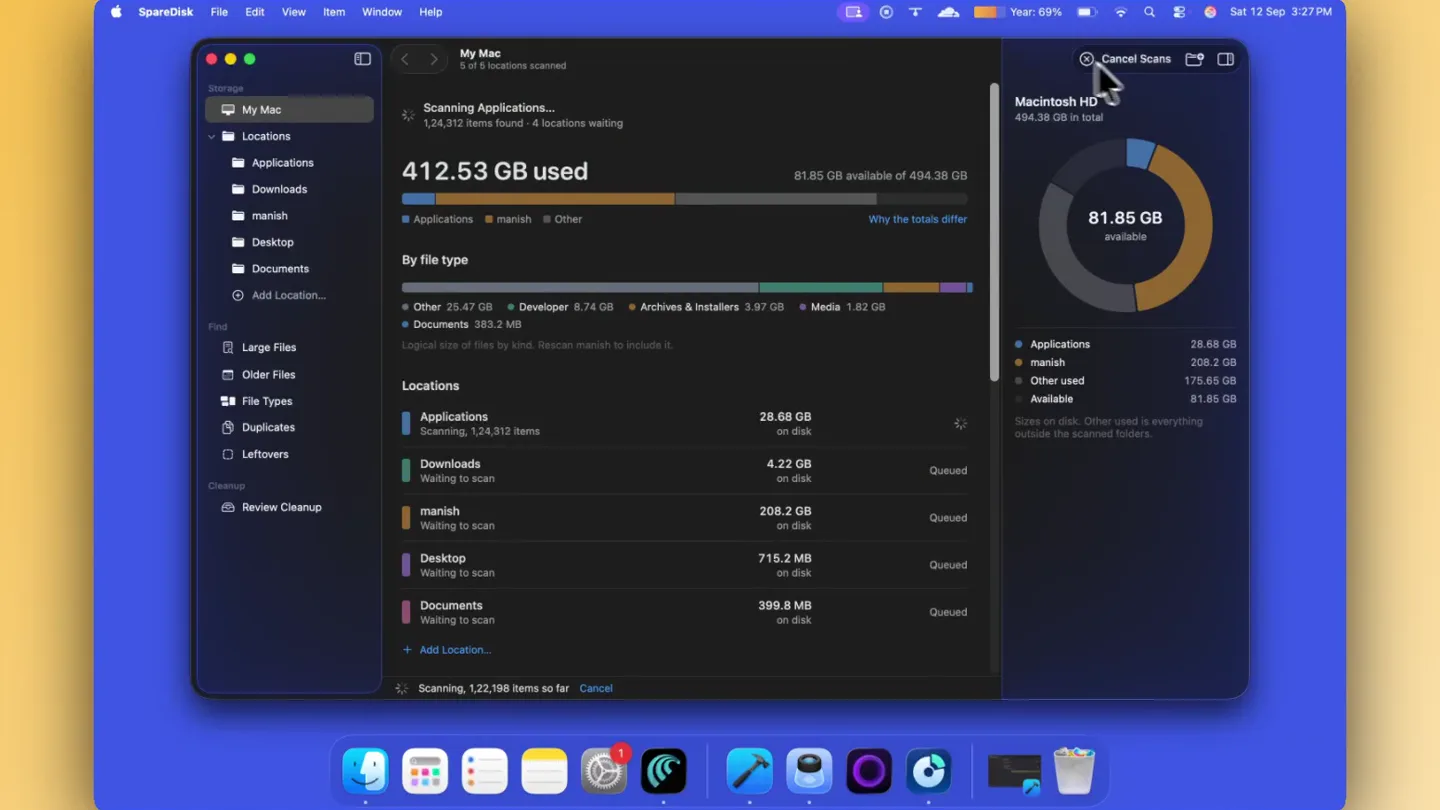
Initial Scan & Overview
“(No spoken dialogue — silent video with ambient visual focus.)”
- On screen
- SpareDisk, File, Edit, View, Item, Window, Help, My Mac, Storage, Locations, Applications, Downloads, manish, Desktop, Documents, Add Location..., Find, Large Files, Older Files, File Types, Duplicates, Leftovers, Cleanup, Review Cleanup, Scanning Applications..., 412.53 GB used, 81.85 GB available, Why the totals differ, By file type, Other, Developer, Archives & Installers, Media, Applications, manish, Other, Available, Locations, Applications, Downloads, manish, Desktop, Documents, Library, Containers, Developer, Application Support, Caches, Android, Xcode.app, Android Studio.app, Swift Playground.app, Docker.app, Comet.app, ChatGPT.app, Cursor.app, Visual Studio Code.app, Blender.app, Claude.app, Logi Tune.app, Google Chrome.app, ZCode.app, LM Studio.app, Antigravity IDE.app, GitHub Desktop.app, Screen Studio.app, Firefox.app, Cadence.app, Zoom.us.app, Brave Browser.app, Cloudflare WARP.app, Antigravity.app, Ollama.app, Devin.app, Add to Review, Move to Trash, Quick Look, Finder, Uninstall...
- Camera
- Static, top-down view of the Mac application window. Occasional subtle mouse cursor movements highlight UI elements.
- Motion
- Direct screen recording with precise cursor interaction, showcasing real-time application functionality and data visualization updates.
Product Reveal
Deep Dive & Visualizations
“(No spoken dialogue — silent video with ambient visual focus.)”
- On screen
- My Mac, Storage, Locations, Applications, Downloads, manish, Desktop, Documents, Add Location..., Find, Large Files, Older Files, File Types, Duplicates, Leftovers, Cleanup, Review Cleanup, manish, Inner ring: this level. Outer ring: inside each folder. Grey: smaller items, click for the list., 734.05 GB, 13,86,674 items, 145 unreadable, +1.61 GB since last scan, Desktop, remotepilot, Timegauge, Timebar, sparedisk-website, merlin-dev, macosapp.mp4, TT1.4.mp4, reddit.mp4, Frame.mp4, ph.mp4, onAir website, Cadence.mp4, dbt_within-main 2, SpareDisk.app, Deadlift_guide_1080p.mp4, SpareDisk, Kinder, packages, Folder, 301 KB, 3,01,040 bytes, 406 KB on disk, Modified 7 Sep 2026 at 11:12 PM, Contains 48 items, Largest inside, Read, Add to Review, Move to Trash, Quick Look, Finder, Older Files, The 200 oldest files from each scanned location, by modification date, Before 2023, 2023, 2024, 415 KB, 3 MB, Leftovers, Library entries named after an app identifier that no installed app claims., No leftovers listed yet., Containers, caches, preferences and saved state whose app is gone. Apple's own identifiers are not shown. Moving to the Trash asks first and checks each item again., Find Leftovers, Move 10 items to the Trash?, 69.9 MB. Each item is checked again first. Space is freed when you empty the Trash., 69.9 MB, 9 items, Cancel, Review Cleanup, Moved 3 items to Trash. 7 could not be moved., Show Trash, Dismiss Report, Needs attention, com.minilabs.learnit, com.manish.SpendBar, com.lemon.lvoverseas, com.minilabs.SpareDiskUITests.xcrunner, com.minilabs.coastUITests.xcrunner, com.minilabs.onAirUITests.xcrunner, Queue is empty. Anything moved can be recovered from the Trash in Finder., Duplicates, Comparing 3 of 541 candidates, Comparing contents, 185.4 MB of up to 126.79 GB, 043-37537-327.dmg.ses, Redundancy counts logical bytes. Cloned files can share blocks, so the Trash may free less. Identical contents can still mean different things to their apps., Moved 3 items to Trash. 7 could not be moved.
- Camera
- Smooth, controlled pans and zooms within the application window, focusing on specific data points and interactive elements.
- Motion
- Seamless UI transitions, radial data visualization animations, and focused cursor interactions demonstrating feature depth.
Feature Teaser
Cleanup & Optimization
“(No spoken dialogue — silent video with ambient visual focus.)”
- On screen
- My Mac, Storage, Locations, Applications, Downloads, manish, Desktop, Documents, Add Location..., Find, Large Files, Older Files, File Types, Duplicates, Leftovers, Cleanup, Review Cleanup, Older Files, The 200 oldest files from each scanned location, by modification date, Before 2023, 2023, 2024, 415 KB, 3 MB, Duplicates, Comparing 16 of 541 candidates, Comparing contents, 9.94 GB of up to 126.79 GB, 043-03487-351.dmg.ses, Redundancy counts logical bytes. Cloned files can share blocks, so the Trash may free less. Identical contents can still mean different things to their apps., Moved 3 items to Trash. 7 could not be moved.
- Camera
- Dynamic camera movements, including quick shifts between different sections of the app, emphasizing the speed of operations.
- Motion
- Rapid UI navigation, progress bar animations, and visual feedback on cleanup actions, conveying efficiency and responsiveness.
Call to Action
Final Review & Call to Action
“(No spoken dialogue — silent video with ambient visual focus.)”
- On screen
- (No on-screen text)
- Camera
- The camera maintains a consistent, slightly zoomed-out view of the application, allowing the user to see the overall impact of the cleanup.
- Motion
- Subtle UI element highlights and a final, clean state of the application, reinforcing the product's value proposition.
Motion design primitives
Synthesizable in Remotion · key components of the mac-productivity-showcase template.
RadialDataExplosion
A circular, multi-layered chart animates to reveal data distribution, with segments expanding and contracting to represent file sizes and categories. A central value updates dynamically.
+ Code construction recipe
Utilize Remotion's <AbsoluteFill> and <Path> components for SVG-based arcs. Animate 'stroke-dasharray' and 'stroke-dashoffset' for segment growth, and 'transform: scale' for overall chart expansion. Use 'interpolate' for smooth value transitions in the central text.
FluidListScroll
A long list of files or items scrolls smoothly and rapidly, with individual items highlighting on hover or selection, and details panels sliding in from the side.
+ Code construction recipe
Implement with Remotion's 'scrollPosition' and 'useCurrentFrame' to control the vertical offset of a list of <Text> or <View> components. Use 'spring' for natural-feeling hover/selection animations and 'translateX' for detail panel entry/exit.
ProgressiveScanBar
A horizontal progress bar animates across the screen, often accompanied by a numerical counter or textual description of the scanning process, indicating ongoing operations.
+ Code construction recipe
Create a <View> for the progress bar background and another for the fill. Animate the 'width' property of the fill <View> using 'interpolate' from 0 to 100%. Update accompanying text with 'useCurrentFrame' and 'interpolate' for numerical counts.
Style DNA & aesthetic system
Visual aesthetic
Typography
Motion
Special effects
Pacing & rhythm
Conceptual story rhythm
- 1
Initial Discovery
Purpose. Introduce the problem of disk clutter and the app's ability to scan and categorize.
Execution. The app window opens, initiates a scan, and populates the main overview with file types and sizes.
- 2
Detailed Exploration
Purpose. Showcase the app's deep-dive capabilities into specific file categories and locations.
Execution. Navigating through file lists, opening detailed views, and interacting with radial charts to visualize data.
- 3
Actionable Cleanup
Purpose. Demonstrate the practical steps of identifying and removing unnecessary files.
Execution. Highlighting 'Older Files', 'Leftovers', and 'Duplicates' sections, showing the process of adding items to review and moving them to trash.
- 4
Efficiency & Resolution
Purpose. Conclude by showing the positive impact of the cleanup and the app's overall efficiency.
Execution. Progress bars completing, confirmation messages, and a final view of a cleaner disk space, reinforcing the product's value.
Remix in Animatiq Studio
Master remix prompt · agent-ready
Sample remix
Objective
Showcase 'TaskFlow', a new project management app for macOS, highlighting its intuitive task creation, team collaboration, and progress tracking features.How the recipe adapts
The RadialDataExplosion primitive would adapt to visualize project progress or team workload distribution. FluidListScroll would be used for rapid task list navigation and reordering. ProgressiveScanBar would become a 'ProgressiveSyncBar' for data synchronization or project completion percentages. The overall pacing would remain calm and informative, focusing on the app's efficiency in managing complex projects.Remix blueprint · mac-productivity-showcase
Scene durations (4 scenes, 101.8s)
Key Remotion components
Related Productivity Product Launches
Explore all Productivity launches →
Don't type, just speak. Flawless voice-to-text across every app at 240 WPM.

One workspace for knowledge scattered across Slack, email, Docs, and Notion. Connect your tools and build apps and agents that stay live with your data.

Notion positions itself as the backbone of your dock — a brand film of the Notion icon among everyday apps, ending on “Works with everything.”