
Scene-by-scene timeline & spoken transcript
The Hook
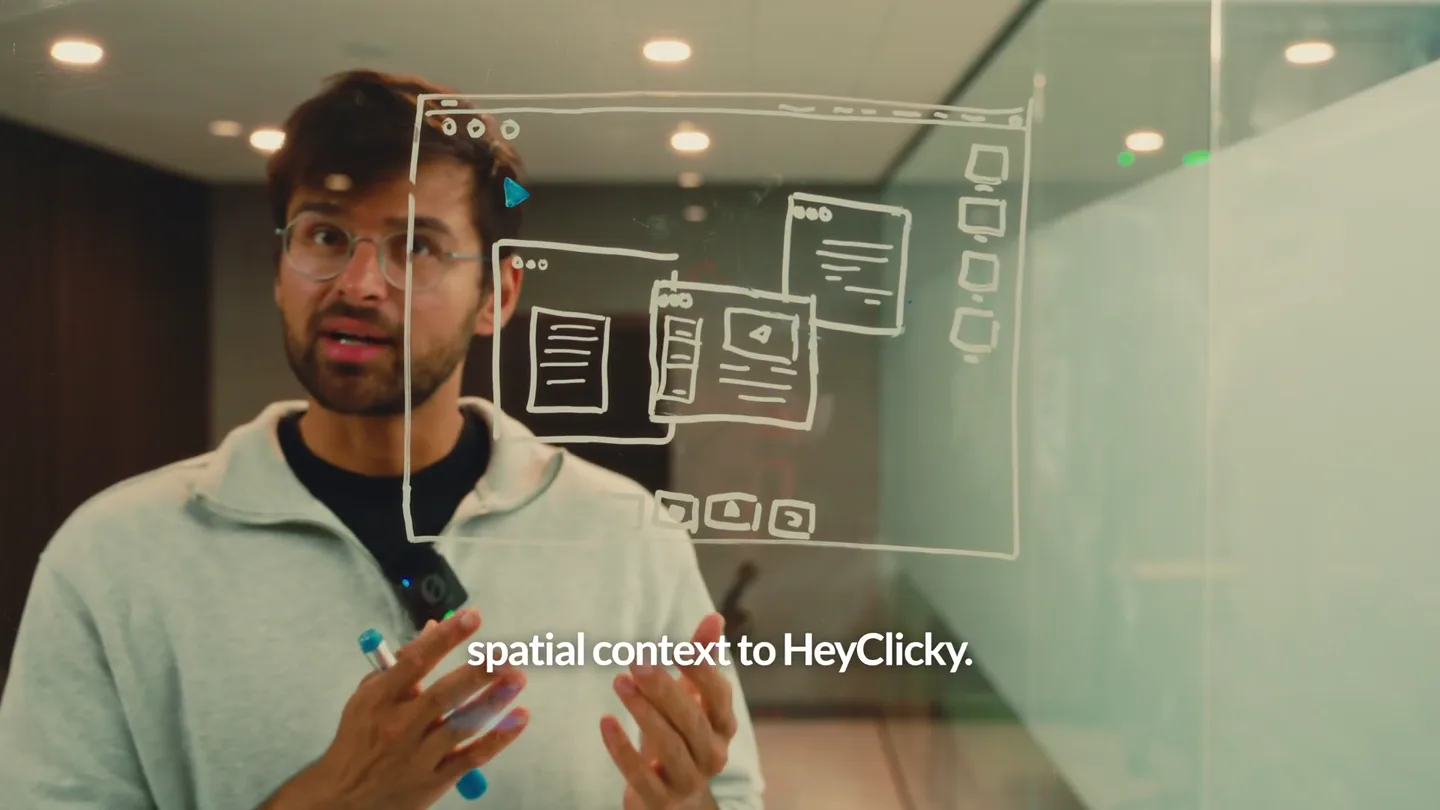
Introducing Spatial Context
“Today we're shipping spatial context. This lets you draw directly on your screen + pass it as context to the model. AI can easily analyze screenshots. But, it has no idea where exactly you want it…”
- On screen
- spatial context to HeyClicky.
- Camera
- Medium shot of the founder, slightly off-center, speaking directly to the camera. A transparent glass board with whiteboard drawings is in the foreground.
- Motion
- Live-action founder presentation with overlaid whiteboard animation. Hand-drawn circles appear and disappear on the glass, emphasizing points.
Problem Agitation
The Challenge of AI Understanding
“…you can actually just press the to hover around the area that my human anatomy exam. tell me more about the muscles”
- On screen
- to actually point out something you can actually just press the to hover around the area that my human anatomy exam. tell me more about the muscles
- Camera
- Alternates between a close-up screen recording of a web browser with a cursor drawing a red curved line, and the founder in a medium shot, gesturing.
- Motion
- Screen recording with animated cursor paths and a 'speaking' waveform graphic. Seamless cuts between live action and screen capture.
Product Reveal
Hey Clicky's Intuitive Solution
“possible today with things a lot nicer if it a website and I want to say, add a button to this and passes it off to our button exactly where I circled.”
- On screen
- possible today with things a lot nicer if it a website and I want to say, add a button to this and passes it off to our button exactly where I circled.
- Camera
- Close-up of a hand pressing a keyboard key, then a screen recording showing a green animated circle highlighting an area on a website, followed by a quick cut to a video editing software interface.
- Motion
- Macro shot of keyboard interaction. Screen recording with dynamic, animated UI elements (green circle highlight, text input). Quick, impactful cuts to demonstrate workflow.
Feature Teaser
Human-like Context for AI
“it's like you can give context As humans, we just want to take Kind of like we'd show a friend So that's that. wall, by the way.”
- On screen
- it's like you can give context As humans, we just want to take Kind of like we'd show a friend So that's that. wall, by the way.
- Camera
- Medium shot of the founder, similar to the opening, with the glass board and its drawings. The camera slightly zooms in and out, and pans subtly.
- Motion
- Live-action founder presentation. The whiteboard drawings on the glass animate with additional circles and lines, reinforcing the 'spatial context' concept.
Call to Action
Hey Clicky Branding
“(No spoken dialogue — A final sub-bass drop and impact sound effect accompanies the logo reveal.)”
- On screen
- heyclicky
- Camera
- Static shot of the 'heyclicky' logo centered on a black background.
- Motion
- Simple, clean text reveal with a strong audio cue. The logo appears instantly, providing a clear brand identifier.
Motion design primitives
Synthesizable in Remotion · key components of the founder-ai-spatial-context-launch template.
GlassBoardOverlayDraw
Hand-drawn whiteboard elements (circles, lines, UI sketches) appear and animate on a transparent glass surface in front of a live-action presenter. These drawings highlight or encircle specific areas, mimicking real-time thought processes.
+ Code construction recipe
Utilize Remotion's <AbsoluteFill> for the live-action video, then layer SVG <Path> or <Circle> components with `stroke-dasharray` and `stroke-dashoffset` animations to simulate drawing. Use `interpolate` for timing the drawing and `spring` for subtle 'pop' effects on new elements. Apply a slight blur or glow effect to the strokes for realism.
DynamicScreenHighlight
A cursor moves across a screen recording, drawing a fluid, colored path or highlighting a specific region with an animated shape. This visual feedback directly correlates with the spoken instruction or action.
+ Code construction recipe
Implement a screen recording as a video asset. Overlay an SVG <Path> component for the drawing effect, animating its `d` attribute or using `stroke-dasharray` for a 'draw-on' effect. For region highlights, use a `<Rect>` or `<Circle>` with `opacity` and `scale` animations, potentially with a `spring` for a bouncy reveal. Ensure precise `interpolate` timing to sync with audio.
UIElementPopIn
Key UI elements, such as text inputs or buttons, appear or change state with a subtle, quick animation, often accompanied by a sound effect. This draws attention to the interactive parts of the product.
+ Code construction recipe
For text, use `opacity` and `y` translation with an `easeOutCubic` interpolation. For buttons or other interactive elements, combine `scale` and `opacity` with a `spring` animation for a satisfying 'pop' effect. Ensure these animations are tightly synchronized with the audio track's high-energy transitions.
Style DNA & aesthetic system
Visual aesthetic
Typography
Motion
Special effects
Pacing & rhythm
Conceptual story rhythm
- 1
The Setup
Purpose. Introduce the core problem and the innovative concept of 'spatial context' through the founder's direct address.
Execution. Founder speaking directly, with conceptual whiteboard drawings animating on a glass pane in front of him.
- 2
The Demonstration
Purpose. Showcase the product's functionality with real-world examples, highlighting its ease of use and problem-solving capabilities.
Execution. Seamless cuts between screen recordings demonstrating the product in action (drawing, highlighting, AI response) and founder commentary.
- 3
The Explanation
Purpose. Elaborate on the 'why' behind the feature, connecting it to human intuition and the limitations of existing AI.
Execution. Return to the founder, using the glass board to visually reinforce the conceptual benefits and comparisons.
- 4
The Call to Action/Brand Reinforcement
Purpose. Conclude with a clear brand identity and a memorable, impactful sign-off.
Execution. Clean, minimalist logo reveal on a black background, punctuated by a strong audio cue.
Remix in Animatiq Studio
Master remix prompt · agent-ready
Sample remix
Objective
Launch a new AI-powered code generation tool called 'CodeSculpt' that allows developers to sketch UI elements and instantly generate production-ready code.How the recipe adapts
The GlassBoardOverlayDraw primitive would adapt to show founder sketches of UI components on a transparent screen, which then transition into the DynamicScreenHighlight primitive demonstrating CodeSculpt interpreting these sketches on a live coding environment. UIElementPopIn would be used for generated code blocks or interactive IDE features. The overall pacing and sound design would remain high-energy, emphasizing speed and efficiency in code generation. The color palette would shift to reflect a developer-centric aesthetic, perhaps with deep blues, greens, and a bright yellow accent for code highlights.Remix blueprint · founder-ai-spatial-context-launch
Scene durations (20 scenes, 88s)
Key Remotion components
Related AI Agents Product Launches
Explore all AI Agents launches →
To ensure that artificial general intelligence benefits all of humanity

Gopuff introduces Go, an AI shopping assistant built with SpaceXAI: say what you need and the order is placed.

Iliad (Troy) trailer made by Grok Imagine 1.5, which was just released