
Stripe · Launch Video Breakdown: Hook, Pacing & Motion Design
Introducing the new Stripe Treasury: • Hold funds in multiple currencies and stablecoins. • Instantly transfer money to US businesses on Stripe for free. • Pay anyone in 160 countries with just the…
Scene-by-scene timeline & spoken transcript
The Hook
Instant Payments & Multi-Currency Balances
“(No spoken dialogue — High-energy electronic score with pizzicato synths and sub-bass drops.)”
- On screen
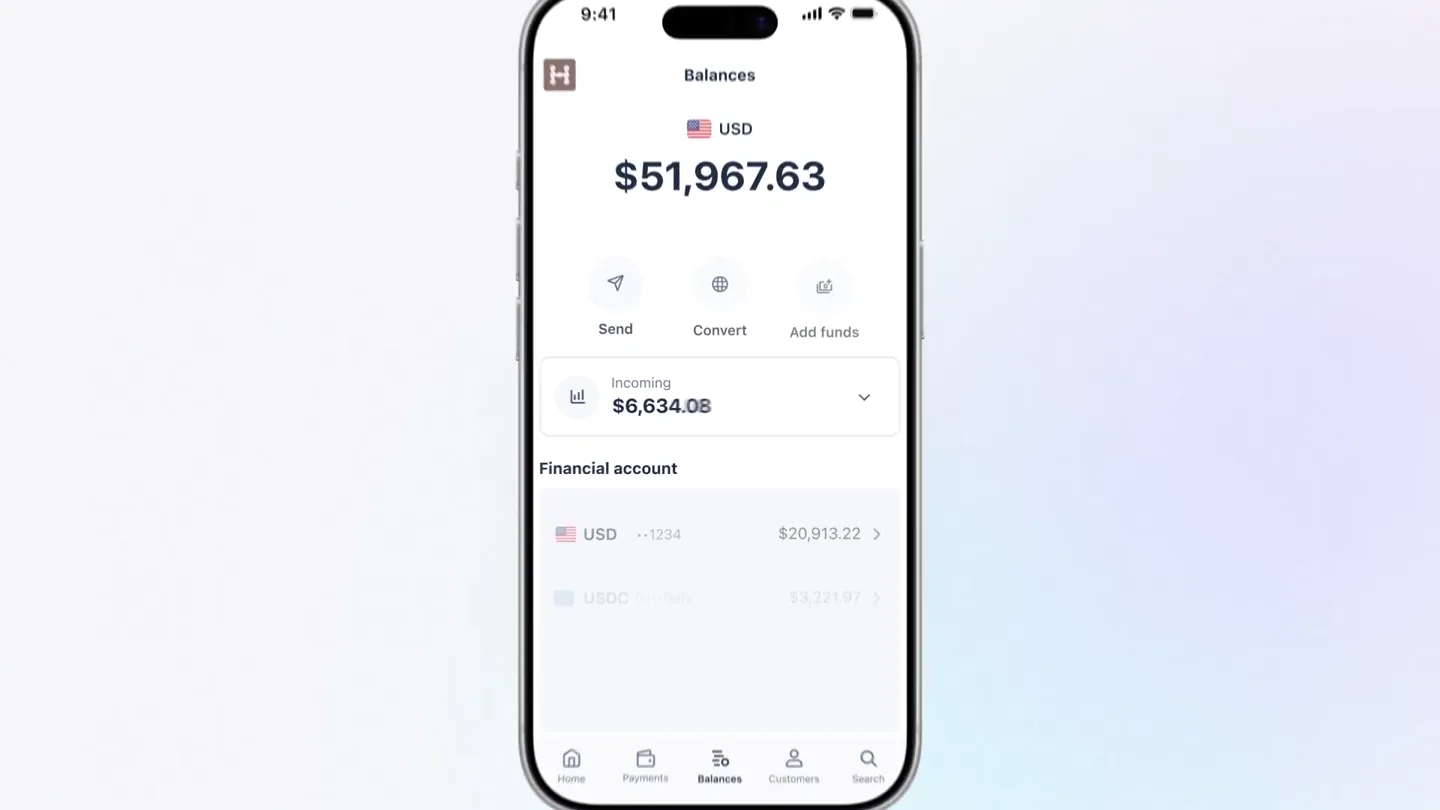
- Stripe You received a payment of $100.00 Stripe You received a payment of $826.24 9:41 Balances USD $57,369.64 Send Convert Add funds Incoming $7,091.21 Financial account USD ..1234 $38,342.28 USDC Du...9dfla $11,390.73 EUR ..1022 €6,060.34 GBP ..8892 £936.83 Home Payments Balances Customers Search
- Camera
- Close-up on a smartphone screen, then a subtle zoom out to reveal the full app interface.
- Motion
- UI element pop-ins, smooth transitions between app screens, and dynamic data updates.
Product Reveal
Seamless Transfers & Virtual Cards
“(No spoken dialogue — Electronic score maintains energy with rhythmic 808s and sweeps.)”
- On screen
- Send Transfer Search by name or Stripe account Add new recipient @ David Right dave@roamantix.com Jonah Kessler jonah.kessler@orionbridge.co Mira Delaney mira.delaney@zenfluse.io Pay another Stripe user Rocket Rides @rocket-rides Galtee Outdoor @galtee-outdoor Queried @queried Send $2 USD From Financial account • USD $38,764.93 To Rocket Rides @rocket-rides Method Instant transfer on Stripe Arrives instantly • Free Cancel Send $2,000 USD Send Financial account • USD $2,000.00 Sent Rocket Rides @rocket-rides $2,000.00 Receipt confirmed Albania Algeria Andorra Angola Antigua & Barbuda Argentina Armenia Austrailia Send $100 USDC From Financial account • USDC $11,847.52 To Soledad Gonzáles Stablecoin Wallet (Base 0x... • 534b) Method Stablecoin transfer Arrives in seconds • Fee starts at $0.50 Cancel Send Create card Create card Cardholder Luke Clum Card type Virtual Virtual cards can be used instantly. Physical Physical cards are shipped to the cardholder. Back Create card
- Camera
- Focus on interactive UI elements, simulating user clicks and input. Transitions are quick cuts between different screens and modals.
- Motion
- Micro-interactions, cursor animations, form field auto-filling, and modal pop-up animations.
Feature Teaser
Advanced Features & AI Integration
“(No spoken dialogue — Sound design emphasizes transitions with risers and impactful sub-bass drops.)”
- On screen
- 2% cashback on card spend For eligible customers who open a Prepaid Card issued by Cross River Bank. 9:41 Can you show me my Stripe balance? Stripe Total balance $57,067.79 Primary account USD $38,764.93 USDC 11,747.02 EUR €6,636.33 GBP £823.12 Can you pay this invoice? Stripe Payment sent. Here's your receipt: Payment sent successfully To Roamantix (@roamantix) Amount $1,738.15 Description Invoice BIL2-218799173 - Commercial property insurance Q2 2026 Status Posted Date April 29, 2026 3:15PM Reference HYPERNIAN.CO Download receipt View transaction
- Camera
- Dynamic camera moves, including a quick pan and zoom to highlight specific data points within the AI chat interface.
- Motion
- Text typing animation, data visualization (charts), and seamless integration of AI chat bubbles.
Call to Action
Comprehensive Dashboard & Final CTA
“(No spoken dialogue — The electronic score builds to a climax with a final impactful sub-bass drop and sustained synth.)”
- On screen
- Recent activity All Money in Money out Amount Description Balance -$1738.15 Invoice BILL-218799173 Financial account • U -$100.50 Soledad Gonzáles (Base 0x... • 534b) Financial account -$2000.00 @rocket-rides Financial accou -$100.11 Jane Diaz ..4676 Financial ac Tomorrow May 6+ Earnings settle daily Financial account Upcoming Recent activity All Money in Money out Amount Description Balance Date -$1738.15 Invoice BILL-218799173 Financial account • USD Apr 29 -$100.50 Soledad Gonzáles (Base 0x... • 534b) Financial account • USDC Apr 29 -$2000.00 @rocket-rides Financial account • USD Apr 29 -$100.11 Jane Diaz ..4676 Financial account • EUR Apr 28 -€2089.21 David Right ..1892 Financial account • USD Apr 28 Hypernian Search... Balances Home Send Transfer Convert Add Create card Transactions Customers Product catalog Incoming earnings $37,098.12 USD $285,092.23 USDC $12,892.23 EUR €6,913.67 Shortcuts Disputes Tax Reports Tomorrow May 6+ Earnings settle daily Financial account Upcoming Apr $19,997.37 30 Incoming • Financial account Products May $16,792.05 Treasury 1 Incoming • Financial account Overview Global Payouts Cards Bill pay Capital Resources Connect Manage cards Payments Manage recipients Billing Integrate with accounting app Reporting More Developer tools stripe.com/treasury
- Camera
- Wide shot of a desktop dashboard, with subtle camera drifts and zooms to highlight different sections. Ends with a full-screen URL reveal.
- Motion
- Smooth scrolling, data updates, and a clean, impactful full-screen text reveal for the call to action.
Motion design primitives
Synthesizable in Remotion · key components of the stripe-treasury-ui-showcase template.
UIDataPopIn
Individual UI elements (notifications, balance figures, buttons) animate into view with a slight bounce or spring effect, often accompanied by a subtle glow or highlight.
+ Code construction recipe
Use `spring()` for position and opacity, with a slight `delay()` for staggered elements. Apply a `box-shadow` with `interpolateColor()` for the glow effect.
InteractiveCursorFlow
A custom cursor icon (hand pointer) moves across the screen, simulating user interaction by clicking on buttons, typing into fields, and selecting options.
+ Code construction recipe
Animate `transform: translate()` for cursor movement. Use `sequence()` to coordinate cursor path with UI element animations. Implement `scale()` and `opacity()` for click feedback.
DynamicDashboardZoom
The camera smoothly zooms and pans across a complex dashboard interface, highlighting key data points, charts, and navigation elements.
+ Code construction recipe
Utilize `interpolate()` for `scale` and `translate` properties of the main dashboard component. Employ `easeOutCubic` for smooth, controlled camera movements.
Style DNA & aesthetic system
Visual aesthetic
Typography
Motion
Special effects
Pacing & rhythm
Conceptual story rhythm
- 1
Initial Immersion
Purpose. Immediately showcase core functionality and ease of use with quick, impactful examples.
Execution. Rapid succession of mobile app notifications and a full-screen balance view, establishing the product's immediate value.
- 2
Feature Deep Dive
Purpose. Demonstrate key features like transfers, multi-currency support, and card creation through guided UI interaction.
Execution. Simulated user clicks and data entry, highlighting the intuitive flow for sending money, managing stablecoins, and issuing virtual cards.
- 3
Innovation Showcase
Purpose. Present advanced capabilities and integrations, emphasizing the product's forward-thinking nature.
Execution. Integration with an AI assistant for balance inquiries and invoice payments, showcasing smart automation.
- 4
Ecosystem Overview & CTA
Purpose. Provide a broader view of the platform's comprehensive dashboard and direct users to learn more.
Execution. A wide shot of the desktop dashboard, followed by a clear, full-screen call to action with the product URL.
Remix in Animatiq Studio
Master remix prompt · agent-ready
Sample remix
Objective
Launch a new AI-powered project management tool called 'TaskFlow AI'.How the recipe adapts
The TaskFlow AI video would open with a UIDataPopIn of new task notifications appearing on a mobile screen. The InteractiveCursorFlow would then demonstrate creating a new project, assigning tasks, and using the AI assistant to generate project summaries. DynamicDashboardZoom would highlight the project overview dashboard, showing real-time progress updates and team activity. The color palette would shift to TaskFlow AI's brand colors, maintaining the vibrant, tech-forward feel. The fast-paced editing and electronic score would remain, emphasizing efficiency and innovation.Remix blueprint · stripe-treasury-ui-showcase
Scene durations (4 scenes, 41s)
Key Remotion components
Related Productivity Product Launches
Explore all Productivity launches →
Anthropic introduces Cowork, which brings the Claude Code way of delegating tasks to everyday, non-technical work.

Don't type, just speak. Flawless voice-to-text across every app at 240 WPM.

One workspace for knowledge scattered across Slack, email, Docs, and Notion. Connect your tools and build apps and agents that stay live with your data.