
Superhuman · Launch Video Breakdown: Hook, Pacing & Motion Design
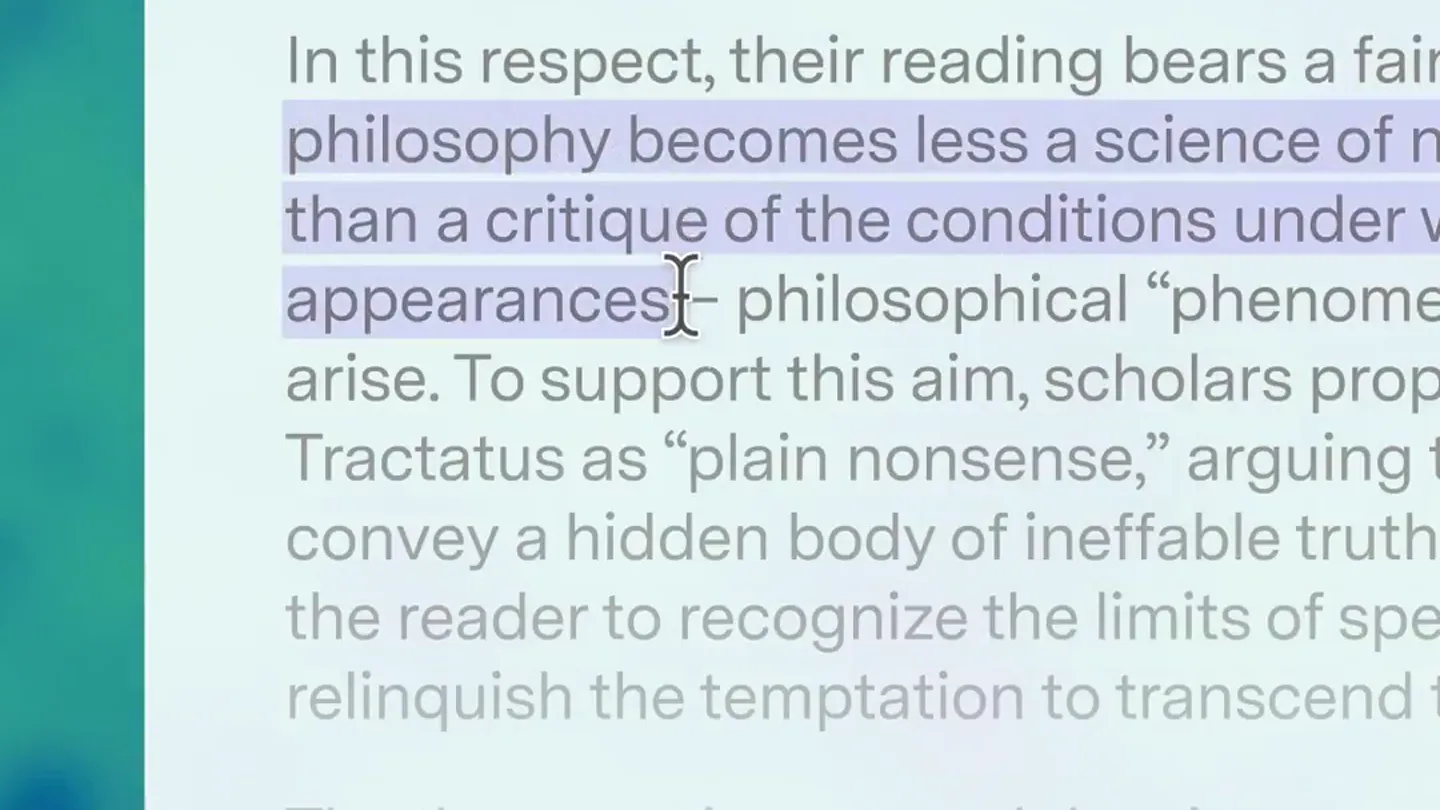
Superhuman Go brings your favorite agents to the cursor in every app and tab. Highlight anything to get started.
Scene-by-scene timeline & spoken transcript
The Hook
Cursor Highlight & Agent Summon
“(No spoken dialogue — High-energy audio transition/riser leading to a sub-bass drop/impact.)”
- On screen
- In this respect, their reading bears a faint Kantian philosophy becomes less a science of noumena than a critique of the conditions under which appearances – philosophical “phenomena” of experience – arise. To support this aim, scholars propose that Wittgenstein’s Tractatus as “plain nonsense,” arguing that it does not convey a hidden body of ineffable truths, but rather invites the reader to recognize the limits of speech and to relinquish the temptation to transcend them. The therapeutic approach has important historical antecedents, but it has also attracted significant critics argue that the “plain nonsense” reading relies on external evidence, including Wittgenstein’s own later remarks, rather than on the Tractatus itself.
- Camera
- Static overhead shot of a document, with a cursor highlighting text.
- Motion
- Smooth cursor animation, text highlighting, and a subtle UI element fade-in.
Product Reveal
Contextual AI Agent Interaction
“(No spoken dialogue — Driving electronic beat with pizzicato synths and deep sub-bass.)”
- On screen
- In this respect, their reading bears a faint Kantian philosophy becomes less a science of noumena than a critique of the conditions under which appearances – philosophical “phenomena” of experience – arise. To support this aim, scholars propose that Wittgenstein’s Tractatus as “plain nonsense,” arguing that it does not convey a hidden body of ineffable truths, but rather invites the reader to recognize the limits of speech and to relinquish the temptation to transcend them. The therapeutic approach has important historical antecedents, but it has also attracted significant critics argue that the “plain nonsense” reading relies on external evidence, including Wittgenstein’s own later remarks, rather than on the Tractatus itself. Type any prompt... Explain Cite Scan for AI Knowledge Checker
- Camera
- Static overhead shot, focusing on the document and the emerging UI.
- Motion
- Responsive UI pop-up animation, dynamic menu item reveal, and a subtle hover state on 'Explain'.
Feature Teaser
Instant Explanation & AI Processing
“(No spoken dialogue — Sub-bass drop/impact with a subtle sweep sound, followed by the driving beat.)”
- On screen
- In this respect, their reading bears a faint Kantian philosophy becomes less a science of noumena than a critique of the conditions under which appearances – philosophical “phenomena” of experience – arise. To support this aim, scholars propose that Wittgenstein’s Tractatus as “plain nonsense,” arguing that it does not convey a hidden body of ineffable truths, but rather invites the reader to recognize the limits of speech and to relinquish the temptation to transcend them. The therapeutic approach has important historical antecedents, but it has also attracted significant critics argue that the “plain nonsense” reading relies on external evidence, including Wittgenstein’s own later remarks, rather than on the Tractatus itself. Explaining... Explain text Noumena, for Kant, are things as they are in themselves, beyond how they appear through human perception. Explain Revise or ask a follow-up
- Camera
- Static overhead shot, with the UI expanding to show the AI explanation.
- Motion
- Progressive loading animation (dots), smooth text reveal, and a clean modal expansion.
Call to Action
Seamless Integration & Dismissal
“(No spoken dialogue — Driving electronic beat continues, fading out slightly towards the end.)”
- On screen
- In this respect, their reading bears a faint Kantian philosophy becomes less a science of noumena than a critique of the conditions under which appearances – philosophical “phenomena” of experience – arise. To support this aim, scholars propose that Wittgenstein’s Tractatus as “plain nonsense,” arguing that it does not convey a hidden body of ineffable truths, but rather invites the reader to recognize the limits of speech and to relinquish the temptation to transcend them. The therapeutic approach has important historical antecedents, but it has also attracted significant critics argue that the “plain nonsense” reading relies on external evidence, including Wittgenstein’s own later remarks, rather than on the Tractatus itself. Explain text Noumena, for Kant, are things as they are in themselves, beyond how they appear through human perception. Explain Revise or ask a follow-up
- Camera
- Static overhead shot, showing the user dismissing the AI explanation.
- Motion
- Smooth UI dismissal animation, returning to the original document state.
Motion design primitives
Synthesizable in Remotion · key components of the contextual-ai-workflow template.
CursorHighlightAndSummon
A cursor smoothly highlights a section of text, followed by a quick, responsive pop-up of a contextual action menu directly at the cursor's position.
+ Code construction recipe
Use `interpolate` for smooth cursor movement and text background color change. Implement a `spring` animation for the menu pop-up, with a slight overshoot for responsiveness. Utilize `opacity` and `scale` transitions for the menu items.
ContextualMenuReveal
A compact menu expands from a single input field into a list of actionable options, with each option appearing sequentially with a subtle fade and slide-up effect.
+ Code construction recipe
Employ `sequence` to stagger the appearance of menu items. Each item should use `spring` for its `y` position and `opacity`, creating a cascading reveal. The initial input field can use a `scale` and `opacity` transition for its transformation into the expanded menu.
AIExplanationModal
A loading state with animated dots transitions into a concise, well-formatted text explanation within a modal window, which then can be dismissed.
+ Code construction recipe
Use `loop` for the loading dots animation. The explanation text should appear with a `typewriter` effect or a rapid `fade-in`. The modal itself should use a `spring` animation for its `scale` and `opacity` when appearing and disappearing, ensuring a clean, snappy feel.
Style DNA & aesthetic system
Visual aesthetic
Typography
Motion
Special effects
Pacing & rhythm
Conceptual story rhythm
- 1
The Instant Trigger
Purpose. Introduce the core interaction: highlighting text to activate the agent.
Execution. Cursor highlights text, immediately followed by a small, responsive UI pop-up.
- 2
The Agent's Menu
Purpose. Showcase the range of actions available through the agent.
Execution. The initial UI expands into a clear menu of options like 'Explain', 'Cite', 'Scan for AI'.
- 3
The Intelligent Response
Purpose. Demonstrate the agent's capability to provide instant, relevant information.
Execution. A loading state transitions into a concise, accurate explanation within a clean modal.
- 4
Seamless Workflow
Purpose. Emphasize the product's non-intrusive integration into the user's existing workflow.
Execution. The explanation modal is easily dismissed, returning the user to their original document without disruption.
Remix in Animatiq Studio
Master remix prompt · agent-ready
Sample remix
Objective
A user wants to quickly iterate on a button design in a Figma-like interface using PixelFlow.How the recipe adapts
The CursorHighlightAndSummon primitive would show the user selecting a button component. The ContextualMenuReveal would display options like 'Generate Variations', 'Optimize for Mobile', or 'Convert to React Component'. The AIExplanationModal would then show a loading state followed by a grid of new button designs or a generated code snippet, all within PixelFlow's clean UI, maintaining the original video's rapid, responsive feel.Remix blueprint · contextual-ai-workflow
Scene durations (4 scenes, 15s)
Key Remotion components
Related Productivity Product Launches
Explore all Productivity launches →
Don't type, just speak. Flawless voice-to-text across every app at 240 WPM.

One workspace for knowledge scattered across Slack, email, Docs, and Notion. Connect your tools and build apps and agents that stay live with your data.

Notion positions itself as the backbone of your dock — a brand film of the Notion icon among everyday apps, ending on “Works with everything.”