
supermemory · Launch Video Breakdown: Hook, Pacing & Motion Design
The new supermemory console has a revamped design, better UX, and new functionality.
Scene-by-scene timeline & spoken transcript
The Hook
Introducing the supermemory console
“(No spoken dialogue — A synth riser leads into a driving electronic beat with sub-bass and arpeggiated synth melodies.)”
- On screen
- supermemory™ Overview Playground Documents Container Tags Memory Graph Requests ANALYTICS User Insights DATA Connectors Import DEVELOPER API Keys Agents Shardul Free Good afternoon, Shardul Onboard your agent to supermemory DOCUMENTS 1 ~-92% MEMORIES 7 ~-91% SEARCH REQUESTS 0 CONTAINER TAGS 1 +100% Requests this month MEMORIES SEARCHES LIVE introducing supermemory console
- Camera
- Starts with a close-up, slightly angled view of the supermemory dashboard, then quickly zooms out and transitions to a full-screen text reveal.
- Motion
- UI element highlight with cursor animation, followed by a quick zoom-out and text typing animation with a blinking cursor effect.
Feature Teaser
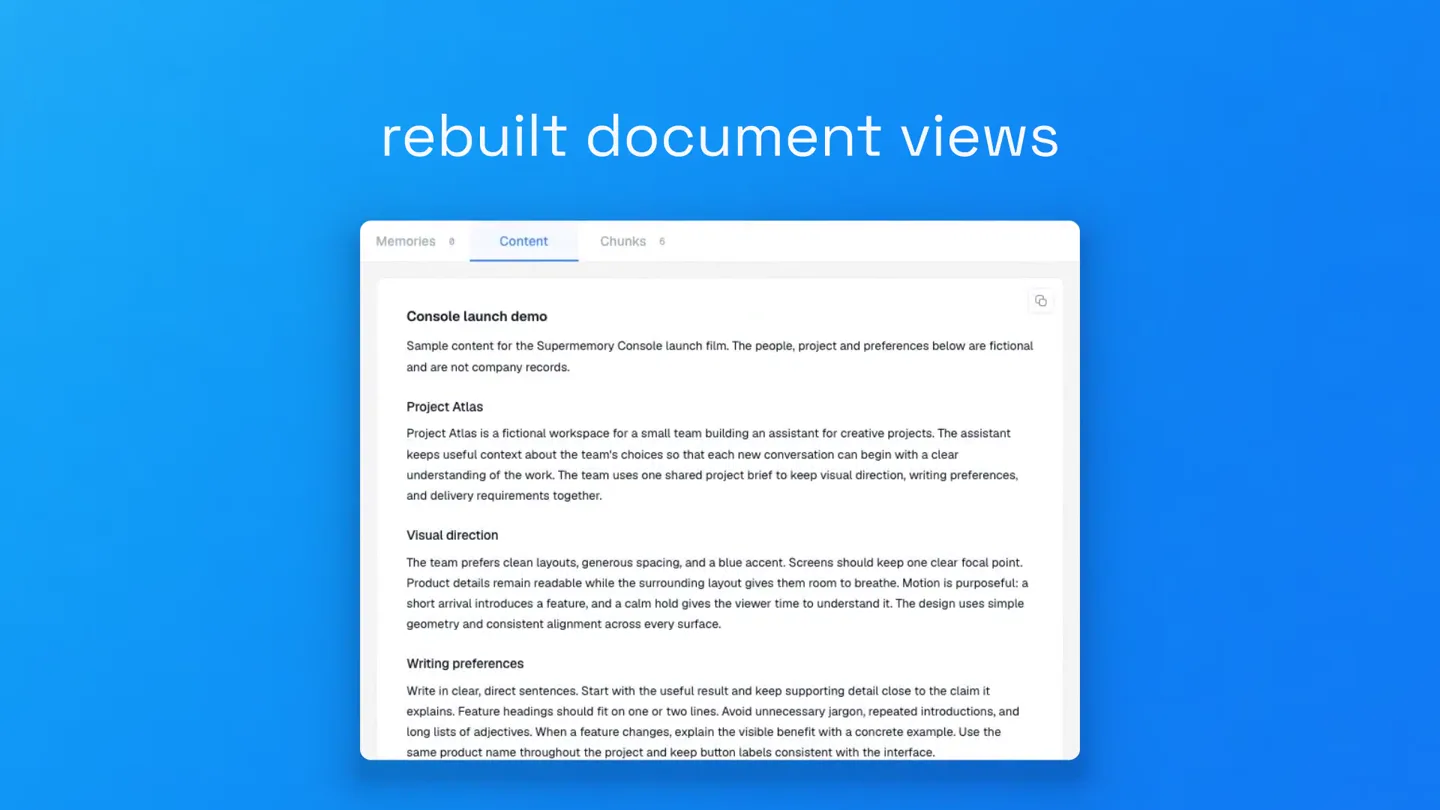
Rebuilt Document Views & Searchable Chunks
“(No spoken dialogue — The driving electronic beat continues with pizzicato synths and 808-style drums.)”
- On screen
- rebuilt| rebuilt document views| Memories 8 Content Chunks 8 Console launch demo Sample content for the Supermemory Console launch film. The people, project and preferences below are fictional and are not company records. Project Atlas Project Atlas is a fictional workspace for a small team building an assistant for creative projects. The assistant keeps useful context about the team's choices so that each new conversation can begin with a clear understanding of the work. The team uses one shared project brief to keep visual direction, writing preferences, and delivery requirements together. Visual direction The team prefers clean layouts, generous spacing, and a blue accent. Screens should keep one clear focal point. Product details remain readable while the surrounding layout gives them room to breathe. Motion is purposeful: a short arrival introduces a feature, and a calm hold gives the viewer time to understand it. The design uses simple geometry and consistent alignment across every surface. Writing preferences Write in clear, direct sentences. Start with the useful result and keep supporting detail close to the claim it explains. Feature headings should fit on one or two lines. Avoid unnecessary jargon, repeated introductions, and long lists of adjectives. When a feature changes, explain the visible benefit with a concrete example. Use the same product name throughout the project and keep button labels consistent with the interface. Memories 8 Content Chunks 8 Search chunks... 01 # Console launch demo Sample content for the Supermemory Console launch film. The people, project and preferences below are fictional and are not company records. 02 ## Writing preferences Write in clear, direct sentences. Start with the useful result and keep supporting detail close to the claim it explains. Feature headings should fit on one or two lines. Avoid unnecessary jargon, repeated ... 03 ## Source material The sample project includes meeting notes, design briefs, product specifications, and research summaries. Each source has a title and a clear purpose. Meeting notes record decisions and next actions. 04 # Finding a passage A reviewer looking for the phrase generous spacing should be able to locate the matching passage in the source material. The phrase belongs to the visual direction section, where it describes the team's preferred ... 05 ## Review workflow The team reviews one scene at a time and checks its meaning before adjusting small details. A successful scene has a clear focal point, readable text, and a transition that leads naturally into the next idea. 06 ## Sample status This document exists only to stage the console launch visuals. It contains no customer data, production measurements, credentials, or confidential plans. Any remembered details derived from this source ... searchable| searchable chunks
- Camera
- A static, slightly angled view of the UI, then a quick pan and zoom to highlight different sections of the interface.
- Motion
- Text typing animation, UI element interaction (tab switching), and a grid layout reveal with a subtle parallax effect.
Feature Teaser
Seamless Agent Connections
“(No spoken dialogue — The electronic beat intensifies, leading to a significant sub-bass drop/impact at 0:19.)”
- On screen
- connecting t supermemory Agents Help Docs Keys held by coding agents, bots, and the CLI. How agents connect Connect an agent All editor plugins at once Claude Code, Cursor, Codex and OpenCode. npx supermemory plugin Claude Code Cursor Codex OpenCode Amp OpenClaw Hermes 1. Add the marketplace /plugin marketplace and supermemory/claude-supermemo... 2. Install /plugin install supermemory 3. Sign in export SUPERMEMORY_CLI_KEY=key-... Supermemory CLI Manage this workspace from a shell npm i -g supermemory && supermemory login Build with Supermemory SDK docs Copy setup prompt Shardul Paste the setup prompt into your coding agent Include an API key connecting to your agents got easier Agents Keys held by coding agents, bots, and the CLI. How agents connect Connect an agent All editor plugins at once Claude Code, Cursor, Codex and OpenCode. npx supermemory plugin Claude Code Cursor Codex OpenCode Amp OpenClaw Hermes 1. Install /add-plugin cursor-supermemory 2. Sign in /supermemory-setup Supermemory CLI Manage this workspace from a shell npm i -g supermemory && supermemory login Agents Keys held by coding agents, bots, and the CLI. How agents connect Connect an agent All editor plugins at once Claude Code, Cursor, Codex and OpenCode. npx supermemory plugin Claude Code Cursor Codex OpenCode Amp OpenClaw Hermes 1. Install bunx opencode-supermemory@latest install 2. Sign in bunx opencode-supermemory@latest login Supermemory CLI Manage this workspace from a shell npm i -g supermemory && supermemory login Agents Keys held by coding agents, bots, and the CLI. How agents connect Connect an agent All editor plugins at once Claude Code, Cursor, Codex and OpenCode. npx supermemory plugin Claude Code Cursor Codex OpenCode Amp OpenClaw Hermes 1. Install openclaw plugins install @supermemory/op... 2. Sign in openclaw supermemory setup 3. Restart the gateway openclaw gateway restart
- Camera
- A static, slightly angled view of the UI, with a cursor interacting with different plugin options.
- Motion
- Text typing animation, cursor interaction with button highlights, and a quick, blurred transition between UI states.
Call to Action
Try the Console Now
“(No spoken dialogue — A more atmospheric, sustained synth pad section begins after the sub-bass drop, with the electronic beat continuing subtly.)”
- On screen
- and much mo and much more! try the console now. supermemory
- Camera
- A dynamic, swirling motion of blurred UI elements, transitioning to a clear text call to action, and finally the company logo.
- Motion
- Blurred UI elements rotating and scaling, text reveal with a subtle fade-in, and a final logo reveal with a gentle pulse.
Motion design primitives
Synthesizable in Remotion · key components of the ui-console-fast-cut-montage template.
TypingCursorReveal
Text appears character by character, simulating typing, often accompanied by a blinking vertical line cursor that follows the text as it's revealed.
+ Code construction recipe
Use `interpolate` to animate the `opacity` and `width` of a text layer, revealing characters sequentially. A separate `AbsoluteFill` or `Text` component with a `borderRight` can simulate the blinking cursor, animated with `spring` for a subtle pulse or `loop` for continuous blinking.
UIDashboardPanZoom
A dashboard UI is presented from an isometric or slightly angled perspective, with the camera smoothly panning and zooming to highlight specific sections or elements.
+ Code construction recipe
Render the UI as a `static` image or a `Composition` of UI elements. Apply `transform` properties (scale, translateX, translateY, rotateX, rotateY) to the parent container, interpolating these values over time to create the pan and zoom effect. Use `easing` functions like `easeOutCubic` for smooth camera movements.
BlurredCardStackTransition
Multiple UI cards or elements are blurred and dynamically arranged in a swirling or layered motion, then transition to a clear, focused state or a new scene.
+ Code construction recipe
Render individual UI cards as `AbsoluteFill` components with `blur` filters and `opacity` animations. Animate their `transform` properties (rotate, translateX, translateY, scale) using `spring` or `interpolate` with complex `easing` curves to create the swirling motion. The transition to a new scene can involve fading out the blurred cards while fading in the new content.
Style DNA & aesthetic system
Visual aesthetic
Typography
Motion
Special effects
Pacing & rhythm
Conceptual story rhythm
- 1
Initial Product Glimpse
Purpose. Immediately introduces the product's interface and core purpose, establishing relevance.
Execution. Close-up of the dashboard, cursor interaction, and a quick zoom-out to reveal the product name.
- 2
Core Feature Showcase
Purpose. Highlights key functionalities and improvements, demonstrating value.
Execution. Animated UI walkthroughs of document views, searchable chunks, and agent connection processes, with text overlays.
- 3
Seamless Integration & Expansion
Purpose. Emphasizes ease of use and the breadth of the product's ecosystem.
Execution. Interactive demonstration of connecting various agent plugins, showing a smooth workflow.
- 4
Call to Action & Brand Reinforcement
Purpose. Encourages user engagement and leaves a lasting brand impression.
Execution. Dynamic swirling UI elements, a clear call to action text, and a final reveal of the company logo.
Remix in Animatiq Studio
Master remix prompt · agent-ready
Sample remix
Objective
Launch video for 'CodeFlow AI', an intelligent code completion and refactoring tool.How the recipe adapts
The TypingCursorReveal primitive would be used to show code being written and completed in an IDE. UIDashboardPanZoom would highlight different sections of the CodeFlow AI plugin interface within the IDE, demonstrating refactoring suggestions and error detection. BlurredCardStackTransition would be adapted to transition between different code snippets or project files, creating a dynamic flow of information. The blue and white palette would be maintained, with code syntax highlighting in complementary colors. The fast-paced electronic music would drive quick cuts between code examples and feature explanations.Remix blueprint · ui-console-fast-cut-montage
Scene durations (4 scenes, 27.6s)
Key Remotion components
Related AI Agents Product Launches
Explore all AI Agents launches →
To ensure that artificial general intelligence benefits all of humanity

Introducing Claude Fable 5: a Mythos-class model that we’ve made safe for general use. Its capabilities exceed those of any model we’ve ever made generally available. https://t.co/2AvmEjHIX8

To understand the true nature of the universe.