
superwhisper · Launch Video Breakdown: Hook, Pacing & Motion Design
Keep a tab on your agents from anywhere — superwhisper's integration is now live in Grok Build.
Scene-by-scene timeline & spoken transcript
The Hook
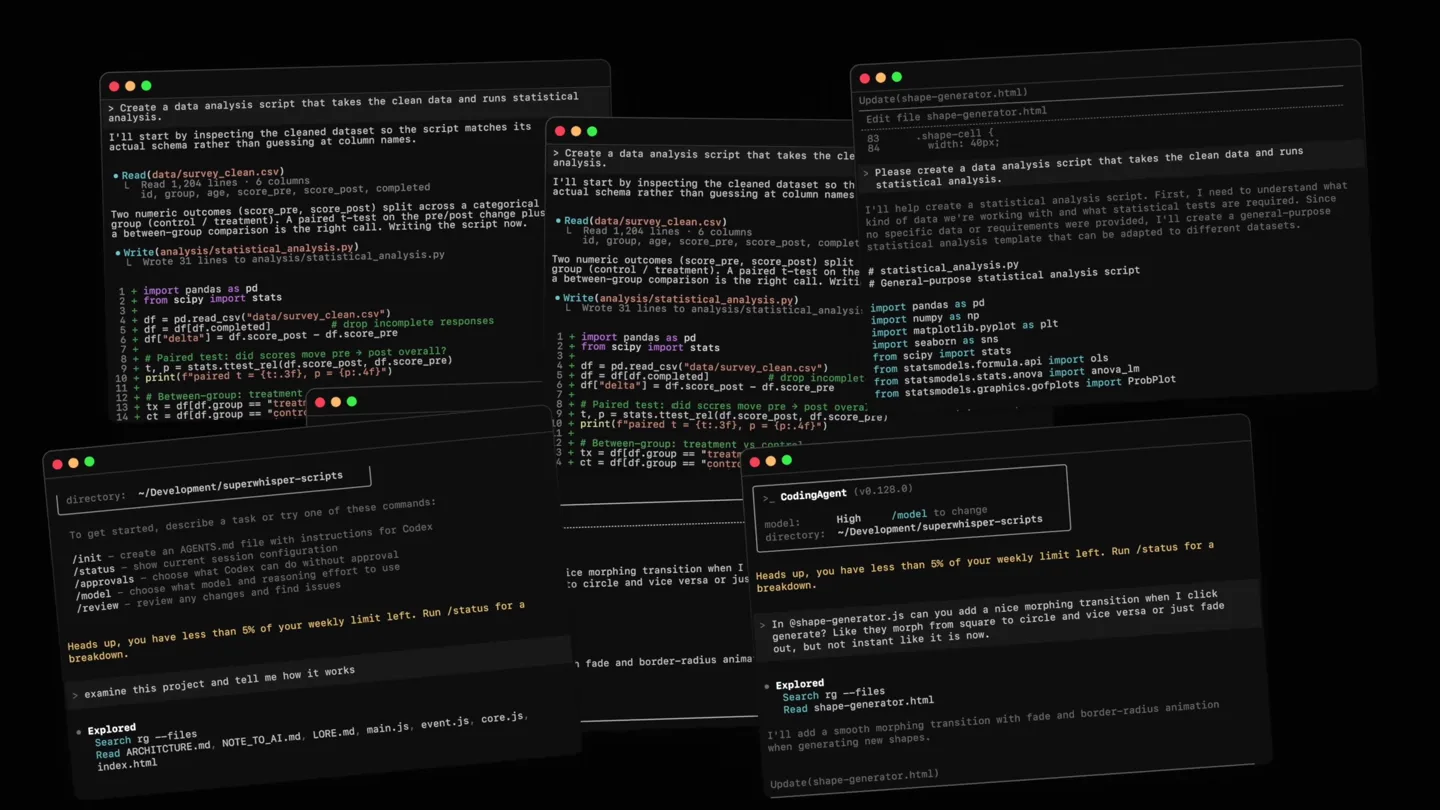
Multi-Window Code Environment Reveal
“(No spoken dialogue — The track features a driving, rhythmic electronic score with a consistent tempo. It incorporates pizzicato synth melodies, a prominent sub-bass line, and 808-style percussion. High-energy audio transitions are present, including a significant riser and sub-bass drop/impact at [0:01].)”
- On screen
- Create a data analysis script that takes the clean data and runs statistical analysis. I'll start by inspecting the cleaned dataset so the script matches its actual schema rather than guessing at column names. Read(data/survey_clean.csv) 1. Read 2,204 lines, 6 columns id, group, age, score_pre, score_post, completed Two numeric outcomes (score_pre, score_post) split across a categorical group (control / treatment). A paired t-test on the pre/post change plus a between-group comparison is the right call. Writing the script now. Write(analysis/statistical_analysis.py) 1. Wrote 31 lines to analysis/statistical_analysis.py import pandas as pd from scipy import stats df = pd.read_csv("data/survey_clean.csv") df = df[df.completed] # drop incomplete responses df["d_score"] = df.score_post - df.score_pre # Paired t-test: did scores move + overall? t, p = stats.ttest_rel(df.score_post, df.score_pre) print(f"paired t = {t:.1f}, p = {p:.3f})") # Between-group: treatment vs control on the change df_group = df[df.group == "treatment"] ct = df[df.group == "control"].delta Update(shape-generator.html) Edit file shape-generator.html <div shape-cell { width: 40px; } Please create a data analysis script that takes the clean data and runs statistical analysis. To help create a statistical analysis script. First, I need to understand what kind of data we're working with and what statistical tests are required. Since no specific data or requirements were provided, I'll create a general-purpose statistical analysis template that can be adapted to different datasets. # statistical_analysis.py # General-purpose statistical analysis import pandas as pd import numpy as np import matplotlib.pyplot as plt import seaborn as sns from scipy import stats from sklearn.linear_model import LinearRegression from statsmodels.formula.api import ols from statsmodels.stats.anova import anova_lm from statsmodels.graphics.gofplots import ProbPlot directory: ~/Development/superwhisper-scripts To get started, describe a task or try one of these commands: /init - create an AGENT.md file with instructions for CodeX /status - show current session configuration /approvals - choose what CodeX can do without approval /models - choose what models and reasoning to use /review - review any changes and find issues Heads up, you have less than 5% of your weekly limit left. Run /status for a breakdown. examine this project and tell me how it works Explored Search rg -files Read ARCHITECTURE.md NOTE_TO_AI.md LORE.md MAIN.js event.js core.js index.html CodeAgent (0.120.0) model: High /model to change directory: ~/Development/superwhisper-scripts Heads up, you have less than 5% of your weekly limit left. Run /status for a breakdown. In shape-generator.js you can add a nice morphing transition when I click generated. Like they morph from square to circle and vice verse or just fade out, but not instant like it is now. Explored Search rg -files Read shape-generator.html I'll add a smooth morphing transition with fade and border-radius animation when generating new shapes. Update(shape-generator.html)
- Camera
- The camera rapidly zooms out from a single terminal window to reveal a complex, multi-window desktop environment, then quickly transitions to black.
- Motion
- Rapid zoom-out, multi-window reveal, quick cut.
Product Reveal
AI Agent Interaction
“(No spoken dialogue — The electronic score continues with a consistent tempo. An impactful sub-bass hit occurs at [0:08].)”
- On screen
- homerow • neil/homerow for (const metric of metrics) { const current = aggregated.get(metric.userId) ?? 0; aggregated.set(metric.userId, current + metric.sessionDuration); } return aggregated; } export function filterActiveUsers( metrics: UserMetrics[], minActions: number = 5 ): UserMetrics[] { return metrics.filter(m => m.actionsPerformed.length >= minActions); } Dictate or type your response Voice to text Dismiss esc Send Add unit tests for these functions and handle the case where the metrics list is empty?
- Camera
- Static, centered view of a single code editor window with an AI agent interaction prompt.
- Motion
- Text typing animation, UI element reveal (voice to text, dismiss, send buttons).
Feature Teaser
Multi-Agent Workflow & Suggestions
“(No spoken dialogue — The electronic score maintains its driving rhythm. A sustained synth pad provides an atmospheric layer.)”
- On screen
- homerow • neil/homerow export function filterActiveUsers( metrics: UserMetrics[], minActions: number = 5 ): UserMetrics[] { return metrics.filter(m => m.actionsPerformed.length >= minActions); } Add unit tests for these functions and handle the case where the metrics list is empty? Dictate or type your response Voice to text Dismiss esc Send landing-page • neil/superwhisper-website <button type="submit" disabled={status === 'sending'}> {status === 'sending' ? 'Sending...' : 'Send Message'} </button> </form> } The form posts to /api/contact which doesn't exist yet. Do you want me to: 1. Create the API route with email forwarding ? 2. Just store submissions in your database for now? 3. Add validation with error messages first? Let me know which direction you'd prefer. Dictate or type your response Voice to text Dismiss esc Send Create the API route with email forwarding
- Camera
- The camera rapidly zooms out to reveal multiple code editor windows, then zooms into a new, single window showing an AI agent offering development suggestions.
- Motion
- Rapid zoom-out, multi-window reveal, zoom-in, text typing animation, UI element interaction.
Feature Teaser
Proactive AI Assistance
“(No spoken dialogue — The electronic score continues with its consistent tempo and atmospheric synth pad.)”
- On screen
- landing-page • neil/superwhisper-website <button {isOpen ? <X size={24} /> : <Menu size={24} />} </button> </div> {isOpen && ( <MobileMenu onClose={() => setIsOpen(false)} /> )} </nav> ); } Dictate or type your response Voice to text Dismiss esc Send I also noticed you don't have any active state on the nav links to show which page the user is on. Want me to add that? I could highlight the current page with an underline or a different color.
- Camera
- Static, centered view of a code editor window with an AI agent proactively suggesting UI/UX improvements.
- Motion
- Text typing animation, UI element reveal.
Call to Action
Integration Announcement & Branding
“(No spoken dialogue — The electronic score builds slightly in intensity, leading to a final impactful sub-bass drop/impact at the end.)”
- On screen
- Agent integration is now available in Grok Build superwhisper
- Camera
- Static, wide shot of a gradient background. Text fades in, then the product logo fades in.
- Motion
- Text fade-in, logo fade-in, subtle background gradient animation.
Motion design primitives
Synthesizable in Remotion · key components of the superwhisper-tech-launch template.
MultiWindowZoomReveal
A rapid zoom-out from a single focused window to reveal a desktop environment with multiple active windows, followed by a quick cut or zoom into another specific window.
+ Code construction recipe
Utilize `interpolate` for camera position (x, y, z) and scale. Implement `spring` for a snappy, responsive feel during the zoom. Manage multiple `AbsoluteFill` components for each window, animating their `opacity` and `transform` properties (scale, translate) based on the camera's perspective. Use `Sequence` to orchestrate the timing of window reveals.
AITypingResponse
Text appears character by character, simulating real-time typing, often followed by the appearance of interactive UI elements like buttons or suggested actions.
+ Code construction recipe
Employ `Sequence` and `spring` for character-by-character text reveal, controlling `opacity` and `transform` (e.g., slight Y-axis bounce). Use `interpolate` for the smooth fade-in and scale-up of UI elements (buttons, suggestion boxes) after the text is fully typed. Consider a `delay` for the UI elements to appear after the typing completes.
GradientTextFade
On-screen text and a logo fade in smoothly against a subtly animated gradient background.
+ Code construction recipe
Create a `LinearGradient` or `RadialGradient` component for the background, animating its `colors` or `stops` over time for subtle movement. Use `interpolate` for the `opacity` of the text and logo components, ensuring a smooth fade-in. Apply a slight `scale` animation with `spring` for the logo for added impact.
Style DNA & aesthetic system
Visual aesthetic
Typography
Motion
Special effects
Pacing & rhythm
Conceptual story rhythm
- 1
The Developer's Canvas
Purpose. Immediately immerse the viewer in a complex, active coding environment, establishing the product's technical context.
Execution. Rapid zoom-out from a single code window to a multi-window desktop, showcasing a bustling developer workflow.
- 2
AI in Action: Code Generation
Purpose. Demonstrate the product's core functionality: intelligent AI assistance within the coding workflow.
Execution. Focus on a single code editor where an AI agent types out code suggestions and offers interactive choices.
- 3
AI in Action: Proactive Suggestions
Purpose. Highlight the AI's advanced capabilities beyond simple code generation, showing its ability to understand context and offer improvements.
Execution. Transition to a new code editor where the AI proactively identifies and suggests UI/UX enhancements.
- 4
The Integration & Brand
Purpose. Announce the product's key integration and reinforce its brand identity.
Execution. A clean, gradient background reveals the integration announcement text, followed by the product logo.
Remix in Animatiq Studio
Master remix prompt · agent-ready
Sample remix
Objective
Launch a new cloud-based data analytics platform called 'InsightFlow'.How the recipe adapts
The MultiWindowZoomReveal primitive would showcase InsightFlow's dashboard with multiple data visualization widgets, zooming out from a single chart to reveal the full suite. The AITypingResponse primitive would demonstrate the platform's natural language query interface, where users type a question and InsightFlow's AI generates a complex SQL query and visual report. The GradientTextFade primitive would be used for the final call to action, announcing 'InsightFlow: Your Data, Unlocked' against a dynamic blue-to-green gradient, followed by the InsightFlow logo.Remix blueprint · superwhisper-tech-launch
Scene durations (5 scenes, 26s)
Key Remotion components
Related AI Agents Product Launches
Explore all AI Agents launches →
To ensure that artificial general intelligence benefits all of humanity

Gopuff introduces Go, an AI shopping assistant built with SpaceXAI: say what you need and the order is placed.

Iliad (Troy) trailer made by Grok Imagine 1.5, which was just released