
Takeone · Launch Video Breakdown: Hook, Pacing & Motion Design
Takeone is an open-source Screen Studio for agents. The agent records the demo, with a smooth cursor, zooms, and a frame you can restyle later.
Scene-by-scene timeline & spoken transcript
The Hook
AI Agent Initiates Demo Recording
“(No spoken dialogue — A driving, rhythmic electronic score begins with pizzicato synths and sub-bass. A prominent riser and sweep at 0:01 leads into a rhythmic section.)”
- On screen
- Hey, record | Thinking Your agent acme-site Thought for 1s I'll start recording. Skill takeone Running Skill takeone Loaded Explore acme.com npx takeone do goto https://acme.com #1 await s.goto("https://acme.com/"); / Projects - Acme" header 1 link "Acme" -> / 2 button "acme-inc" (opens menu) 3 searchbox "Search" ... 31 more lines, and the view: Reply to your agent...
- Camera
- Static, then a subtle zoom into the terminal window, followed by a slight pan to reveal the full UI.
- Motion
- UI element reveals with typing animation, code block expansion, and a smooth, controlled zoom and pan to transition from terminal to full application view.
Product Reveal
Automated Demo Recording in Action
“(No spoken dialogue — The rhythmic electronic score continues. A significant riser and sweep at 0:08 culminates in a sub-bass impact at 0:09, marking a transition.)”
- On screen
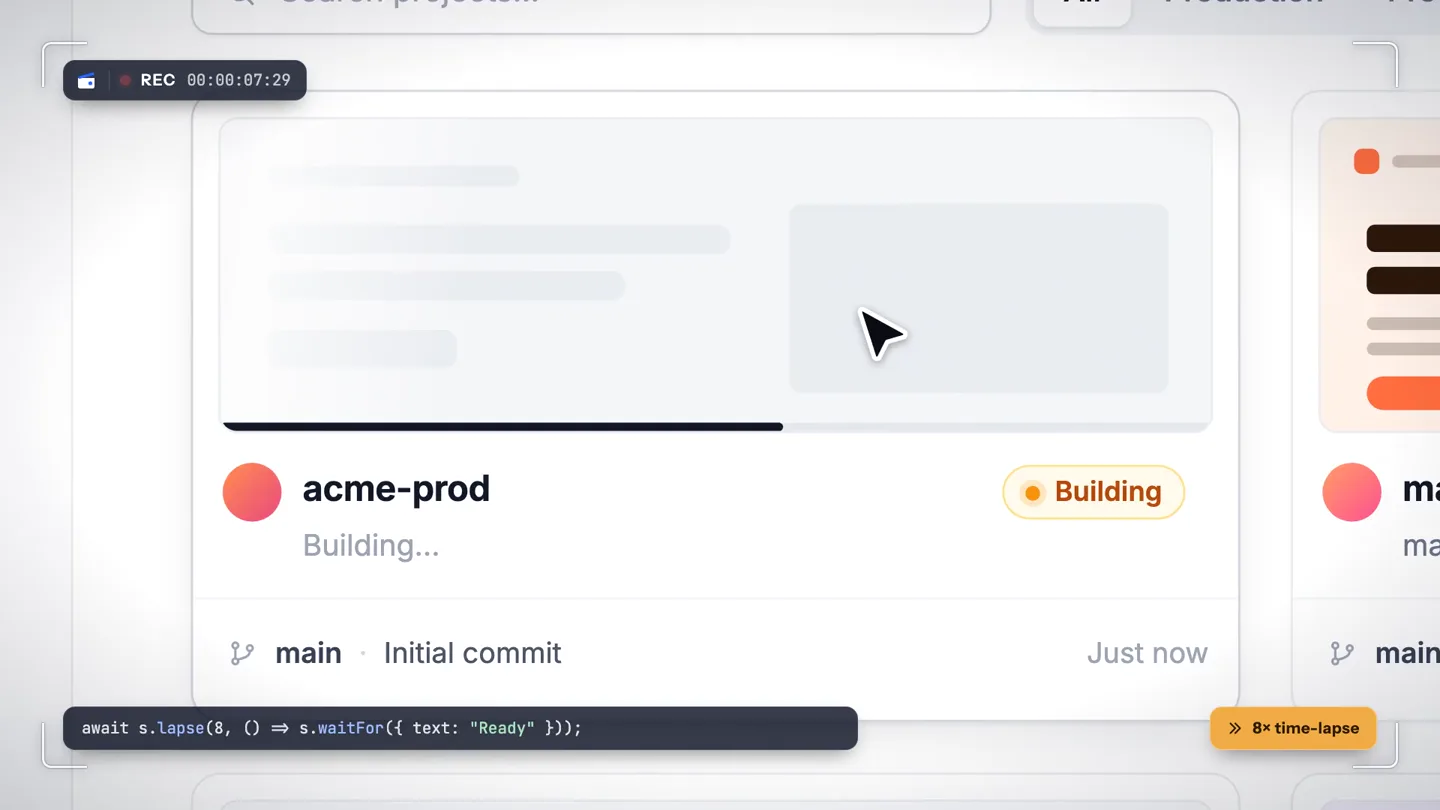
- REC 00:00:28 await s.startRecording(); + New project await s.type({ role: "textbox", name: "Project name" }, "acme-prod"); Create a project Deploy a new app from your Git repository. Project name acme-pro| acme-pro.acme.app Framework Next.js Region Frankfurt • fra await s.lapse(8, () => s.waitFor({ text: "Ready" })); » 8× time-lapse acme-prod Deploying to fra1... Building main Initial commit acme-prod.acme.app await s.stopRecording();
- Camera
- Dynamic close-up on UI elements, following the cursor's path and text input, then a subtle zoom out to show the project card.
- Motion
- Smooth cursor animation, text typing simulation, UI element highlighting, and a 'time-lapse' effect indicated by a badge, all synchronized with the agent's actions.
Feature Teaser
Restyle Demos Without Re-recording
“(No spoken dialogue — The electronic score maintains its energetic rhythm.)”
- On screen
- Demo videos, recorded by your agent Restyle without re-recording frame.background = mint frame.background = signal
- Camera
- Static wide shot of the application UI, then a subtle, smooth background color change.
- Motion
- Text overlay animation, followed by a smooth, cross-fade transition of the application's background color, demonstrating the restyling feature.
Call to Action
Export and Install Takeone
“(No spoken dialogue — The electronic score builds anticipation. A dramatic riser and sweep at 0:28 is followed by a powerful sub-bass drop/impact at 0:29, leading to a final, sustained note.)”
- On screen
- Your agent acme-site Export the take npx takeone session export demo.ts ✓ 6 steps Record npx takeone record demo.ts ✓ done Done. Here's your video. output.mp4 0:24 - 1920×1080 - 60 fps Reply to your agent... takeone Your next demo is one take away $ npx skills add atharvadeosthale/takeone Copy Copied Works with Claude Code Codex Cursor and more atharvadeosthale/takeone Open source, MIT takeone.atharva.codes
- Camera
- Zoom out from the terminal, then a full-screen reveal of the brand and call to action.
- Motion
- Terminal output animation, followed by a clean, full-screen text reveal with a 'copy to clipboard' interaction feedback, and subtle supporting text fades.
Motion design primitives
Synthesizable in Remotion · key components of the developer-tool-automation-showcase template.
AgentTerminalSequence
Simulates an AI agent's terminal interaction, displaying user input, 'thinking' states, agent responses, and code execution with a dynamic cursor and text typing effect.
+ Code construction recipe
Use Remotion's `Sequence` and `AbsoluteFill` for layout. Implement typing effects with `spring` or `interpolate` on `text-shadow` and `opacity` for the cursor. Animate text reveals using `split` and `map` over characters with `delay` and `stagger` for a natural typing feel. Use `useCurrentFrame` and `interpolate` for progress bars and status updates.
SmoothUIScreenRecording
Captures a screen recording with a smooth, animated cursor, dynamic zooms, and pans, highlighting interactive elements and simulating user input.
+ Code construction recipe
Utilize Remotion's `AbsoluteFill` for the base UI. Implement cursor movement with `spring` or `interpolate` on `transform` properties (x, y). Create zooms and pans using `scale` and `translate` on the main UI container, driven by `useCurrentFrame` and `interpolate` with `ease-in-out` curves. Highlight interactive elements with `opacity` or `scale` animations on hover/click states.
DynamicBackgroundRestyle
Demonstrates a UI's ability to be restyled by smoothly transitioning its background color or other visual properties, often with a textual overlay indicating the change.
+ Code construction recipe
Use `AbsoluteFill` for the UI and a separate `AbsoluteFill` for the background. Animate the `backgroundColor` property using `interpolateColor` or `spring` for smooth transitions between hex codes. Overlay text indicating the style change can be animated with `opacity` and `translateY` for a subtle reveal.
Style DNA & aesthetic system
Visual aesthetic
Typography
Motion
Special effects
Pacing & rhythm
Conceptual story rhythm
- 1
The Agent's Command
Purpose. Introduce the core interaction: commanding an AI agent to perform a task.
Execution. Typing animation in a terminal-like interface, followed by the agent's response and initiation of a 'skill'.
- 2
Automated Workflow Demonstration
Purpose. Showcase the product's primary function: automated screen recording of a complex workflow.
Execution. Smooth cursor movements, text input, and UI interactions within a simulated application, with a 'time-lapse' indicator.
- 3
Post-Recording Flexibility
Purpose. Highlight a key differentiator: the ability to restyle recorded demos without re-recording.
Execution. A static view of the recorded demo, followed by a smooth, animated change of its background color, demonstrating customization.
- 4
Call to Action & Integration
Purpose. Guide users on how to get started and emphasize the product's open-source nature.
Execution. A clean, full-screen reveal of the product name, tagline, and a command-line installation snippet with a 'copy' interaction.
Remix in Animatiq Studio
Master remix prompt · agent-ready
Sample remix
Objective
A new CI/CD pipeline automation tool that visually demonstrates deployment steps and allows for post-deployment environment configuration changes.How the recipe adapts
The AgentTerminalSequence primitive would be adapted to show a user typing a deployment command, followed by the agent initiating the CI/CD pipeline. The SmoothUIScreenRecording primitive would then visualize the deployment process within a dashboard, showing stages like 'build', 'test', and 'deploy' with a smooth cursor highlighting progress. Finally, the DynamicBackgroundRestyle primitive would demonstrate changing environment variables or themes post-deployment without re-running the pipeline, using a smooth color transition on the environment's UI. The call to action would feature a command-line snippet to install the CI/CD tool.Remix blueprint · developer-tool-automation-showcase
Scene durations (4 scenes, 40s)
Key Remotion components
Related Developer Tools Product Launches
Explore all Developer Tools launches →
Agentic CLI for coding, building apps, and automating workflows.

New in Claude Code: your sessions can now message each other. Tell Claude to send a summary (not your history or files), and the other session picks it up mid-task.

Meet Qwen3.8-Max: A New Bar for Coding and Cowork. https://t.co/mJaA8vr6xT