
Tarout · Launch Video Breakdown: Hook, Pacing & Motion Design
Tarout is a cloud for coding agents. Tell Claude Code, Cursor, or Codex to deploy, and Tarout detects the framework and puts the app live.
Scene-by-scene timeline & spoken transcript
The Hook
Effortless Deployment with AI Agents
“(No spoken dialogue — Driving electronic beat with sub-bass and pizzicato synth. Riser at 0:02, sub-bass drop at 0:03.)”
- On screen
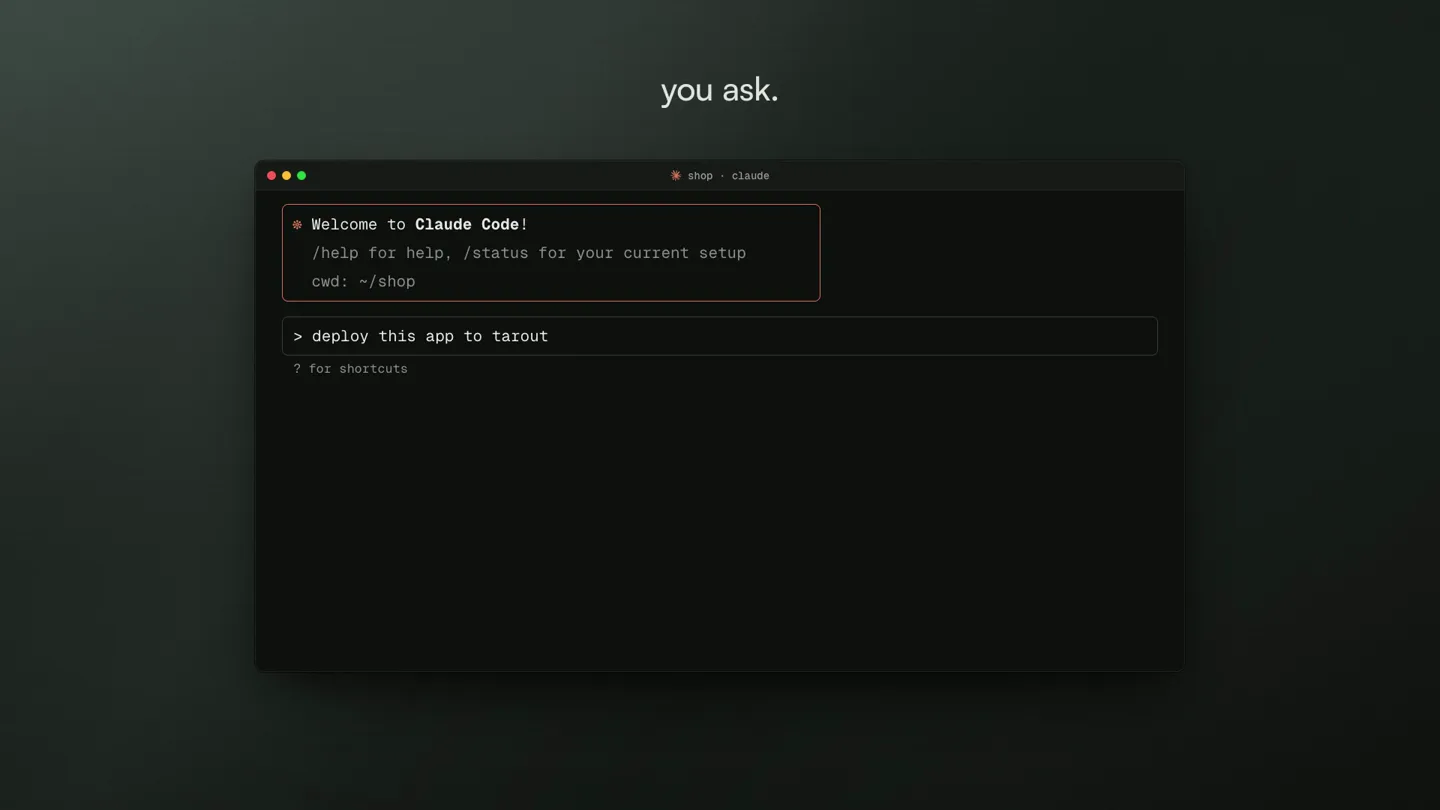
- you ask. shop : claude Welcome to Claude Code! /help for help, /status for your current setup cwd: ~/shop deploy this app ? for shortcuts I'll ship it with the Tarout CLI. Bash (tarout up)
- Camera
- Static shot of a terminal window, then a quick cut to a browser window. The camera is mostly static, focusing on the UI elements.
- Motion
- Terminal command line typing animation, followed by a quick cut to a browser window with a product page. UI elements animate in, such as a button click.
Product Reveal
Introducing Tarout: The Cloud for Coding Agents
“(No spoken dialogue — Energetic electronic beat continues. Riser at 0:08, sub-bass drop at 0:09.)”
- On screen
- Tarout runs it. Souq Autumn drop Shop now Desert Runner SAR 349 Najd Tote SAR 189 Corniche Cap SAR 99 Add to cart meet tarout.sa tarout Home Product Docs Pricing Dashboard The cloud platform built for coding agents Your coding agent writes the code and builds the infrastructure to run it. Build from scratch and deploy to production in minutes. GET STARTED IN MINUTES Choose your agent Claude Code Cursor Codex Copilot Windsurf + Others or drop a static site, no account needed works with the agent you already use Copied Claude Code Cursor Codex Copilot Windsurf + Others
- Camera
- Zoom out from a browser window to reveal the Tarout homepage. Subsequent shots focus on specific UI interactions within the Tarout dashboard.
- Motion
- Seamless UI transitions, highlighting key features like agent selection. Elements slide in and out, and a checkmark animation confirms selection.
Feature Teaser
Advanced Features: Metrics, Autofix, and AI Gateway
“(No spoken dialogue — Beat maintains energy. Risers at 0:13, 0:18. Sub-bass drops at 0:14, 0:19.)”
- On screen
- metrics Tarout Souq Apps Databases Storage Domains Servers AI Gateway Apps / shop shop Running deployments Logs Metrics Settings CPU 23% Memory 412 MB / 1 GB Requests / min 792 3:07 am. a deploy fails. Autofix Beta When a deployment fails, Al finds the cause, commits a fix and deploys it. fixed and redeployed while you sleep . RECENT AUTOFIX RUNS shop Build failed Fixed less than a minute ago Missing await in the checkout handler Pull request #42 autofix/7f2c shop.tarout.app is live Every database Every server applications any language or framework. Your configures it, with no Dockerfiles YAML. Databases Managed PostgreSQL with connection pooling, scheduled backups to your own S3 storage, and instant provisioning. Explore Object Storage S3-compatible object storage. Your agent uploads and retrieves files with zero setup. Explore Cloud S Full root configure Go Next.js React Node.js Python Django Laravel Go Next.js any language. any framework. no Dockerfiles. no YAML. MySQL Rust TypeScript Vue Svelte Docker PostgreSQL MySQL Rust it's also an AI gateway . one key. every model. GLM DeepSeek Kimi MiniMax Qwen baseURL: "https://tarout.sa/api/ai/v1" model: "qwen3" OpenAl-compatible pay per token in SAR need a whole server? $ tarout servers create provisioning vm-7f2c in dammam... install Coolify or Dokploy in one click. $ tarout servers create provisioning vm-7f2c in dammam... running vm-7f2c Running One-click install Installed Dokploy hosted in Saudi Arabia. Dammam live region
- Camera
- Rapid cuts between different UI elements and abstract graphical representations. The camera often pans or zooms slightly to highlight specific information.
- Motion
- Fast-paced UI animations, data visualization (graphs animating), text highlights, and icon animations. Elements slide, scale, and fade in with quick, precise movements. A dotted globe animates to show a location.
Call to Action
Start Free and Deploy Globally
“(No spoken dialogue — The electronic beat builds to a climax, with risers at 0:23, 0:28, 0:33, 0:38, 0:43 and sub-bass drops at 0:24, 0:29, 0:34, 0:39, 0:44. The track fades out.)”
- On screen
- start free. Most Popular Free Starter Business 0 19 49 per month per month per month forever Five apps on the shared pool for one flat Ten apps on the shared pool with a Perfect for trying out Tarout or small monthly price. Add managed databases managed database included, for one flat personal projects. and storage as you grow. monthly price. 1 shared app 5 apps included 10 apps included 1 managed database (2MB) Managed databases from 29 / mo 1 managed database (10 GB) included 50MB object storage 0.12 / GB / mo Object storage from Auto-deploy from git Custom domains & SSL 0.12 / GB / mo HTTPS included Scheduled database backups to your Custom domains & SSL Community support S3 Scheduled database backups to your Email support S3 Start Free Start Building Email support Choose Business The cloud platform built for coding agents. Start free | tarout.
- Camera
- A wide shot of the pricing page, followed by an abstract pixelated transition. The final shot is a centered view of the Tarout logo and tagline.
- Motion
- Pricing table reveal with checkmark animations. A pixelated grid transition effect leads to the final branding shot. Text and logo animate in with a clean, confident reveal.
Motion design primitives
Synthesizable in Remotion · key components of the tarout-devtool-launch template.
TerminalTypewriterReveal
Text appears character by character in a terminal window, simulating live typing. Subsequent lines and commands are revealed sequentially.
+ Code construction recipe
Use Remotion's `Sequence` and `spring` for character-by-character opacity and scale. Implement `interpolate` for cursor blinking and line-by-line reveal. Utilize a monospace font for authenticity.
UIDataVizReveal
UI elements like graphs, metrics, and checkboxes animate into view with smooth transitions, often accompanied by subtle scaling or fading effects. Data points on graphs grow or fill.
+ Code construction recipe
Employ `spring` for bouncy UI element entrances (e.g., buttons, cards). Use `interpolate` for progress bars, line graphs, and numerical counters. SVG path animations can be used for line graphs, and `scale` for bar charts.
PixelatedGridTransition
A scene transitions by breaking down into a grid of squares that fade or scale out, revealing the next scene or a central logo/text element.
+ Code construction recipe
Create a grid of `Rect` components. Animate each `Rect`'s `opacity` and `scale` using `spring` or `interpolate` with staggered delays based on its position in the grid. Can also use a shader for a more complex pixelation effect.
Style DNA & aesthetic system
Visual aesthetic
Typography
Motion
Special effects
Pacing & rhythm
Conceptual story rhythm
- 1
The Problem & Solution Hook
Purpose. Immediately demonstrates the product's core value proposition: simplifying complex developer tasks.
Execution. Starts with a terminal command for deployment, quickly cutting to a live, deployed web application, showcasing instant results.
- 2
Product Overview & Integration
Purpose. Introduces Tarout as a platform and highlights its compatibility with existing AI coding agents.
Execution. Reveals the Tarout dashboard, showing agent selection and seamless integration with popular tools like Claude Code.
- 3
Feature Deep Dive & Innovation
Purpose. Showcases advanced capabilities like monitoring, automated error fixing, and AI gateway functionality.
Execution. Rapid cuts between metrics dashboards, an 'Autofix' notification, and an animated diagram illustrating the AI gateway's 'one key, every model' concept.
- 4
Scalability, Localization & CTA
Purpose. Emphasizes the platform's versatility, global reach, and encourages user engagement.
Execution. Highlights support for various languages/frameworks, server provisioning, Saudi Arabian hosting, and concludes with a clear pricing structure and call to action.
Remix in Animatiq Studio
Master remix prompt · agent-ready
Sample remix
Objective
Launch a new API management platform called 'NexusFlow' that simplifies API deployment and monitoring for developers.How the recipe adapts
The TerminalTypewriterReveal primitive would show developers typing 'nexusflow deploy' and 'nexusflow monitor'. The UIDataVizReveal would animate API request graphs, latency metrics, and successful deployment notifications. The PixelatedGridTransition would be used between showcasing the CLI, the web dashboard, and the pricing page. The accent color would shift from green to a vibrant blue, maintaining the dark mode base. The overall pacing would remain high-energy, emphasizing NexusFlow's speed and efficiency.Remix blueprint · tarout-devtool-launch
Scene durations (6 scenes, 48s)
Key Remotion components
Related Developer Tools Product Launches
Explore all Developer Tools launches →
Agentic CLI for coding, building apps, and automating workflows.

New in Claude Code: your sessions can now message each other. Tell Claude to send a summary (not your history or files), and the other session picks it up mid-task.

Meet Qwen3.8-Max: A New Bar for Coding and Cowork. https://t.co/mJaA8vr6xT