
untitledinbrackets · Launch Video Breakdown: Hook, Pacing & Motion Design
We’ve built a macOS app for all the power users out there. It launches on Nov 3rd. Pre-order on your Mac computer at the link below to have it installed on launch day. https://t.co/oGq84pTYeZ https://t.co/CMJlHFy9fZ
Scene-by-scene timeline & spoken transcript
The Hook
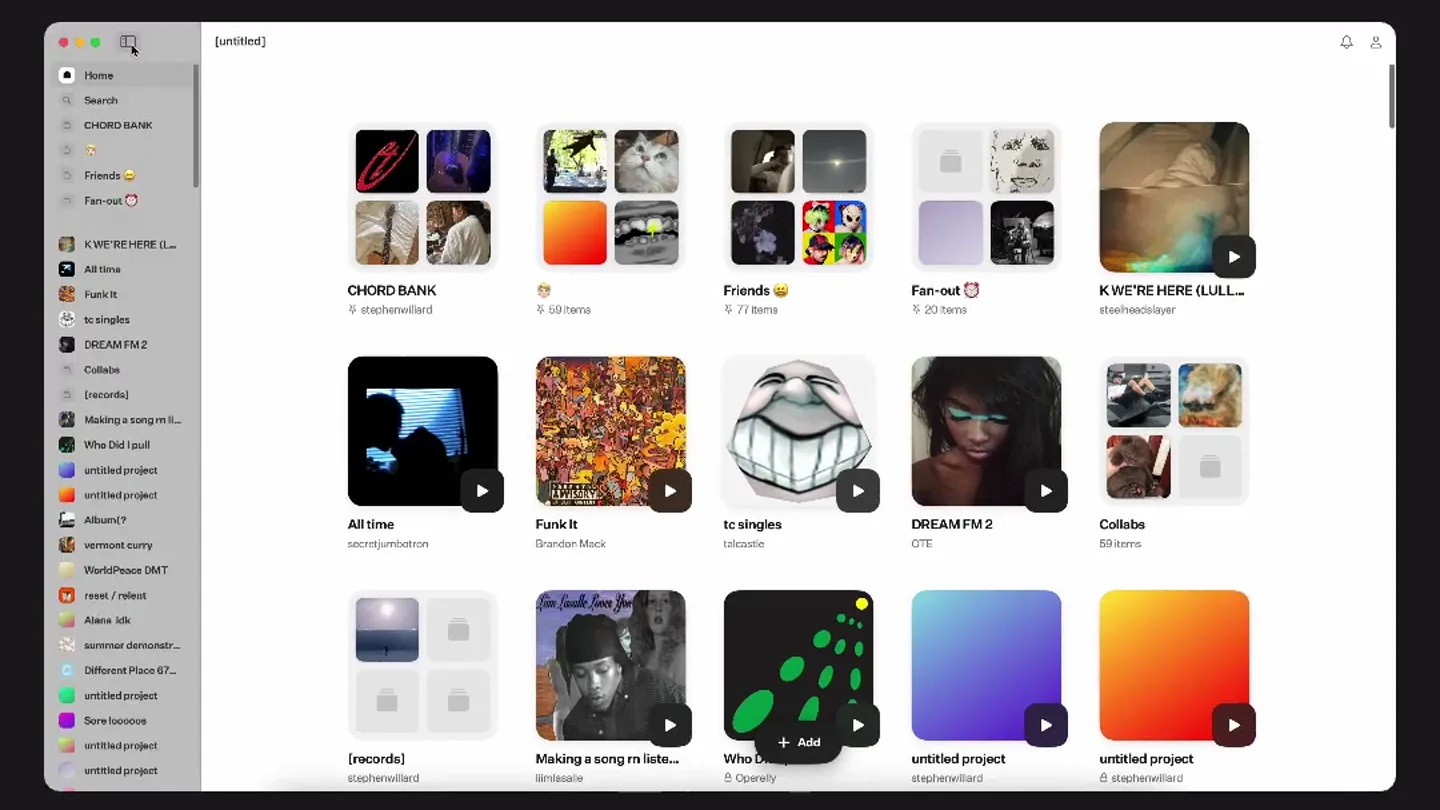
App Overview & Navigation
“(No spoken dialogue — The audio features a solo acoustic guitar, likely steel-string, played with a fingerstyle technique. The sound is natural and unadorned, focusing solely on the guitar's timbre and performance. The tempo is moderate and consistent throughout the piece.)”
- On screen
- [untitled]
- Camera
- Static, full-screen capture of a macOS application window.
- Motion
- Cursor interaction, UI element reveals (sidebar, folder navigation) with subtle easing.
Product Reveal
Deep Dive into 'Chord Bank'
“(No spoken dialogue — The audio features a solo acoustic guitar, likely steel-string, played with a fingerstyle technique. The sound is natural and unadorned, focusing solely on the guitar's timbre and performance. The tempo is moderate and consistent throughout the piece.)”
- On screen
- Home Search CHORD BANK Friends Fan-out K'WE'RE HERE (LULL... All time Funk It tc singles DREAM FM 2 Collabs [records] Making a song rn liste... Who C... untitled project untitled project untitled project CHORD BANK stephwillard - 1tracks - 0:00 + Add tracks Gypsy Guitar Track Eva Babitz sunset recording Play button icon
- Camera
- Static, full-screen capture of a macOS application window, focusing on a specific folder view.
- Motion
- Smooth transition from grid view to list view, cursor interaction, and playback initiation.
Feature Teaser
Audio Playback & Sharing
“(No spoken dialogue — The audio features a solo acoustic guitar, likely steel-string, played with a fingerstyle technique. The sound is natural and unadorned, focusing solely on the guitar's timbre and performance. The tempo is moderate and consistent throughout the piece.)”
- On screen
- Share Gypsy Guitar Track Chord Bank stephwillard 0:00 2:08 Play/Pause icons Volume icon AirPlay icon Fullscreen icon
- Camera
- Static, full-screen capture of a macOS application window, with a modal overlay.
- Motion
- Modal window reveal with subtle fade and scale, waveform animation, and playback progress.
Call to Action
Pre-order & Branding
“(No spoken dialogue — The audio features a solo acoustic guitar, likely steel-string, played with a fingerstyle technique. The sound is natural and unadorned, focusing solely on the guitar's timbre and performance. The tempo is moderate and consistent throughout the piece.)”
- On screen
- Pre-order on the App Store [untitled]
- Camera
- Static, black background with centered text.
- Motion
- Text fade-in and fade-out, simple cross-dissolve between text elements.
Motion design primitives
Synthesizable in Remotion · key components of the macos-productivity-showcase template.
MacOSAppWindow
A realistic macOS application window appears, complete with traffic light buttons and a title bar, showcasing UI interactions within its frame.
+ Code construction recipe
Use a Remotion 'AbsoluteFill' component for the background. Create a 'div' for the window with 'borderRadius', 'boxShadow', and 'backgroundColor'. Implement traffic light buttons as SVG or styled 'div' elements. Animate UI elements within the window using 'interpolate' for position/opacity and 'spring' for click feedback.
InteractiveCursor
A macOS-style cursor moves across the screen, highlighting and clicking on various UI elements, simulating user interaction.
+ Code construction recipe
Render a custom SVG cursor. Animate its 'x' and 'y' position using 'interpolate' along a predefined path. Use 'delay' and 'duration' to synchronize cursor movements with UI changes. Add a subtle 'scale' or 'opacity' animation on click events.
AudioWaveformPlayer
A modal window appears, displaying an audio track with a dynamic waveform visualization and playback controls.
+ Code construction recipe
Create a modal 'div' with 'fade' and 'scale' transitions using 'spring'. Generate a waveform using a 'canvas' element or a series of 'div' bars whose heights are animated with 'interpolate' based on audio data. Implement playback progress with a moving indicator and time display.
Style DNA & aesthetic system
Visual aesthetic
Typography
Motion
Special effects
Pacing & rhythm
Conceptual story rhythm
- 1
Initial Exploration
Purpose. Introduce the application's overall interface and navigation structure.
Execution. Full-screen app window with cursor navigating through main categories and folders.
- 2
Feature Deep Dive
Purpose. Showcase a core feature (e.g., 'Chord Bank') and its specific functionalities.
Execution. Transition into a detailed view of a selected folder, demonstrating content organization.
- 3
Interactive Demonstration
Purpose. Illustrate user interaction with a key feature, such as audio playback.
Execution. Opening a modal player, showing waveform animation and playback controls.
- 4
Call to Action
Purpose. Direct viewers on how to acquire the product.
Execution. Simple text overlay on a black background, revealing pre-order information and brand name.
Remix in Animatiq Studio
Master remix prompt · agent-ready
Sample remix
Objective
A new task management application for macOS.How the recipe adapts
The MacOSAppWindow primitive would be used to showcase the task manager's interface. The InteractiveCursor primitive would demonstrate adding tasks, setting due dates, and organizing projects. Instead of an audio waveform, a 'TaskProgressGraph' primitive could be reverse-engineered to show a subtle, animated progress bar or a small chart within the app's UI, reflecting task completion. The overall pacing would remain slow and deliberate, highlighting the app's ease of use and organizational benefits.Remix blueprint · macos-productivity-showcase
Scene durations (4 scenes, 28s)
Key Remotion components
Related Productivity Product Launches
Explore all Productivity launches →
Anthropic introduces Cowork, which brings the Claude Code way of delegating tasks to everyday, non-technical work.

Don't type, just speak. Flawless voice-to-text across every app at 240 WPM.

One workspace for knowledge scattered across Slack, email, Docs, and Notion. Connect your tools and build apps and agents that stay live with your data.