
Biplob Ghatak · Launch Video Breakdown: Hook, Pacing & Motion Design
Hey everyone, Excited to launch my first SaaS app. Introducing https://t.co/oxy3qgcLnR, an autonomous AI chatbot that lives on your website, trains on docs, PDFs, FAQs, and more, and responds in a well structured way to help reduce support tickets. Let me know your thoughts. https://t.co/q90wkxbda8
Scene-by-scene timeline & spoken transcript
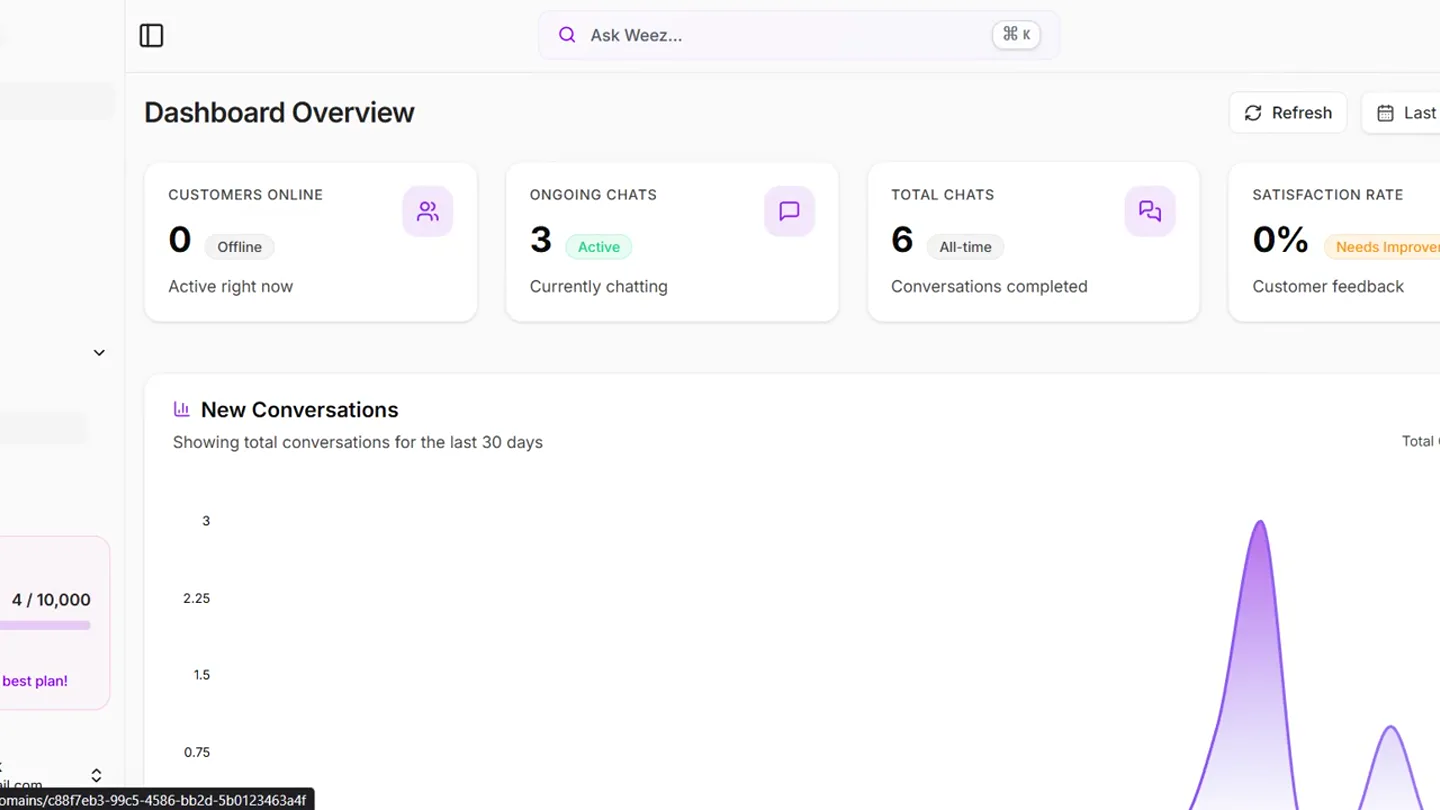
Product Reveal
Dashboard & Knowledge Base Setup
“(No spoken dialogue — The track begins with a sustained, evolving pad sound, creating an atmospheric and slightly mysterious mood. At 00:09, a subtle riser builds, leading into a sub-bass impact at 00:10. This is followed by a rhythmic, arpeggiated synth pattern that establishes a driving, yet still ambient, feel. Another riser and sub-bass impact occur at 00:20.)”
- On screen
- WeezIQ, Dashboard Overview, CUSTOMERS ONLINE, 0, Offline, Active right now, ONGOING CHATS, 3, Active, Currently chatting, TOTAL CHATS, 6, All-time, Conversations completed, SATISFACTION RATE, 0%, Needs Improvement, Customer feedback, New Conversations, Showing total conversations for the last 30 days, 6, Total Conversations, Pro Plan, Credits, 4 / 10,000, Resets Feb 28, You're on the best plan!, Biplob Ghatak, ghatakbits.in, weezlq.com, Playground, Knowledge Base, Add website URLs to train your AI chatbot. The system will automatically crawl and extract content from your website pages., Storage Used, 53k / 50.0M, 0.1% of your plan limit, Completed, 7, Successfully crawled URLs, Status, 0 Pending, 0 Processing, Total Characters, 53,355, Available for AI training, Add Website URLs, Single URL, Multiple URLs, Website URL, https://example.com/page, Enter a URL from your website to add to the knowledge base. The system will automatically crawl and extract content., Add URLs, Help Desk, Question, Add a question that you believe is frequently asked., Type your question, Answer, Provide the answer to this frequently asked question. Use the toolbar to format your text., B I U S E = = = = = = = = = = = = = =, Create, No Questions added yet. I
- Camera
- Static wide shot of the UI, with subtle, smooth panning and zooming to highlight specific sections.
- Motion
- Smooth UI navigation with animated cursor interactions and content reveals. Subtle parallax scrolling of background elements.
Feature Teaser
Chatbot Customization & Branding
“(No spoken dialogue — The music continues to build with additional layers of synth textures and a more pronounced, almost percussive, synth melody emerging around 00:30. A significant high-energy transition with a prominent riser and sub-bass drop hits at 00:40.)”
- On screen
- RAG Knowledge Sources, 7 sources connected, Lead Form, Enabled, Appearance, Content, Theme Mode, Appearance, Select the color theme for the chatbot, Light, Dark, Colors, Background Color, Buttons, header, send icon, user bubbles, #7C46E6, #048b4c, Foreground Color, Text & icons on colored elements, #FFFFFF, Homepage Background, Covers 50% of the chatbot homepage with a fade-out effect at the bottom., Color, Image, Homepage Background Color, #1A1A1A, #b30000, #099538, Homepage Text Color, Color for welcome message text, #FFFFFF, HelpDesk, Show HelpDesk, Display HelpDesk button on the chatbot landing page, Save All Settings, Hi there, How can I help you?, Ask a Question, Help Desk, Home, Messages, Help, Powered by WeezIQ, Weez AI, WeezIQ AI, Hey, Initial messages, Hi! What can I help you with?, Enter each message in a new line., Suggested messages, Keep showing the suggested messages after the user's first message, Add suggested message... 0/40 + Add, Message placeholder, Type your message here..., Dismissible notice, 0/1000, B I U S E = = = = = = = = = = = = = =, You can use this to add a dismissible notice with rich text and links. It will be dismissed after the user sends a message.
- Camera
- Dynamic camera movements, including quick zooms and pans, to follow cursor interactions and highlight UI changes.
- Motion
- Interactive UI elements with instant state changes (e.g., dark mode toggle, color picker), showcasing real-time customization. Smooth transitions between different customization options.
Feature Teaser
Advanced Chatbot Configuration
“(No spoken dialogue — This energy is maintained, with a slight build and another sub-bass impact at 00:50. The track then transitions into a more open, expansive soundscape with sustained pads and shimmering synth elements, gradually fading out with a final sub-bass impact at 01:00 and a lingering pad.)”
- On screen
- Website Description, A short summary describing what your website is about. This helps the AI understand your business context., WeezIQ is a business specializing in AI-powered customer support solutions that transform conversations into revenue. Their flagship product is an autonomous AI agent designed to enhance customer engagement, streamline support processes, and boost sales. With a focus on innovative automation, WeezIQ helps businesses deliver efficient, scalable, and intelligent customer interactions to drive growth and improve customer satisfaction., Save Summary, Cancel, Customize how your chatbot appears to visitors, Chatbot Avatar, Upload Image, Max 2MB., Display name, Weez AI, Welcome message, This greeting appears on the landing page. You can use rich text formatting and links., Initial messages, Hi! What can I help you with?, Enter each message in a new line., Suggested messages, Keep showing the suggested messages after the user's first message, Add suggested message... 0/40 + Add, Message placeholder, Type your message here..., Dismissible notice, 0/1000, B I U S E = = = = = = = = = = = = = =, You can use this to add a dismissible notice with rich text and links. It will be dismissed after the user sends a message., Save All Settings, Hi there, How can I help you?, Ask a Question, Help Desk, Home, Messages, Help, Powered by WeezIQ, WeezIQ AI
- Camera
- Fluid camera movements, including smooth pans and zooms, to follow the cursor and highlight text input and configuration changes.
- Motion
- Animated text input and real-time preview updates of the chatbot interface. Seamless transitions between different configuration panels.
Call to Action
Final Customization & Call to Action
“(No spoken dialogue — The track then transitions into a more open, expansive soundscape with sustained pads and shimmering synth elements, gradually fading out with a final sub-bass impact at 01:00 and a lingering pad.)”
- On screen
- Website Description, A short summary describing what your website is about. This helps the AI understand your business context., WeezIQ is a business specializing in AI-powered customer support solutions that transform conversations into revenue. Their flagship product is an autonomous AI agent designed to enhance customer engagement, streamline support processes, and boost sales. With a focus on innovative automation, WeezIQ helps businesses deliver efficient, scalable, and intelligent customer interactions to drive growth and improve customer satisfaction., Save Summary, Cancel, Customize how your chatbot appears to visitors, Chatbot Avatar, Upload Image, Max 2MB., Display name, Weez AI, Welcome message, This greeting appears on the landing page. You can use rich text formatting and links., Initial messages, Hi! What can I help you with?, Enter each message in a new line., Suggested messages, Keep showing the suggested messages after the user's first message, Add suggested message... 0/40 + Add, Message placeholder, Type your message here..., Dismissible notice, 0/1000, B I U S E = = = = = = = = = = = = = =, You can use this to add a dismissible notice with rich text and links. It will be dismissed after the user sends a message., Save All Settings, Hi there, How can I help you?, Ask a Question, Help Desk, Home, Messages, Help, Powered by WeezIQ, WeezIQ AI
- Camera
- Subtle camera movements, primarily focusing on the chatbot preview and the 'Save All Settings' button, with a final hold on the product interface.
- Motion
- Final UI adjustments and a clear visual cue for saving settings, reinforcing user control and product readiness. Gradual fade out of the UI elements.
Motion design primitives
Synthesizable in Remotion · key components of the saas-ui-showcase-ai-agent template.
UIPanZoom
A smooth, controlled camera pan and zoom across a static UI, highlighting different sections and elements as if a user is navigating.
+ Code construction recipe
Utilize `interpolate` for camera position (x, y) and scale, mapping time to specific UI coordinates. Employ `spring` for a natural, slightly elastic feel on zoom transitions. Use `AbsoluteFill` to contain the UI and animate its `transform` property.
InteractiveElementReveal
UI elements (e.g., text fields, buttons, toggles) animate into view or change state in response to a simulated cursor interaction, often accompanied by a subtle highlight.
+ Code construction recipe
Implement `spring` for opacity and scale changes on element appearance. For toggles and color pickers, use `interpolate` to smoothly transition between states (e.g., background color, icon change). SVG filters for subtle glow or shadow on hover/focus states.
RealtimePreviewUpdate
Changes made in one part of the UI (e.g., color picker, text input) are immediately reflected in a live preview window, demonstrating dynamic functionality.
+ Code construction recipe
Bind the preview component's props (e.g., `backgroundColor`, `textColor`, `welcomeMessage`) directly to state variables that are updated via `interpolate` or `spring` when the corresponding input fields are 'typed' into or 'changed'. Use `Sequence` to orchestrate the timing of input and preview updates.
Style DNA & aesthetic system
Visual aesthetic
Typography
Motion
Special effects
Pacing & rhythm
Conceptual story rhythm
- 1
Initial Setup & Overview
Purpose. Introduce the product's core dashboard and initial configuration capabilities.
Execution. Wide shots of the dashboard, followed by guided navigation through knowledge base setup, highlighting key metrics and input fields.
- 2
Customization Deep Dive
Purpose. Showcase the extensive customization options for the AI chatbot's appearance and behavior.
Execution. Interactive demonstration of theme switching (light/dark), color palette selection, and real-time preview updates of the chatbot widget.
- 3
Advanced Configuration
Purpose. Detail the more advanced settings, such as website description for AI training and welcome messages.
Execution. Focused views on text input fields, avatar uploads, and message configuration, with the chatbot preview updating dynamically.
- 4
Refinement & Readiness
Purpose. Conclude by showing the final touches and the product being ready for deployment.
Execution. Final adjustments to settings, emphasizing the 'Save All Settings' action, and a lingering shot of the fully customized chatbot.
Remix in Animatiq Studio
Master remix prompt · agent-ready
Sample remix
Objective
Demonstrate 'CodeFlow AI', an autonomous AI code reviewer that integrates with GitHub.How the recipe adapts
The UI will feature a dark theme with teal and orange highlights. The UIPanZoom primitive will navigate through a simulated GitHub pull request interface, highlighting CodeFlow AI's inline suggestions. InteractiveElementReveal will show code snippets being analyzed and suggested changes appearing. RealtimePreviewUpdate will demonstrate a 'refactor' button instantly applying AI-generated code improvements in a side-by-side diff view.Remix blueprint · saas-ui-showcase-ai-agent
Scene durations (4 scenes, 105.7s)
Key Remotion components
Related AI Agents Product Launches
Explore all AI Agents launches →
To ensure that artificial general intelligence benefits all of humanity

Gopuff introduces Go, an AI shopping assistant built with SpaceXAI: say what you need and the order is placed.

Iliad (Troy) trailer made by Grok Imagine 1.5, which was just released