
Whisple · Launch Video Breakdown: Hook, Pacing & Motion Design
Whisple is an open-source, local-first app built with GPUI and Rust, with voice commands and support for OpenAI and Grok.
Scene-by-scene timeline & spoken transcript
The Hook
The Problem with Typing
“(No spoken dialogue — The music features a driving, rhythmic electronic score with pizzicato synths, a prominent sub-bass, and subtle percussive elements. There are several high-energy audio transitions, including risers and sweeps, often accompanied by sub-bass drops or impacts. The overall sound design is clean, modern, and builds tension and excitement.)”
- On screen
- You think in sentences. You type in letter| What if you just said it? Whisple Local-first voice dictation.
- Camera
- Static, centered framing on text and then product logo.
- Motion
- Text reveal with a typing cursor effect, followed by a subtle glow and zoom-in on the product logo and tagline.
Product Reveal
Seamless Voice Dictation
“Um, the new build looks great. Let's ship it on Thursday.”
- On screen
- A voice bar for your whole Maya You 9:38 Running the last checks now. Maya 9:41 Is the new build ready for Thursday? Message Maya Start recording ^Space Turbo Record again ^Space Turbo
- Camera
- Static, centered framing on the application UI.
- Motion
- UI elements animate in with soft fades and subtle bounces. Text appears as if being typed by voice, demonstrating the core functionality.
Feature Teaser
Privacy and Control
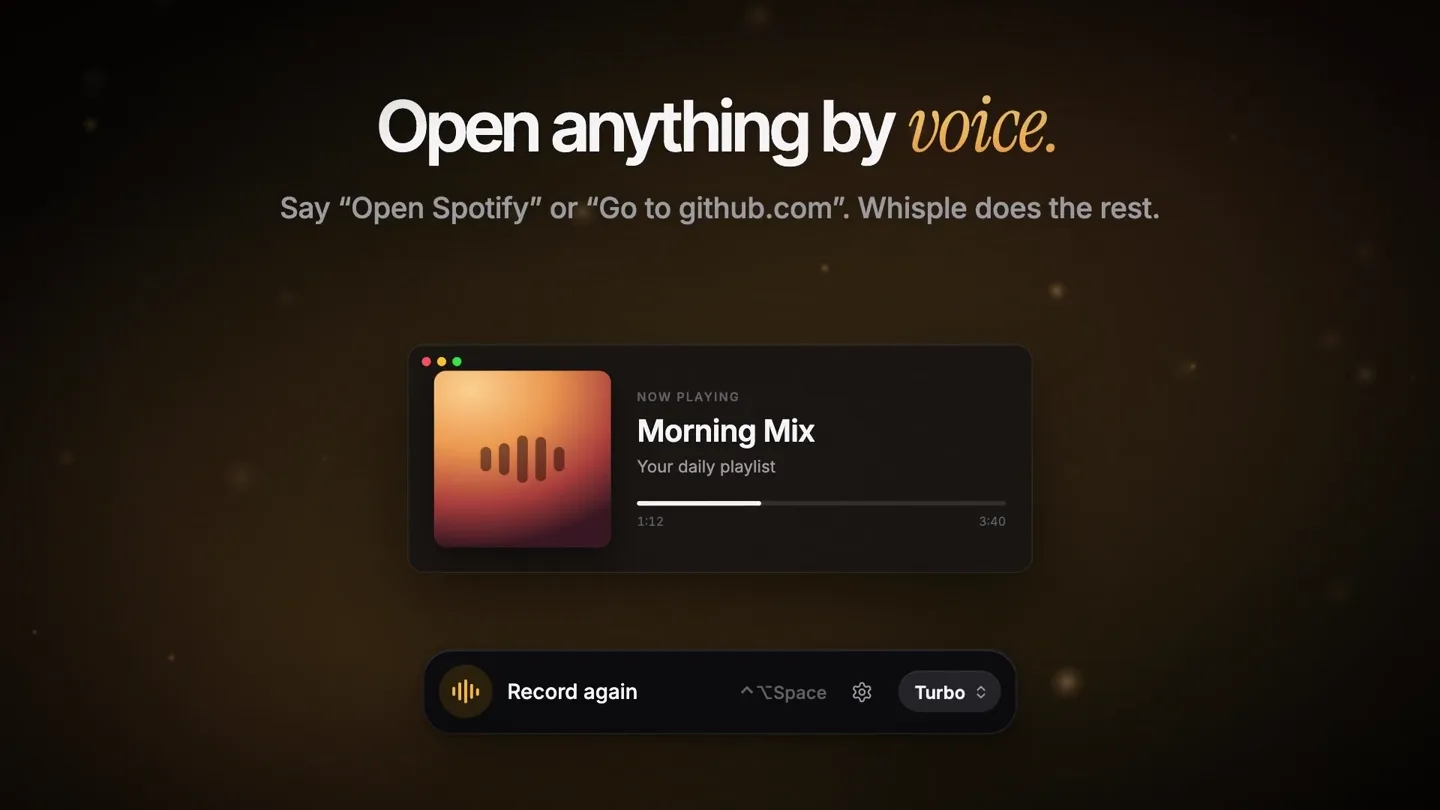
“Open Spotify. Hey Whisple, write a quick reply to Maya.”
- On screen
- Private by default. Transcribes on your device, even offline. Cloud is optional. OpenAI Cloud Grog Cloud Turbo On device Quick preview On device Manage models... Start recording ^Space Turbo Open anything by voice. Say “Open Spotify” or “Go to github.com”. Whisple does the rest. NOW PLAYING Morning Mix Your daily playlist Record again ^Space Turbo Ask about your screen. Start with “Hey Whisple” and it writes the reply for you. Maya Re: Weekly sync Can we move tomorrow's sync to Friday? Thursday is all launch. Reply... Record again ^Space Turbo
- Camera
- Static, centered framing on the application UI.
- Motion
- UI elements animate in with soft fades and subtle bounces. Text appears as if being typed by voice, demonstrating the core functionality. Highlighted text and UI elements draw attention to key features.
Call to Action
Multilingual Support & CTA
“Hola! Qué tal?”
- On screen
- Speaks your language. Auto-detects twenty languages. No settings to change. ESPAÑOL ¡Hola! ¿Qué tal? Record again ^Space Turbo Whisple Talk instead of typing. whisple.app macOS - Windows
- Camera
- Static, centered framing on the application UI and then the product logo.
- Motion
- Text reveals with a typing effect, followed by a subtle glow and zoom-in on the product logo and tagline. The final call to action text animates in with a soft fade.
Motion design primitives
Synthesizable in Remotion · key components of the whisple-dev-tool-launch template.
TypingTextReveal
Text appears character by character, simulating a typing effect, often with a blinking cursor at the end of the line. This is used for both problem statements and voice dictation demonstrations.
+ Code construction recipe
Use `interpolate` to control the `opacity` and `width` of a text element, revealing characters sequentially. A blinking cursor can be achieved with a `spring` animation on its `opacity`.
SoftUIFadeIn
Application UI elements, such as windows, buttons, and text fields, fade in smoothly with a slight upward or downward translation, giving a gentle, modern feel.
+ Code construction recipe
Apply `spring` animations to `opacity` and `translateY` (or `translateX`) properties of UI components. Use a low `damping` value for a soft, subtle bounce.
GlowAndZoomLogo
The product logo and accompanying tagline appear with a subtle glow effect, then slightly zoom in to emphasize the brand identity.
+ Code construction recipe
Utilize `interpolate` for `scale` and `opacity` to create the zoom and fade. A `box-shadow` or SVG filter can be animated for the glow effect, with `spring` for a natural feel.
Style DNA & aesthetic system
Visual aesthetic
Typography
Motion
Special effects
Pacing & rhythm
Conceptual story rhythm
- 1
The Frustration
Purpose. Establish a relatable problem: the disconnect between thought and typing speed.
Execution. Typing text reveal on a dark background, highlighting the contrast between 'sentences' and 'letters'.
- 2
The Solution
Purpose. Introduce Whisple as the intuitive answer to the typing problem.
Execution. Product logo reveal with a warm glow, followed by a demonstration of voice dictation in a chat app.
- 3
The Power-Ups
Purpose. Showcase advanced features like privacy, voice commands, and AI integration.
Execution. Sequential UI demonstrations with on-screen text highlighting 'Private by default', 'Open anything by voice', and 'Ask about your screen'.
- 4
The Global Reach & CTA
Purpose. Emphasize multilingual support and provide a clear call to action.
Execution. Demonstration of multilingual dictation, culminating in the Whisple logo, tagline, and website/platform availability.
Remix in Animatiq Studio
Master remix prompt · agent-ready
Sample remix
Objective
A new AI-powered code refactoring tool called 'SyntaxFlow'.How the recipe adapts
The 'TypingTextReveal' primitive would be used to show code being automatically refactored line by line, highlighting the efficiency. 'SoftUIFadeIn' would introduce the SyntaxFlow IDE plugin and its configuration panels. The 'GlowAndZoomLogo' would feature the SyntaxFlow logo at the beginning and end, perhaps with a subtle animation of code flowing into the logo. The golden accents would be used for syntax highlighting or success messages, maintaining the premium feel.Remix blueprint · whisple-dev-tool-launch
Scene durations (11 scenes, 56s)
Key Remotion components
Related Developer Tools Product Launches
Explore all Developer Tools launches →
Agentic CLI for coding, building apps, and automating workflows.

New in Claude Code: your sessions can now message each other. Tell Claude to send a summary (not your history or files), and the other session picks it up mid-task.

Meet Qwen3.8-Max: A New Bar for Coding and Cowork. https://t.co/mJaA8vr6xT