
Scene-by-scene timeline & spoken transcript
The Hook
Personalized AI Course Introduction
“I live my life with no regrets, tongue and cheek but lips could kill.”
- On screen
- Backed by Y Combinator Our Most Personalized AI Course Wondering
- Camera
- Static, centered text reveal.
- Motion
- Text reveal with a subtle fade-in and scale-up, synchronized with a high-energy audio transition.
Product Reveal
Micro-Lesson Structure
“(No spoken dialogue — subtle sub-bass impact at 0:04, driving synth melody continues.)”
- On screen
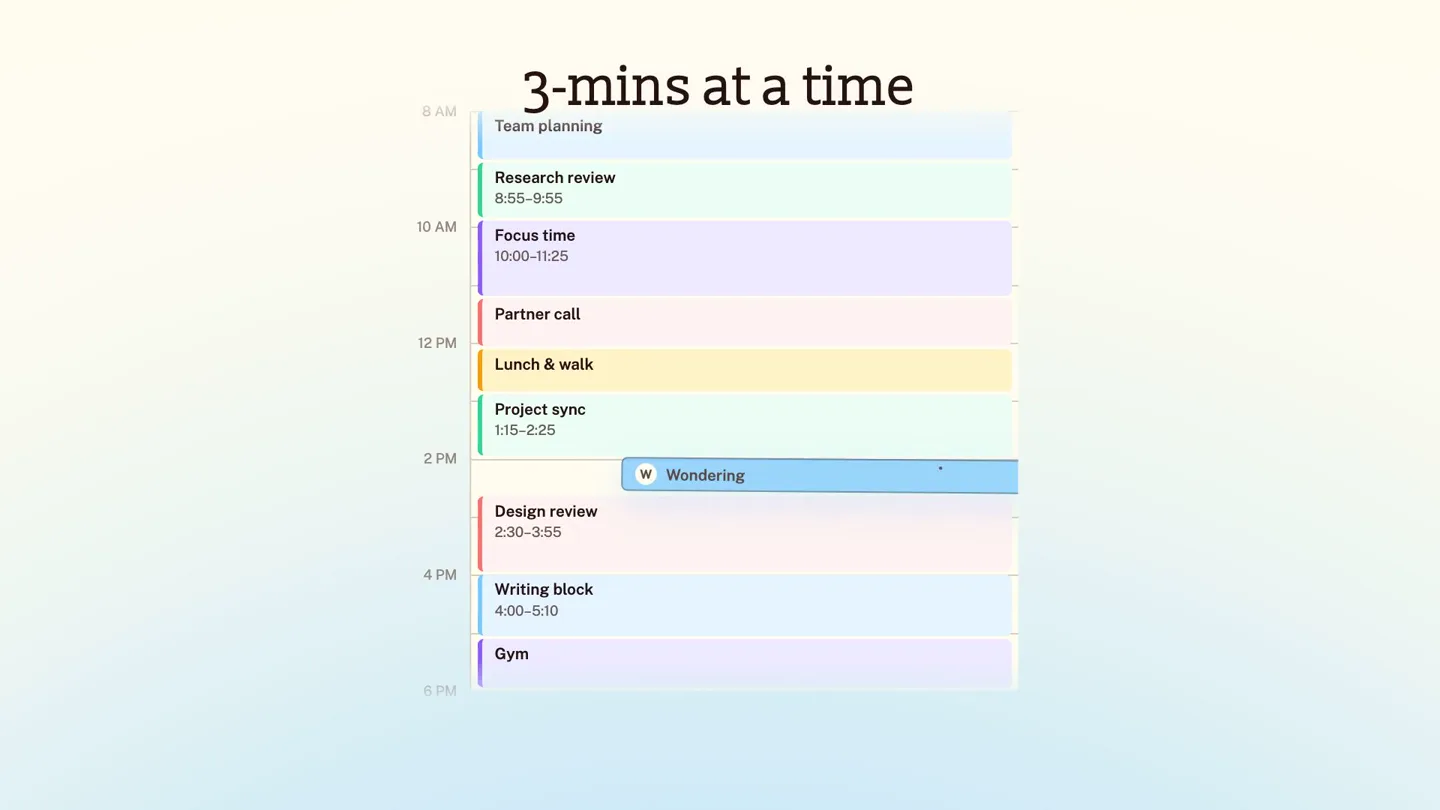
- 3-mins at a time 8 AM Team planning Research review 8:55-9:55 10 AM Focus time 10:00-11:25 Partner call 12 PM Lunch & walk Project sync 1:15-2:25 2 PM W Wondering 3 min Design review 2:30-3:55 4 PM Writing block 4:00-5:10 6 PM Gym We break down the path into 3-minute lessons
- Camera
- Static, showcasing a calendar UI.
- Motion
- UI elements animate in, highlighting a 'Wondering' 3-minute slot. A curved arrow and explanatory text appear, emphasizing the micro-lesson concept.
Feature Teaser
Adaptive Learning Path
“What would you like to know?”
- On screen
- Designed for your specific goal and role 1. Why is it brilliant at this and hopeless at that? 6 lessons ~3 min each The Boundary Is Not Where You Think Working Memory; Not Storage Sort Your Own Tasks Guessing Was The Winning Strategy Show, Don't Tell Match The Checking To The Stakes We reorder or skip what you know. We tailor lessons to your occupation and goals.
- Camera
- Static, presenting a lesson list UI.
- Motion
- Text and arrows animate in, illustrating how lessons are reordered, skipped, or tailored based on user knowledge and goals. Subtle UI element highlights.
Call to Action
Interactive Learning & CTA
“(No spoken dialogue — driving synth melody continues, clean and punchy trap production.)”
- On screen
- Taught the way you learn best Not sure it clicked? Ask me — I sit inside every lesson. Ask anything... Interactive exercises Practice each idea until it sticks. Probability Distribution mat floor chair roof table other 35% 25% 15% 10% 8% 7% Interactive visual Build intuition by seeing concepts change in real time. Try now at wondering.app/learn-ai Wondering
- Camera
- Static, showcasing interactive UI elements, then a final static CTA.
- Motion
- UI elements animate in, demonstrating an AI chat interface and an interactive data visualization. The final scene transitions to a clear, centered call to action with the company logo.
Motion design primitives
Synthesizable in Remotion · key components of the wondering-ai-course-launch template.
TextFadeScale
Text appears with a subtle fade-in and slight scale-up effect, often synchronized with audio beats or scene transitions. It creates a gentle yet impactful reveal.
+ Code construction recipe
Use `interpolate` for `opacity` from 0 to 1 and `scale` from 0.95 to 1.05 over a short duration (e.g., 10-15 frames), applying an `easeOutCubic` or `easeOutQuint` easing function.
UIHighlightArrow
Specific UI elements are highlighted with a subtle glow or color change, accompanied by a curved arrow and explanatory text animating into view. This draws attention to key features.
+ Code construction recipe
Implement `interpolate` for `opacity` and `transform` (translate/rotate) for the arrow and text. Use SVG paths for the curved arrow, animating `stroke-dashoffset` for a drawing effect. Highlight UI elements with `background-color` or `box-shadow` transitions.
DynamicContentReveal
Complex UI components, such as a calendar schedule or a lesson list, animate into the scene, often with individual sub-elements appearing sequentially or with staggered delays.
+ Code construction recipe
Utilize `Sequence` and `AbsoluteFill` components. Animate individual list items or schedule blocks using `spring` for `y` position and `opacity`, with `delay` props to create a staggered entrance effect.
Style DNA & aesthetic system
Visual aesthetic
Typography
Motion
Special effects
Pacing & rhythm
Conceptual story rhythm
- 1
The Hook: Value Proposition
Purpose. Immediately state the core benefit and credibility to capture attention.
Execution. Bold text reveal of 'Our Most Personalized AI Course' with Y Combinator backing, synchronized with a high-energy audio intro.
- 2
Problem/Solution: Time Constraint
Purpose. Address a common pain point (lack of time) and introduce the product's unique solution.
Execution. Calendar UI demonstrating '3-mins at a time' lessons, with an arrow highlighting the micro-lesson approach.
- 3
Feature Deep Dive: Adaptability
Purpose. Showcase the intelligent, adaptive nature of the AI course.
Execution. Lesson list UI with animated arrows and text explaining how content is reordered, skipped, and tailored to the user.
- 4
Call to Action: Engagement
Purpose. Demonstrate interactive elements and guide the user to the next step.
Execution. Interactive UI examples (AI chat, data visualization) followed by a clear, direct URL call to action.
Remix in Animatiq Studio
Master remix prompt · agent-ready
Sample remix
Objective
Launch a new AI-powered financial planning tool called 'WealthPilot'.How the recipe adapts
The video would open with 'Your Personalized Financial Co-Pilot' using TextFadeScale, backed by a 'Backed by FinTech Innovators' badge. The UIHighlightArrow primitive would demonstrate how WealthPilot intelligently rebalances portfolios, showing a graph with an arrow pointing to an optimized asset allocation. DynamicContentReveal would animate a personalized financial dashboard, highlighting savings goals and investment performance. The overall aesthetic would maintain the clean, minimalist UI, but with a color palette shifted to blues and greens to evoke trust and growth. The fast-cut pacing and modern trap-style audio would be retained to convey innovation and efficiency.Remix blueprint · wondering-ai-course-launch
Scene durations (4 scenes, 13s)
Key Remotion components
Related AI Agents Product Launches
Explore all AI Agents launches →
To ensure that artificial general intelligence benefits all of humanity

Gopuff introduces Go, an AI shopping assistant built with SpaceXAI: say what you need and the order is placed.

Iliad (Troy) trailer made by Grok Imagine 1.5, which was just released