
Worker Previews · Launch Video Breakdown: Hook, Pacing & Motion Design
Worker Previews gives your agent an entire production-like environment for every change it makes.
Scene-by-scene timeline & spoken transcript
The Hook
Introducing Worker Previews
“(No spoken dialogue — The track begins with a slow, evolving synth pad, accompanied by a subtle arpeggiated synth melody. A low-frequency sub-bass drone is present throughout.)”
- On screen
- Introducing Worker Previews Branch changes Isolated preview
- Camera
- Static wide shot, then subtle zoom out revealing more elements.
- Motion
- Text reveal with subtle scale and fade, accompanied by a diagrammatic flow animation from 'Branch changes' to 'Isolated preview'.
Problem Agitation
Environment for Every Change
“(No spoken dialogue — The synth pad and arpeggiated melody continue, maintaining an ambient yet anticipatory feel.)”
- On screen
- Give your agent an environment for every change it makes.
- Camera
- Static shot, then a subtle pan to the right.
- Motion
- Text appears with a subtle bounce and scale. Multiple small robot icons animate in a scattered, playful manner around the text, then converge and dissipate.
Product Reveal
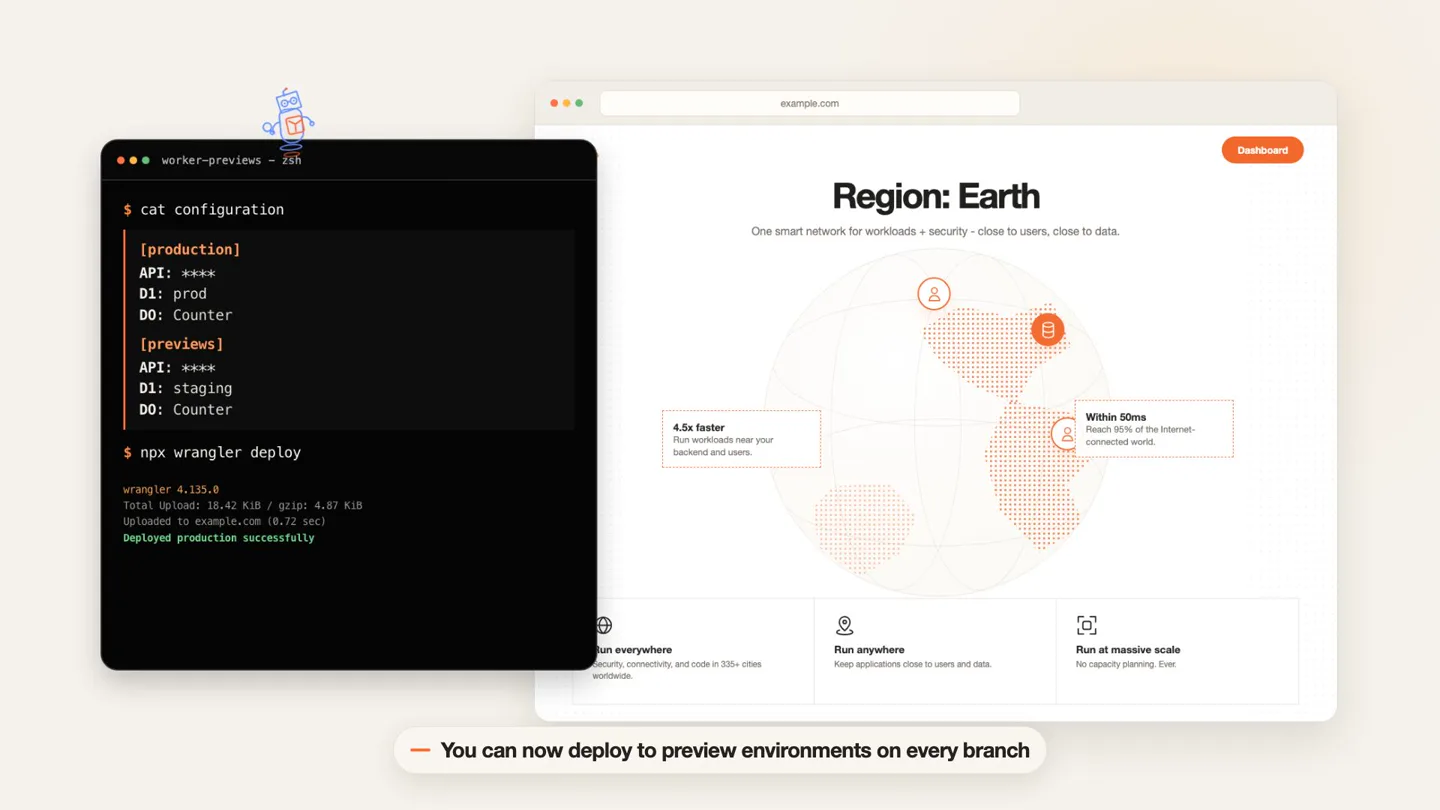
Seamless Preview Deployment
“(No spoken dialogue — A high-energy audio transition with a synth riser and a subtle sub-bass drop/impact occurs, leading into a more rhythmic section with a driving synth bassline and a pulsating synth melody.)”
- On screen
- worker-previews - zsh $ cat configuration [production] API: **** D1: prod D0: Counter [previews] API: **** D1: staging D0: Counter $ npx wrangler deploy wrangler-4.135.0 Total uploaded: 18.42 KiB / gzip: 4.07 KiB Uploaded to example.com (8.72 sec) Deployed production successfully Region: Earth One smart network for workloads + security – close to users, close to data. 4.5x faster Run workloads near your backend and users. Within 50ms Reach 95% of the Internet- connected world. Run everywhere security, connectivity, and code in 300+ cities worldwide. Run anywhere Keep applications close to users and data. Run at massive scale No capacity planning. Ever. Dashboard — In the same way you deploy to production — You can now deploy to preview environments on every branch $ git branch fix-ui $ cat configuration [production] API: **** D1: prod D0: Counter [previews] API: **** D1: staging D0: Counter $ npx wrangler preview Serve your preview URLs on a custom domain Preview ready at fix-ui.preview.example.com — Set preview settings once, then override them per branch when needed $ edit configuration [previews] API: **** - D1: staging + D1: testing $ npx wrangler preview Preview ready at migration-test.preview.example.com — For a migration test, swap the staging D1 for a test database $ edit configuration [previews] API: **** D1: staging + R2: t + R2: test-bucket $ npx wrangler preview Preview ready at r2-test.preview.example.com — Experiment with a new feature by adding a resource, then merge it when you're ready
- Camera
- Dynamic camera movements, including zooms, pans, and subtle rotations around the UI elements.
- Motion
- Terminal UI typing animation, browser UI updates, and a 'card stack' animation for multiple preview environments. Text overlays slide in from the bottom.
Feature Teaser
Automatic Isolation & Observability
“(No spoken dialogue — Another subtle sub-bass drop/impact is heard. The track maintains a consistent, driving energy with layered synth textures and a prominent, evolving arpeggiated synth line. The overall feel is futuristic and energetic.)”
- On screen
- AUTOMATIC ISOLATION Automatically provisioned for every Preview Durable Object namespaces and Container applications get separate storage and instances. Worker definition export class Counter container PreviewApp Preview deployed PREVIEW fix-ui fix-ui.preview.example.com Scoped to fix-ui Durable Object namespace Counter-7F2A Isolated storage Container application preview-app-7f2a 1 instance PREVIEW migration-test migration-test.preview.example.com Scoped to migration-test Durable Object namespace Counter-51BC Isolated storage Container application preview-app-51bc 1 instance PREVIEW r2-test r2-test.preview.example.com Scoped to r2-test Durable Object namespace Counter-C4BD Isolated storage Container application preview-app-c4bd 1 instance — State changes, migrations, sessions, and concurrent tests stay scoped to each Preview ONE FEEDBACK LOOP PER BRANCH Observability for every Preview Inspect logs, errors, metrics, and traces for each Preview. PREVIEW fix-ui fix-ui.preview.example.com Live Events Metrics Traces Requests 67B Errors 2 p95 42ms 10:09:24 info GET /api/session 10:09:13 error POST /api/test 10:09:23 trace Counter.fetch() PREVIEW migration-test migration-test.preview.example.com Live Events Metrics Traces Requests 782 Errors 1 p95 49ms 10:09:14 info GET /api/session 10:09:13 error POST /api/test 10:09:22 trace Counter.fetch() PREVIEW r2-test r2-test.preview.example.com Live Events Metrics Traces Requests 846 Errors 3 p95 56ms 10:09:24 info GET /api/session 10:09:13 error POST /api/test 10:09:22 trace Counter.fetch() — Send traffic, inspect what happened, push a fix, and verify the next deployment before production Set your agents free! Go build.
- Camera
- Zoom out to reveal a multi-panel diagram, then a pan across multiple browser windows displaying metrics.
- Motion
- Diagrammatic elements animate into view with subtle fades and lines connecting components. Bar charts and log entries populate dynamically. Final text appears with a bold, impactful scale and color change.
Motion design primitives
Synthesizable in Remotion · key components of the devtool-api-test-flow template.
TerminalTypewriter
Simulates real-time typing in a terminal window, with commands and output appearing character by character, including syntax highlighting and line breaks.
+ Code construction recipe
Use Remotion's `Sequence` and `AbsoluteFill` for the terminal background. Implement a custom `Typewriter` component that uses `split()` on text and `map()` with `delayRender()` or `spring()` for character-by-character animation. Use `interpolate()` for cursor blinking. Apply `CodeSurfer` or similar for syntax highlighting.
MultiPreviewCardStack
Multiple browser or terminal windows appear to stack and fan out, revealing different preview environments or configurations, often with a subtle 3D rotation.
+ Code construction recipe
Utilize `AbsoluteFill` for the base. Create multiple `BrowserWindow` or `TerminalWindow` components. Animate their `transform` properties (translateY, rotateX/Y/Z) using `spring()` or `interpolate()` with `delay` for a staggered effect. Apply `z-index` for stacking order and `box-shadow` for depth.
DiagrammaticFlowReveal
Abstract or literal diagrams animate into view, with lines connecting nodes, and text/icons fading or scaling in to explain relationships and processes.
+ Code construction recipe
Use `AbsoluteFill` for the canvas. Employ `SVG` paths with `stroke-dasharray` and `stroke-dashoffset` animated via `interpolate()` to draw connecting lines. Nodes and text can use `spring()` for `opacity` and `scale` to appear. Group related elements within `Sequence` components for synchronized reveals.
Style DNA & aesthetic system
Visual aesthetic
Typography
Motion
Special effects
Pacing & rhythm
Conceptual story rhythm
- 1
The Setup
Purpose. Introduce the product and its core value proposition in a concise, engaging manner.
Execution. Product logo and tagline reveal, followed by an abstract representation of the problem space (isolated vs. production environments).
- 2
The Workflow
Purpose. Demonstrate the product's ease of use and integration into a developer's existing workflow.
Execution. Live terminal typing and browser updates showing deployment to production and then to preview environments on different branches.
- 3
The Benefits
Purpose. Highlight key technical advantages and features that solve developer pain points.
Execution. Diagrams illustrating automatic isolation and multi-branch observability dashboards with dynamic metrics.
- 4
The Call to Action
Purpose. Inspire developers to adopt the product and empower their agents.
Execution. A bold, impactful closing statement with a clear, motivating message.
Remix in Animatiq Studio
Master remix prompt · agent-ready
Sample remix
Objective
A developer needs to quickly test multiple API endpoints across different environments and visualize performance metrics.How the recipe adapts
The TerminalTypewriter primitive would show commands for initiating API tests. The MultiPreviewCardStack would be adapted to display multiple API test reports or environment configurations. The DiagrammaticFlowReveal would illustrate the data flow from test execution to metric visualization. The color palette would shift to deep blues and vibrant greens to reflect a different brand identity while maintaining the tech-forward aesthetic.Remix blueprint · devtool-api-test-flow
Scene durations (4 scenes, 49s)
Key Remotion components
Related Developer Tools Product Launches
Explore all Developer Tools launches →
Agentic CLI for coding, building apps, and automating workflows.

New in Claude Code: your sessions can now message each other. Tell Claude to send a summary (not your history or files), and the other session picks it up mid-task.

Meet Qwen3.8-Max: A New Bar for Coding and Cowork. https://t.co/mJaA8vr6xT