
Zeron · Launch Video Breakdown: Hook, Pacing & Motion Design
An open-source desktop app built with GPUI.
Scene-by-scene timeline & spoken transcript
The Hook
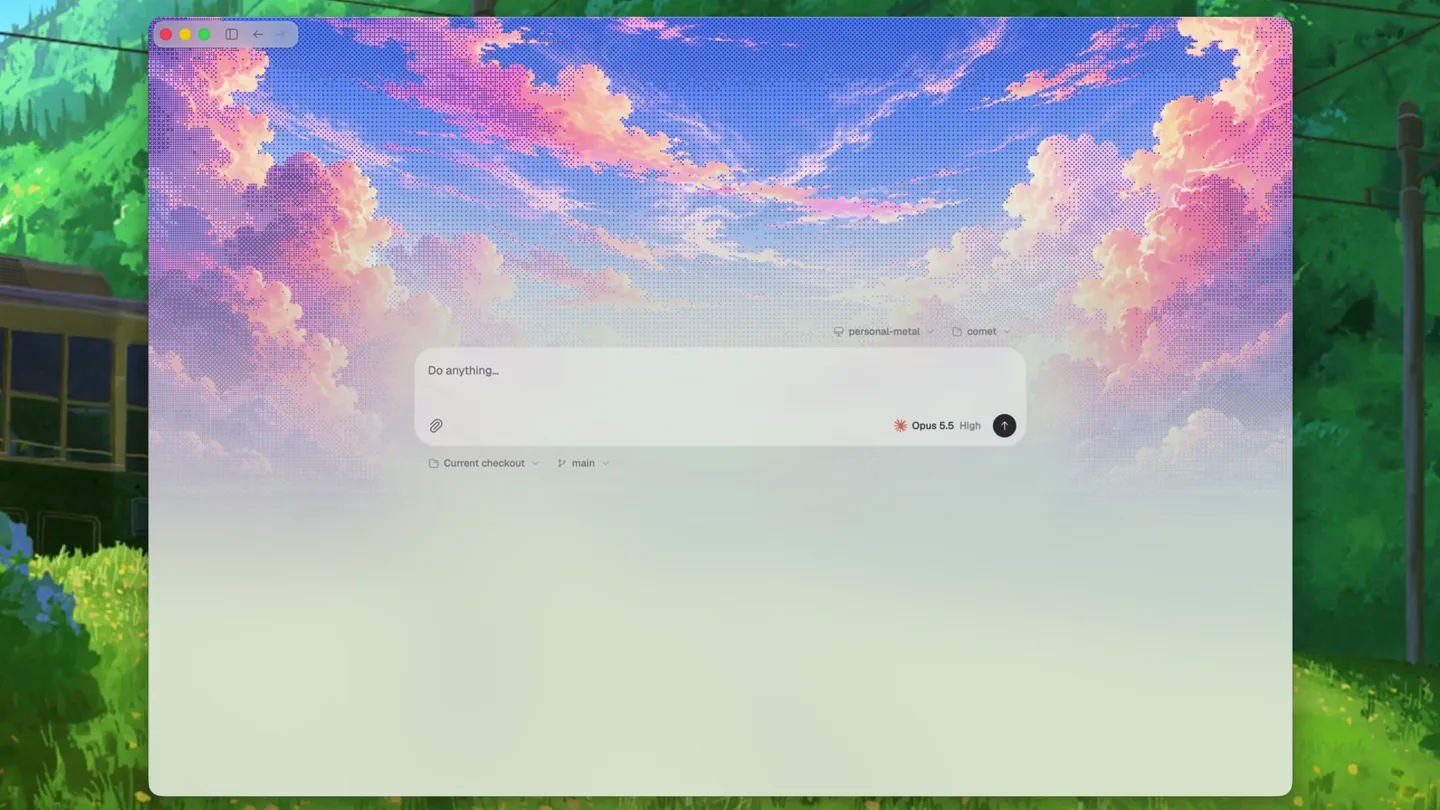
Pixelated Sky Desktop App Reveal
“(No spoken dialogue — Silent video with ambient visual focus.)”
- On screen
- Do anything... personal-email comet Opus 5.5 High Current checkout main
- Camera
- Static, centered shot of a desktop application window, framed against a pixel art background.
- Motion
- Subtle, almost imperceptible breathing animation on the application window, suggesting readiness.
Product Reveal
Interactive Prompt State
“(No spoken dialogue — Silent video with ambient visual focus.)”
- On screen
- Do anything... personal-email comet Opus 5.5 High Current checkout main
- Camera
- Static, maintaining the same centered view of the application.
- Motion
- The input field subtly pulses or changes state, indicating user interaction readiness or a background process.
Feature Teaser
Contextual Information Display
“(No spoken dialogue — Silent video with ambient visual focus.)”
- On screen
- Do anything... personal-email comet Opus 5.5 High Current checkout main
- Camera
- Static, consistent framing of the desktop application.
- Motion
- Small UI elements like 'Opus 5.5 High' or 'Current checkout' might show a brief, subtle highlight or state change.
Call to Action
Anticipatory Input Prompt
“(No spoken dialogue — Silent video with ambient visual focus.)”
- On screen
- Do anything... personal-email comet Opus 5.5 High Current checkout main
- Camera
- Static, holding the central application view.
- Motion
- The 'Do anything...' prompt area subtly animates, perhaps a gentle glow or a cursor blink, inviting user input.
Call to Action
Final Product Glimpse
“(No spoken dialogue — Silent video with ambient visual focus.)”
- On screen
- Do anything... personal-email comet Opus 5.5 High Current checkout main
- Camera
- Static, concluding on the full application view.
- Motion
- A final, subtle animation across the entire application window, perhaps a soft fade or a slight scale, before the cut.
Motion design primitives
Synthesizable in Remotion · key components of the pixel-grid-canvas-reveal template.
PixelSkyWindowReveal
A desktop application window appears centered, framed by a vibrant, pixelated sky background. The window itself has a subtle, almost imperceptible 'breathing' animation.
+ Code construction recipe
Use `AbsoluteFill` for the pixel art background. The application window can be a `Sequence` with a `spring` animation for `scale` and `opacity` on mount, and a very subtle, looping `loop` animation for `scale` or `translateY` to simulate breathing.
InteractivePromptPulse
The main input field within the application subtly pulses or changes its background color/border, indicating readiness for user input or a background process.
+ Code construction recipe
Apply a `spring` animation to the `backgroundColor` or `borderColor` of the input field, or a `loop` animation for a subtle `boxShadow` or `opacity` change on a pseudo-element.
ContextualBadgeHighlight
Small informational badges or text elements (e.g., 'Opus 5.5 High') briefly highlight or show a state change, drawing attention to key features.
+ Code construction recipe
Use `interpolate` or `spring` on the `opacity` or `backgroundColor` of specific text/badge elements, triggered by a `Sequence` or `delay` to create a staggered reveal or emphasis.
Style DNA & aesthetic system
Visual aesthetic
Typography
Motion
Special effects
Pacing & rhythm
Conceptual story rhythm
- 1
The Whimsical Canvas
Purpose. Establishes a unique and inviting visual environment, setting the product apart from typical developer tools.
Execution. The pixelated sky background immediately captures attention, framing the clean application window.
- 2
The Open Invitation
Purpose. Highlights the product's core function as an intuitive, open-ended tool for various tasks.
Execution. The 'Do anything...' prompt is central, subtly animated to draw focus and suggest versatility.
- 3
Intelligent Assistance
Purpose. Showcases the product's smart features and contextual awareness, like AI integration or version control.
Execution. Elements like 'Opus 5.5 High' and 'Current checkout' are visible, hinting at advanced capabilities without explicit explanation.
- 4
Seamless Workflow
Purpose. Conveys the ease of use and integrated nature of the application within a developer's workflow.
Execution. The static, calm camera and subtle UI animations suggest a smooth, uninterrupted user experience.
Remix in Animatiq Studio
Master remix prompt · agent-ready
Sample remix
Objective
Launch video for 'CanvasFlow', an open-source visual programming tool for web animations.How the recipe adapts
Remix blueprint · pixel-grid-canvas-reveal
Scene durations (4 scenes, 4.8s)
Key Remotion components
Related Developer Tools Product Launches
Explore all Developer Tools launches →
Agentic CLI for coding, building apps, and automating workflows.

New in Claude Code: your sessions can now message each other. Tell Claude to send a summary (not your history or files), and the other session picks it up mid-task.

Meet Qwen3.8-Max: A New Bar for Coding and Cowork. https://t.co/mJaA8vr6xT