
ben hylak · Launch Video Breakdown: Hook, Pacing & Motion Design
we built the first sane way to debug your agent locally. you can see your traces. codex/claude code can too. this lets them write evals and test your agents automatically. best part: it's completel…
Scene-by-scene timeline & spoken transcript
The Hook
Live Debugging in Action
“(No spoken dialogue — high-energy electronic riser leading into a driving beat with pizzicato synths and sub-bass. Sweep effect at 0:05, followed by another riser and sub-bass drop/impact at 0:09.)”
- On screen
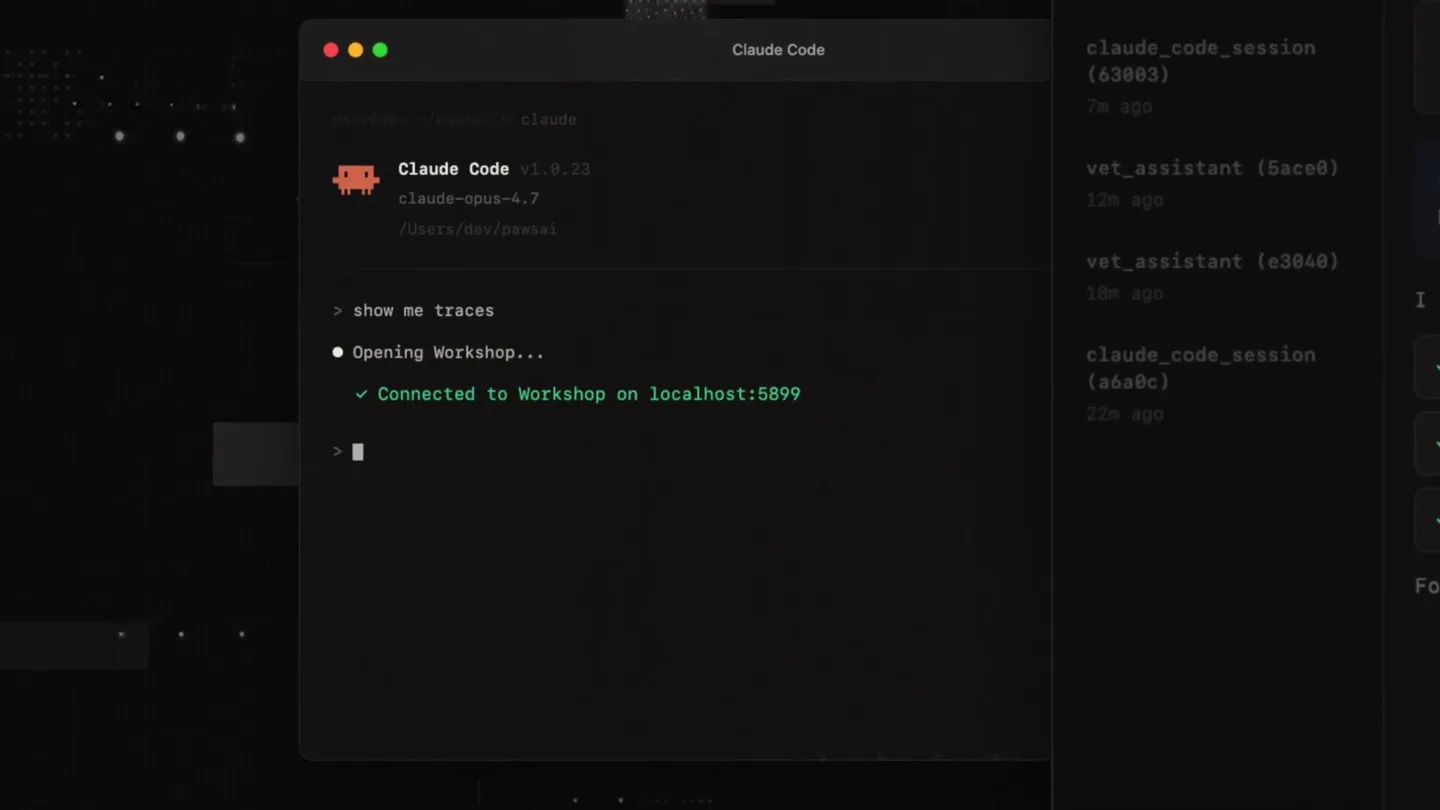
- vet_assistant (aa7eb) last now vet_assistant (74d67) 2m ago claude_code_session (fd153) 4m ago claude_code_session (a3083) 7m ago vet_assistant (5ace0) 12h ago vet_assistant (e3040) 18h ago claude_code_session (a6a0c) 22m ago Overview Span Tree Comms TRAJECTORY ai.generateText check_symptoms get_breed_risks check_mobility SYSTEM You are a veterinary triage assistant. Assess symptom severity, check the symptom database, and re immediate, same-day, or routine care. Always ask clarifying questions. user My golden retriever started limping on her front left leg yesterday. She's 7 and normally very activ I want to make sure we assess this properly. Let me check the symptom da check_symptoms get_breed_risks check_mobility Claude Code Claude Code v1.0.23 claude-opus-4.7 /Users/dev/pawsai show me traces Opening Workshop... Connected to Workshop on localhost:5899 figure out what happen Reading trace aa7eb from Workshop... I found the issue - the agent jumped straight to a recomme follow-up questions. The system prompt says *always ask clarifying questio skipped that step entirely. Creating eval: test_symptom_followup.ts Patching src/promp Re-running agent against eval... eval passes agent now asks 3 follow-up questions Saved eval to test suite. localhost:5899 connected claude-sonnet-4 1 node DURATION 1.0s 859 m/216 out $0.122 TRACE vet_assistant (b2f1) vet_assistant (aa7eb) vet_assistant (74d67) claude_code_session (fd153) claude_code_session (a3083) vet_assistant (5ace0) vet_assistant (e3040) claude_code_session (a6a0c) goal passed ai.generateText check_symptoms get_breed_risks check_mobility SYSTEM You are a veterinary triage assistant. Assess symptom severity, check the symptom database, and re immediate, same-day, or routine care. Always ask clarifying questions. user My golden retriever started limping on her front left leg yesterday. She's 7 and normally very active I want to make sure we assess this properly. Let me check the symptom database for limping in a 7-year-old Golden Retriever. check_symptoms get_breed_risks check_mobility For a 7-year-old Golden, limping over 24 hours should be checked. Could be a sprain, arthritis flare, or ligament issue.
- Camera
- Static screen capture of a terminal and a web UI, with subtle background elements. The camera zooms in slightly on the terminal output.
- Motion
- Screen recording with dynamic text typing animation, progress bar fills, and checkmark reveals. Subtle background glitching and pixel displacement effects.
Product Reveal
Key Differentiators
“(No spoken dialogue — driving beat continues with layered electronic percussion and synth melodies.)”
- On screen
- your agent was Local. Open source.
- Camera
- Static full-screen text overlays. The background features abstract, glitching geometric patterns.
- Motion
- Fast-cut text reveals with a subtle glitch/chromatic aberration effect on text. Background elements animate with a digital noise and pixel displacement.
Feature Teaser
Easy Installation
“(No spoken dialogue — driving beat continues, leading into a significant sub-bass drop/impact at 0:18.)”
- On screen
- workshop $ curl -fsSL raindrop.sh/install | bash
- Camera
- Static full-screen view with a central command line instruction. Background elements remain consistent.
- Motion
- Text reveal with a glitch effect, followed by a terminal command typing animation. The background elements continue their subtle, digital animation.
Call to Action
Discover Raindrop
“(No spoken dialogue — final high-energy sweep and impact at 0:21, then fades out.)”
- On screen
- Try it out now at raindrop.ai raindrop
- Camera
- Static full-screen text and logo reveals. The camera subtly zooms out on the final logo.
- Motion
- Text and logo reveals with glitch and chromatic aberration. The background elements continue their subtle, digital animation, fading out with the logo.
Motion design primitives
Synthesizable in Remotion · key components of the developer-tool-glitch-launch template.
TerminalTypewriter
Text appears character by character in a terminal-like interface, simulating live typing. This is often accompanied by a blinking cursor and command line prompts.
+ Code construction recipe
Use Remotion's `Sequence` and `spring` for character reveal timing. Implement a `Text` component with `split()` and `map()` to animate individual characters. A blinking cursor can be achieved with `interpolate` and `loop` for opacity.
GlitchTextReveal
Text appears with a brief, digital glitching effect, often involving chromatic aberration, pixel displacement, and scanline artifacts, before settling into a clean state.
+ Code construction recipe
Apply SVG filters for chromatic aberration and pixelation. Use `interpolate` to animate the intensity of these filters from high to zero over a short duration. Combine with `Text` components and `spring` for position/scale.
AbstractDataGrid
A dark background features subtle, animated grids of dots, dashed lines, and rectangular shapes that shift, fade, and glitch, creating a technical, data-driven aesthetic.
+ Code construction recipe
Utilize `Canvas` or multiple `AbsoluteFill` components with `background-image` set to SVG patterns for dots and lines. Animate `transform` properties (translate, scale, rotate) and `opacity` with `interpolate` and `noise` functions for organic, glitchy movement. Apply `filter: blur()` and `filter: saturate()` for depth.
Style DNA & aesthetic system
Visual aesthetic
Typography
Motion
Special effects
Pacing & rhythm
Conceptual story rhythm
- 1
Problem & Solution Demo
Purpose. Immediately demonstrate the product's core functionality and value proposition by showing a real-world debugging scenario.
Execution. Live screen recording of the product UI, highlighting the problem (agent error) and the solution (debugging, eval creation, fix verification) with dynamic text and UI updates.
- 2
Value Proposition Highlights
Purpose. Articulate the key benefits and differentiators of the product in a concise, impactful manner.
Execution. Full-screen text overlays with glitch effects, presenting single-word or short phrases ('Local.', 'Open source.') against an abstract, glitching background.
- 3
Call to Action - Installation
Purpose. Provide clear, actionable instructions for users to get started with the product.
Execution. A prominent terminal command for installation, presented with a typing animation and glitch effects, reinforcing the developer-tool nature.
- 4
Brand Reveal & Final CTA
Purpose. Conclude with brand identity and a final, memorable call to action.
Execution. Progressive reveal of the brand name and logo, culminating in the product URL, all enhanced with glitch effects and subtle background animation.
Remix in Animatiq Studio
Master remix prompt · agent-ready
Sample remix
Objective
Launch a new AI-powered code refactoring tool called 'RefactorFlow'.How the recipe adapts
The video would open with a screen recording of 'RefactorFlow' in action, showing a developer's IDE with messy code being automatically cleaned and optimized by the tool. The 'TerminalTypewriter' primitive would simulate the tool's output and progress. The 'GlitchTextReveal' primitive would be used for key messages like 'Intelligent.', 'Automated.', 'Seamless Integration.', appearing with a digital distortion before settling. The 'AbstractDataGrid' primitive would serve as the dynamic, technical background throughout, evolving with subtle shifts and glitches. The installation command '$ npm install refactorflow-cli' would be presented using the 'TerminalTypewriter' style. The final call to action would feature the 'RefactorFlow' logo and 'refactorflow.dev' with a strong glitch and impact, mirroring the original video's energetic conclusion.Remix blueprint · developer-tool-glitch-launch
Scene durations (4 scenes, 23s)
Key Remotion components
Related Developer Tools Product Launches
Explore all Developer Tools launches →
xAI opens voice cloning on its API: build a custom voice in about two minutes or pick from 80+ voices in 28 languages.

Claude can now operate your Mac, opening apps, browsing and filling spreadsheets, as a research preview in Cowork and Claude Code.

Agentic CLI for coding, building apps, and automating workflows.