
divyansh tiwari · Launch Video Breakdown: Hook, Pacing & Motion Design
Claude Code suddenly makes WAY more sense after installing this official Anthropic plugin It reads your entire project and instantly tells you what you should actually enable, use, and configure. T…
Scene-by-scene timeline & spoken transcript
The Hook
Plugin Installation Command
“(No spoken dialogue — A prominent sub-bass drop/impact occurs at [00:00:00.000], followed by a subtle, high-frequency riser that builds to [00:00:01.000]. Another significant sub-bass impact is heard at [00:00:01.000]. A distinct, high-energy audio transition with a sweep effect and a sub-bass drop/impact occurs at [00:00:02.000].)”
- On screen
- Claude Code V2.1.119 Opus 4.7 (1M context) with xhigh effort Claude Max ~\Desktop\カメイ会社 > /plugin install claude-code-setup@claude-plugins-official [Opus 4.7 (1M context)] | 5h: 2% | 週: 9% | Ctx: 0%
- Camera
- Static, full-screen view of a terminal interface.
- Motion
- Text typing animation, simulating real-time command input.
Product Reveal
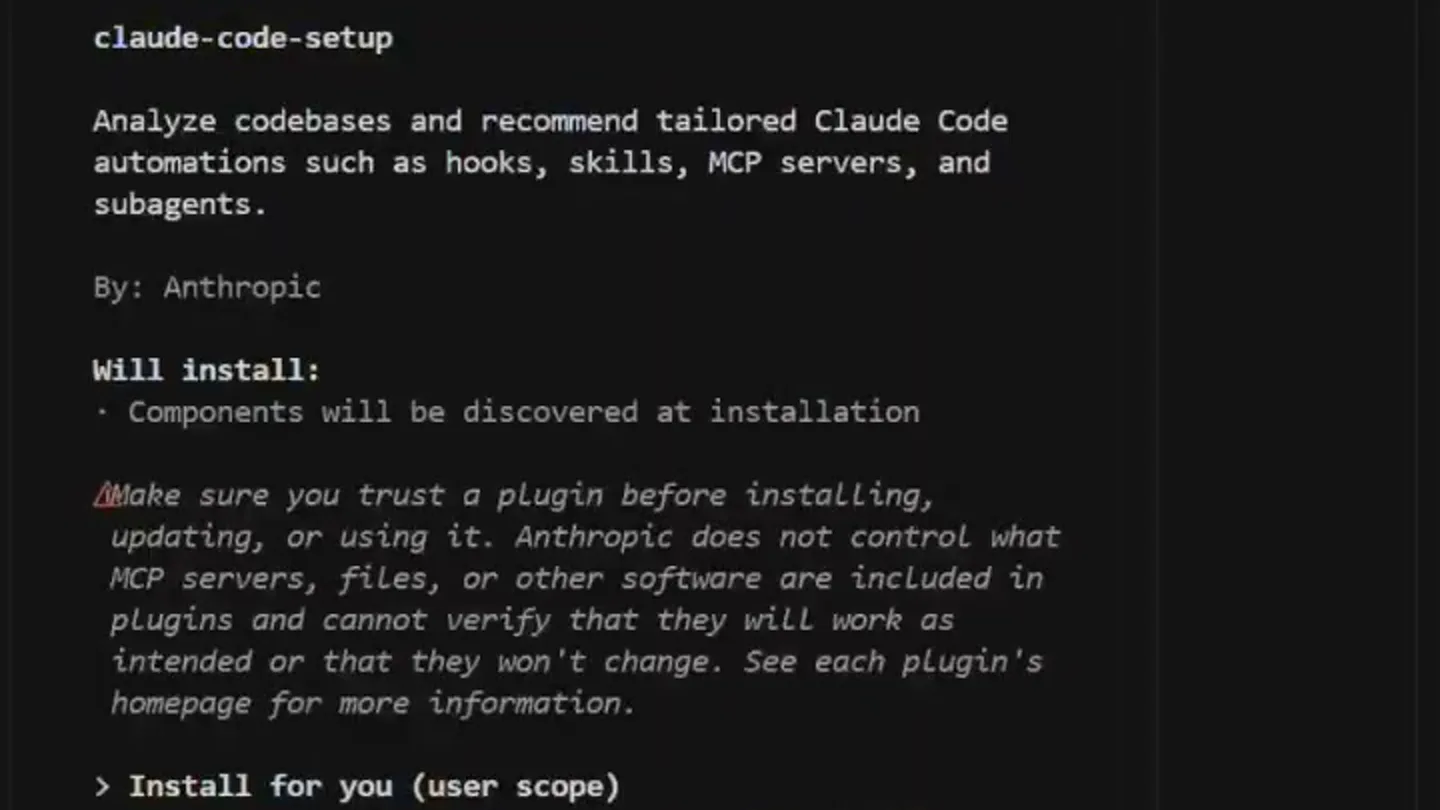
Plugin Details Display
“(No spoken dialogue — A sustained, low-frequency drone continues until [00:00:03.000]. A new, more melodic synth layer with a subtle arpeggiated feel enters at [00:00:03.000], accompanied by a gentle, percussive synth element. A noticeable high-energy audio transition with a sweep and sub-bass drop/impact is present at [00:00:04.000].)”
- On screen
- /plugin install claude-code-setup@claude-plugins-official Plugins Discover Installed Marketplaces Errors Plugin Details claude-code-setup Analyze codebases and recommend tailored Claude Code automations such as hooks, skills, MCP servers, and subagents. By: Anthropic Will install: - Components will be discovered at installation Make sure you trust a plugin before installing, updating, or using it. Anthropic does not control what MCP servers, files, or other software are included in plugins and cannot verify that they will work as intended or that they won't change. See each plugin's homepage for more information. > Install for you (user scope) Install for all collaborators on this repository (project scope) Install for you, in this repo only (local scope) Open homepage Back to plugin list Enter to select Esc to back
- Camera
- Static, full-screen view of a terminal-like UI, revealing plugin details.
- Motion
- Instant cut to a new UI state, followed by a subtle text highlight animation on 'Discover'.
Feature Teaser
Installation Scope Selection
“(No spoken dialogue — The track then features a sustained, evolving synth pad with a slight tremolo effect, creating a sense of anticipation. A prominent sub-bass drop/impact is heard at [00:00:05.000]. This is followed by a high-frequency riser that builds from [00:00:05.000] to [00:00:06.000]. Another sub-bass impact occurs at [00:00:06.000]. A high-energy audio transition with a sweep and sub-bass drop/impact is present at [00:00:07.000].)”
- On screen
- /plugin install claude-code-setup@claude-plugins-official Plugins Discover Installed Marketplaces Errors Plugin Details claude-code-setup Analyze codebases and recommend tailored Claude Code automations such as hooks, skills, MCP servers, and subagents. By: Anthropic Will install: - Components will be discovered at installation Make sure you trust a plugin before installing, updating, or using it. Anthropic does not control what MCP servers, files, or other software are included in plugins and cannot verify that they will work as as intended or that they won't change. See each plugin's homepage for more information. > Install for you (user scope) Install for all collaborators on this repository (project scope) Install for you, in in this repo only (local scope) Open homepage Back to plugin list Enter to select Esc to back
- Camera
- Static, full-screen view, focusing on the installation options.
- Motion
- Cursor movement and selection highlight, simulating user interaction within the terminal UI.
Call to Action
Plugin Installation Confirmation
“(No spoken dialogue — The track then features a sustained, low-frequency drone that continues until [00:00:08.000]. A new, more melodic synth layer with a subtle arpeggiated feel enters at [00:00:08.000], accompanied by a gentle, percussive synth element. A noticeable high-energy audio transition with a sweep and sub-bass drop/impact is present at [00:00:09.000]. The track then features a sustained, evolving synth pad with a slight tremolo effect, creating a sense of anticipation. A prominent sub-bass drop/impact is heard at [00:00:10.000]. This is followed by a high-frequency riser that builds from [00:00:10.000] to [00:00:11.000]. The audio concludes with a final sub-bass impact at [00:00:11.000].)”
- On screen
- Claude Code V2.1.119 Opus 4.7 (1M context) with xhigh effort Claude Max ~\Desktop\カメイ会社 > /plugin install claude-code-setup@claude-plugins-official ✓ Installed claude-code-setup. Run /reload-plugins to apply. > [Opus 4.7 (1M context)] | 5h: 2% | 週: 9% | Ctx: 0% Plugins changed. Run /reload-plugins to activate. I
- Camera
- Static, full-screen view, returning to the terminal with confirmation message.
- Motion
- Instant cut to a new UI state, displaying installation success and next steps.
Motion design primitives
Synthesizable in Remotion · key components of the terminal-cli-install-flow template.
TerminalTypewriterEffect
Text appears character by character, simulating real-time typing in a command-line interface. A blinking cursor follows the text input.
+ Code construction recipe
Use `interpolate` to animate the `text-content` property of a `<span>` or `<p>` element, revealing characters sequentially. A separate `interpolate` or `spring` animation can control the `opacity` of a cursor element for blinking.
UIStateCut
An instantaneous transition between two distinct UI states, mimicking a rapid screen refresh or navigation within a terminal application.
+ Code construction recipe
Achieve this with a direct component swap or by rendering different components based on a state change, without any explicit transition animation. This is a hard cut, not a dissolve or wipe.
MenuItemHighlight
A subtle background color change or border highlight on a menu item, indicating selection or focus, often accompanied by a cursor movement.
+ Code construction recipe
Apply `interpolate` to `backgroundColor` or `borderColor` properties of a `<div>` or `<li>` element. Use `spring` for a more natural, bouncy highlight effect. Cursor movement can be animated with `translateX` and `translateY`.
Style DNA & aesthetic system
Visual aesthetic
Typography
Motion
Special effects
Pacing & rhythm
Conceptual story rhythm
- 1
Command Input
Purpose. Introduces the product through a familiar developer interaction: typing a command to install a plugin.
Execution. A terminal screen with a typing animation for the plugin installation command.
- 2
Plugin Overview
Purpose. Explains what the plugin does and its benefits, building immediate value.
Execution. A UI screen displaying detailed information about the 'claude-code-setup' plugin.
- 3
Installation Options
Purpose. Guides the user through the installation process, highlighting flexibility.
Execution. The UI showing different installation scopes with a cursor selecting an option.
- 4
Confirmation & Next Steps
Purpose. Confirms successful installation and provides clear instructions for activation.
Execution. Return to the terminal screen with a success message and a prompt to reload plugins.
Remix in Animatiq Studio
Master remix prompt · agent-ready
Sample remix
Objective
Launch a new command-line interface (CLI) tool for real-time data synchronization.How the recipe adapts
The recipe adapts by replacing 'Claude Code' specific text with 'QuantumSync CLI' commands and output. The plugin details screen would describe data synchronization features. The installation options would be tailored to 'QuantumSync's' deployment methods, maintaining the dark terminal theme and rapid cuts. The audio cues would align with the new product's actions, such as a sub-bass drop when a sync command is executed.Remix blueprint · terminal-cli-install-flow
Scene durations (4 scenes, 11.1s)
Key Remotion components
Related Developer Tools Product Launches
Explore all Developer Tools launches →
xAI opens voice cloning on its API: build a custom voice in about two minutes or pick from 80+ voices in 28 languages.

Claude can now operate your Mac, opening apps, browsing and filling spreadsheets, as a research preview in Cowork and Claude Code.

Agentic CLI for coding, building apps, and automating workflows.