
bg0 · Launch Video Breakdown: Hook, Pacing & Motion Design
bg0 is an open-source remove.bg replacement that runs locally with WebGPU. It is free and unlimited, and images never leave the device.
Scene-by-scene timeline & spoken transcript
The Hook
Instant Local Background Removal
“(No spoken dialogue — Silent video with ambient visual cues.)”
- On screen
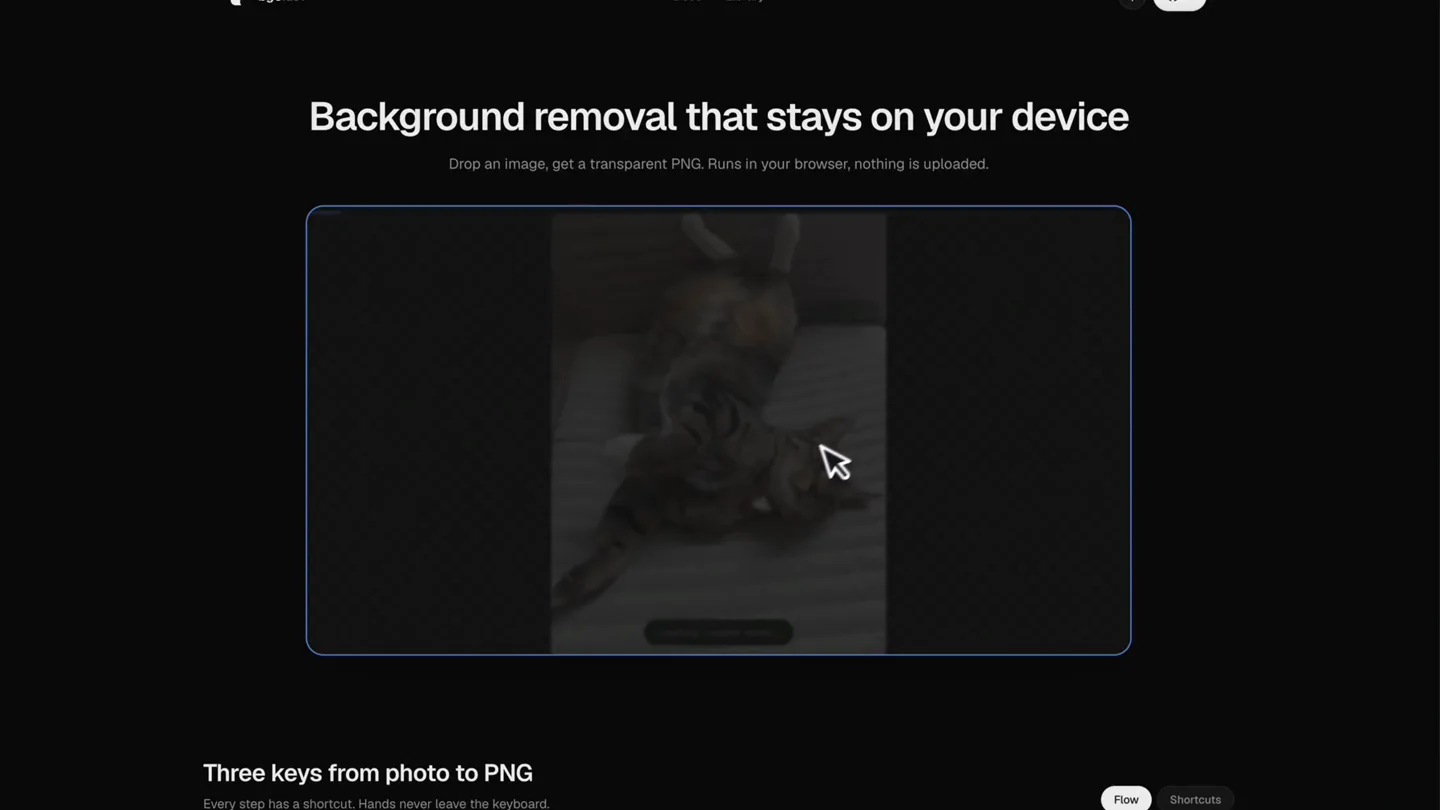
- bg0.dev Docs Library Background removal that stays on your device Drop an image, get a transparent PNG. Runs in your browser, nothing is uploaded. Release to remove the background Choose image or paste PNG, JPG, WebP Three keys from photo to PNG Every step has a shortcut. Hands never leave the keyboard. BEFORE AFTER cat-bg0.png 750 KB Flow Shortcuts
- Camera
- Static wide shot of the web application interface, focusing on the central image upload area.
- Motion
- Cursor interaction, drag-and-drop animation, subtle UI element highlighting.
Product Reveal
Real-time Processing & Preview
“(No spoken dialogue — Silent video with ambient visual cues.)”
- On screen
- bg0.dev Docs Library Background removal that stays on your device Drop an image, get a transparent PNG. Runs in your browser, nothing is uploaded. Removing background... Three keys from photo to PNG Every step has a shortcut. Hands never leave the keyboard. Compare Result Original BEFORE AFTER WASM 6.0s 768x1024 Hold Space to peek slide Esc next image Copy Download PNG 750 KB
- Camera
- Static wide shot, then a slight zoom into the image processing area.
- Motion
- Progress bar animation, real-time background removal effect, before/after slider reveal.
Feature Teaser
Interactive Comparison & Navigation
“(No spoken dialogue — Silent video with ambient visual cues.)”
- On screen
- Compare Result Original BEFORE AFTER WASM 6.0s 768x1024 Hold Space to peek slide Esc next image Copy Download PNG 750 KB
- Camera
- Close-up on the image viewer, following the cursor's interaction with the comparison slider.
- Motion
- Interactive slider animation, UI element hover states, smooth cursor movement.
Call to Action
Effortless Export Options
“(No spoken dialogue — Silent video with ambient visual cues.)”
- On screen
- Compare Result Original BEFORE AFTER WASM 6.0s 768x1024 Hold Space to peek slide Esc next image Copy Download PNG 750 KB PNG copied to the clipboard
- Camera
- Close-up on the export buttons, highlighting the copy and download actions.
- Motion
- Button click animation, confirmation toast notification, subtle icon changes.
Motion design primitives
Synthesizable in Remotion · key components of the local-privacy-tool-launch template.
DragAndDropUpload
An image thumbnail is dragged from an external source into a designated drop zone, which then expands to display the full image. The drop zone highlights upon hover.
+ Code construction recipe
Use `interpolate` for scaling and opacity changes on the drop zone. Implement `spring` for the image's entry animation and the drop zone's highlight effect. Utilize SVG filters for subtle glow on hover.
BeforeAfterSlider
A vertical or horizontal slider divides an image, revealing the 'before' state on one side and the 'after' state (with background removed) on the other. The slider follows cursor movement.
+ Code construction recipe
Employ `interpolate` to control the clip-path or width/height of the 'after' image based on cursor position. Use `spring` for the slider handle's subtle bounce on interaction. Canvas rendering for efficient image manipulation.
InteractiveButtonFeedback
Buttons react to cursor hover and click events with subtle scaling, color changes, and a confirmation message appearing briefly after a click.
+ Code construction recipe
Apply `spring` for button scale and color transitions on hover and click. Use `interpolate` for the opacity and translateY of the confirmation toast message, with a short duration and ease-out curve.
Style DNA & aesthetic system
Visual aesthetic
Typography
Motion
Special effects
Pacing & rhythm
Conceptual story rhythm
- 1
Problem Introduction & Solution Tease
Purpose. Immediately showcases the core problem (background removal) and hints at the product's unique, local solution.
Execution. The initial screen with the 'Background removal that stays on your device' headline and the empty drop zone.
- 2
Direct Product Demonstration
Purpose. Visually demonstrates the product's primary function in real-time, emphasizing speed and ease of use.
Execution. Dragging an image, the 'Removing background...' state, and the instant reveal of the processed image.
- 3
Feature Deep Dive & Control
Purpose. Highlights interactive features like comparison and navigation, showcasing user control and flexibility.
Execution. The before/after slider interaction and the 'Hold Space to peek' functionality.
- 4
Seamless Integration & Export
Purpose. Concludes by demonstrating how easily users can integrate the output into their workflow.
Execution. The 'Copy' and 'Download PNG' actions with their respective feedback.
Remix in Animatiq Studio
Master remix prompt · agent-ready
Sample remix
Objective
A local, privacy-focused video transcription tool that runs in the browser.How the recipe adapts
The DragAndDropUpload primitive would be adapted for video file input. The BeforeAfterSlider would become a 'Before/After Transcription' view, showing raw audio waveform vs. transcribed text, with a slider to compare. InteractiveButtonFeedback would be used for 'Start Transcription' and 'Copy Transcript' buttons, maintaining the same responsive visual cues.Remix blueprint · local-privacy-tool-launch
Scene durations (4 scenes, 16s)
Key Remotion components
Related Creative Tools Product Launches
Explore all Creative Tools launches →
A vibe design partner with an AI-native canvas for turning ideas into UI.

We heard you wanted to use Codex rate limit resets on your own time. Starting today, we’re rolling out the ability to save rate limit resets to use later. We’re starting Go, Plus, Pro, and Business
Introducing Framer 3.0 with Agents, Branching, Community, and an all-new design.