
Steve (Builder.io) · Launch Video Breakdown: Hook, Pacing & Motion Design
Builder.io's Review Agent tests each pull request in a real browser and returns findings, repros and one-click fixes.
Scene-by-scene timeline & spoken transcript
The Hook
Automated Browser Testing
“baby to go”
- On screen
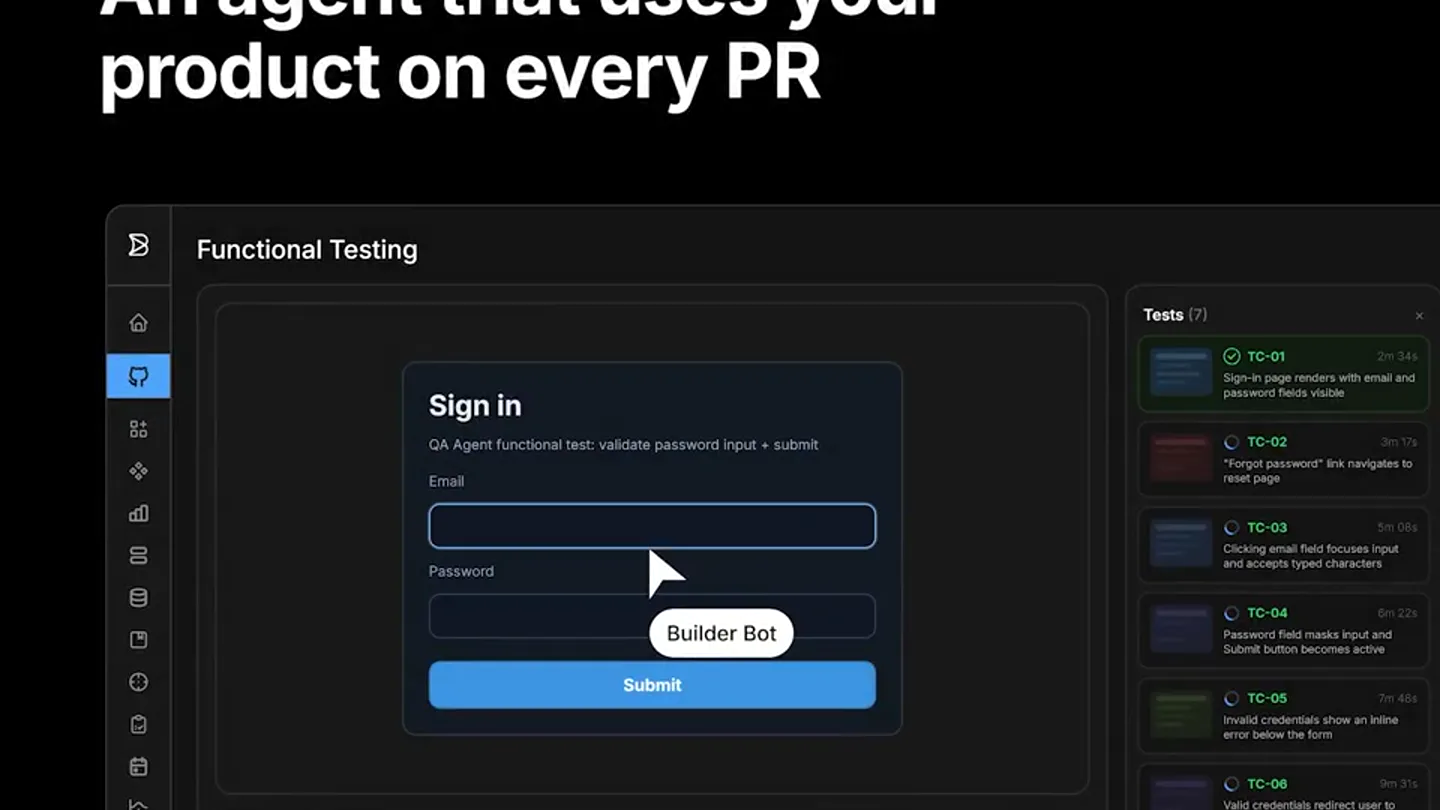
- An agent that uses your product on every PR Functional Testing Sign in QA Agent functional test: validate password input + submit Email qa.agent@example.com Password Submit Builder Bot Tests [7] TC-01 Sign-in page renders with email and password fields visible TC-02 "Forgot password" link navigates to reset page TC-03 Clicking email field focuses input and accepts typed characters TC-04 Password field masks input and Submit button becomes active TC-05 Invalid credentials show an inline error below the form TC-06 Valid credentials redirect user to dashboard without error TC-07 Network (325) Console (406) Info
- Camera
- Static wide shot of a browser-like interface, then a slow zoom into the 'Sign in' form, followed by a pan to the right showing test case results.
- Motion
- Zoom and pan with UI element highlighting and text input simulation.
Problem Agitation
Agent Writes Test Cases & Finds Bugs
“ready to go”
- On screen
- The agent writes test cases for each PR Critical flows TC-01: Load the PR reviews list without filters (succeed) TC-02: User can add filters to narrow results (succeed) Edge cases TC-03: Empty array displays an empty state (failed) TC-04: No network connection shows recovery UI (couldn't run) Regression TC-05: Legacy pages won't break existing behavior (succeed) TC-06: Existing links will continue to resolve (couldn't run) to find real bugs automatically Add a comment Write Preview Add your comment here... Markdown is supported Paste, drop, or click to add files
- Camera
- Static shot of a list of test cases, then a slight zoom out to reveal a comment box.
- Motion
- Text reveal animation, icon state changes (check, cross, warning), and simulated typing.
Product Reveal
One-Click Fixes & Code Review
“woo”
- On screen
- @builderio please fix TC-03 empty state handling Close pull request Comment that you can fix in context. Plus, automatic code review src/contexts/ClaimContext.jsx Comment on lines +71 to +74 71 + */ 72 + function generateClaimID() { 73 + const timestamp = new Date().getTime(); 74 + return `CLM-${new Date().getFullYear()}-${Math.floor builder-io-integration bot reviewed Apr 22, 2026 Claim ID collision risk - insufficient randomness The generateClaimId() function generates IDs using only year + random (0-9999), creating a ~50% collision risk by 120 claims per year (birthday paradox). The unused timestamp variable suggests incomplete implementation. Use UUID or timestamp-based ID generation to guarantee uniqueness.
- Camera
- Static shot of a comment box, then a cut to a code review interface with a slight downward pan.
- Motion
- Simulated typing, text highlight, and code diff animation.
Feature Teaser
Automated Fixes & Call to Action
“baby to go”
- On screen
- React with or to help me improve. Fix in Builder Reply... makes issues a one-click fix Stop shipping broken code. Let agents verify every change actually works.
- Camera
- Static shot of the code review interface, then a cut to a full-screen text overlay.
- Motion
- Button highlight, text reveal, and color accent on keywords.
Call to Action
Builder.io Logo Reveal
“(No spoken dialogue — The driving electronic beat with 808s and sub-bass continues, ending with a final sub-bass drop.)”
- On screen
- Stop shipping broken code. Let agents verify every change actually works. builder.io
- Camera
- Static shot of text, then a logo reveal at the bottom.
- Motion
- Simple fade-in for the logo.
Motion design primitives
Synthesizable in Remotion · key components of the devtool-ai-refactor-launch template.
UITextInputSimulation
Simulates a user typing into an input field, with a blinking cursor and character-by-character text appearance. This is often accompanied by a 'Builder Bot' label indicating automated input.
+ Code construction recipe
Use `interpolate` for cursor opacity (blink effect) and `spring` for character reveal. Implement a `Sequence` component to control the timing of each character's appearance. The 'Builder Bot' label can be a `AbsoluteFill` with `spring` for its entrance.
TestCaseStatusReveal
Displays a list of test cases, where each case dynamically reveals its status (success, failure, or warning) with corresponding icons and color changes. The status icons animate in.
+ Code construction recipe
Utilize `spring` for the icon and text entrance for each test case. Use conditional rendering or `interpolate` on color properties to switch between green (success), red (failure), and orange (warning) based on test results. Icons can be SVG components.
CodeDiffHighlight
Highlights lines of code, specifically showing additions (green) and removals (red) in a code review context. Text within the code block can also be highlighted or underlined to draw attention to specific issues.
+ Code construction recipe
Render code lines as `Text` components within a `CodeBlock` component. Use `interpolate` on `backgroundColor` for line highlights and `Text` `color` for specific word highlights. A `Sequence` can control the timing of these highlights to simulate a review process.
Style DNA & aesthetic system
Visual aesthetic
Typography
Motion
Special effects
Pacing & rhythm
Conceptual story rhythm
- 1
Automated Interaction
Purpose. Introduce the core concept of an agent interacting with a product like a human.
Execution. Simulated user input (typing, clicking) within a familiar UI, demonstrating the agent's capability.
- 2
Problem & Solution
Purpose. Highlight the pain point of manual testing and show how the agent automates test case generation and bug detection.
Execution. Dynamic display of test cases being written and their results (pass/fail), followed by a comment suggesting a fix.
- 3
Deep Dive & Fix
Purpose. Showcase the agent's ability to perform code reviews and offer one-click solutions.
Execution. Code diffs with highlights, detailed bug descriptions, and a 'Fix in Builder' call to action.
- 4
Impact & Call to Action
Purpose. Summarize the benefits and provide a clear directive to the audience.
Execution. Concise, impactful text overlays emphasizing 'Stop shipping broken code' and the Builder.io logo reveal.
Remix in Animatiq Studio
Master remix prompt · agent-ready
Sample remix
Objective
A new AI-powered code refactoring tool that automatically optimizes legacy codebases.How the recipe adapts
The video would open with a simulated IDE showing messy legacy code. The 'UITextInputSimulation' primitive would show the AI agent initiating a refactor. 'TestCaseStatusReveal' would adapt to show refactoring progress and success rates. 'CodeDiffHighlight' would visually demonstrate the before-and-after of the refactored code, highlighting improvements. The rapid cuts and electronic beat would maintain the high-energy feel, culminating in a call to action like 'Modernize your codebase, instantly.'Remix blueprint · devtool-ai-refactor-launch
Scene durations (5 scenes, 29s)
Key Remotion components
Related Developer Tools Product Launches
Explore all Developer Tools launches →
xAI opens voice cloning on its API: build a custom voice in about two minutes or pick from 80+ voices in 28 languages.

Claude can now operate your Mac, opening apps, browsing and filling spreadsheets, as a research preview in Cowork and Claude Code.

Agentic CLI for coding, building apps, and automating workflows.