
Rabi Shanker Guha · Launch Video Breakdown: Hook, Pacing & Motion Design
AI keeps getting smarter. But the UIs around it still feel stuck in the 60s. We asked: what if AI could generate its own interface? That’s why we built C1 by @thesysdev - the Generative UI API. LLM outputs should not be limited to just text! We're live on Product Hunt. Would https://t.co/dPDR6hm1Qv
Scene-by-scene timeline & spoken transcript
The Hook
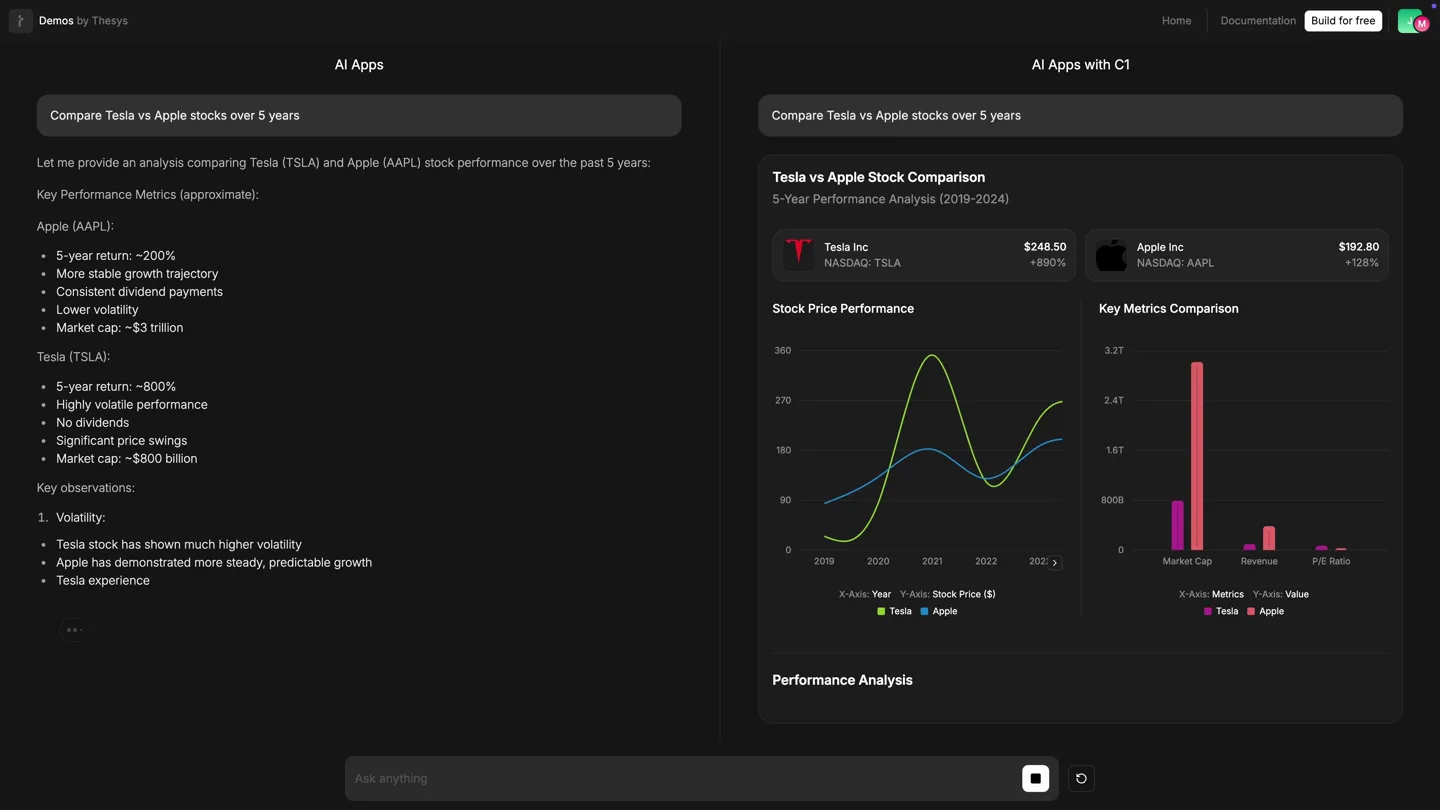
AI vs. Generative UI: Stock Analysis
“(No spoken dialogue — Gradual build-up with synth pad and subtle riser, then rhythmic synth melody and driving beat with a sub-bass drop/impact at 0:04.)”
- On screen
- Demos by Thesys AI Apps Compare Tesla vs Apple stocks over 5 years Let me provide an analysis comparing Tesla (TSLA) and Apple (AAPL) stock performance over the past 5 years: Key Performance Metrics (approximate): Apple (AAPL): • 5-year return: ~200% • More stable growth trajectory • Consistent dividend payments Tesla (TSLA): • 5-year return: ~800% • Highly volatile performance • No dividends • Significant price swings • Market cap: ~$800 billion Key observations: 1. Volatility: • Tesla stock has shown much higher volatility • Apple has demonstrated more steady, predictable growth • Tesla experienced extreme surges in 2020-2021, followed by significant corrections 2. Investment Characteristics: • Apple: More defensive, blue-chip stock with stable returns • Tesla: Growth/momentum stock with higher risk-reward profile 3. Fundamental Differences: • Apple: Mature company with diverse revenue streams • Tesla: Still in growth phase, focused primarily on EVs Ask anything Home Documentation Build for free AI Apps with C1 Compare Tesla vs Apple stocks over 5 years Composing response... Tesla vs Apple Stock Comparison 5-Year Performance Analysis (2019-2024) Tesla Inc NASDAQ: TSLA $248.50 +880% Apple Inc NASDAQ: AAPL $192.80 +128% Stock Price Performance Key Metrics Comparison Performance Analysis Tesla has delivered exceptional returns with 880% growth over 5 years, driven by EV market leadership and manufacturing scale-up. Apple showed steady 128% growth, supported by consistent product innovation and 2019 2020 2021 2022 2023 X-Axis: Year Y-Axis: Stock Price ($) Tesla Apple X-Axis: Metrics Y-Axis: Value Tesla Apple Market Cap Revenue P/E Ratio Volatility Fundamentals Tesla Revenue Growth 1,400% increase from $7B to $98B Apple Revenue Stability Steady growth from $260B to $383B Market Position Tesla leads EV, Apple dominates premium tech Investment Insights Tesla offered higher returns but with significant volatility. Apple provided more stable growth with lower
- Camera
- Static, wide shot of a split-screen UI. The left panel shows a traditional AI app, while the right panel, 'AI Apps with C1', dynamically generates and populates a rich, interactive UI with charts and data.
- Motion
- Split-screen comparison, real-time data visualization, dynamic UI element generation, smooth scrolling, and interactive hover states (e.g., mouse cursor highlighting chart data).
Problem Agitation
Credit Card Qualification: Static vs. Generative Forms
“(No spoken dialogue — A short, sharp riser leads into a more intense section, with the main melodic theme becoming more pronounced and a sub-bass impact at 0:10.)”
- On screen
- Demos by Thesys AI Apps Which credit cards do I qualify for I apologize, but I cannot provide specific credit card recommendations without knowing important details about your financial situation, including: • Your credit score • Income level • Employment status • Current debt obligations • Monthly expenses • Credit history length • Recent credit applications Additionally, I want to note that I cannot access real-time credit qualification data or make definitive statements about which cards you'll be approved for, as those decisions are made by individual card issuers. To find credit cards you may qualify for, I suggest: 1. Check your credit score through free services like Credit Karma or your credit card issuer 2. Use credit card issuers' pre-qualification tools (these typically don't affect your credit score) 3. Research cards that match your credit profile 4. Consider secured credit cards if you're building credit 5. Consult with your bank or credit union about their card offerings Would you like to share some of your financial details so I can provide more tailored guidance about types of cards that might be appropriate for your situation? Ask anything Home Documentation Build for free AI Apps with C1 Which credit cards do I qualify for Find Credit Cards You Qualify For Get personalized recommendations based on your financial profile To determine which credit cards you qualify for, I'll need some information about your financial situation. This helps match you with cards that align with your credit profile and spending habits. Credit Score Range* Select your credit score range Select your approximate credit score range Annual Income* 50000 Your gross annual income in USD Primary Use Case* Everyday spending and rewards Building or rebuilding credit Travel and dining Balance transfers or debt consolidation What will you mainly use this card for? Monthly Spending Select monthly spending range Approximate monthly spending on credit cards Additional Preferences Important Note Credit card approval depends on multiple factors including credit history, income, debt-to-income ratio, and the card issuer's specific criteria. This tool provides general guidance based on typical requirements.
- Camera
- Static, wide shot of the split-screen UI. The left panel shows a static, text-heavy AI response, while the right panel dynamically generates an interactive form with input fields and dropdowns.
- Motion
- Dynamic form generation, smooth input field population, dropdown menu interactions, and scrolling to reveal more form elements.
Product Reveal
Generative UI in Action: Credit Card Recommendations
“(No spoken dialogue — A brief pause in the main rhythm, then reintroduction of the driving beat and melody with added percussive elements, a sweeping riser, and a powerful sub-bass drop/impact at 0:18.)”
- On screen
- Demos by Thesys AI Apps Which credit cards do I qualify for I apologize, but I cannot provide specific credit card recommendations without knowing important details about your financial situation, including: • Your credit score • Income level • Employment status • Current debt obligations • Monthly expenses • Credit history length • Recent credit applications Additionally, I want to note that I cannot access real-time credit qualification data or make definitive statements about which cards you'll be approved for, as those decisions are made by individual card issuers. To find credit cards you may qualify for, I suggest: 1. Check your credit score through free services like Credit Karma or your credit card issuer 2. Use credit card issuers' pre-qualification tools (these typically don't affect your credit score) 3. Research cards that match your credit profile 4. Consider secured credit cards if you're building credit 5. Consult with your bank or credit union about their card offerings Would you like to share some of your financial details so I can provide more tailored guidance about types of cards that might be appropriate for your situation? Ask anything Home Documentation Build for free AI Apps with C1 Which credit cards do I qualify for Find Credit Cards You Qualify For Get personalized recommendations based on your financial profile To determine which credit cards you qualify for, I'll need some information about your financial situation. This helps match you with cards that align with your credit profile and spending habits. Credit Score Range* Select your credit score range Excellent (750+) Select your approximate credit score range Annual Income* 0 120000 Your gross annual income in USD Primary Use Case* Everyday spending and rewards Building or rebuilding credit Travel and dining Balance transfers or debt consolidation What will you mainly use this card for? Monthly Spending $500 - $1,500 Approximate monthly spending on credit cards Additional Preferences No annual fee Cash back rewards Travel rewards/miles 0% intro APR period Sign-up bonus Select features that are important to you Find Matching Cards Thinking... Your Credit Card Matches Based on your excellent credit score and $120,000 income Composing response... 750+ Credit Score $120K Annual Income Top Recommendations Chase Freedom Unlimited No annual fee cash back card 1.5% Cash Back No Annual Fee Welcome Bonus: $200 after spending $500 in first 3 months Rewards: 1.5% cash back on all purchases, 5% on travel through Chase portal APR: 17.99% - 26.74% Variable Citi Double Cash Card 2% cash back on everything 2% Cash Back No Annual Fee Welcome Bonus: $200 when you buy, 1% when you pay (effectively 2% on all purchases) Balance Transfer: 0% intro APR for 18 months APR: 18.24% - 28.24% Variable Capital One Venture Rewards Travel rewards card 2X Miles $95 Annual Fee Rewards: 2X miles on every purchase, 5X miles on hotels a rental cars Benefits: Global Entry/TSA PreCheck credit Additional Great Options
- Camera
- Static, wide shot of the split-screen UI. The right panel dynamically populates the form, processes input, and then generates a list of credit card recommendations with detailed feature cards.
- Motion
- Interactive form filling, dynamic content loading (e.g., 'Thinking...' state), card-based UI generation, and horizontal scrolling for multiple recommendations.
Feature Teaser
Product Search: Text vs. Generative UI
“(No spoken dialogue — The melody becomes more intricate with a sense of urgency, followed by a final, extended riser and sweep leading to a conclusive impact, and a sustained, resonant synth chord with fading sub-bass.)”
- On screen
- Demos by Thesys AI Apps Find me a dining table that seats 6 people and is available in oak finish I'll help you find a 6-person dining table in oak finish. Here are some suggested options: 1. Traditional Style Rectangle Table • Dimensions: 60" L x 36" W x 30" H • Solid oak construction with warm oak finish • Seats 6 comfortably • Classic design with turned legs • Price range: $600-$800 2. Modern Farmhouse Table • Dimensions: 72" L x 38" W x 30" H • Oak veneer over engineered wood • Light oak/natural finish • Includes leaf extension • Simple clean lines with X-base design • Price range: $500-700 3. Contemporary Round Table • 54" diameter • Solid oak top with pedestal base • Golden oak finish • Perfect for smaller dining spaces • Price range: $450-$650 Would you like me to: • Provide more specific details about any of these options? • Suggest additional styles? • Recommend specific retailers that carry these tables? • Share tips for choosing between different table shapes for your space? Please let me know what additional information would be most helpful. Ask anything Home Documentation Build for free AI Apps with C1 Find me a dining table that seats 6 people and is available in oak finish Oak Dining Tables for 6 People Discover beautiful oak dining tables perfect for family gatherings 6 Seating Capacity Oak Wood Finish Featured Oak Dining Tables Popular 6-Seater Oak Tables Rustic Oak Farmhouse Table Solid oak construction with traditional farmhouse design. Seats 6 comfortably with sturdy trestle base. $899 Contemporary Oak Dining Table Sleek modern design with clean lines and natural oak grain. Perfect for contemporary dining rooms. $1,299 Extendable Oak Table Versatile design that extends t seat up to 8 people. Premium finish with butterfly leaf extension. $1,599 Oak Table Buying Guide Key Features to Consider Table Dimensions Standard 6-seater tables measure 72-84 inches long Oak Wood Grade Choose between solid oak or oak veneer based on budget Finish Type Natural, honey, or weathered oak finishes available
- Camera
- Static, wide shot of the split-screen UI. The right panel dynamically generates a product catalog UI with images, prices, and a buying guide, contrasting with the left panel's text-only response.
- Motion
- Dynamic product card generation with images and details, smooth scrolling, and interactive elements like a buying guide accordion.
Motion design primitives
Synthesizable in Remotion · key components of the generative-ui-showcase template.
SplitScreenComparison
A vertical split divides the screen, showcasing two distinct UI experiences side-by-side. Content on each side animates independently, highlighting differences.
+ Code construction recipe
Use a `Split` component from Remotion, with `left` and `right` children. Animate content within each child using `interpolate` for text typing, `spring` for UI element appearance, and `Sequence` for timed reveals.
GenerativeUIReveal
UI elements (charts, forms, product cards) appear dynamically, often with a subtle fade-in and scale-up effect, as if being composed in real-time.
+ Code construction recipe
Employ `spring` for `opacity` and `scale` properties on newly generated UI components. Use `Sequence` and `delay` to stagger the appearance of multiple elements, mimicking a generative process. SVG paths can be animated with `stroke-dasharray` and `stroke-dashoffset` for chart drawing.
InteractiveCursorHighlight
A mouse cursor moves across the screen, interacting with UI elements by hovering, clicking, and scrolling, triggering dynamic visual feedback like tooltips or expanded sections.
+ Code construction recipe
Create a `Cursor` component that follows a predefined `Path` using `interpolate`. Trigger state changes (e.g., `isHovered`, `isClicked`) on UI elements based on cursor position and animate their properties (e.g., `backgroundColor`, `boxShadow`, `opacity` for tooltips) using `spring` or `tween`.
Style DNA & aesthetic system
Visual aesthetic
Typography
Motion
Special effects
Pacing & rhythm
Conceptual story rhythm
- 1
The Problem: Static AI
Purpose. Establish the current limitation of AI outputs (text-only, non-interactive) by showing a typical, unengaging AI response.
Execution. Left panel displays a long, scrolling text response from a standard AI app, highlighting its lack of visual structure and interactivity.
- 2
The Solution: Generative UI
Purpose. Introduce C1 as the solution, demonstrating its ability to transform raw AI output into rich, interactive user interfaces.
Execution. Right panel, 'AI Apps with C1', dynamically generates charts, forms, and structured data visualizations in real-time, directly contrasting the left panel.
- 3
Interactive Advantage
Purpose. Showcase the practical benefits of generative UIs through user interaction, proving its utility and ease of use.
Execution. A mouse cursor interacts with the generated UI on the right, filling forms, clicking buttons, and revealing more detailed information, demonstrating responsiveness and depth.
- 4
Diverse Applications
Purpose. Illustrate the versatility of C1 across different use cases, from financial analysis to product discovery.
Execution. Transition through multiple distinct scenarios (stock analysis, credit cards, product search), each time showing the generative UI creating a tailored, interactive experience.
Remix in Animatiq Studio
Master remix prompt · agent-ready
Sample remix
Objective
Launch a new AI-powered project management tool that generates dynamic dashboards and task flows.How the recipe adapts
The split-screen will compare a traditional text-based project update on the left with a C1-powered generative dashboard on the right. The generative UI will dynamically create Gantt charts, Kanban boards, and interactive task lists based on natural language input. The mouse cursor will highlight task dependencies and drag-and-drop tasks between stages. Sound design will emphasize the 'snapping' and 'connecting' of generated project elements.Remix blueprint · generative-ui-showcase
Scene durations (4 scenes, 26s)
Key Remotion components
Related Developer Tools Product Launches
Explore all Developer Tools launches →
xAI opens voice cloning on its API: build a custom voice in about two minutes or pick from 80+ voices in 28 languages.

Claude can now operate your Mac, opening apps, browsing and filling spreadsheets, as a research preview in Cowork and Claude Code.

Agentic CLI for coding, building apps, and automating workflows.