
Oliver Prompts · Launch Video Breakdown: Hook, Pacing & Motion Design
Claude Code can now autonomously test your entire iOS app. Every screen. Every flow. Debug logs included. Structured bug report at the end. One prompt. No scripts. No setup.
Scene-by-scene timeline & spoken transcript
The Hook
Autonomous iOS App Testing Begins
“(No spoken dialogue — ambient visual with a subtle, rhythmic beat at 110 BPM.)”
- On screen
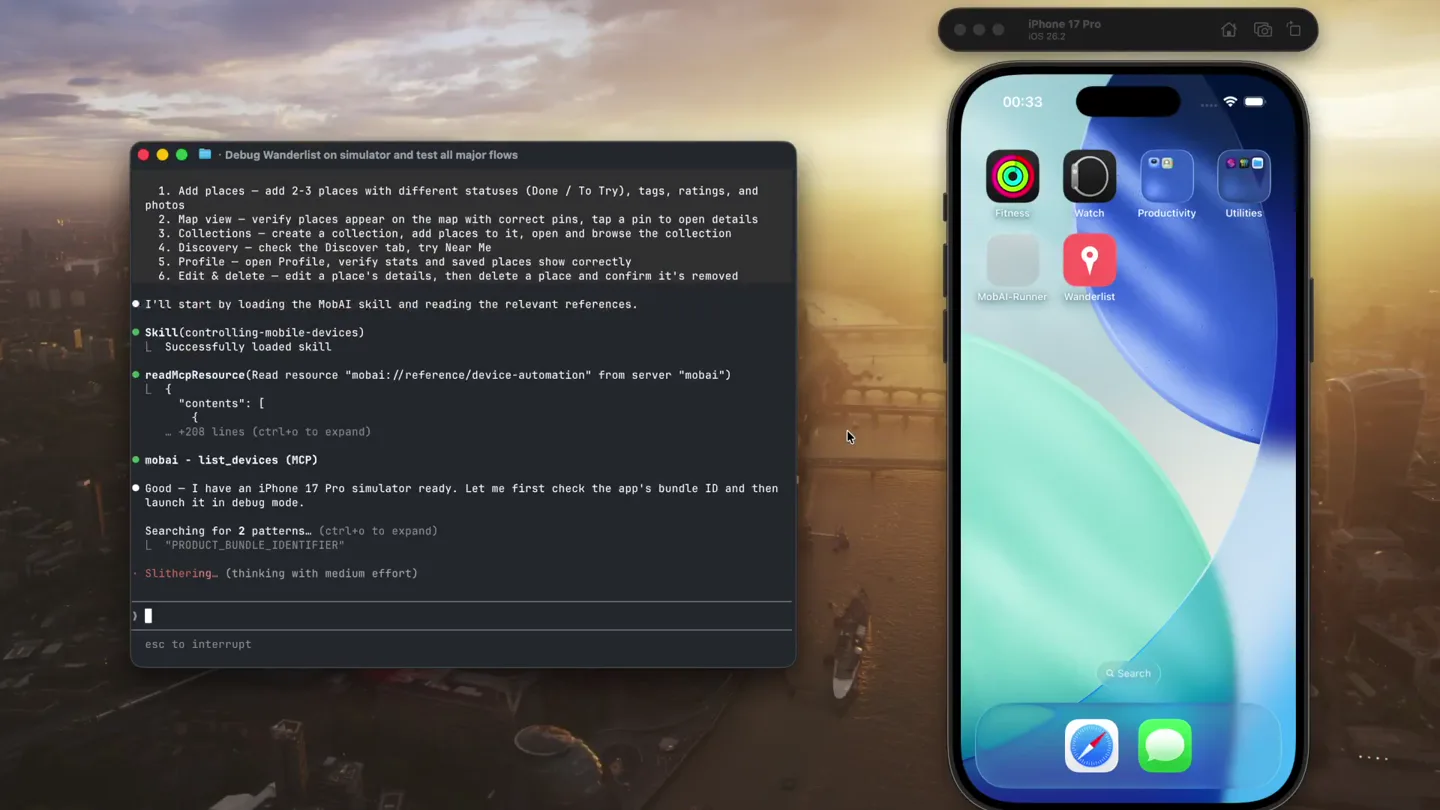
- Debug Wanderlist on simulator and test all major flows Claude Code v2.1.98 Opus 4.6 (1M context) with medium effort : Claude Max ~/Projects/Wanderlist Launch Wanderlist in debug mode on the simulator using MobAI, then walk through every major flow: 1. Add places - add 2-3 places with different statuses (Done / To Try), tags, ratings, and Photos. 2. Map view - verify places appear on the map with correct pins, tap a pin to open details 3. Collections - create a collection, add places to it, open and browse the collection 4. Discovery - check the Discover tab, try Near Me 5. Profile - open Profile, verify stats and saved places show correctly 6. Edit & delete - edit a place's details, then delete a place and confirm it's removed I'll start by loading the MobAI skill and reading the relevant references. Skill(controlling-mobile-devices) Successfully loaded skill readMcPResource(Read resource "mobai://reference/device-automation" from server "mobai") { "contents": [ "+208 lines (ctrl-o to expand) ] } mobai - list_devices (MCP) flittering. (thinking with medium effort) esc to interrupt 2 MCP servers need auth : /mcp iPhone 17 Pro iOS 18.2 Fitness Watch Productivity Utilities MobAI-Runner Wanderlist Search
- Camera
- Static overhead shot of a terminal window and an iPhone simulator. The terminal is on the left, the iPhone on the right. Both are slightly angled.
- Motion
- Real-time terminal output with text appearing as if typed, synchronized with app interactions on the simulator. Smooth, instant app screen transitions.
Product Reveal
Claude AI Autonomously Navigates iOS App
“(No spoken dialogue — ambient visual with a subtle, rhythmic beat at 110 BPM.)”
- On screen
- Debug Wanderlist on simulator and test all major flows readMcPResource(Read resource "mobai://reference/device-automation" from server "mobai") { "contents": [ "+208 lines (ctrl-o to expand) ] } mobai - list_devices (MCP) Good - I have an iPhone 17 Pro simulator ready. Let me first check the app's bundle ID and then launch it in debug mode. Searched for 2 patterns (ctrl-o to expand) Bundle ID is run.mobai.wanderlist. Let me launch it in debug mode. mobai - debug_app (MCP){device_id: "FB47F8C9-3B15-4A4B-9BFB-9D88023B8416", bundle_id: "run.mobai.wanderlist"} App launched in debug mode. Let me observe the current screen and set up task tracking. mobai - execute_dsl (MCP){device_id: "FB47F8C9-3B15-4A4B-9BFB-9D88023B8416", commands: "{\"version\":\"1.9.2\",\"steps\":[{\"action\":\"wait_for\",\"stable\":true,\"timeout_ms\":5000},{\"action\":\"tap\",\"predicate\":{\"text\":\"Allow\"}},{\"action\":\"wait_for\",\"stable\":true,\"timeout_ms\":5000},{\"action\":\"tap\",\"predicate\":{\"text\":\"Change to Always Allow\"}},{\"action\":\"wait_for\",\"stable\":true,\"timeout_ms\":5000},{\"action\":\"observe\",\"include\":[\"ui_tree\"]}]}"} Seasoning. (34s - 4.395 tokens) Add 2-3 places with different statuses, tags, ratings, photos Verify map view - pins and pin details Collections - create, add places, browse Discovery - check Discover tab and Near Me Profile - verify stats and saved places Edit & delete a place esc to interrupt | ctrl-t to hide tasks iPhone 17 Pro iOS 18.2 @user_pS9xdJxC 0 places Map List Allow "Wanderlist" to also use your location even when you are not using the app? Wanderlist uses your location in the background to alert you when you're near saved places on your list. Keep Only While Using Change to Always Allow Discover My Map Collections Profile Add Place Search for a place... Current location Pick on map Save Place Blue Bottle Coffee Market St, San Francisco, CA, United States +1 (415) 653-3394 bluebottlecoffee.com View on Google Maps Status Done To Try Tags Restaurant Hotel Shopping Friend Bar Cafe Museum Park + New tag Note Add Place Search for a place... Golden Gate Park Current location Pick on map q w e r t y u i o p a s d f g h j k l z x c v b n m 123 Save Place Golden Gate Park Stanyan St, San Francisco, CA, United States +1 (415) 631-2700 sfgatepark.org View on Google Maps Status Done To Try Tags Restaurant Hotel Shopping Friend Bar Cafe Museum Park Save to my map Add Place Search for a place... q w e r t y u i o p a s d f g h j k l z x c v b n m 123 @user_pS9xdJxC 3 places Map List All Done To Try Restaurant Hotel Shopping San Francisco Museum of Modern Art Blue Bottle Coffee Golden Gate Park Discover My Map Collections Profile Place Details Done Blue Bottle Coffee Market St, San Francisco, CA, United States +1 (415) 653-3394 bluebottlecoffee.com Your Save To Try Cafe Edit Delete @user_pS9xdJxC 3 places Map List All Done To Try Restaurant Hotel Shopping San Francisco Museum of Modern Art Blue Bottle Coffee Golden Gate Park Discover My Map Collections Profile Collections No collections yet Create a collection to organize your saved places Create Collection Discover My Map Collections Profile Collections SF Weekend Trip 0 places Discover My Map Collections Profile Cancel Add Places Add (2) San Francisco Museum of Modern Art (SFMOMA) 3rd St, San Francisco, CA, United States Golden Gate Park Stanyan St, San Francisco, CA, United States Blue Bottle Coffee Market St, San Francisco, CA, United States Discover Restaurants Cafes Bars Hotels Discover My Map Collections Profile Sign Out Profile N nothing special 3 Places 1 Collections My Collections SF Weekend Trip 2 places Discover My Map Collections Profile Place Details Done Blue Bottle Coffee Market St, San Francisco, CA, United States +1 (415) 653-3394 bluebottlecoffee.com Your Save Done Restaurant Cafe Edit Delete Place Details Done Blue Bottle Coffee Market St, San Francisco, CA, United States +1 (415) 653-3394 bluebottlecoffee.com Your Save Done Restaurant Cafe Edit Delete @user_pS9xdJxC 2 places Map List All Done To Try Restaurant Hotel Shopping San Francisco Museum of Modern Art To Try Museum Blue Bottle Coffee Done Restaurant Cafe Discover My Map Collections Profile Debug Wanderlist on simulator and test all major flows 1. Collections Pass 2. Discovery Pass 3. Profile Pass 4. Edit & Delete Pass Observations - No confirmation dialog on delete - tapping Delete removes the place instantly. Consider adding a confirmation alert to prevent accidental deletions. - Status toggle UX - the "To Try" / "Done" toggle works but the accessibility state (isSelected) didn't always update in the tree immediately, though the save reflected correctly. - Note field - the note text field was visible on the save form but tapping it didn't open the keyboard reliably on first attempt. I waited for 27s > For shortcuts iPhone 17 Pro iOS 18.2
- Camera
- Static overhead shot of a terminal window and an iPhone simulator. The terminal is on the left, the iPhone on the right. Both are slightly angled.
- Motion
- The terminal window displays a stream of commands and observations, while the iPhone simulator executes the corresponding app actions in real-time. This creates a split-screen narrative of AI instruction and app execution.
Feature Teaser
Structured Bug Report Generation
“(No spoken dialogue — ambient visual with a subtle, rhythmic beat at 110 BPM.)”
- On screen
- Debug Wanderlist on simulator and test all major flows 1. Collections Pass 2. Discovery Pass 3. Profile Pass 4. Edit & Delete Pass Observations - No confirmation dialog on delete - tapping Delete removes the place instantly. Consider adding a confirmation alert to prevent accidental deletions. - Status toggle UX - the "To Try" / "Done" toggle works but the accessibility state (isSelected) didn't always update in the tree immediately, though the save reflected correctly. - Note field - the note text field was visible on the save form but tapping it didn't open the keyboard reliably on first attempt. I waited for 27s > For shortcuts iPhone 17 Pro iOS 18.2 Oliver Prompts Claude Code can now autonomously test your entire iOS app. Every screen. Every flow. Debug logs included. Structured bug report at the end. One prompt. No scripts. No setup.
- Camera
- The camera slowly zooms out and pans slightly to reveal more of the desktop background, while the terminal window and iPhone simulator shrink and move to the bottom left. A large text overlay appears in the center.
- Motion
- A smooth, slow zoom-out and repositioning of the product elements, followed by a prominent text reveal. This transition emphasizes the high-level benefit after the detailed demonstration.
Call to Action
Oliver Prompts: Autonomous iOS Testing
“(No spoken dialogue — ambient visual with a subtle, rhythmic beat at 110 BPM.)”
- On screen
- Oliver Prompts Claude Code can now autonomously test your entire iOS app. Every screen. Every flow. Debug logs included. Structured bug report at the end. One prompt. No scripts. No setup.
- Camera
- Static shot of the desktop with the product tagline prominently displayed. The terminal and iPhone simulator are minimized and positioned in the bottom left.
- Motion
- A static, clean presentation of the core value proposition, allowing the viewer to absorb the key message without distraction. The background remains consistent with the earlier scenes.
Motion design primitives
Synthesizable in Remotion · key components of the ai-dev-tool-split-screen-demo template.
DualTerminalRaceSplit
A split-screen layout where a terminal window on the left displays rapidly scrolling code/logs, while an iPhone simulator on the right simultaneously executes corresponding UI actions. Both elements are slightly angled and positioned on a desktop background.
+ Code construction recipe
Use `AbsoluteFill` for the desktop background. Position two `AbsoluteFill` children for the terminal and iPhone, applying `transform: rotateZ()` for the angle and `translateX/Y` for positioning. For the terminal text, use `map` over an array of log lines, animating `opacity` and `transform: translateY()` with `spring()` for a smooth scroll effect. For the iPhone, use `Sequence` to orchestrate `AbsoluteFill` components for each app screen, with `spring()` or `interpolate()` for instant, yet smooth, screen transitions.
ContextualZoomReveal
A slow, deliberate zoom-out from the detailed product demonstration, revealing a broader context or a key message. The product elements shrink and reposition while a new, larger text element fades in.
+ Code construction recipe
Animate the `scale` and `translate` properties of the `DualTerminalRaceSplit` component using `interpolate()` over a specific frame range. Simultaneously, animate the `opacity` and `scale` of a new `Text` component for the headline, ensuring it appears smoothly as the other elements recede. Use `Easing.bezier()` for a smooth, non-linear zoom effect.
DynamicTextStream
Text appears character by character or line by line within a terminal window, simulating real-time typing or log output. This is often accompanied by subtle cursor animations.
+ Code construction recipe
For character-by-character, use `split()` on the text string and `map` over characters, animating `opacity` and `scale` with `delay` for each character using `spring()`. For line-by-line, use `Sequence` to render each line, animating `opacity` and `translateY` for a smooth reveal. A blinking cursor can be implemented with a `Rectangle` component and `loop()`ing `opacity` animation.
Style DNA & aesthetic system
Visual aesthetic
Typography
Motion
Special effects
Pacing & rhythm
Conceptual story rhythm
- 1
The Setup
Purpose. Introduce the environment and the AI's objective.
Execution. Static shot of the terminal and iPhone simulator, with initial instructions appearing in the terminal.
- 2
The Demonstration
Purpose. Showcase the AI's autonomous interaction with the app.
Execution. Continuous, synchronized display of terminal commands and real-time app actions on the iPhone simulator.
- 3
The Outcome
Purpose. Highlight the structured output and value proposition.
Execution. Terminal displaying a summary of tests and observations, followed by a zoom-out to reveal the product tagline.
- 4
The Call to Value
Purpose. Reinforce the core benefit and brand.
Execution. Prominent display of the company name and tagline, with the demonstration elements minimized.
Remix in Animatiq Studio
Master remix prompt · agent-ready
Sample remix
Objective
Launch a new AI-powered data pipeline tool called 'QuantumFlow' that automates data ingestion, transformation, and visualization.How the recipe adapts
The DualTerminalRaceSplit primitive will be adapted to show data ingestion scripts and AI-driven transformation commands in the terminal, while the iPhone simulator is replaced with a web-based dashboard UI displaying real-time data flow and visualization updates. The DynamicTextStream will show data processing logs. The ContextualZoomReveal will transition from the detailed data flow to the 'QuantumFlow: Intelligent Data Orchestration' tagline.Remix blueprint · ai-dev-tool-split-screen-demo
Scene durations (4 scenes, 67s)
Key Remotion components
Related Developer Tools Product Launches
Explore all Developer Tools launches →
xAI opens voice cloning on its API: build a custom voice in about two minutes or pick from 80+ voices in 28 languages.

Claude can now operate your Mac, opening apps, browsing and filling spreadsheets, as a research preview in Cowork and Claude Code.

Agentic CLI for coding, building apps, and automating workflows.