
Dan McAteer · Launch Video Breakdown: Hook, Pacing & Motion Design
This is amazing. Do this: 1. Set model to Opus 4.8 2. Reasoning effort to /ultracode Enables Claude Code's new Dynamic Workflows. Claude will autonomously detect complex tasks, write an orchestrati…
Scene-by-scene timeline & spoken transcript
The Hook
Introducing Opus 4.8 & Claude Code
“(No spoken dialogue — silent video with ambient typing sounds)”
- On screen
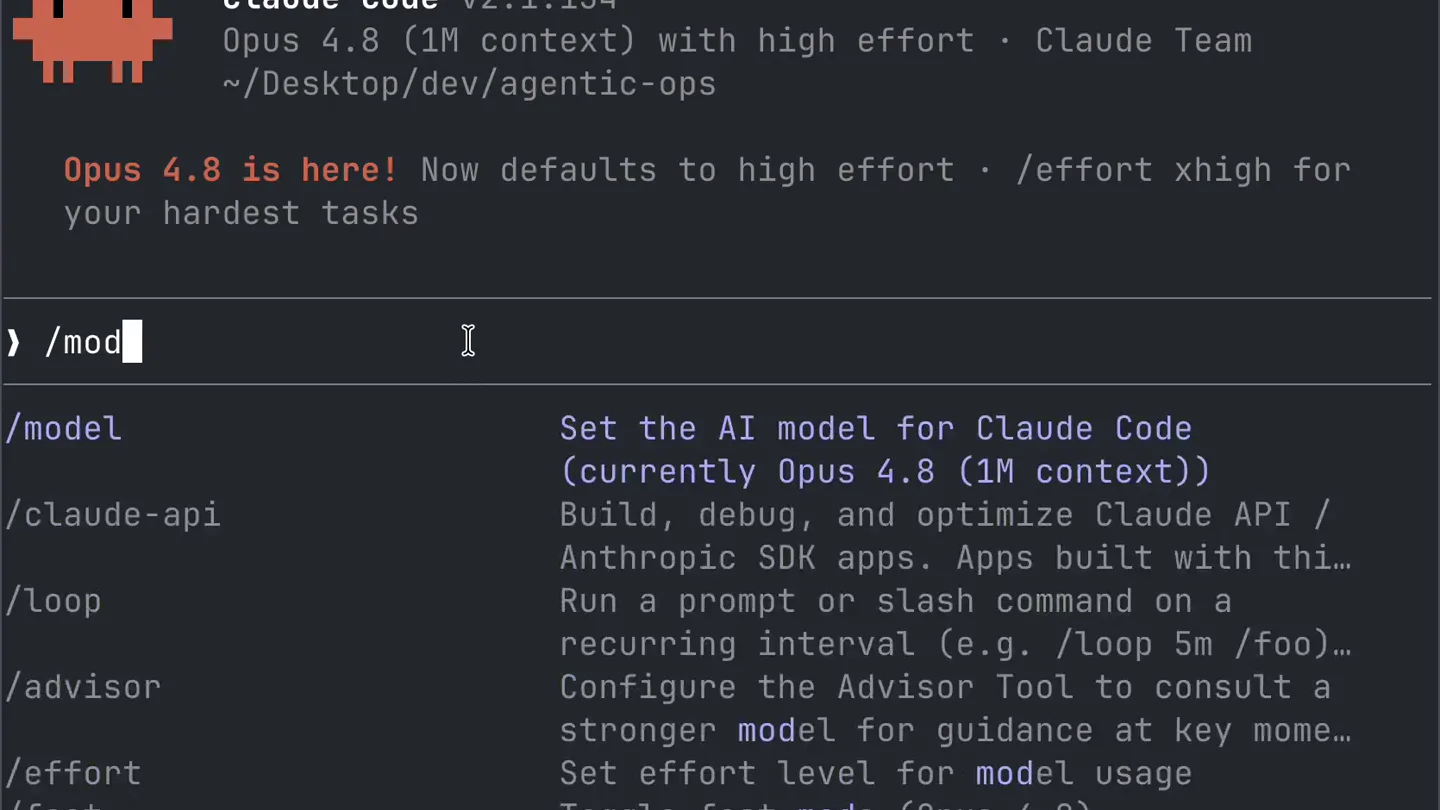
- Last login: Wed May 20 10:50:17 on ttys000 danmcateer@Dans-MacBook-Pro agentic-ops % claude Claude Code v2.1.154 Opus 4.8 (1M context) with high effort · Claude Team ~/Desktop/dev/agentic-ops Opus 4.8 is here! Now defaults to high effort · /effort xhigh for your hardest tasks Try "how does <filepath> work?" ? for shortcuts · ← for agents
- Camera
- Static, top-down view of a terminal window.
- Motion
- Text appears via a rapid, character-by-character typing animation, simulating real-time command line input.
Product Reveal
Setting the AI Model to Opus 4.8
“(No spoken dialogue — silent video with ambient typing sounds)”
- On screen
- /model Set the AI model for Claude Code (currently Opus 4.8 (1M context)) /claude-api Build, debug, and optimize Claude API / Anthropic SDK apps. Apps built with thi... /loop Run a prompt or slash command on a recurring interval (e.g. /loop 5m /foo)... /advisor Configure the Advisor Tool to consult a stronger model for guidance at key mome... /effort Set effort level for model usage /fast Toggle fast mode (Opus 4.8) /status Show Claude Code status including version, model, account, API connectivi... Select model Switch between Claude models. Your pick becomes the default for new sessions. For other/previous model names, specify with --model. 1. Default (recommended) Sonnet 4.6 · Best for everyday tasks 2. Sonnet (1M context) Sonnet 4.6 with 1M context · Draws from usage credits · $3/$15 per Mtok 3. Opus (1M context) ✓ Opus 4.8 with 1M context · Most capable for complex work 4. Haiku Haiku 4.5 · Fastest for quick answers High effort (default) ←/→ to adjust Enter to set as default · s to use this session only · Esc to cancel Set model to Opus 4.8 (1M context) and saved as your default for new sessions
- Camera
- Static, top-down view of a terminal window.
- Motion
- Rapid text input and menu navigation, with a quick highlight and selection animation for 'Opus (1M context)'.
Feature Teaser
Unlocking Ultracode Effort Level
“(No spoken dialogue — silent video with ambient typing sounds)”
- On screen
- /effort Set effort level for model usage /code-review Review the current diff for correctness bugs and reuse/simplification/efficienc... /simplify Review the changed code for reuse, simplification, efficiency, and altitud... /update-config Use this skill to configure the Claude Code harness as settings.json. Automat... /verify Verify that a code change actually does what it's supposed to be by running the ap... Effort Faster Smarter low medium high xhigh max ultracode xhigh + workflows ←/→ to adjust · Enter to confirm · Esc to cancel Set effort level to ultracode (this session only): xhigh + dynamic workflow orchestration
- Camera
- Static, top-down view of a terminal window.
- Motion
- A slider animation quickly moves from 'high' to 'ultracode', accompanied by a glowing purple highlight effect around 'ultracode'.
Call to Action
Dynamic Workflows Enabled
“(No spoken dialogue — silent video with ambient typing sounds)”
- On screen
- ultracode ultracode · xhigh effort + dynamic workflows for maximum thorough...
- Camera
- Static, top-down view of a terminal window.
- Motion
- A final text reveal confirms the 'ultracode' setting and its benefits, with a subtle purple glow around the word 'ultracode'.
Motion design primitives
Synthesizable in Remotion · key components of the terminal-cli-workflow-showcase template.
TerminalTypewriterEffect
Text appears character by character, simulating real-time typing in a command-line interface, often with a blinking cursor.
+ Code construction recipe
Use `Sequence` and `spring` for character reveal. Each character's `opacity` and `transform` (slight Y-offset) can be animated. A blinking cursor can be a separate `AbsoluteFill` with `interpolate` for opacity.
MenuItemHighlightSelect
A menu item is highlighted with a distinct background color or border, then confirmed with a checkmark or selection animation.
+ Code construction recipe
Employ `interpolate` for background color transitions and `spring` for the checkmark's entrance. Use `AbsoluteFill` or `Rect` components for the highlight and `Img` or `Svg` for the checkmark.
EffortSliderGlow
A slider control animates its indicator to a specific point, accompanied by a subtle, expanding glow effect around the selected value.
+ Code construction recipe
Animate the `left` or `transformX` property of the slider thumb using `spring`. The glow effect can be achieved with a `RadialGradient` or `BoxShadow` on a `Div`, animating its `opacity` and `scale` using `interpolate`.
Style DNA & aesthetic system
Visual aesthetic
Typography
Motion
Special effects
Pacing & rhythm
Conceptual story rhythm
- 1
Initial Setup & Context
Purpose. Establish the environment and introduce the core product (Claude Code with Opus 4.8).
Execution. Rapid typing animation revealing the terminal login and initial product information.
- 2
Model Configuration
Purpose. Demonstrate a key user action: selecting the powerful Opus 4.8 model.
Execution. Typing '/model', navigating a menu, and selecting 'Opus (1M context)' with a quick highlight.
- 3
Effort Level Adjustment
Purpose. Showcase a critical feature: setting the 'ultracode' effort level for advanced workflows.
Execution. Typing '/effort', animating a slider to 'ultracode', and a purple glow effect.
- 4
Confirmation & Benefit
Purpose. Conclude by confirming the new settings and hinting at the enhanced capabilities.
Execution. Final text output confirming 'ultracode' and 'dynamic workflow orchestration', with a lingering purple glow.
Remix in Animatiq Studio
Master remix prompt · agent-ready
Sample remix
Objective
Demonstrate the setup and activation of 'QuantumSync CLI' for real-time data synchronization.How the recipe adapts
The TerminalTypewriterEffect will be used for commands like 'qs init' and 'qs config'. The MenuItemHighlightSelect will adapt for choosing synchronization modes (e.g., 'bidirectional', 'one-way'). The EffortSliderGlow will be repurposed for a 'Sync Frequency' slider, culminating in a pulsing blue glow around 'real-time' to signify active synchronization.Remix blueprint · terminal-cli-workflow-showcase
Scene durations (4 scenes, 13.8s)
Key Remotion components
Related Developer Tools Product Launches
Explore all Developer Tools launches →
xAI opens voice cloning on its API: build a custom voice in about two minutes or pick from 80+ voices in 28 languages.

Claude can now operate your Mac, opening apps, browsing and filling spreadsheets, as a research preview in Cowork and Claude Code.

Agentic CLI for coding, building apps, and automating workflows.