
Dorsa · Launch Video Breakdown: Hook, Pacing & Motion Design
We made Claude Code multiplayer! Use it with other people in the same terminal, and connect your Claudes so they can all talk to each other.
Scene-by-scene timeline & spoken transcript
The Hook
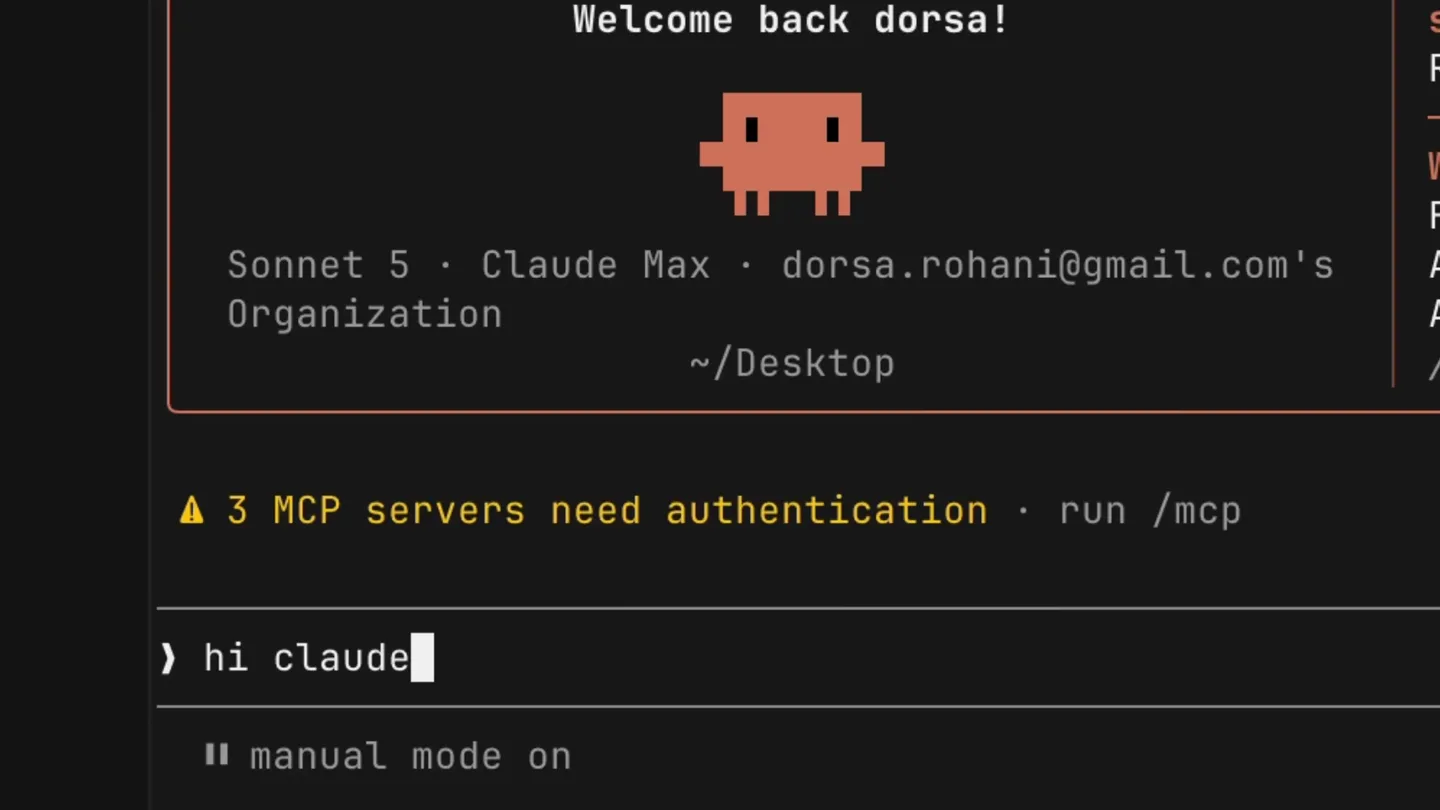
Multiplayer Terminal Intro
“(No spoken dialogue — Silent video with ambient typing sounds.)”
- On screen
- Welcome back dorsa! Sonnet 5 · Claude Max · dorsa.rohani@gmail.com's Organization ~/Desktop ▲ 3 MCP servers need authentication · run /mcp ) | manual mode on · ? for shortcuts · ← for agents hi claude! Hi! What are you working on today? * Brewed for 2s a cool new project I'd love to hear more! What's the idea, and what would you like to build first? * Brewed for 2s excited to show u! + Burrowing... L Tip: Press Shift+Enter to send a multi-line message manual mode on - esc to interrupt - ← for agents
- Camera
- Static, close-up on a terminal window, then a rapid zoom out and pan to reveal multiple terminals.
- Motion
- Typewriter text animation, cursor blinking, rapid blur-zoom transition, and a smooth camera pan.
Product Reveal
Connecting Multiple Claudes
“(No spoken dialogue — Silent video with ambient typing sounds.)”
- On screen
- Sessions Sharing /Documents → claude Claude Code v2.1.204 Welcome back Shubham! Sonnet 5 with medium effort · Claude Pro · Shubham Patil ~/Documents manual mode on · ? for shortcuts · ← for agents PROJECTS Screenshot 2024-08-09 at 8.51.pm.png Screenshot 2025-12-01 at 12.45.18 AM.png Screenshot 2025-12-03 at 4.22.pm.png unity renamed.jpg untitled folder upT [base] dorsa@mac Desktop % claude - Claude Code v2.1.204 Welcome back dorsa! Sonnet 5 · Claude Max · dorsa.rohani@gmail.com's Organization ~/Desktop ▲ 3 MCP servers need authentication · run /mcp hi claude! Hi! What are you working on today? * Brewed for 2s a cool new project I'd love to hear more! What's the idea, and what would you like to build first? * Brewed for 2s excited to show u! I'm ready when you are – go ahead and show me the project (files, a repo, a description, whatever you've got) and I'll dig in. * Baked for 3s the message is "the br Sock-hopping... L Tip: Run /install-github-app to tag @claude right free from your Github and PRs what is the message? * Misting... The message is: "the british are coming" * Accomplishing... (running stop hooks... 2/5 · 5s · ↓ 8 tokens)
- Camera
- Dynamic camera movement, following a connecting line between two terminal windows, then a wider shot of multiple terminals.
- Motion
- Curved path animation for connection lines, split-screen layout, and synchronized text input across terminals.
Feature Teaser
Multi-User Collaboration
“(No spoken dialogue — Silent video with ambient typing sounds.)”
- On screen
- Dorsa Rohani's terminal Shubham Patil's terminal last login: Wed Jul 8 12:19:49 on ttys009 drohani@Dorsa-Rohani's-Mac-Desktop % Claude Code v2.1.204 Welcome back dorsa! Sonnet 5 · Claude Max · dorsa.rohani@gmail.com's Organization ~/Desktop ▲ 3 MCP servers need authentication · run /mcp hi claude! Hi! What are you working on today? * Brewed for 2s a cool new project I'd love to hear more! What's the idea, and what would you like to build first? * Brewed for 2s excited to show u! I'm ready when you are – go ahead and show me the project (files, a repo, a description, whatever you've got) and I'll dig in. * Baked for 3s the message is "the british are coming" Get it - sounds like this might be a message you want relayed to that other terminal peer in the room. Want me to send "the british are coming" to that surface via the mosaic handoff command, or is this just context for what the project does? * Baked for 14s /dorsh send it to the terminal manual mode on · ? for shortcuts · ← for agents what is the message? The message is: "the british are coming" * Crunched for 6s manual mode on · ? for shortcuts · ← for agents Opus 4.8 (1M context) · Claude Max · dorsa.rohani@gmail.com's Organization ~/Desktop Extended: Fable 5 is included in your weekly limit Through July 12, you can use up to 50% of your weekly usage limit on Fable 5. your limit, you can continue on Fable 5 with usage faster than Opus 4.8. Run /model and select Fable to use it. learn more +1 more · /status manual mode on what is the message? The message is: "the british are coming" + Seasoning... (running stop hooks... 0/4 · 1s · manual mode on · esc to interrupt · ← for agents
- Camera
- Zooming in on a specific interaction, then a rapid pan to another terminal, maintaining a dynamic perspective.
- Motion
- Multi-cursor interaction, synchronized text input, and a dynamic grid layout for multiple terminals.
Call to Action
Seamless AI Integration
“(No spoken dialogue — Silent video with ambient typing sounds.)”
- On screen
- The message is: "the british are coming" * Brewed for 2s manual mode on · ? for shortcuts · ← for agents Opus 4.8 (1M context) · Claude Max · dorsa.rohani@gmail.com's Organization ~/Desktop Extended: Fable 5 is included in your weekly limit Through July 12, you can use up to 50% of your weekly usage limit on Fable 5. your limit, you can continue on Fable 5 with usage faster than Opus 4.8. Run /model and select Fable to use it. learn more +1 more · /status manual mode on what is the message? The message is: "the british are coming" + Seasoning... (running stop hooks... 0/4 · 1s · manual mode on · esc to interrupt · ← for agents
- Camera
- Rapid cuts between different terminal views, highlighting the flow of information and collaboration.
- Motion
- Fast-paced editing, synchronized text output, and subtle UI animations for status updates.
Motion design primitives
Synthesizable in Remotion · key components of the dorsa-multiplayer-terminal-launch template.
MultiCursorTypewriter
Multiple distinct cursors (each with a user label) appear and type text simultaneously or sequentially within the same terminal window, simulating collaborative input.
+ Code construction recipe
Use `Sequence` and `AbsoluteFill` for terminal background. Implement `spring` for cursor blink and `interpolate` for text reveal. Position multiple `AbsoluteFill` components with `z-index` for user labels. Manage text content and cursor positions via `useState` and `useEffect` to simulate typing across different users.
TerminalGridConnect
Multiple terminal windows are arranged in a dynamic grid, with animated curved lines connecting specific elements or actions between them, indicating data flow or user interaction.
+ Code construction recipe
Utilize `Grid` or `Flex` for terminal layout. Employ `SVG` paths with `stroke-dasharray` and `stroke-dashoffset` for drawing animated curved lines. `interpolate` the `stroke-dashoffset` property to create a 'drawing' effect. Coordinate start/end points of SVG paths with specific UI elements in each terminal using `measureElement`.
BlurZoomTransition
A rapid, high-speed transition where the current scene blurs intensely and zooms out, revealing a new scene or a wider perspective of the environment.
+ Code construction recipe
Apply a `CSS filter: blur()` with `interpolate` for the blur radius, transitioning from 0 to a high value and back to 0. Simultaneously, use `transform: scale()` with `interpolate` for the zoom effect. Combine with `AbsoluteFill` and `z-index` to layer the transition over the outgoing scene and reveal the incoming one.
Style DNA & aesthetic system
Visual aesthetic
Typography
Motion
Special effects
Pacing & rhythm
Conceptual story rhythm
- 1
Individual Interaction
Purpose. Introduce the core Claude Code terminal experience and user interaction.
Execution. Close-up on a single terminal, showing a user interacting with Claude via typing and receiving responses.
- 2
Multiplayer Reveal
Purpose. Demonstrate the product's unique multiplayer capability.
Execution. Rapid zoom-out to reveal multiple terminals, with animated lines connecting them, showing simultaneous activity.
- 3
Collaborative Workflow
Purpose. Illustrate how multiple users and AI agents collaborate in real-time.
Execution. Dynamic camera movements between terminals, highlighting shared messages and synchronized actions with multiple cursors.
- 4
Seamless Integration
Purpose. Showcase the fluid integration of AI and user input across the collaborative environment.
Execution. Fast cuts and synchronized text output across all terminals, emphasizing the speed and efficiency of the Dorsa platform.
Remix in Animatiq Studio
Master remix prompt · agent-ready
Sample remix
Objective
Launch video for 'Nexus', a collaborative code editor with integrated AI for pair programming.How the recipe adapts
The MultiCursorTypewriter primitive will show two developers and an AI agent simultaneously editing code. The TerminalGridConnect primitive will illustrate real-time code synchronization and AI suggestions flowing between editor panes. The BlurZoomTransition will be used to quickly shift focus between different code files or AI interaction panels, maintaining a high-energy, efficient feel. The dark theme and monospace fonts will be retained, with Nexus-specific branding colors for accents.Remix blueprint · dorsa-multiplayer-terminal-launch
Scene durations (4 scenes, 33s)
Key Remotion components
Related Developer Tools Product Launches
Explore all Developer Tools launches →
xAI opens voice cloning on its API: build a custom voice in about two minutes or pick from 80+ voices in 28 languages.

Claude can now operate your Mac, opening apps, browsing and filling spreadsheets, as a research preview in Cowork and Claude Code.

Agentic CLI for coding, building apps, and automating workflows.