
Claude · Launch Video Breakdown: Hook, Pacing & Motion Design
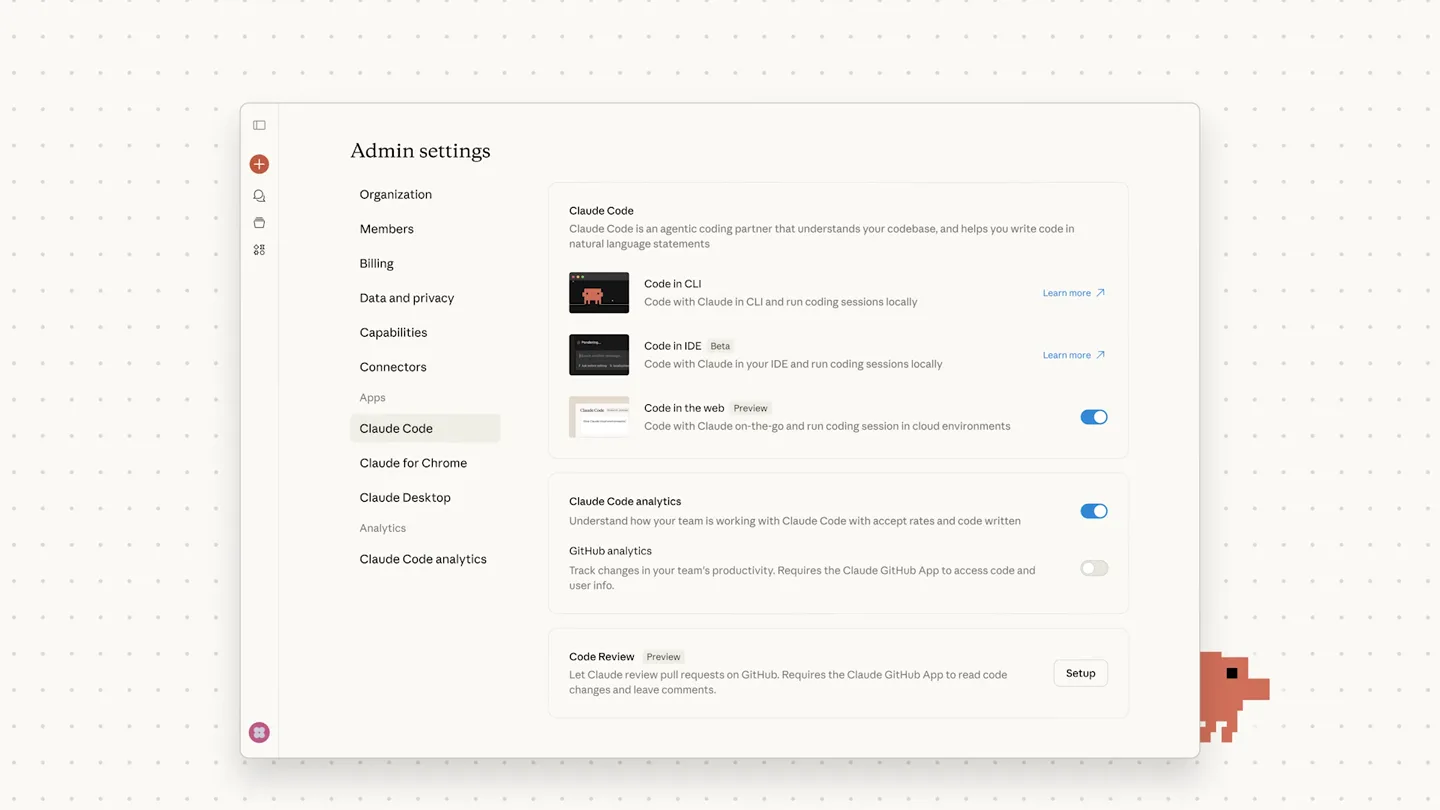
Claude Code adds Code Review: when a pull request opens, a team of agents hunts for bugs in the change.
Scene-by-scene timeline & spoken transcript
The Hook
Introducing Code Review
“(No spoken dialogue — A high-energy electronic riser leads into a driving beat with glitchy percussion and prominent sub-bass.)”
- On screen
- Introducing Code Review
- Camera
- Static wide shot of a UI element, then a quick zoom out to reveal a pixel art character, followed by a full screen text reveal.
- Motion
- UI element interaction, pixel art character animation, text reveal with subtle bounce.
Product Reveal
Claude Code in Action: Bug Hunting
“(No spoken dialogue — The driving electronic beat continues with glitchy percussive elements.)”
- On screen
- Filter out sessions that start with "API Error" from the /resume command results. Users shouldn't see or try to resume failed API error sessions. * Starting Claude Code acme/saas-app Create PR VS Code CLI Ready to code... Fix: filter out API Error sessions from /resume command #6654 Open acme-user wants to merge 3 commits into main from fix-resume-api Conversation 4 Commits 3 Checks 17 Files changed 3 acme-user commented 30 minutes ago Summary Filter out sessions that start with "API Error" from the /resume command results Prevents users from seeing and attempting to resume failed API error sessions Claude bot reviewed 2 mins ago src/api/sessions.ts return res.json({ id: session.id, userId: session.userId, email: session.userEmail, accessToken: session.accessToken, refreshToken: session.refreshToken, metadata: session.metadata, Claude bot Just now This endpoint returns session data including accessToken and refreshToken without verifying that the requesting user owns this session. Any authenticated user can access any other user's tokens by guessing or enumerating session IDs. Add an ownership check before returning sensitive data: This endpoint should verify req.auth.userId matches session.userId before returning any data. Strip accessToken and refreshToken from the response entirely - they should never be sent to the client. Extended reasoning... Concrete proof: the snapshot User A calls GET /api/sessions/sess_b_0042 with their own valid JWT: User A now holds live, usable credentials for User B's account. Impact and fix Impact: Full account takeover for any user. IDOR / CVSS 9.1 Critical. Fix: Add an ownership guard and strip tokens from the response shape: Update To do Add an ownership guard and strip tokens from the response shape: * Doing hard yakka acme/saas-app Create PR VS Code CLI Ready to code... Unresolve converstation claude[bot] marked this conversation as resolved fix: add session ownership check to prevent unauthorized token access Verified d4f8a2c
- Camera
- Dynamic panning and zooming across UI elements, simulating user interaction and code review flow.
- Motion
- Seamless UI navigation, text highlighting, and simulated typing/bot responses.
Feature Teaser
Problem Solved: Debug and Destress
“(No spoken dialogue — The driving electronic beat continues, building intensity with the glitchy percussion. A significant sub-bass drop/impact occurs at 0:39.)”
- On screen
- Debug and destress Introducing Code Introducing Code Review * Claude Code
- Camera
- Quick cuts between full-screen text reveals and pixel art character animations, emphasizing key benefits.
- Motion
- Text reveals with character animation, rapid scene transitions, and a final brand logo reveal.
Call to Action
Claude Code: The Future of Code Review
“(No spoken dialogue — The music resolves with a final sub-bass impact and fades out.)”
- On screen
- * Claude Code
- Camera
- Static shot of the brand logo, then a subtle zoom out.
- Motion
- Brand logo reveal with a subtle, confident hold.
Motion design primitives
Synthesizable in Remotion · key components of the pixel-ui-tech-launch template.
PixelCharacterReveal
A pixel art character animates into view, often with a subtle bounce or transformation, accompanying a text reveal or scene transition. It acts as a visual mascot and indicator of activity.
+ Code construction recipe
Use `spring()` for position and scale animations. Implement SVG filters for pixelation effects. Animate SVG paths for character transformations. Coordinate with `Sequence` for timing.
DynamicUIPanZoom
The camera dynamically pans and zooms across a software UI, highlighting specific elements, text, or interactions, simulating a user's focused attention or a bot's automated process.
+ Code construction recipe
Utilize `interpolate()` for smooth camera `transform` properties (translate, scale). Employ `AbsoluteFill` for the UI container. Use `measureText` for precise text alignment and highlighting. Masking techniques can simulate focused areas.
GlitchyTextReveal
Text appears on screen with a subtle, digital glitch effect, often accompanied by a quick scale or opacity animation, reinforcing the tech-forward and 'bug-hunting' theme.
+ Code construction recipe
Apply `spring()` for initial text scale and opacity. Implement a custom WebGL shader or SVG filter for the glitch effect (e.g., chromatic aberration, displacement map). Use `random()` for varied glitch intensity.
Style DNA & aesthetic system
Visual aesthetic
Typography
Motion
Special effects
Pacing & rhythm
Conceptual story rhythm
- 1
The Setup
Purpose. Introduce the problem and the product's core function.
Execution. Starts with a UI interaction leading to a bold text reveal: 'Introducing Code Review', accompanied by a pixel art character.
- 2
The Demonstration
Purpose. Showcase the product's capabilities in a real-world scenario.
Execution. Detailed UI walkthrough of Claude Code identifying and fixing a security vulnerability in a pull request, with dynamic camera movements.
- 3
The Benefit
Purpose. Highlight the positive impact and user experience.
Execution. Quick cuts to benefit-oriented text ('Debug and destress') with evolving pixel art characters, reinforcing ease of use and efficiency.
- 4
The Brand
Purpose. Reinforce brand identity and call to action.
Execution. Final reveal of the 'Claude Code' logo, solidifying the brand's presence.
Remix in Animatiq Studio
Master remix prompt · agent-ready
Sample remix
Objective
Launch a new AI-powered code refactoring tool called 'RefactorFlow' that automatically optimizes legacy codebases.How the recipe adapts
The RefactorFlow video would open with a UI showing messy legacy code, then a pixel art robot character would appear, symbolizing the AI. Dynamic UI pans would highlight sections of code being analyzed and then cleanly refactored. Glitchy text reveals would introduce features like 'Automated Optimization' and 'Dependency Cleanup'. The final scene would feature the RefactorFlow logo with the robot mascot, all set to a driving electronic track with digital sound effects.Remix blueprint · pixel-ui-tech-launch
Scene durations (4 scenes, 44s)
Key Remotion components
Related Developer Tools Product Launches
Explore all Developer Tools launches →
xAI opens voice cloning on its API: build a custom voice in about two minutes or pick from 80+ voices in 28 languages.

Claude can now operate your Mac, opening apps, browsing and filling spreadsheets, as a research preview in Cowork and Claude Code.

Agentic CLI for coding, building apps, and automating workflows.