
Santi Torres · Launch Video Breakdown: Hook, Pacing & Motion Design
This plugin completely changes everything you thought you knew about Claude Code. Anthropic launched it quietly: claude-code-setup, an official plugin that scans your project and tells you exactly…
Scene-by-scene timeline & spoken transcript
The Hook
Terminal Command Input
“(No spoken dialogue — A sustained, evolving synth pad creates an atmospheric backdrop with a prominent sub-bass drone. A subtle, high-frequency synth swell occurs.)”
- On screen
- Claude Code V2.1.119 Opus 4.7 (1M context) with xhigh effort Claude Max ~/Desktop\カイメイ会社 > /plugin install claude-code-setup@claude-plugins-official [Opus 4.7 (1M context)] | 5h: 2% | 週: 9% | Ctx: 0% L claude
- Camera
- Static, close-up view of a terminal interface.
- Motion
- Text typing animation, simulating real-time command input with a blinking cursor.
Product Reveal
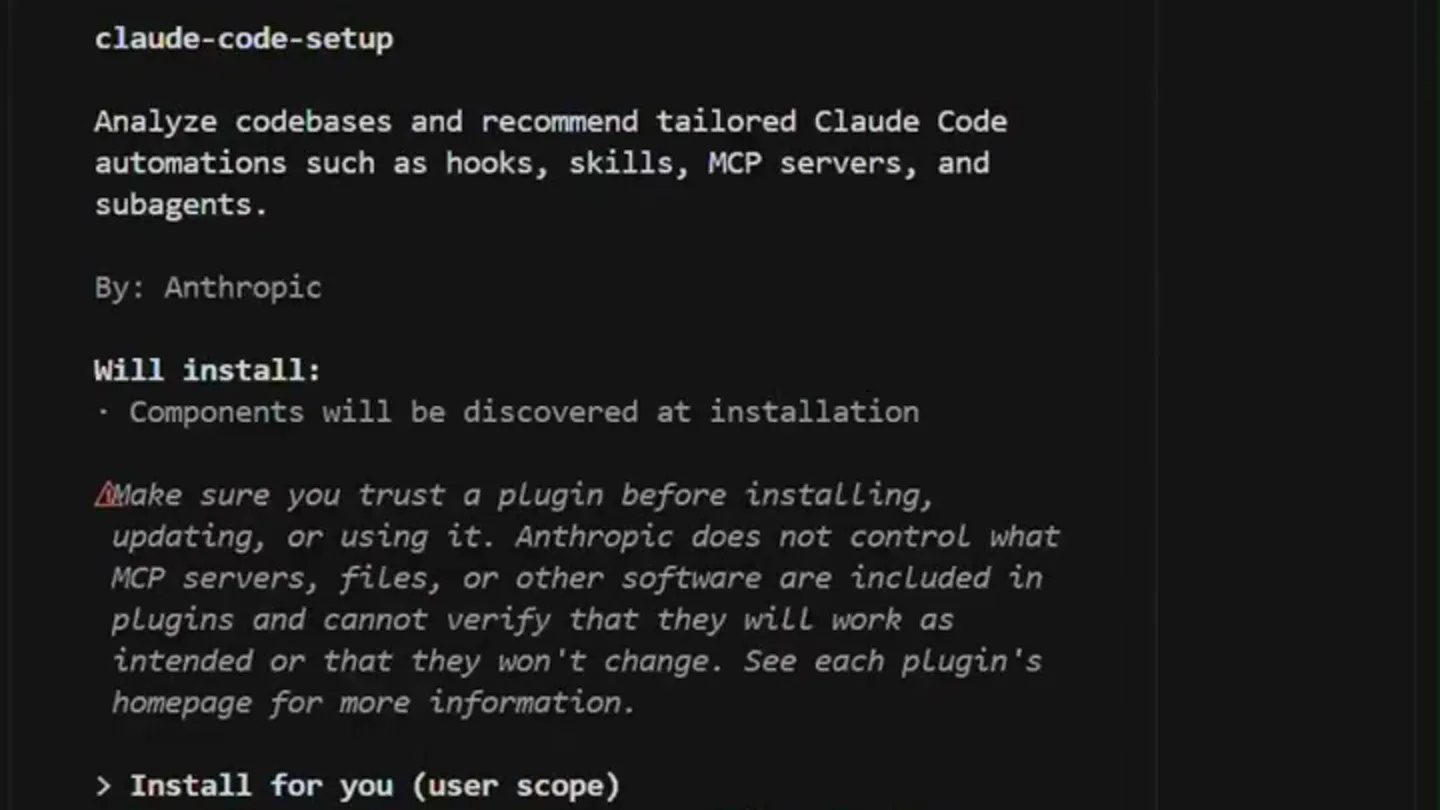
Plugin Details Display
“(No spoken dialogue — A significant high-energy audio transition occurs with a rising synth sweep, followed by a sub-bass drop/impact at 0:05.)”
- On screen
- /plugin install claude-code-setup@claude-plugins-official Plugins Discover Installed Marketplaces Errors Plugin Details Claude-code-setup Analyze codebases and recommend tailored Claude Code automations such as hooks, skills, MCP servers, and subagents. By: Anthropic Will install: - Components will be discovered at installation Make sure you trust a plugin before installing, updating, or using it. Anthropic does not control what MCP servers, files, or other software are included in plugins and cannot verify that they will work as intended or that they won't change. See each plugin's homepage for more information. > Install for you (user scope) Install for all collaborators on this repository (project scope) Install for you, in this repo only (local scope) Open homepage Back to plugin list Enter to select Esc to back L claude
- Camera
- Static, close-up view of a terminal interface, revealing new content.
- Motion
- Instantaneous scene cut revealing a new screen state, followed by a subtle text highlight animation.
Call to Action
Installation Confirmation
“(No spoken dialogue — A sustained, resonant synth tone fades out.)”
- On screen
- Claude Code V2.1.119 Opus 4.7 (1M context) with xhigh effort Claude Max ~/Desktop\カイメイ会社 > /plugin install claude-code-setup@claude-plugins-official ✓ Installed claude-code-setup. Run /reload-plugins to apply. > [Opus 4.7 (1M context)] | 5h: 2% | 週: 9% | Ctx: 0% Plugins changed. Run /reload-plugins to activate. I L claude
- Camera
- Static, close-up view of the terminal, showing installation success.
- Motion
- Instantaneous scene cut revealing the final state, with a checkmark animation and new text appearing.
Motion design primitives
Synthesizable in Remotion · key components of the terminal-cli-launch template.
TerminalTypewriterEffect
Text appears character by character, simulating typing in a command-line interface, accompanied by a blinking cursor.
+ Code construction recipe
Use `interpolate` for character opacity and position, `spring` for cursor blink, and `Sequence` to manage text reveal timing. Implement a custom `Typewriter` component.
InstantScreenTransition
An abrupt, hard cut between two distinct terminal screen states, mimicking a rapid user interaction or system response.
+ Code construction recipe
Achieve this with direct `AbsoluteFill` components for each screen state, controlled by `Sequence` for precise timing and `spring` for any subtle element entry.
SubtleTextHighlight
Specific lines or words of text briefly change color or background to draw attention, then revert.
+ Code construction recipe
Utilize `interpolate` on `backgroundColor` or `color` properties, triggered by `spring` for a smooth, quick highlight and fade. Apply to `Text` components.
Style DNA & aesthetic system
Visual aesthetic
Typography
Motion
Special effects
Pacing & rhythm
Conceptual story rhythm
- 1
Command Entry
Purpose. Introduces the user's intent to install a plugin, setting up the context within a developer environment.
Execution. Typing animation of the `/plugin install` command in a terminal.
- 2
Plugin Discovery
Purpose. Reveals the details and purpose of the 'claude-code-setup' plugin, explaining its functionality.
Execution. Instant cut to the plugin details screen, with key information highlighted.
- 3
Installation Confirmation
Purpose. Confirms the successful installation of the plugin, providing next steps.
Execution. Instant cut to the terminal showing 'Installed' message and a prompt to reload plugins.
- 4
Call to Action
Purpose. Instructs the user on how to activate the newly installed plugin.
Execution. Final screen state with the 'Run /reload-plugins to activate' message.
Remix in Animatiq Studio
Master remix prompt · agent-ready
Sample remix
Objective
Showcasing a new CLI tool for automated cloud resource provisioning.How the recipe adapts
The TerminalTypewriterEffect will be used for typing `cloud-provision init` and `cloud-provision deploy`. InstantScreenTransition will reveal the configuration file and then the deployment status. SubtleTextHighlight will draw attention to resource names and success messages. The dark terminal theme and monospace fonts will be retained, with a similar ambient electronic soundtrack and sharp sound design for command execution and deployment completion.Remix blueprint · terminal-cli-launch
Scene durations (3 scenes, 11s)
Key Remotion components
Related Developer Tools Product Launches
Explore all Developer Tools launches →
xAI opens voice cloning on its API: build a custom voice in about two minutes or pick from 80+ voices in 28 languages.

Claude can now operate your Mac, opening apps, browsing and filling spreadsheets, as a research preview in Cowork and Claude Code.

Agentic CLI for coding, building apps, and automating workflows.