
Claude · Launch Video Breakdown: Hook, Pacing & Motion Design
Claude Managed Agents pairs a tuned agent harness with production infrastructure, now in public beta on the Claude Platform.
Scene-by-scene timeline & spoken transcript
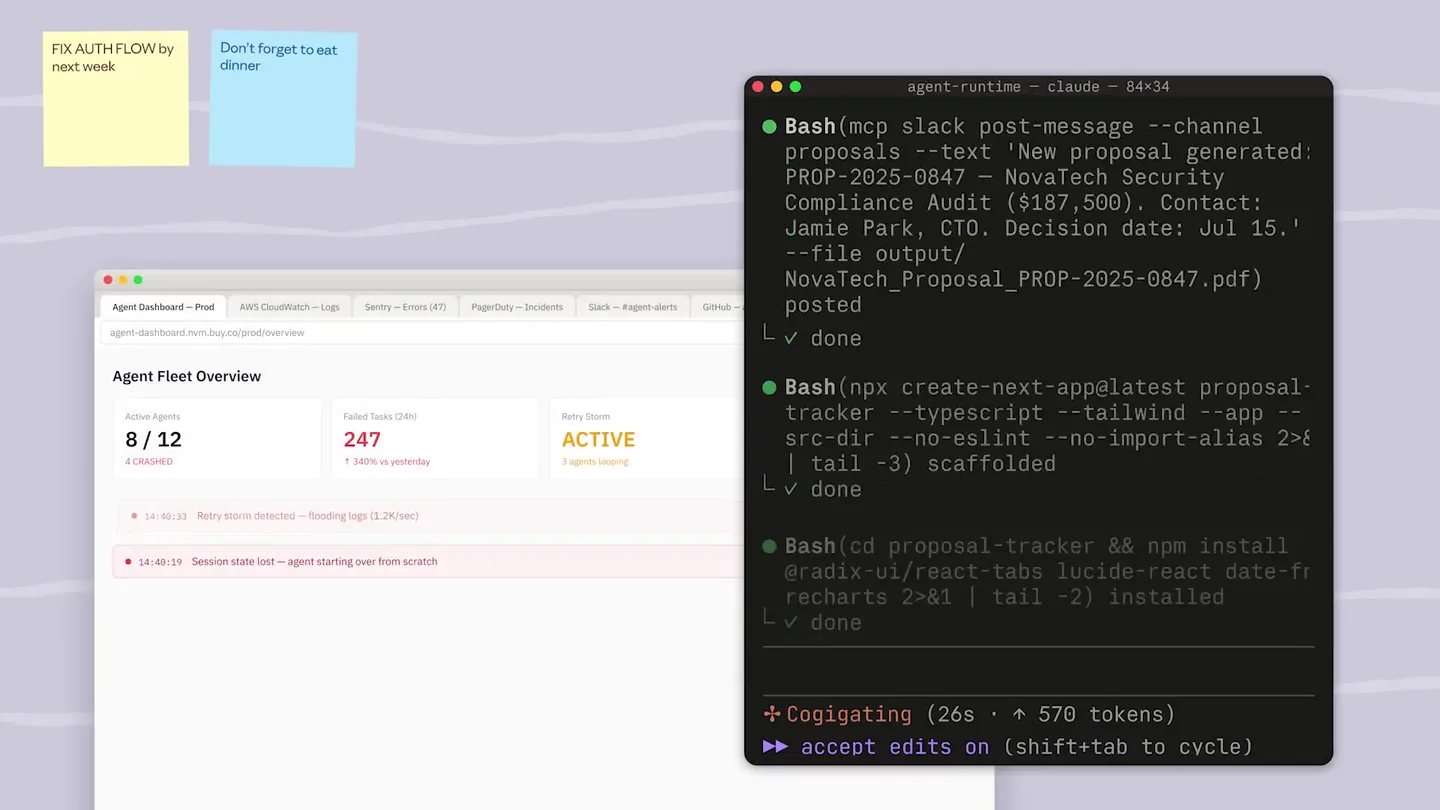
The Hook
Developer's Dilemma: The Agent Debugging Challenge
“(No spoken dialogue — 'whoosh' at 0:00, 'click' at 0:01, 'thump' at 0:02, 'clack' at 0:03, 'snap' at 0:04)”
- On screen
- FIX AUTH FLOW by next week. agent-runtime -- claude — 84×34 Read(src/agent/checkpoint.py) 134 lines done Bash(python run_agent.py --session test-001) done Bash(docker ps -a --format 'table {{.ID}}\t{{.Image}}\t{{.Status}}\t{{.Names}}') done Grep("OOM|SIGKILL|exit code 137") 7 matches in 3 files done Read(src/agent/sandbox.py) 112 lines done Bash(mcp connect hubspot --agent agent_01JR4KW9 --scope deals,contacts,companies) connected done Cogigating (26s ^ 570 tokens) accept edits on (shift+tab to cycle) Don't forget to eat dinner Retry storm took down staging at 2am again.. retro needed PagerDuty CRITICAL: Support agent down — 47 tickets queued AWS CloudWatch Lambda timeout: code-review-agent exceeded 900s Sentry New issue: OutOfMemoryError in research-agent Py checkpoint.py retries.py containers.yml py tools.py AGENT DASHBOARD — Prod agent-dashboard.rvm.buy.co EXPLORER CLAUDE-CAFE v claude visual-testing-playwright.. v workloads settings.local.json v config containers.yml Dockerfile.agent dockerfile.proxy prometheus.yml init.sql v src checkpoint.py retries.py tools.py sandbox.py auth.py infra rate_limiter.py logging.py secrets.py v node_modules v playwright-traces v src .gitignore pyproject.toml package.json OUTLINE C Checkpoint D CheckpointManager F save core > checkpoint.py CheckpointManager > save import os, json, time, gzip, logging from typing import Optional from dataclasses import dataclass, field from pathlib import Path logger = logging.getLogger(__name__) CHECKPOINT_DIR = os.environ.get("CHECKPOINT_DIR", "/var/lib/agent-checkpoints") MAX_CHECKPOINTS_PER_SESSION = 5 CHECKPOINT_COMPRESSION = True @dataclass class Checkpoint: session_id: str checkpoint_id: str messages: list[dict] sandbox_snapshot: Optional[dict] turn_number: int created_at: float = field(default_factory=time.time) metadata: dict = field(default_factory=dict) @property def path(self) -> str: return os.path.join(CHECKPOINT_DIR, self.session_id, f"{self.checkpoint_id}.checkpoint") def size_bytes(self) -> int: return os.path.getsize(self.path) except OSError: return 0 ...when Claude Dashboard Support admin.dashboard/support Loop is breaking before it even starts Network outage — 'web_search' tool can't reach 'api.search.brave.com'. The circuit breaker hits 10 consecutive ConnectionError failures and trips to OPEN state. All 3 retries exhaust against a dead upstream. OOM kill — The sandbox container ('PID 4812') is killed with exit code 137 (SIGKILL). This is the kernel OOM killer — the container's memory is being exceeded, likely because cold-starting from step 0 reloads the full model state without the incremental checkpoint optimization. Cogigating (26s ^ 570 tokens) accept edits on (shift+tab to cycle) Failed Tasks (24h) 247 100% vs yesterday Sandbox crashed — restart req Auth token expired mid-run — session killed Memory cap hit — agent terminated (PID 4812) Retry storm detected — flooding logs (1.2k/sec) Session state lost — agent starting over from scratch
- Camera
- The camera rapidly pans and zooms across a cluttered desktop environment, revealing multiple overlapping developer tools and error messages. The perspective shifts quickly, mimicking a user frantically navigating a complex system.
- Motion
- Fast-paced, multi-layered screen capture montage with rapid camera pans, zooms, and quick cuts. Elements like sticky notes and error pop-ups animate into view with a slight bounce.
Product Reveal
Introducing Claude Managed Agents: Orchestrating AI Workflows
“(No spoken dialogue — 'pop' at 0:09, 'thump' at 0:10, 'riser' from 0:11-0:12, 'sub-bass drop/impact' at 0:12)”
- On screen
- Introducing Claude Managed Agents ← Sessions / Session...heC6T3Y Build investment thesis for BuyCo idle merges-and-acks env 1 file production-vault 22 hours ago 5m 34s (2m 44s active) 71.0k / 5.7k (100%) Actions Ask Claude Transcript Debug All events Copy all Orchestrator Reporter Analyst Forecaster Running Session start 1s 0:00 User Data Analysis Task — BuyCo retail orders 780 toks 1s 0:01 Agent I'll start by unzipping the dataset, then prepare the unified CSV files. 1,878in / 100out 3s 0:02 Bash unzip /mnt/session/uploads/buyco.zip -d /workspace/data/ 4s 0:05 Write /workspace/prepare.py 3s 0:09 Bash cd /workspace && python3 prepare.py 3s 0:12 Agent Data is ready. Now I'll delegate to all three agents in parallel. 6,837in / 68out 2s 0:30
- Camera
- The camera smoothly zooms out and pans to reveal a clean, organized UI. The perspective shifts from a chaotic desktop to a focused product view, highlighting the 'Orchestrator' timeline.
- Motion
- Smooth zoom-out and pan, revealing a structured UI. UI elements animate in with subtle fades and slides, emphasizing clarity and control. Text appears with a typewriter effect.
Feature Teaser
Agent Configuration & Workflow Execution
“(No spoken dialogue — 'riser' from 0:21-0:22, 'sub-bass drop/impact' at 0:22, 'whoosh' at 0:29, 'thump' at 0:30, 'riser' from 0:37-0:38, 'sub-bass drop/impact' at 0:38)”
- On screen
- import client session = client.agents.sessions.create( agent_id="agent_01JR4KW9" ) client.sessions.events.send( session_id=session.id, events=[ { "type": "user", "content": [ { "type": "text", "text": f"Evaluate an acquisition of {company}." } ] } ] ) Ideating (26s ^ 570 tokens) accept edits on (shift+tab to cycle) Deal tracker Proposals Timeline Agent YESTERDAY Delivered Lettis Labs Proposal delivered. SOC 2 addendum auto-attached. 4:26pm Reviewed Cascade Financial & Co. Compliance language updated. Ready for delivery. 2:10pm MAR 27 Won Foundry OS Deal closed at $850K (+8% over initial proposal). 11:14am MAR 26 Flagged V Ventures Phase 3 scope exceeds delivery window. Hourly rate below minimum. Hold for review. 2:20pm MAR 25 Reviewed V Ventures Executive summary strengthened. ROI projections validated. 9:20am $4.2M pipeline 12 actives 68% win rate 3 today ← Sessions / Session...heC6T3Y Build investment thesis for BuyCo Active merges-and-acks env 1 file production-vault 22 hours ago 5m 34s (2m 44s active) 71.0k / 5.7k (100%) Transcript Debug All events Copy all Agent Running Session start 1s 0:00 User Evaluate an acquisition of BuyCo 780 toks 1s 0:01 Agent Agent: Starting full acquisition analysis of BuyCo 1,878in / 100out 3s 0:02 Glob Scanning data room file structure 4s 0:05 Glob 8 files found in /workspace/data-room/ 4s 0:05 Read Opening income statement FY2023-2025 3s 0:09 Read Income statement loaded — Rev $421M, EBITDA $59M 3s 0:09 Read Opening balance sheet FY2025 3s 0:09 Read Balance sheet loaded — Net Debt $124M 3s 0:09 Web_search Retail sector comp multiples 18s 0:12 Web_search Comp median 8.8x; 3 precedent transactions 18s 0:12 Web_fetch BuyCo expansion article 18s 0:12 Glob 8 files found in /workspace/data-room/ buyco-dataroom/2026-q1/. Three files (.DS_Store, .gitkeep, ~$lockfile.tmp) were skipped as hidden or temporary. The largest file is management_presentation.pdf at 3.2 MB and will need the PDF reader to parse. Most recent activity was on inventory_metrics_Q4_2025.csv, modified earlier this morning at 09:23. Tip: The three FY statements (income, balance sheet, cash flow) appear to cover overlapping periods — consider loading them together for a unified 3-year view before running ratios. merges-and-acks Active agent_01ICZYfJyZbppy6vfh7fN v177484654448... View agent details System prompt You are a senior M&A analyst specializing in retail sector transactions. Assess whether a deal is worth pursuing based on financial statements, operating data, and market context. ### Framework 1. Financial Health - Revenue trajectory (3-year CAGR, YoY trends) - Gross margin and EBITDA margin vs. retail comps - Net Debt / EBITDA; interest coverage ratio 2. Retail-Specific Signals - Same-store sales growth (SSS) - Inventory turnover and days-on-hand - Revenue per square foot MCPs and tools agent_toolset Read and write Connected Skills None Callable agents What do you want to build? Upload existing spec as context / to add skills or sub agents Let Claude interview you Build an agent that evaluates acquisition targets. It should research Deep research Multi-step web research with source synthesis and citation. Use as a standalone step or feed... RAG retrieval Retrieves relevant chunks from a vector store or document collection. Pair with a drafting st... Draft generator Produces a structured first draft — email, doc, summary, report — from a template and a set... Task planner Breaks a high-level goal down into an ordered list of sub-tasks. Output is a structured plan a... Structured ext Parses unstructu schema. Define y Intent router Classifies an inco the right sub-age Reflection loop Iteratively critiqu until a quality th Summarizer Condenses long c thread history. Co Build an agent that evaluates acquisition targets. It should research companies, pull financials, run competitive benchmarks, and draft an investment memo. Agents / Merges & Acks Create agent Configure environment Start session Integrate Publish Build an agent that evaluates acquisition targets. It should research companies, pull financials, run competitive benchmarks, and draft an investment memo. Generated agent config Your agent. This is the API call that created it. POST /v1/agents curl -X POST https://api.anthropic.com/v1/agents \ -H "x-api-key: $ANTHROPIC_API_KEY" \ -H "anthropic-version: 2023-06-01" \ -H "anthropic-beta: managed-agents-2024-04-01" \ -H "Content-Type: application/json" \ -d '{ "name": "deal-analyst", "model": "claude-opus-d-4-6" }' agent_id_agent_01JR4KW9 Next: Create environment Sandboxing Error recovery Auth Memory Event state mgmt File persistence Checkpointing Retry policies proposal-system - claude — 80×34 import client = anthropic.Anthropic() session = client.agents.sessions.create( agent_id="agent_01JR4KW9" ) client.sessions.events.send( session_id=session.id, events=[ { "type": "user", "content": [ { "type": "text", "text": f"Evaluate an acquisition of {company}." } ] } ] ) Building (26s ^ 570 tokens) accept edits on (shift+tab to cycle)
- Camera
- The camera smoothly navigates through various UI panels, showcasing agent creation, configuration, and execution. It follows a user's cursor interaction, highlighting key features like prompt input, code generation, and data analysis. The perspective is often a close-up on specific UI elements, then pulls back to show context.
- Motion
- Guided UI walkthrough with smooth camera movements, highlighting interactive elements. Text input is animated with a typing effect, and UI panels slide or fade into view. Cursor movements are tracked and emphasized.
Call to Action
Accelerate to Production-Grade Agents
“(No spoken dialogue — 'whoosh' at 0:55, 'thump' at 0:56)”
- On screen
- Fast track your way to production-grade agents Claude Managed Agents, now available on the Claude Platform Claude
- Camera
- The camera pulls back from the detailed UI, transitioning to a clean, minimalist title card. It then zooms slightly into the final logo reveal. The movement is deliberate and impactful.
- Motion
- Smooth, deliberate camera pull-back and zoom. Text appears with a subtle fade-in and scale animation. The final logo reveal uses a gentle zoom and a soft glow effect.
Motion design primitives
Synthesizable in Remotion · key components of the developer-tool-launch-chaos-to-clarity template.
MultiPanelDesktopChaos
Multiple overlapping application windows and sticky notes rapidly animate onto the screen, often with a slight bounce or spring effect, creating a sense of a busy, problem-filled desktop. The camera quickly pans and zooms between these elements.
+ Code construction recipe
Utilize `spring()` for position and scale animations of individual windows and notes. Implement `interpolate()` for rapid camera `x`, `y`, and `zoom` properties. Use `z-index` to manage overlapping layers and `opacity` for quick fade-ins.
GuidedUITextReveal
Text appears character by character as if being typed, often accompanied by a blinking cursor. UI elements like input fields or code blocks highlight as text is revealed, and panels slide or fade into view to support the narrative.
+ Code construction recipe
Employ `Sequence` and `spring()` for character-by-character text reveal, controlling `opacity` and `x` position. Use `interpolate()` for smooth `translateY` and `opacity` transitions for sliding/fading UI panels. Cursor animation can be a simple `opacity` toggle.
ContextualZoomReveal
The camera smoothly zooms into a specific UI element or text block to emphasize detail, then smoothly zooms out or pans to reveal the broader context or a new section of the interface.
+ Code construction recipe
Implement `interpolate()` for `camera.zoom`, `camera.x`, and `camera.y` properties with `ease-in-out` curves for smooth transitions. Use `AbsoluteFill` components for UI elements and animate their `scale` and `opacity` in conjunction with camera movements.
Style DNA & aesthetic system
Visual aesthetic
Typography
Motion
Special effects
Pacing & rhythm
Conceptual story rhythm
- 1
The Problem Landscape
Purpose. To quickly establish the pain points and complexity developers face, creating immediate relatability and a need for a solution.
Execution. Rapid-fire montage of cluttered desktop screens, error messages, and developer tools, using quick pans and zooms to convey chaos.
- 2
The Solution Unveiled
Purpose. To introduce Claude Managed Agents as the answer to the previously agitated problems, showcasing its core value proposition.
Execution. A smooth transition from chaos to a clean, organized UI, highlighting the product's dashboard and key features with deliberate, guided animations.
- 3
Deep Dive into Features
Purpose. To demonstrate the product's capabilities through a guided tour of agent creation, configuration, and workflow execution.
Execution. Sequential, focused camera movements through various UI panels, emphasizing user interaction, typing animations, and data processing visualizations.
- 4
Empowerment & Call to Action
Purpose. To reinforce the product's benefit (production-grade agents) and guide the viewer to the next step.
Execution. A grand, sweeping camera pull-back revealing a concise marketing message, followed by a clean logo reveal, signifying clarity and impact.
Remix in Animatiq Studio
Master remix prompt · agent-ready
Sample remix
Objective
Launch a new AI-powered code refactoring tool called 'RefactorFlow'.How the recipe adapts
The initial chaotic scene would feature multiple IDE windows with messy code, linting errors, and stack traces, rapidly panning across them. The transition would reveal RefactorFlow's clean interface, demonstrating how it intelligently suggests and applies refactors with typing animations and smooth code diff views. The final call to action would highlight 'Automate your code quality with RefactorFlow'.Remix blueprint · developer-tool-launch-chaos-to-clarity
Scene durations (4 scenes, 59s)
Key Remotion components
Related Developer Tools Product Launches
Explore all Developer Tools launches →
xAI opens voice cloning on its API: build a custom voice in about two minutes or pick from 80+ voices in 28 languages.

Claude can now operate your Mac, opening apps, browsing and filling spreadsheets, as a research preview in Cowork and Claude Code.

Agentic CLI for coding, building apps, and automating workflows.