
stevibe · Launch Video Breakdown: Hook, Pacing & Motion Design
Claude Opus 4.7 vs 4.8 side-by-side canvas test
Scene-by-scene timeline & spoken transcript
The Hook
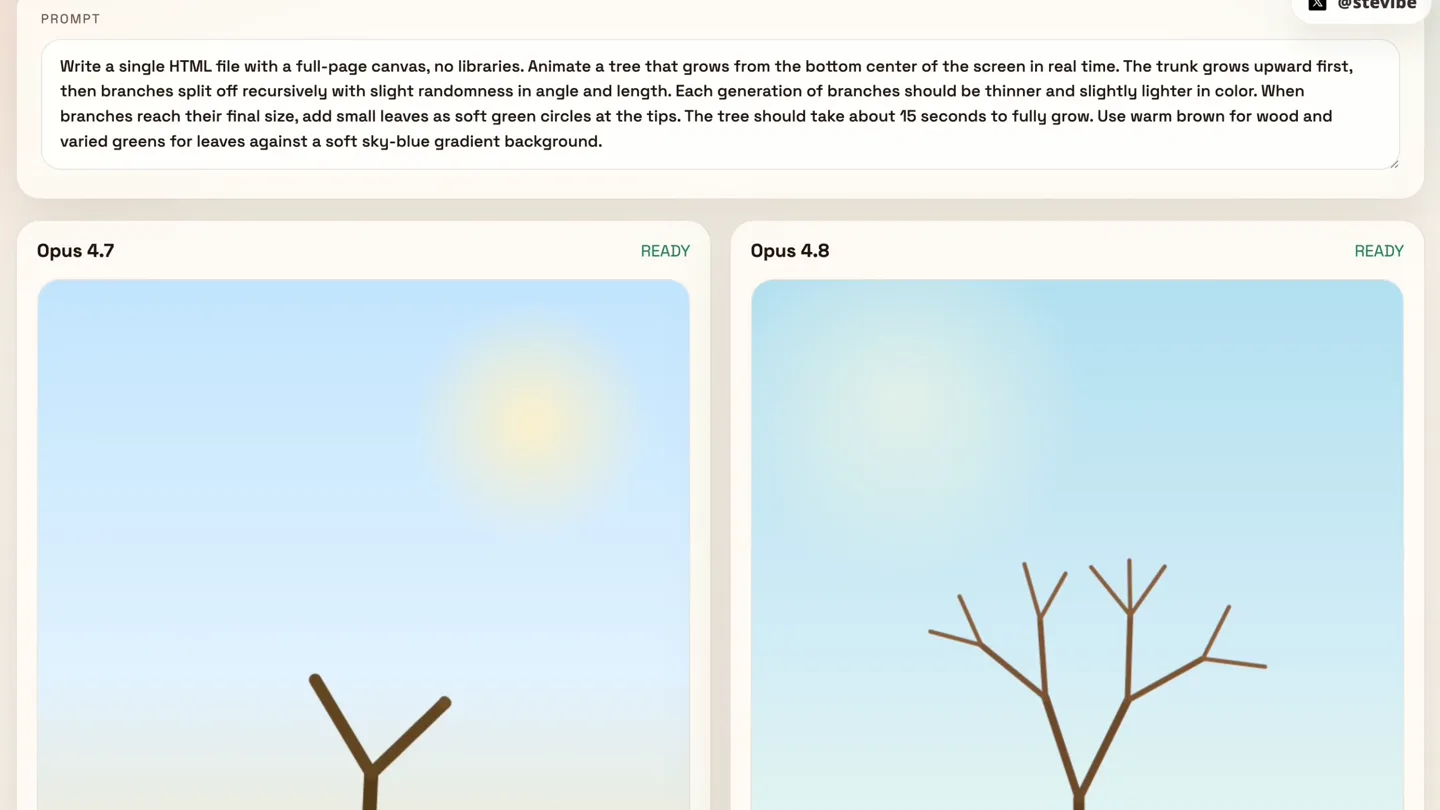
Generative Tree Growth Comparison
“(No spoken dialogue — The track opens with a sustained, evolving pad sound, creating an atmospheric and slightly mysterious mood. At 00:03, a subtle, high-frequency riser begins, building tension. This is followed by a significant sub-bass drop/impact at 00:04, marking a transition. From 00:04 to 00:08, a rhythmic, arpeggiated synth pattern emerges, accompanied by a deep sub-bass pulse, giving it a driving, yet still ambient feel. At 00:08, a new, more prominent high-frequency riser starts, leading into another impactful sub-bass drop at 00:09.)”
- On screen
- Claude Opus 4.7 vs 4.8 PROMPT @stevibe Write a single HTML file with a full-page canvas, no libraries. Animate a tree that grows from the bottom center of the screen in real time. The trunk grows upward first, then branches split off recursively with slight randomness in angle and length. Each generation of branches should be thinner and slightly lighter in color. When branches reach their final size, add small leaves as soft green circles at the tips. The tree should take about 15 seconds to fully grow. Use warm brown for wood and varied greens for leaves against a soft sky-blue gradient background. Opus 4.7 READY Opus 4.8 READY
- Camera
- Static, wide shot of two side-by-side canvas outputs.
- Motion
- Procedural generation, organic growth animation, side-by-side comparison.
Product Reveal
Boids Simulation Comparison
“(No spoken dialogue — This transition introduces a more complex rhythmic layer with additional percussive synth elements and a sustained, bright synth melody.)”
- On screen
- Claude Opus 4.7 vs 4.8 PROMPT @stevibe Write a single HTML file with a full-page canvas, no libraries. Simulate a school of ~80 fish using boids rules (separation, alignment, cohesion) swimming across the screen. Fish are small triangular shapes that rotate to match their heading, with a subtle tail-wiggle animation. The school should react to the mouse cursor by gently veering away from it. Background is an underwater gradient (deep blue at bottom, lighter teal near the top) with slow-drifting caustic light patterns on top and a few bubbles rising from the bottom. Fish colors vary slightly within a silvery-blue palette. Opus 4.7 READY Opus 4.8 READY
- Camera
- Static, wide shot of two side-by-side canvas outputs.
- Motion
- Particle system animation, emergent behavior simulation, side-by-side comparison.
Feature Teaser
Progressive House Construction
“(No spoken dialogue — Another high-energy riser begins at 00:13, culminating in a powerful sub-bass impact at 00:14, which then transitions into a more open, expansive soundscape with sustained pads and a subtle, evolving synth texture. A final, extended riser begins around 00:20, building intensity towards the end of the clip, with a final sub-bass impact at 00:24.)”
- On screen
- Claude Opus 4.7 vs 4.8 PROMPT @stevibe corners, (3) wall till - tan/beige siding this in between the wall frames, (4) roof - two triangular roof panels slide in from above and meet at the peak, with red shingle texture appearing row by row, (5) door - a brown door fades in on the front wall with a small gold doorknob, (6) windows - two windows appear on either side of the door with visible cross-frames and blue glass, (7) details - a chimney extends up from the roof, a small puff of smoke begins rising from it, a path of stepping stones appears leading to the door, and a small tree grows beside the house. Each stage should have a brief caption at the top ["Laying foundation", "Raising walls", etc.]. Between stages, pause for 0.5 seconds. Loop continuously. Opus 4.7 3. Adding siding READY Opus 4.8 Laying foundation READY Opus 4.7 4. Installing roof READY Opus 4.8 Raising walls READY Opus 4.7 5. Hanging the door READY Opus 4.8 Adding siding READY Opus 4.7 6. Placing windows READY Opus 4.8 Building roof READY Opus 4.7 7. Finishing touches READY Opus 4.8 Hanging door READY Opus 4.7 7. Finishing touches READY Opus 4.8 Installing windows READY Opus 4.7 7. Finishing touches READY Opus 4.8 Finishing touches READY Opus 4.7 7. Finishing touches READY Opus 4.8 Home sweet home READY
- Camera
- Static, wide shot of two side-by-side canvas outputs.
- Motion
- Sequential build-up animation, object instantiation, side-by-side comparison.
Motion design primitives
Synthesizable in Remotion · key components of the ai-code-comparison-split template.
DualCanvasComparison
Two distinct canvas animations play simultaneously side-by-side, demonstrating different outputs from a shared prompt. A central dividing line separates the two interactive areas.
+ Code construction recipe
Utilize two `<Canvas>` components within a flex container, each rendering a distinct animation logic. Implement a shared parent component to manage the prompt text and 'READY' status for both. Use `useCurrentFrame` and `interpolate` for synchronized animation states across both canvases.
ProceduralGrowthAnimation
An organic structure (like a tree) grows progressively, with elements appearing and expanding over time, often with recursive branching or sequential additions.
+ Code construction recipe
Implement a custom React component that uses `useCurrentFrame` and `interpolate` to control the scale, position, and opacity of SVG or Canvas elements. For recursive growth, define a function that draws branches based on a depth parameter, with animation delays or staggered interpolations for each generation.
SequentialObjectBuild
A complex object (like a house) is constructed piece by piece, with each component appearing and settling into place in a defined sequence.
+ Code construction recipe
Create a component that renders multiple sub-components (e.g., 'Foundation', 'Walls', 'Roof'). Each sub-component's visibility and transformation (e.g., `translateY`, `scale`, `opacity`) are controlled by `interpolate` based on specific time ranges within the overall scene duration. Use `delay` for sequential appearance.
Style DNA & aesthetic system
Visual aesthetic
Typography
Motion
Special effects
Pacing & rhythm
Conceptual story rhythm
- 1
The Prompt Setup
Purpose. Clearly state the challenge or instruction given to the AI models.
Execution. The prompt text is displayed prominently at the top, setting the context for the subsequent visual comparison.
- 2
Side-by-Side Execution
Purpose. Visually demonstrate the output of two different AI versions in parallel.
Execution. Two distinct canvas areas, labeled 'Opus 4.7' and 'Opus 4.8', animate their respective generative outputs simultaneously.
- 3
Feature Progression
Purpose. Showcase the step-by-step development or complexity of the generative output.
Execution. Animations unfold over time, revealing progressive stages of growth (tree), movement (fish), or construction (house), allowing for detailed comparison.
- 4
Outcome & Comparison
Purpose. Allow the viewer to directly compare the quality, speed, or accuracy of the two versions.
Execution. The continuous side-by-side display highlights the subtle and significant differences in the generative results.
Remix in Animatiq Studio
Master remix prompt · agent-ready
Sample remix
Objective
Launch a new AI-powered code generation tool for interactive web components.How the recipe adapts
The DualCanvasComparison primitive would be adapted to show 'SyntaxFlow Alpha' vs 'SyntaxFlow Beta' generating interactive web components. Instead of trees or fish, the canvases would display live-rendered UI elements, like a dynamic chart or a drag-and-drop interface, progressively building up. The ProceduralGrowthAnimation could be used to show elements of the UI appearing and animating into place, while SequentialObjectBuild could demonstrate the step-by-step assembly of a complex component. The prompt area would describe the desired component, and the side-by-side view would highlight the efficiency or quality differences between the two SyntaxFlow versions.Remix blueprint · ai-code-comparison-split
Scene durations (3 scenes, 27s)
Key Remotion components
Related Creative Tools Product Launches
Explore all Creative Tools launches →
Anthropic Labs launches Claude Design, which turns conversation into prototypes, slides and one-pagers, powered by Claude Opus 4.7.

A vibe design partner with an AI-native canvas for turning ideas into UI.

Your work tools in Claude are now available on mobile. Explore Figma designs, create Canva slides, check Amplitude dashboards, all from your phone. Give it a try: