
Evan Yadegari · Launch Video Breakdown: Hook, Pacing & Motion Design
Introducing Clone by https://www.10x.app/ You can now clone any website or app in minutes
Scene-by-scene timeline & spoken transcript
The Hook
Instant App Cloning Intro
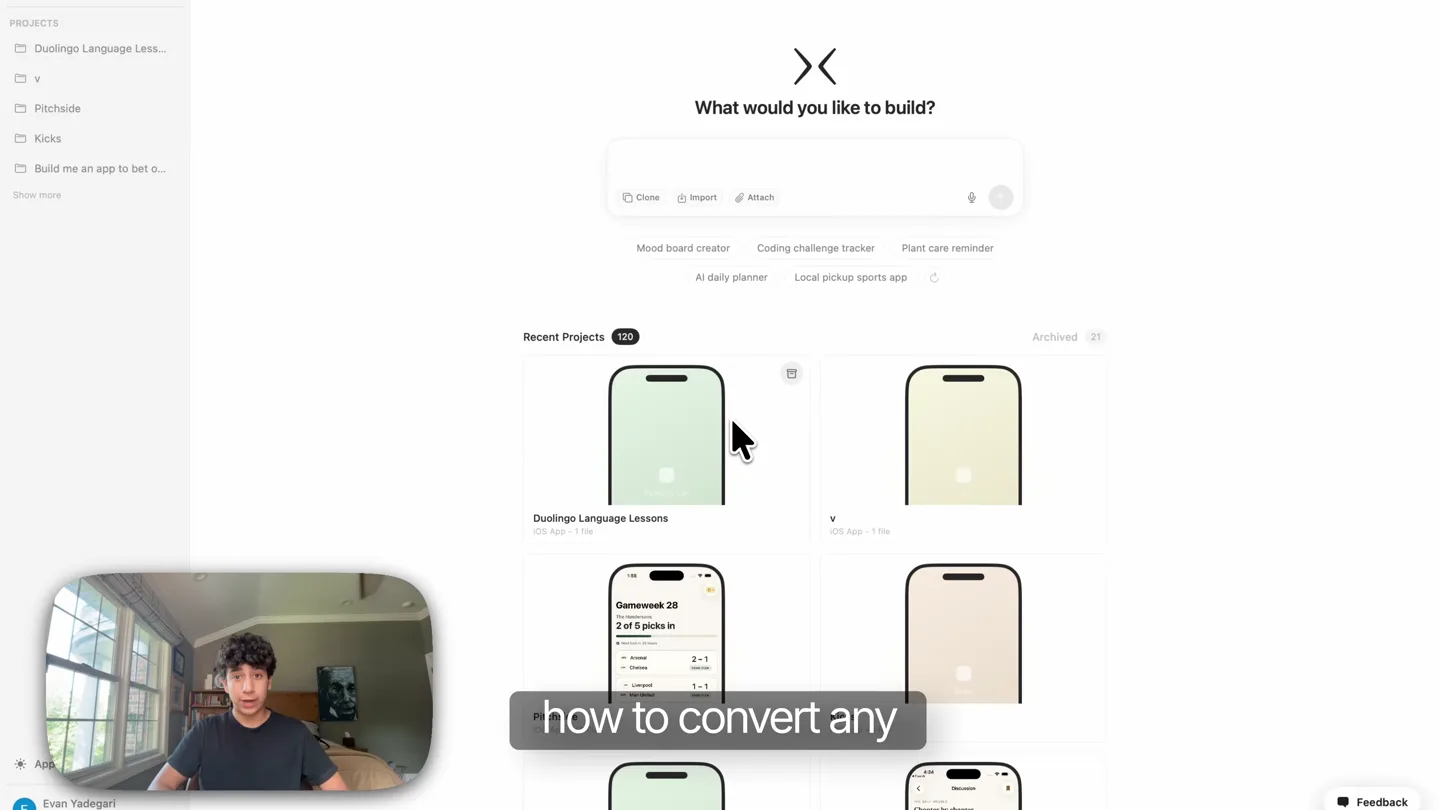
“Hey, what's up guys? In this video, I'm going to show you how to convert any website into an app in minutes. First, you want to head over to 10x and click on this clone button right here.”
- On screen
- PROJECTS Duolingo Language Less... v Pitchside Kicks Build me an app to bet o... Show more What would you like to build? Clone Import Attach Mood board creator Coding challenge tracker Plant care reminder AI daily planner Local pickup sports app Recent Projects: 120 Archived 21 Duolingo Language Lessons iOS App - 1 file v iOS App - 1 file Gameweek 28 2 of 5 packs in 1-1 Evan Yadegari Apps Feedback Clone into an app Clone app Clone website
- Camera
- Static wide shot of the presenter in a picture-in-picture overlay, with the main screen showing a web application interface. The camera focuses on the presenter's upper body.
- Motion
- Picture-in-picture overlay, cursor interaction highlighting UI elements, subtle zoom on UI elements.
Product Reveal
Cloning Process Demonstration
“Plug in whichever website you want to clone. In my case, I want to clone Product Hunt. Now let's wait.”
- On screen
- Clone website Enter a public website URL and 10x will turn that page into a native SwiftUI app. example.com Clone website Mood board creator Coding challenge tracker Plant care reminder AI daily planner Local pickup sports app Evan Yadegari Apps Code Next setup action Step 1 of 3 Run your app successfully Launch the preview and confirm the first screen load Suggested features Design system Pending Colors, visual style, and preview stay blank until the final design direction is selected. Active integrations No integrations required yet. Fetching app data 1ms Producthunt Product Hunt L... Duolingo Language Less... v Pitchside Show more The plan looks great. Start building the app now. Switching to Build mode 1.4s Learning UI-design 3.1s Updated project 2 times 9.9s Wrote 5 files These single-file typecheck errors are expected (no cross-file context). I'll continue building and verify the whole project at the end. Writing file Current Task Build Producthunt clone v1 Ship 5-screen native iOS clone of Product Hunt with ranked feed, detail, topics, saved, profile. Foundation: App, ContentView, Tabs, Theme, Models, ProductStore + sample data ProductRowView swipe-between-products PHTheme.swift wasn't saved (probably collided with same path). Let me recreate. Wrote 2 files Planning task Build Producthunt clone v1 7.1s Edited Models/PHTheme.swift That's a single-file typecheck limitation (no UIKit context). Let me revert and run full project check. Edited 2 files Used 3 tools 5.8s Planning task Build Producthunt clone v1 9.4s Wrote Models/PHTheme.swift UIKit isn't visible here. Use a simpler Color approach. Edited 2 files Verify Compile 1.5s Reviewing request Current Task Build Producthunt clone v1 Ship 5-screen native iOS clone of Product Hunt with ranked feed, detail, topics, saved, profile. Foundation: App, ContentView, Tabs, Theme, Models, ProductStore + sample data ProductRowView swipe-between-products
- Camera
- The presenter remains in a picture-in-picture overlay. The main screen shows a step-by-step UI interaction, including typing a URL and a loading sequence with dynamic text updates.
- Motion
- Cursor interaction, text input animation, dynamic UI updates, progress bar visualization, subtle camera shake on UI elements during 'waiting' phase.
Feature Teaser
Result & Comparison
“And just like that, the app is done. And as you can see, it's astonishingly similar to Product Hunt. Wow.”
- On screen
- PROJECTS Producthunt Product Hunt L... Duolingo Language Less... v Pitchside Show more Performed 9 actions Design options and the draft brief are saved. Once you pick a reference + palette (or lor Hit Other to describe a custom direction), I'll write the Pre-Build Confirmation and hand off to Start Building. My recommendation for closest source fidelity: Product Hunt reference + Signature Orange palette. If you want the late-night-scout vibe, go with Apollo for Reddit + Night Launch. Build Producthunt Summary A native SwiftUI clone of producthunt.com tuned for indie hackers and makers who want to scout daily launches on their phone. Mobile-first reading experience with a ranked daily feed, swipeable product detail pages, topic browsing, and local save-for-later. Roadmap A native SwiftUI clone of producthunt.com tuned for indie hackers and makers who want to scout daily launches on their phone. Mobile-first reading experience with a ranked daily feed, swipeable product detail pages, topic browsing, and local save-for-later. Milestones Confirm design reference + palette (Product Hunt + Signature Orange) Lock Pre-Build Confirmation Expand plan The plan looks great. Start building the app now. 4:12 Pitchside Top Products Launching today 6 products - 5,328 upvotes Today Yesterday This Week 1. Vela Voice-first calendar that books meetings while you walk AI/Artificial Intelligence Productivity 1.3K 142 2. Brushstroke 3 Hand-drawn illustration AI that actually understands line weight Artificial Intelligence Design Tools 98 3. Quill.dev Markdown-native docs for engineering teams that ship daily Developer Productivity SaaS Tools 71 4. Forge HQ PROMOTED Operating system for indie hardware startups SaaS Productivity 54 5. Lumen Notes A reading app that quietly reorients itself around what you care about Today Topics Saved Profile The Daily Digest Subscribe
- Camera
- The main screen transitions to a full-screen view of the cloned app on a mobile device, showcasing its fidelity. The presenter remains in the picture-in-picture overlay.
- Motion
- Seamless UI transition from web app to mobile app view, subtle cursor interaction within the mobile app, quick cuts to highlight key features.
Call to Action
Try 10x.app
“If you want to convert a website into an app, check out 10x.”
- On screen
- P Search [x + k] Best Products Launches News Forums Advertise Subscribe Sign in SaaS E-Commerce Essentials for launching a product Upvote (84) 76 3. Minimi Your ambient memory for Claude Productivity Artificial Intelligence Tech 53 339 4. Veltrix AI AI finance copilot for cash flow, margins, and growth Artificial Intelligence Data & Analytics Data 43 245 Start with Framer, get a free domain Get your free domain 5. Ideogram 4.0 Generate design-ready image with open weight, layout control Design Tools Open Source Social Media 8 189 Hunt, directly in your inbox. Sign Up with autonomous AI agents 7. Nometron 3 Ultra by NVIDIA 4:12 Pitchside Top Products Launching today 6 products - 5,328 upvotes Today Yesterday This Week 1. Vela Voice-first calendar that books meetings while you walk AI/Artificial Intelligence Productivity 1.3K 142 2. Brushstroke 3 Hand-drawn illustration AI that actually understands line weight Artificial Intelligence Design Tools 98 3. Quill.dev Markdown-native docs for engineering teams that ship daily Developer Productivity SaaS Tools 71 4. Forge HQ PROMOTED Operating system for indie hardware startups SaaS Productivity 54 5. Lumen Notes A reading app that quietly reorients itself around what you care about Today Topics Saved Profile The Daily Digest Subscribe x 10x.app
- Camera
- The video transitions from the app comparison to a full-screen black background with the product URL displayed centrally. The presenter is no longer visible.
- Motion
- Fade to black, simple text reveal, direct call to action.
Motion design primitives
Synthesizable in Remotion · key components of the founder-led-ui-clone-tutorial template.
PictureInPictureTutorial
A live-action presenter is shown in a rounded-rectangle overlay in the bottom-left corner, while the main screen displays a screen recording of a web application or mobile app. The presenter's overlay remains static or subtly scales.
+ Code construction recipe
Use a <AbsoluteFill> for the main screen recording. Overlay a <Sequence> with a <Video> component for the presenter, applying a `borderRadius` and `overflow: hidden` to a container `<div>`. Use `spring()` for subtle scale transitions on the presenter's overlay if needed.
DynamicUICursorHighlight
A mouse cursor interacts with UI elements, performing clicks and text input. Key elements are highlighted or subtly animated upon interaction, and text fields show a typing animation.
+ Code construction recipe
Implement a custom cursor component that follows a predefined path using `interpolatePath()` or `spring()` for smooth movement. Use `Sequence` and `Series` to orchestrate clicks and text input. For text input, use `typewriter()` effect on text components. Highlight UI elements with `spring()`-driven `scale` or `opacity` changes on click.
SeamlessAppTransition
A web application interface smoothly transitions into a mobile application view, maintaining visual context and demonstrating the cloned app's fidelity. This involves a change in framing and device context.
+ Code construction recipe
Use `AbsoluteFill` for both the web app and mobile app scenes. Employ `interpolate()` for `scale`, `x`, `y` properties to smoothly transition the web app content into the mobile device frame. Use `spring()` for the final snap into the mobile device's screen. Consider a subtle `blur()` or `opacity` fade during the transition for a polished look.
Style DNA & aesthetic system
Visual aesthetic
Typography
Motion
Special effects
Pacing & rhythm
Conceptual story rhythm
- 1
The 'How-To' Hook
Purpose. Immediately grabs attention by promising a quick solution to a common developer problem (converting websites to apps).
Execution. Presenter introduces the topic in a picture-in-picture, while the main screen shows the initial UI of the 10x app, setting the stage for a tutorial.
- 2
The Cloning Journey
Purpose. Demonstrates the simplicity and speed of the product's core functionality.
Execution. Step-by-step screen recording of the website cloning process, including typing the URL and a brief loading sequence, with the presenter guiding verbally.
- 3
The 'Wow' Reveal
Purpose. Showcases the impressive outcome and fidelity of the cloned app, validating the product's effectiveness.
Execution. A seamless transition from the web app interface to the fully functional, native-looking mobile app, highlighting its resemblance to the original website.
- 4
The Direct Call
Purpose. Encourages viewers to take immediate action and try the product.
Execution. A clear, full-screen display of the product's URL, accompanied by the presenter's final verbal call to action.
Remix in Animatiq Studio
Master remix prompt · agent-ready
Sample remix
Objective
Launch a new AI-powered design tool that converts hand-drawn sketches into production-ready UI code.How the recipe adapts
The PictureInPictureTutorial primitive will show the founder sketching on a tablet while the main screen displays the CanvasFlow web interface. The DynamicUICursorHighlight primitive will demonstrate the AI processing the sketch and generating UI elements, with highlights on generated components. The SeamlessAppTransition primitive will show the generated UI moving from the web interface to a simulated mobile device, showcasing the code output. The color palette will adapt to CanvasFlow's brand colors, likely a vibrant blue and white, while maintaining the clean, modern aesthetic. The fast pacing and direct narrative will remain, focusing on the 'sketch-to-code in minutes' value proposition.Remix blueprint · founder-led-ui-clone-tutorial
Scene durations (5 scenes, 37s)
Key Remotion components
Related Developer Tools Product Launches
Explore all Developer Tools launches →
xAI opens voice cloning on its API: build a custom voice in about two minutes or pick from 80+ voices in 28 languages.

Claude can now operate your Mac, opening apps, browsing and filling spreadsheets, as a research preview in Cowork and Claude Code.

Agentic CLI for coding, building apps, and automating workflows.