
Prajwal Tomar · Launch Video Breakdown: Hook, Pacing & Motion Design
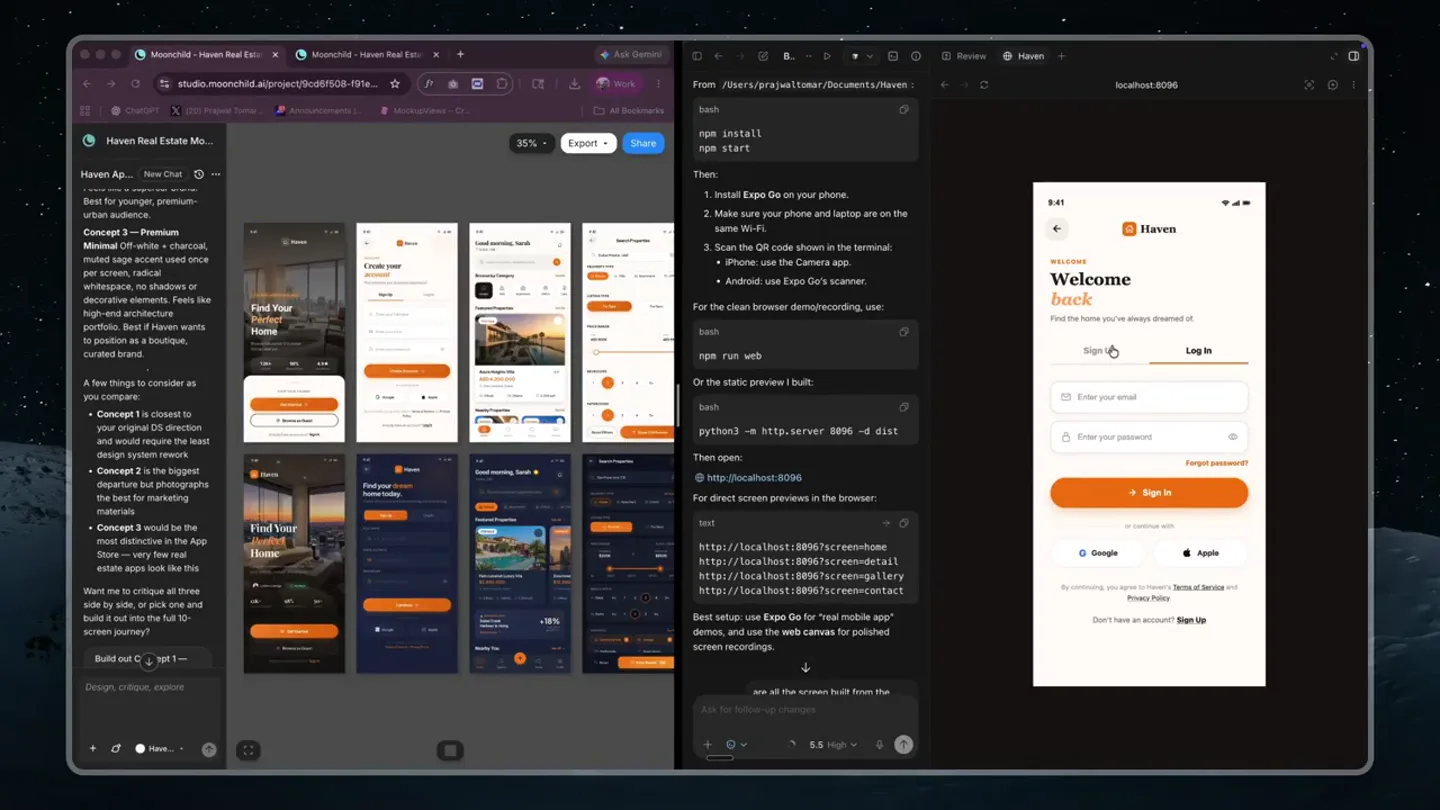
Codex is CRACKED at design now and I don't think people understand how BIG this is. Look at this. Design on the left. Codex shipping pixel-perfect code on the right in under 3 minutes. The whole Fi…
Scene-by-scene timeline & spoken transcript
The Hook
AI-Powered Design to Code Workflow
“(No spoken dialogue — A driving, high-energy electronic score with prominent sub-bass and synth elements begins, establishing a fast pace.)”
- On screen
- Moonchild - Haven Real Estate Mo... Haven App... New Chat Concept 3 - Premium Minimal off-white + Charcoal, muted sage accent used once per screen, radical architectural renderings or decorative elements. Feels like high-end architecture portfolio. Best if Haven wants to position as a boutique, curated brand. A few things to consider as you compare: Concept 1 is closest to your original OS direction and would require the least amount of development. Concept 2 is the biggest departure but photographs the best for marketing materials. Concept 3 would be the most expensive of the App Store, but few real estate apps look like this. Want me to critique all three side by side or pick one and build it out into the full 10-screen journey? Build out C3 Export From: /Users/prajwaltomar/Documents/Haven: bash npm install npm start Then: 1. Install Expo Go on your phone. 2. Make sure your phone and laptop are on the same Wi-Fi. 3. Scan the QR code shown in the terminal. iPhone, use the Camera app. Android, use Expo Go's scanner. For the clean browser demo/recording, use: bash npm run web Or the static preview I built: bash python3 -m http.server 8886 -d dist Then open: http://localhost:8086 For direct screen previews in the browser: text http://localhost:8086/screens/home http://localhost:8086/screens/details http://localhost:8086/screens/gallery http://localhost:8086/screens/contact Best setup: use Expo Go for "real mobile app" demos, and use the web canvas for polished screen recordings. 9:41 Haven Welcome back Find the home you've always dreamed of. Sign Up Log In Enter your email Enter your password Forgot password? Sign In G Google Apple By signing in, you agree to our Terms of Service and Privacy Policy. Don't have an account? Sign Up Create your account Enter your full name Email Address Phone Number Good morning, Sarah Q Search location, neighborhood... Browse by Category House Apartment Office Land Featured Properties For Sale Azure Heights Villa AED 4,200,000 5 4 6,200 5 4 6,200 Nearby Properties See All
- Camera
- The camera is static, presenting a wide shot of a desktop environment with multiple application windows open. The focus is on the rapid, dynamic interaction within the rightmost mobile app emulator.
- Motion
- Rapid UI interaction simulation with quick taps and screen transitions within a mobile app emulator. The left side shows a static AI chat interface and design mockups, while the right side demonstrates real-time app functionality.
Product Reveal
Seamless Property Browsing & Inquiry
“(No spoken dialogue — The electronic score continues with evolving synth pads and arpeggiated melodies, maintaining high energy.)”
- On screen
- 9:41 Search Properties Q Dubai, UAE, Marina Property Type House Apartment Office Listing Type For Sale For Rent Price Range AED 500K AED 5M Bedrooms 1 2 3 4 5+ Bathrooms 1 2 3 4 5+ Reset Filters Show 143 Results Good morning, Sarah Q Search location, neighborhood... Browse by Category House Apartment Office Land Featured Properties For Sale Azure Heights Villa AED 4,200,000 5 4 6,200 5 4 6,200 Nearby Properties See All Saved Properties My Profile Edit Profile Phone Number Location Property Alerts Notification Settings Help Center Contact Us About Haven Sarah Mitchell 7 3 9 Edit Profile Change Password Phone Number Location Property Alerts Notification Settings Contact Agent Description Azure Heights Villa AED 4,200,000 5 4 6,200 Description A masterpiece of contemporary design nestled in the heart of Palm Jumeirah, this exquisite villa boasts spacious living areas, lavish finishes, and panoramic views of the Arabian Gulf. Enjoy seamless indoor-outdoor living with a private infinity pool, sun terrace, and mature landscaped gardens – all mere steps from the pristine beach. Read More Amenities Pool Gym Parking Garden Security AC Your Agent James Harrington Contact Agent
- Camera
- The camera remains static, observing the desktop setup. The mobile app emulator on the right continues to be the focal point, showcasing various screens and user flows.
- Motion
- Fast-paced, sequential screen transitions within the mobile app, demonstrating navigation, search filters, property details, and agent contact forms. The UI elements animate smoothly between states.
Feature Teaser
Interactive Gallery & Profile Management
“(No spoken dialogue — The electronic score intensifies with percussive electronic hits and subtle risers, building anticipation.)”
- On screen
- 9:41 Contact Agent Your Details Your Full Name Email Address Phone Number Your Message I am interested in this property and would like to schedule a viewing at your earliest convenience. Could you please provide more details about the availability and any upcoming open house dates? PREFERRED CONTACT TIME Morning Afternoon Evening Send Inquiry Inquiry Sent Search Properties Q Dubai, UAE, Marina Property Type House Apartment Office Listing Type For Sale For Rent Price Range AED 500K AED 5M Bedrooms 1 2 3 4 5+ Bathrooms 1 2 3 4 5+ Reset Filters Show 143 Results Good morning, Sarah Q Search location, neighborhood... Browse by Category House Apartment Office Land Featured Properties For Sale Azure Heights Villa AED 4,200,000 5 4 6,200 5 4 6,200 Nearby Properties See All Saved Properties My Profile Edit Profile Phone Number Location Property Alerts Notification Settings Help Center Contact Us About Haven Sarah Mitchell 7 3 9 Edit Profile Change Password Phone Number Location Property Alerts Notification Settings Contact Agent Description Azure Heights Villa AED 4,200,000 5 4 6,200 Description A masterpiece of contemporary design nestled in the heart of Palm Jumeirah, this exquisite villa boasts spacious living areas, lavish finishes, and panoramic views of the Arabian Gulf. Enjoy seamless indoor-outdoor living with a private infinity pool, sun terrace, and mature landscaped gardens – all mere steps from the pristine beach. Read More Amenities Pool Gym Parking Garden Security AC Your Agent James Harrington Contact Agent
- Camera
- The camera remains fixed, maintaining the wide desktop view. The mobile app emulator continues to cycle through various screens, highlighting different features.
- Motion
- Fluid transitions between app screens, including a photo gallery view with horizontal scrolling, profile management, and property details. The UI elements respond with subtle, quick animations.
Call to Action
Full-Cycle App Demonstration
“(No spoken dialogue — The electronic score reaches its peak with a powerful sub-bass drop and sustained synth pads, concluding with a sense of accomplishment.)”
- On screen
- 9:41 Contact Agent Your Details Your Full Name Email Address Phone Number Your Message I am interested in this property and would like to schedule a viewing at your earliest convenience. Could you please provide more details about the availability and any upcoming open house dates? PREFERRED CONTACT TIME Morning Afternoon Evening Send Inquiry Inquiry Sent Search Properties Q Dubai, UAE, Marina Property Type House Apartment Office Listing Type For Sale For Rent Price Range AED 500K AED 5M Bedrooms 1 2 3 4 5+ Bathrooms 1 2 3 4 5+ Reset Filters Show 143 Results Good morning, Sarah Q Search location, neighborhood... Browse by Category House Apartment Office Land Featured Properties For Sale Azure Heights Villa AED 4,200,000 5 4 6,200 5 4 6,200 Nearby Properties See All Saved Properties My Profile Edit Profile Phone Number Location Property Alerts Notification Settings Help Center Contact Us About Haven Sarah Mitchell 7 3 9 Edit Profile Change Password Phone Number Location Property Alerts Notification Settings Contact Agent Description Azure Heights Villa AED 4,200,000 5 4 6,200 Description A masterpiece of contemporary design nestled in the heart of Palm Jumeirah, this exquisite villa boasts spacious living areas, lavish finishes, and panoramic views of the Arabian Gulf. Enjoy seamless indoor-outdoor living with a private infinity pool, sun terrace, and mature landscaped gardens – all mere steps from the pristine beach. Read More Amenities Pool Gym Parking Garden Security AC Your Agent James Harrington Contact Agent
- Camera
- The camera remains static, providing a consistent view of the desktop. The mobile app emulator completes its demonstration loop, showcasing the breadth of its features.
- Motion
- A continuous loop of app interactions, demonstrating the full user journey from browsing to inquiry, profile management, and gallery viewing. The transitions are quick and responsive, emphasizing efficiency.
Motion design primitives
Synthesizable in Remotion · key components of the ai-dev-desktop-app-showcase template.
MobileAppScreenCycle
A mobile application emulator rapidly cycles through various screens, simulating user interaction like tapping, scrolling, and form submission. Screens transition quickly, often with a subtle slide or fade.
+ Code construction recipe
Utilize Remotion's `Sequence` and `AbsoluteFill` components. Each app screen is a separate `AbsoluteFill` child. Use `interpolate` for `opacity` and `transform` (e.g., `translateX`) to create quick slide-in/out or fade transitions between screens. Manage timing with `spring` for a snappy feel on taps and `delay` for sequential screen reveals.
DesktopEnvironmentShowcase
A static wide shot of a desktop environment featuring multiple open application windows, with one primary application (a mobile emulator) dynamically showcasing its features.
+ Code construction recipe
Render a static background image of the desktop. Overlay `Img` or `Video` components for the static application windows (e.g., AI chat, code editor). Position the `MobileAppScreenCycle` component within a designated area on the desktop to simulate the mobile emulator. No camera motion, just content updates.
UIScrollAndTapFeedback
Within the mobile app, elements like buttons highlight on tap, and content areas scroll smoothly. Input fields show text entry, and forms indicate submission success.
+ Code construction recipe
For button taps, use `spring` to animate `scale` or `background-color` on click events. Simulate scrolling by animating `translateY` of content within a masked container. Text input can be faked by rapidly changing `Text` component content. Form submission success can be a quick `Checkmark` icon animation with `spring` for bounce.
Style DNA & aesthetic system
Visual aesthetic
Typography
Motion
Special effects
Pacing & rhythm
Conceptual story rhythm
- 1
The Setup
Purpose. Introduce the context of the AI-powered design workflow and the product's environment.
Execution. A wide, static shot of a developer's desktop with multiple tools open, highlighting the AI chat and code editor alongside the mobile app.
- 2
Core Product Demonstration
Purpose. Showcase the primary features and user journey of the mobile application.
Execution. Rapid cycling through key app screens: login, home, search, property details, and inquiry forms, all within the mobile emulator.
- 3
Feature Deep Dive
Purpose. Highlight specific interactive elements and advanced functionalities.
Execution. Demonstrating the photo gallery, profile management, and filter options with quick, responsive UI animations.
- 4
Efficiency & Completion
Purpose. Conclude by emphasizing the product's seamlessness and the full cycle of user interaction.
Execution. A continuous loop of app interactions, reinforcing the product's completeness and the speed of the design-to-code process.
Remix in Animatiq Studio
Master remix prompt · agent-ready
Sample remix
Objective
Launch a new AI-powered financial planning app called 'WealthFlow' that helps users manage investments and budgets.How the recipe adapts
The 'MobileAppScreenCycle' primitive will be adapted to showcase WealthFlow's specific screens: a secure login with biometric prompt, a personalized dashboard with real-time investment graphs, a budget creation flow with interactive sliders, and a goal-setting interface. The 'DesktopEnvironmentShowcase' will feature a static AI chat window generating financial advice and a code editor showing Python scripts for financial algorithms. The 'UIScrollAndTapFeedback' will highlight interactive elements like adding a new investment, adjusting budget categories, and confirming a financial goal. The color palette will shift to a professional blue and green scheme, maintaining the high-energy electronic score.Remix blueprint · ai-dev-desktop-app-showcase
Scene durations (4 scenes, 41.9s)
Key Remotion components
Related Creative Tools Product Launches
Explore all Creative Tools launches →
Anthropic Labs launches Claude Design, which turns conversation into prototypes, slides and one-pagers, powered by Claude Opus 4.7.

A vibe design partner with an AI-native canvas for turning ideas into UI.

Your work tools in Claude are now available on mobile. Explore Figma designs, create Canva slides, check Amplitude dashboards, all from your phone. Give it a try: