
Compositor · Launch Video Breakdown: Hook, Pacing & Motion Design
Compositor is a free, open-source Photoshop-like image editor. Robbie Tilton built it to leave Adobe, then released it with the compositing tools he actually uses.
Scene-by-scene timeline & spoken transcript
The Hook
Futuristic UI & Compositing Reveal
“(No spoken dialogue — A sustained, evolving synth pad with a high-frequency sweep and subtle sub-bass rumble creates an atmospheric opening.)”
- On screen
- (No on-screen text)
- Camera
- Static wide shot of a stylized image editor UI, then a slow zoom into a hand holding a glowing device.
- Motion
- UI elements animate in, revealing layers and tools. Color shifts from blue to red, indicating a transformation or effect. The glowing device is composited into the scene.
Product Reveal
Product Feature Showcase
“(No spoken dialogue — A percussive synth arpeggio enters, establishing a driving rhythm, followed by a significant sub-bass drop/impact at 0:08, marking an energetic transition.)”
- On screen
- 01
- Camera
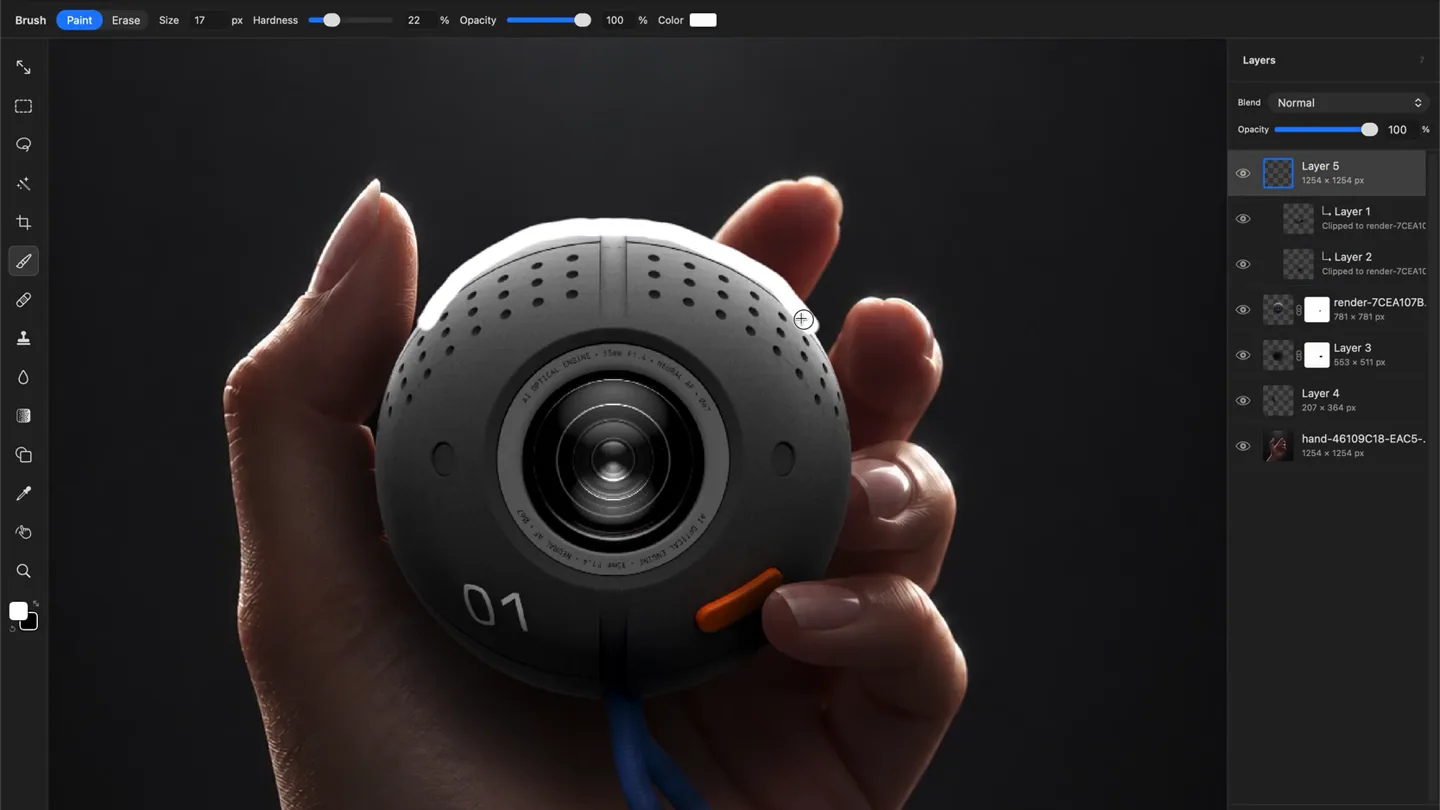
- Close-up on a hand holding a spherical camera, with subtle camera movements to highlight details.
- Motion
- UI overlays demonstrate editing actions like painting, erasing, and applying filters (Gaussian Blur, Motion Blur). Text '01' appears and is manipulated, showcasing precise control.
Feature Teaser
Advanced Editing Capabilities
“(No spoken dialogue — Various electronic sound effects, including risers and sweeps, build anticipation.)”
- On screen
- (No on-screen text)
- Camera
- Dynamic close-ups on specific areas of an image being edited, such as clothing textures and facial features.
- Motion
- Demonstrates advanced tools like Lasso, Polygonal selection, and Content-Aware healing. The UI elements are integrated seamlessly, showing real-time adjustments and effects.
Call to Action
Final Product Reveal & Call
“(No spoken dialogue — Risers and sweeps lead into an impactful sub-bass drop at 0:30. The track concludes with a final impactful sub-bass hit at 0:34.)”
- On screen
- (No on-screen text)
- Camera
- Rapid cuts between different editing scenarios, culminating in a final product shot or stylized graphic.
- Motion
- Fast-paced montage of editing actions, emphasizing speed and efficiency. The overall visual style reinforces the product's modern and powerful capabilities.
Motion design primitives
Synthesizable in Remotion · key components of the futuristic-ui-compositing-reveal template.
UIOverlayReveal
UI elements like toolbars, layer panels, and dialog boxes animate into view with a clean, precise motion, often accompanied by subtle glows or color shifts.
+ Code construction recipe
Use `interpolate` for position and opacity, `spring` for subtle bounce on entry. SVG filters for glows and blurs. Coordinate with `AbsoluteFill` for UI placement.
ContentAwareTransform
Specific image areas are highlighted and transformed (e.g., healing, scaling, color adjustment) with a visual indication of the tool's effect, often using a grid or selection outline.
+ Code construction recipe
Utilize `Canvas` for direct pixel manipulation or `Image` components with `CSS filters` and `clip-path` for effects. Animate `transform` properties and `opacity` for selection outlines.
DynamicColorShift
The overall color palette of a scene or specific elements shifts dramatically, often from one primary color to another (e.g., blue to red), indicating a change in mode or effect.
+ Code construction recipe
Implement `interpolate` on `filter: hue-rotate()` or `background-color` properties. Use `useCurrentFrame` to synchronize color changes with audio cues for impact.
Style DNA & aesthetic system
Visual aesthetic
Typography
Motion
Special effects
Pacing & rhythm
Conceptual story rhythm
- 1
The Digital Canvas
Purpose. Introduce the product's core functionality and visual style.
Execution. Opening with a wide shot of the Compositor UI, demonstrating basic layer manipulation and gradient application, setting a futuristic tone with blue lighting.
- 2
Precision & Power
Purpose. Showcase the detailed control and advanced tools available.
Execution. Close-ups on specific editing actions like brush strokes, selections, and filter adjustments, highlighting the product's capability for fine-tuning.
- 3
Transformative Effects
Purpose. Illustrate the dramatic impact of Compositor's features.
Execution. Rapid color shifts (blue to red), application of motion blur and Gaussian blur, and content-aware healing, demonstrating powerful image transformations.
- 4
Seamless Workflow
Purpose. Convey the efficiency and fluidity of the editing process.
Execution. A montage of quick cuts showing various tools in action, emphasizing a smooth and intuitive user experience.
Remix in Animatiq Studio
Master remix prompt · agent-ready
Sample remix
Objective
Launch a new AI-powered music production software.How the recipe adapts
The UIOverlayReveal primitive would be adapted to show Harmonix's track arrangement and effects panels animating in. ContentAwareTransform would visualize AI-driven audio waveform manipulation, like automatically cleaning up vocals or generating drum patterns. DynamicColorShift would indicate changes in musical modes or the application of different audio effects, shifting from cool blues for ambient sounds to warm reds for energetic beats.Remix blueprint · futuristic-ui-compositing-reveal
Scene durations (4 scenes, 35.1s)
Key Remotion components
Related Creative Tools Product Launches
Explore all Creative Tools launches →
A vibe design partner with an AI-native canvas for turning ideas into UI.

We heard you wanted to use Codex rate limit resets on your own time. Starting today, we’re rolling out the ability to save rate limit resets to use later. We’re starting Go, Plus, Pro, and Business
Introducing Framer 3.0 with Agents, Branching, Community, and an all-new design.