
Bear Liu · Launch Video Breakdown: Hook, Pacing & Motion Design
CUBE Type is a small web tool: type a few words and they come out as isometric block letters you can style and export for posters, social posts, stickers, and slide titles.
Scene-by-scene timeline & spoken transcript
The Hook
Intriguing Chat Message Reveal
“(No spoken dialogue — Upbeat chiptune music begins with a 'coin collect' sound effect as the message appears.)”
- On screen
- Molly online Did you make this?! 9:41 Message
- Camera
- Static, centered view of a mobile chat interface.
- Motion
- Text message bubble animates in from the bottom, followed by an image reveal with a subtle pop effect.
Product Reveal
Web Tool Introduction and Basic Typing
“(No spoken dialogue — Chiptune music continues, with a 'typing' sound effect as the URL is entered.)”
- On screen
- typeincube.com CUBE Type Free Isometric Typography Generator hello Wraps at 12 characters. Your own line breaks are kept. COMPOSITION STYLE PALETTE
- Camera
- Zoom out from a search bar to reveal a full desktop browser window, then a slight pan to focus on the text input area.
- Motion
- Seamless transition from mobile chat to desktop browser. Cursor animation and text typing effect, followed by an instant render of isometric blocks.
Feature Teaser
Dynamic Styling and Composition Showcase
“(No spoken dialogue — Chiptune music continues, with 'click' and 'selection' sound effects accompanying UI interactions.)”
- On screen
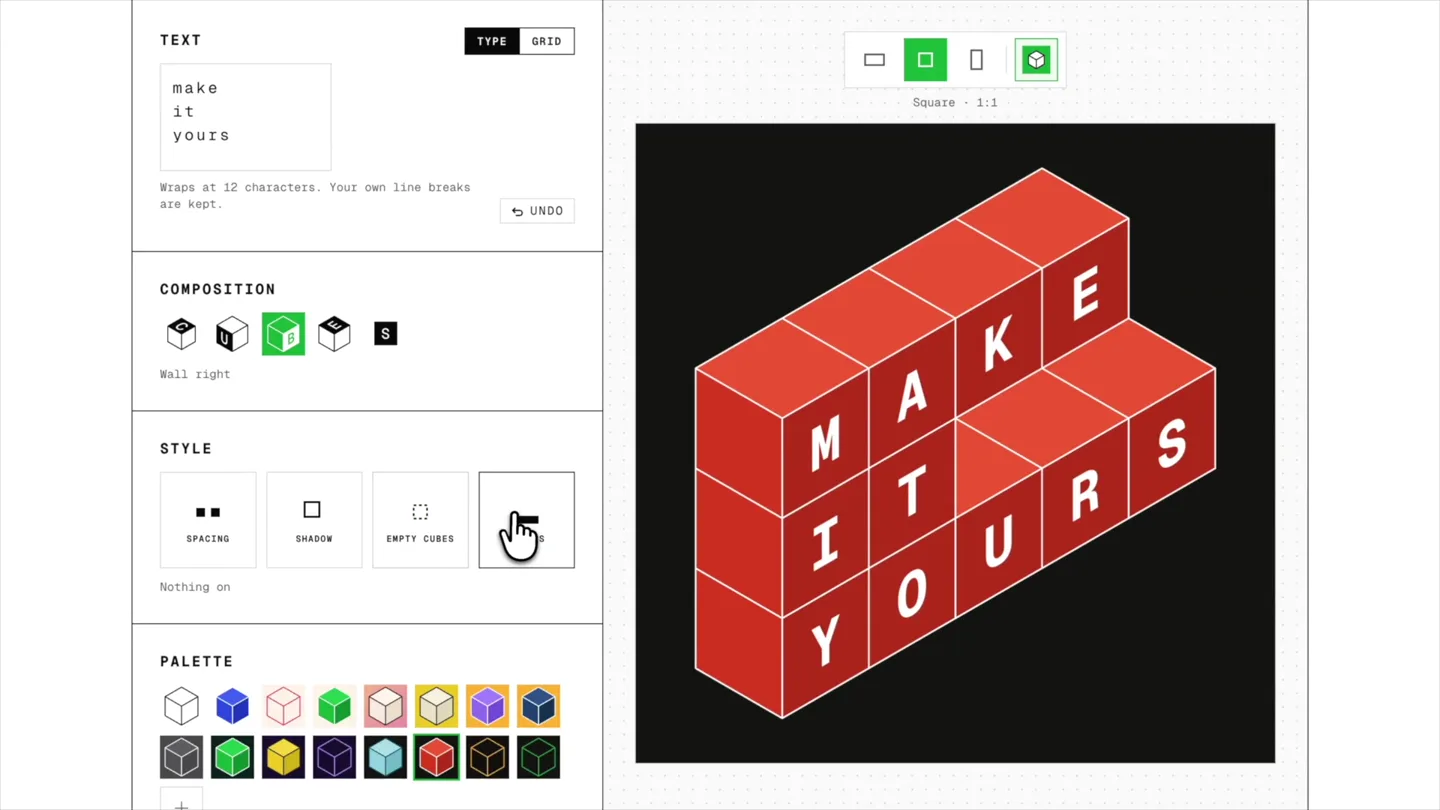
- TEXT make it yours COMPOSITION STYLE PALETTE Wraps at 12 characters. Your own line breaks are kept. UNDO Spacing Shadow Empty cubes Stairs Square - 1:1 Portrait - 1:16 ALL YOU NEED IS LOVE Nothing on Riso pink Ggreen on deep sea
- Camera
- Static view of the web application, with occasional subtle zooms on interactive elements.
- Motion
- Rapid-fire demonstration of UI interactions: clicking composition options, style changes (shadow, stairs), and palette selections. Isometric blocks instantly reconfigure and recolor with each click, often accompanied by a 'jump' or 'pop' animation.
Call to Action
Creative Possibilities and Final CTA
“(No spoken dialogue — Chiptune music builds slightly, incorporating a 'game over' sound effect briefly before resolving with a final 'coin collect' sound.)”
- On screen
- ONE MORE THING I LOVE CUBE TYPE CUBE TYPE A tiny playground for isometric typography typeincu
- Camera
- Dynamic camera movements, including pans, zooms, and rotations around the isometric text blocks, culminating in a static shot of the product name and URL.
- Motion
- Fast-paced montage of various styled isometric text blocks, showcasing different layouts and colors. Text typing animation for the final call to action, with a blinking cursor.
Motion design primitives
Synthesizable in Remotion · key components of the retro-isometric-ui-showcase template.
IsometricBlockPop
Individual isometric blocks or entire compositions appear with a slight scale-up and bounce, simulating a physical pop-up or build effect. This is often triggered by a UI interaction.
+ Code construction recipe
Utilize `spring()` for scale and Y-axis translation, with a slight overshoot and damping. Combine with `Sequence` and `AbsoluteFill` for staggered block reveals. SVG filters for subtle shadow effects.
InstantPaletteSwap
The color scheme of the isometric text blocks and sometimes the background instantly changes upon user interaction, creating a vibrant, immediate visual feedback loop.
+ Code construction recipe
Implement `interpolateColor()` or direct CSS variable updates on click events. Ensure `useCurrentFrame()` and `durationInFrames()` are used for smooth, but quick, color transitions if not instantaneous. Use `AbsoluteFill` for background color changes.
RetroTypewriterCursor
A block-style cursor blinks and text appears character by character, mimicking a classic typewriter or terminal input, often accompanied by a typing sound effect.
+ Code construction recipe
Use `Sequence` and `spring()` for character reveal with `delay`. Implement a blinking cursor using `interpolate()` with `loop: true` for opacity. `measureText()` for accurate character positioning.
Style DNA & aesthetic system
Visual aesthetic
Typography
Motion
Special effects
Pacing & rhythm
Conceptual story rhythm
- 1
The 'Wow' Moment
Purpose. Immediately capture attention and demonstrate the product's core output in an engaging, relatable context.
Execution. A chat message reveals an impressive isometric text image, sparking curiosity and a desire to know 'how'.
- 2
The 'How-To' Unveiling
Purpose. Showcase the simplicity and accessibility of the tool, guiding the user through the basic creation process.
Execution. A seamless transition to the web app, demonstrating typing and the instant rendering of isometric text.
- 3
The 'Possibilities' Montage
Purpose. Highlight the versatility and creative potential of the tool by rapidly demonstrating various styling options.
Execution. Quick cuts and interactive UI elements showcasing different compositions, colors, and styles of the isometric text.
- 4
The 'Call to Create'
Purpose. Reinforce the product's value proposition and provide a clear path for users to try it themselves.
Execution. A final sequence of dynamic isometric text animations, culminating in the product name and URL with a clear call to action.
Remix in Animatiq Studio
Master remix prompt · agent-ready
Sample remix
Objective
A new web-based 'Pixel Art Generator' called 'PixelForge' that converts images into pixel art and allows custom editing.How the recipe adapts
The opening chat message would feature a friend sharing a stunning pixel art image created with PixelForge. The product reveal would show a user uploading an image and instantly seeing it pixelated. The feature teaser would rapidly cycle through different pixelation styles, color palettes, and brush tools, with each click instantly updating the canvas. The call to action would display 'PixelForge' in pixel art style, followed by the website URL, all accompanied by similar chiptune music and 8-bit sound effects.Remix blueprint · retro-isometric-ui-showcase
Scene durations (4 scenes, 48s)
Key Remotion components
Related Creative Tools Product Launches
Explore all Creative Tools launches →
A vibe design partner with an AI-native canvas for turning ideas into UI.

We heard you wanted to use Codex rate limit resets on your own time. Starting today, we’re rolling out the ability to save rate limit resets to use later. We’re starting Go, Plus, Pro, and Business
Introducing Framer 3.0 with Agents, Branching, Community, and an all-new design.