
Justine Moore · Launch Video Breakdown: Hook, Pacing & Motion Design
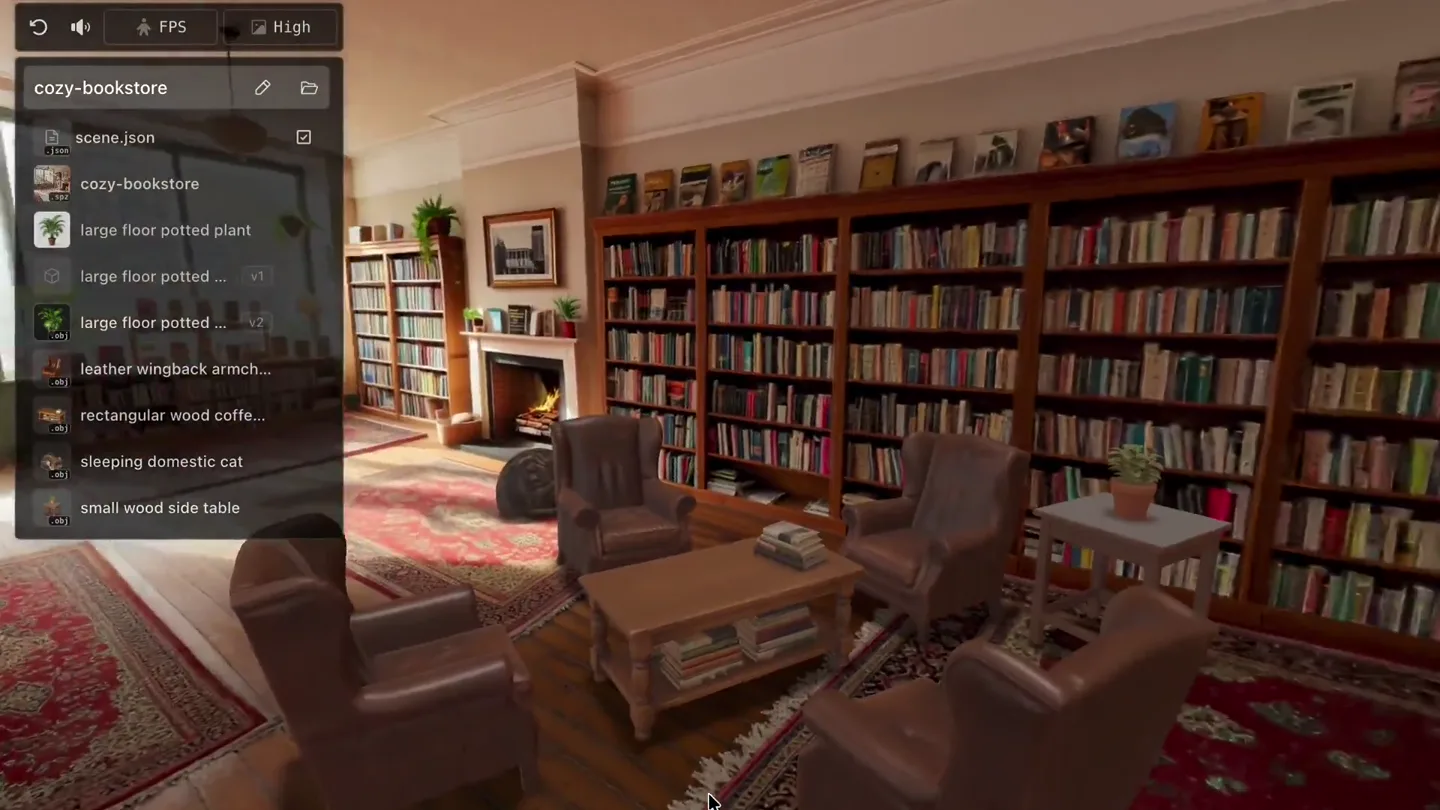
Generate an interactive 3D world I opened this project in Cursor and uploaded an image of a cozy bookstore. The agent then generated the environment, chose objects to turn into 3D meshes, added col…
Scene-by-scene timeline & spoken transcript
The Hook
Explore the 3D World
“(No spoken dialogue — The audio features a low-frequency, sustained sub-bass drone and ambient synth pads, creating a calm atmosphere.)”
- On screen
- MOVE AROUND THE WORLD
- Camera
- Smooth, slow pan and tilt within a 3D rendered bookstore environment, simulating user navigation.
- Motion
- In-engine camera movement, 3D environment rendering, and animated text overlay.
Product Reveal
Wireframe Visualization
“(No spoken dialogue — The audio features a low-frequency, sustained sub-bass drone and ambient synth pads, creating a calm atmosphere.)”
- On screen
- VIEW WIREFRAMES
- Camera
- The camera continues a slow, deliberate pan, revealing the underlying wireframe structure of the 3D scene.
- Motion
- Real-time rendering mode toggle (textured to wireframe), in-engine camera movement, and animated text overlay.
Feature Teaser
Object Interaction & Physics
“(No spoken dialogue — The audio features a low-frequency, sustained sub-bass drone and ambient synth pads, creating a calm atmosphere.)”
- On screen
- INTERACT WITH OBJECTS
- Camera
- The camera maintains a steady, slightly zoomed-in perspective as objects within the scene are manipulated.
- Motion
- Physics-based object interaction (gravity, collision), 3D object animation, and animated text overlay.
Call to Action
AI-Generated Content
“(No spoken dialogue — The audio features a low-frequency, sustained sub-bass drone and ambient synth pads, creating a calm atmosphere.)”
- On screen
- THE AGENT CREATED A 3D CAT 😂
- Camera
- The camera holds a static wide shot, focusing on the emergence and placement of a new 3D object.
- Motion
- 3D object instantiation, subtle object animation (landing), and animated text overlay with emoji.
Motion design primitives
Synthesizable in Remotion · key components of the interactive-3d-showcase template.
InEngineCameraPan
A smooth, continuous camera movement within a 3D environment, simulating user exploration or a guided tour.
+ Code construction recipe
Utilize Remotion's <ThreeCanvas> component with a controlled camera rig. Animate camera position and rotation using `interpolate` with `ease-in-out` curves for smooth starts and stops, or `spring` for more natural, physics-based motion.
WireframeToggleEffect
A seamless transition between a fully textured 3D scene and its underlying wireframe representation, often accompanied by a change in lighting or shading.
+ Code construction recipe
Implement a custom shader or post-processing effect within <ThreeCanvas> that interpolates between a standard PBR material and a wireframe material. Use `interpolate` to control the transition duration and easing, potentially fading in a grid overlay.
PhysicsObjectInteraction
3D objects within the scene react to simulated forces, such as gravity or user input, demonstrating dynamic and interactive capabilities.
+ Code construction recipe
Integrate a physics engine (e.g., Rapier, Cannon.js) with <ThreeCanvas>. Animate object positions and rotations based on physics simulations, triggered by user actions or timed events. Use `spring` for realistic bounce and settling.
Style DNA & aesthetic system
Visual aesthetic
Typography
Motion
Special effects
Pacing & rhythm
Conceptual story rhythm
- 1
Immersive Exploration
Purpose. Introduce the interactive 3D environment and its core navigation.
Execution. Smooth camera pan through a detailed 3D bookstore, with an overlay 'MOVE AROUND THE WORLD'.
- 2
Technical Transparency
Purpose. Reveal the underlying technology and structure of the 3D world.
Execution. Transition from textured scene to wireframe view, highlighting the mesh construction with 'VIEW WIREFRAMES'.
- 3
Dynamic Interaction
Purpose. Demonstrate the ability to manipulate and interact with objects within the environment.
Execution. Physics-based interaction where furniture is knocked over, accompanied by 'INTERACT WITH OBJECTS'.
- 4
AI Creation Showcase
Purpose. Highlight the generative AI capabilities of the product.
Execution. A 3D cat is generated and placed in the scene, with the text 'THE AGENT CREATED A 3D CAT 😂'.
Remix in Animatiq Studio
Master remix prompt · agent-ready
Sample remix
Objective
A new AI-powered architectural visualization tool that generates building exteriors from sketches.How the recipe adapts
The recipe adapts by showcasing a 3D building exterior. The camera smoothly orbits the generated building. A wireframe toggle reveals the underlying architectural mesh. Users interact by dragging and dropping facade elements, which snap into place with physics. The final scene shows the AI generating a unique rooftop garden, with text 'AI-GENERATED ROOFTOP OASIS'.Remix blueprint · interactive-3d-showcase
Scene durations (4 scenes, 20s)
Key Remotion components
Related Developer Tools Product Launches
Explore all Developer Tools launches →
xAI opens voice cloning on its API: build a custom voice in about two minutes or pick from 80+ voices in 28 languages.

Claude can now operate your Mac, opening apps, browsing and filling spreadsheets, as a research preview in Cowork and Claude Code.

Agentic CLI for coding, building apps, and automating workflows.