
Cursor · Launch Video Breakdown: Hook, Pacing & Motion Design
Cursor can now create new components and frontends in Figma using your team's design system.
Scene-by-scene timeline & spoken transcript
The Hook
AI-Powered Figma Design Prompt
“(No spoken dialogue — Typing sound effect implied by text animation)”
- On screen
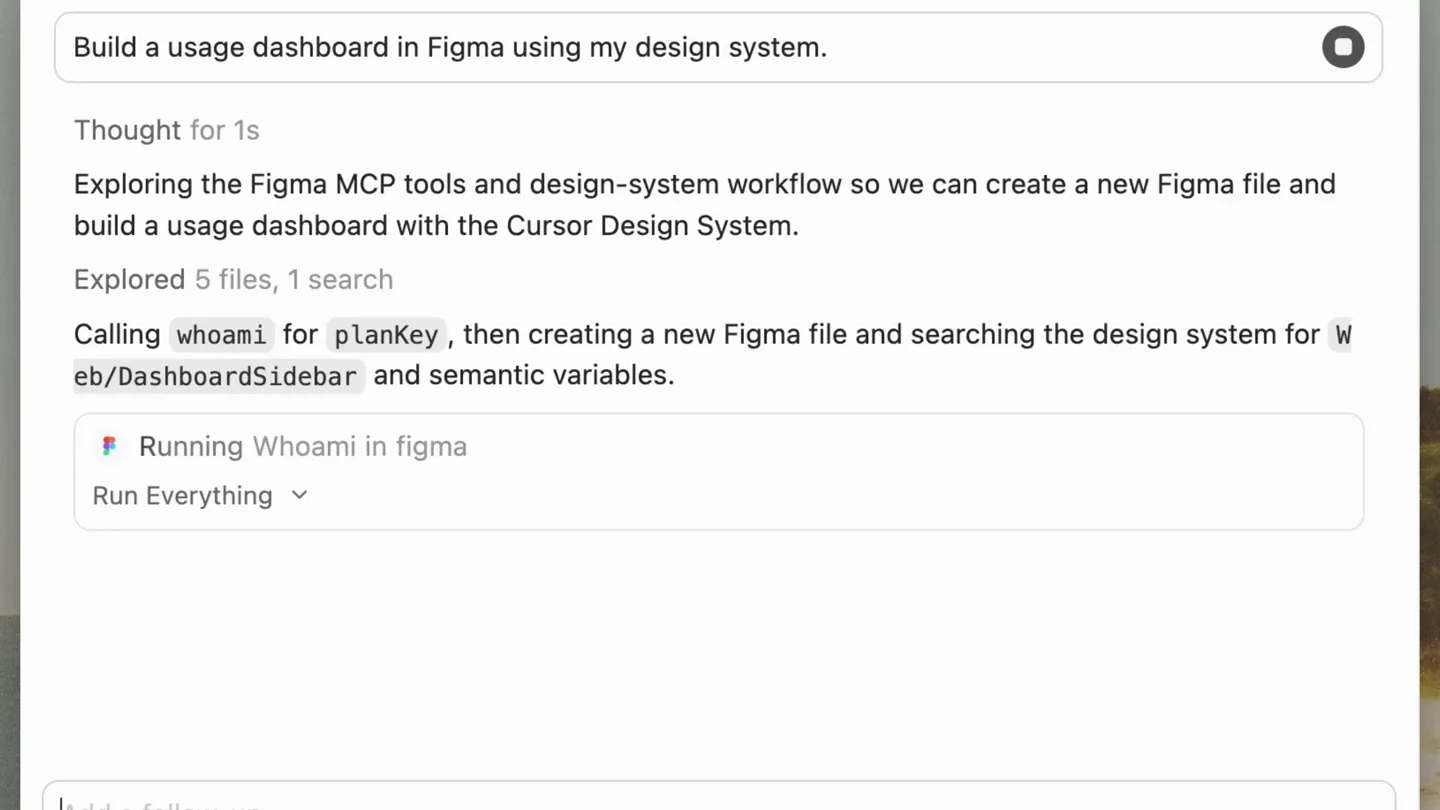
- Build a usage dashboard in Figma using my design system.
- Camera
- Static, full-screen view of a chat interface within a browser window.
- Motion
- Typing text animation, simulating real-time input.
Product Reveal
AI Agent Executes Design System Tasks
“(No spoken dialogue — Rapid scrolling and text generation sound effects implied)”
- On screen
- Usage dashboard design in Figma Build a usage dashboard in Figma using my design system. Thought for 1s Exploring the Figma MCP tools and design-system workflow so we can create a new Figma file and build a usage dashboard with the Cursor Design System. Explored 5 files, 1 search Calling whoami for planKey , then creating a new Figma file and searching the design system for Web/DashboardSidebar and semantic variables. Running Whoami in figma Run Everything Ran Whoami in figma Thought briefly Ran Create New File in figma Thought briefly Running Search Design System in figma Ran Search Design System in figma Ran Search Design System in figma Thought briefly Ran Search Design System in figma Run Everything Updating color variables I'm updating the sidebar component's background and text colors using the new variable values. I'm importing Figma variables using figma.variables.importVariableByKeyAsync for the sidebar colors. I'm adjusting the Figma variable binding API call to properly set the color variable using importVariableByKeyAsync . I'm binding color variables to fills and strokes using setBoundVariableForPaint with the correct API signature. I'm correcting the variable binding for stroke colors, using stroke binding type and verifying TextNode fills for text color. Thinking with a fallback to generic 'Inter' font. Creating root frame I'm creating a horizontal root frame named 'Usage dashboard' with dimensions 1440x900 and setting up its layout properties. Setting up sidebar I'm setting up the sidebar with fixed width 260 and configuring its layout properties. I'm configuring the sidebar layout with vertical auto-layout, grow factor 1, and 32px padding. I'm implementing the sidebar layout with vertical auto-layout and 32px padding. Setting up sidebar 9s Building the dashboard with Web/DashboardSidebar , semantic color variables, KPIs, a bar chart (plot frame, baseline, labels), and a small table—one use_figma script. Explored 2 files Ran Get Metadata in figma Adjusting chart layout 3s Fixing a layout issue: the chart section hugged to 100px width. Stretching it to full main width. Ran Use Figma in figma Thought briefly Ran Get Metadata in figma Run Everything Planning next moves Ran Use Figma in figma Thought briefly Ran Get Metadata in figma Thought briefly Ran Use Figma in figma Explored 1 search Ran Get Metadata in figma Run Everything Thought briefly Here's what's in place: Figma file Usage dashboard (wZG2MLeMTrGpLLvUxUIreK) — created under your Anysphere org (full seat). What's on the screen 1. Shell — Web/DashboardSidebar from Cursor Design System (imported as a component set instance, 260px wide). 2. Tokens — Classic cursorSemantic/* colors bound to frames, text, strokes, and chart bars: Surfaces: bg/editor, bg/elevated Text: text/primary, text/secondary, text/tertiary Borders: border/primary, border/secondary
- Camera
- Static, full-screen view of the chat interface. Content scrolls rapidly upwards.
- Motion
- Fast vertical scrolling, simulating an AI agent's rapid thought process and execution. Text appears instantly or with a subtle fade-in.
Feature Teaser
Figma Integration & Component Manipulation
“(No spoken dialogue — UI interaction sound effects implied)”
- On screen
- Usage dashboard - Figma Hi, Edwin Share Design Prototype 24% Page 1 Layers Usage dashboard Web/DashboardSidebar Section Main Section Container List Section Padded-Divider Section Padded-Divider Dashboard/Cell Icon/D... Label Padded-Divider Integrations Pro Cloud Agents Pro Bugbot Pro Usage Log Billing & Invoices Docs Contact DashboardSidebar Position Alignment X 0 Y 0 Rotation 0° Auto layout Resizing W Fill H Hug Alignment Gap 15 Padding Clip content Flow 00 00 00 00 Gap 10 lg Cursor System (Core) Position X 8 Y 5 Rotation 0° Auto layout Resizing W 18 H 18 Alignment Gap 10
- Camera
- Zoom-in and pan across the Figma interface, focusing on specific UI elements and the generated design.
- Motion
- Rapid zoom and pan, highlighting specific UI elements and the dynamic creation/manipulation of design components within Figma. Cursor interaction is clearly visible.
Motion design primitives
Synthesizable in Remotion · key components of the ai-code-gen-showcase template.
AITypingText
Text appears character by character, simulating a user typing, followed by a rapid burst of generated text that scrolls quickly.
+ Code construction recipe
Use `Sequence` and `spring` for character-by-character reveal. For generated text, use `interpolate` for `opacity` and `translateY` combined with `overflow: hidden` on a container to simulate fast scrolling.
RapidScrollFeed
A continuous, fast vertical scroll of text content within a fixed viewport, giving the impression of an AI processing information rapidly.
+ Code construction recipe
Implement a `ScrollView` or a custom component with `translateY` animation driven by `interpolate` over a short duration, creating a high-speed scroll effect. Ensure content is pre-rendered or efficiently loaded.
FigmaUIZoomPan
Dynamic camera movement involving quick zooms into specific UI elements and smooth pans across the interface to follow cursor interactions.
+ Code construction recipe
Utilize `interpolate` for `scale` and `translateX`/`translateY` properties on a parent container or a `Canvas` element. Coordinate these animations with cursor movement and UI element highlights using `spring` for smooth transitions.
Style DNA & aesthetic system
Visual aesthetic
Typography
Motion
Special effects
Pacing & rhythm
Conceptual story rhythm
- 1
The Prompt
Purpose. Introduce the user's objective and the AI's input mechanism.
Execution. Typing animation of a clear, concise command into a chat interface.
- 2
AI Execution
Purpose. Demonstrate the AI's rapid processing and problem-solving capabilities.
Execution. Fast-scrolling text output detailing the AI's internal steps and actions.
- 3
Figma Integration
Purpose. Showcase the AI's direct impact and creation within the Figma environment.
Execution. Transition to Figma, with the AI's output (a dashboard) being built and manipulated.
- 4
Component Refinement
Purpose. Highlight the AI's ability to work with design systems and refine components.
Execution. Zoomed-in views of Figma, showing the AI adjusting sidebar components and properties.
Remix in Animatiq Studio
Master remix prompt · agent-ready
Sample remix
Objective
Generate a responsive navigation bar with a dark mode toggle for a new e-commerce site.How the recipe adapts
Remix blueprint · ai-code-gen-showcase
Scene durations (4 scenes, 25s)
Key Remotion components
Related Creative Tools Product Launches
Explore all Creative Tools launches →
Anthropic Labs launches Claude Design, which turns conversation into prototypes, slides and one-pagers, powered by Claude Opus 4.7.

A vibe design partner with an AI-native canvas for turning ideas into UI.

Your work tools in Claude are now available on mobile. Explore Figma designs, create Canva slides, check Amplitude dashboards, all from your phone. Give it a try: