
Cursor · Launch Video Breakdown: Hook, Pacing & Motion Design
Side chats let you ask questions and explore ideas without interrupting your main conversation. Each side chat is a durable agent conversation you can @-mention back into the main thread.
Scene-by-scene timeline & spoken transcript
The Hook
AI Agent Workflow Introduction
“(No spoken dialogue — High-energy riser/sweep leading into a sub-bass drop/impact, followed by a sustained, evolving electronic pad.)”
- On screen
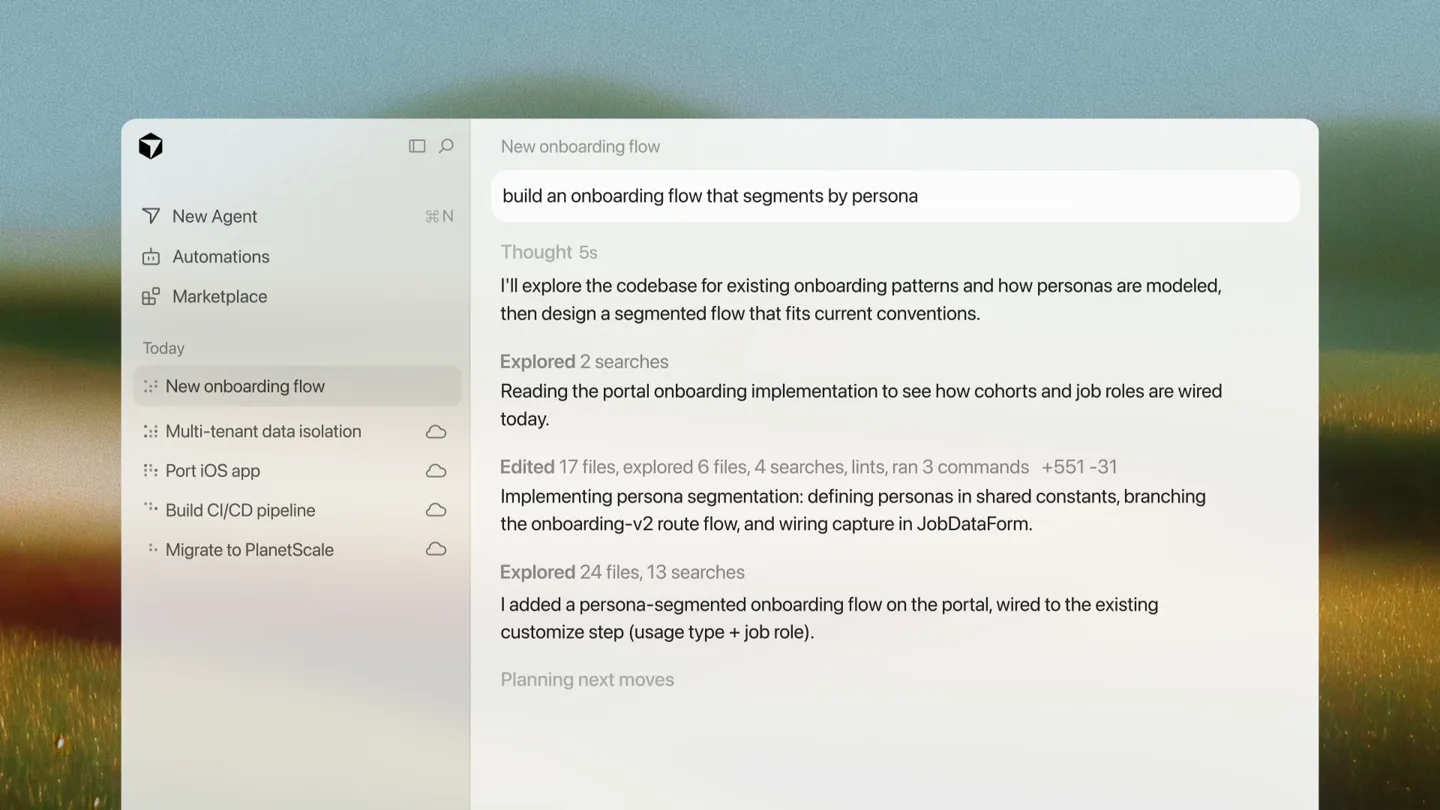
- New onboarding flow build an onboarding flow that segments by persona Thought 5s I'll explore the codebase for existing onboarding patterns and how personas are modeled, then design a segmented flow that fits current conventions. Explored 2 searches Reading the portal onboarding implementation to see how cohorts and job roles are wired today. Edited 17 files, explored 6 files, 4 searches, lints, ran 3 commands +551 -31 Implementing persona segmentation: defining personas in shared constants, branching the onboarding-v2 route flow, and wiring capture in JobDataForm. Explored 24 files, 13 searches I added a persona-segmented onboarding flow on the portal, wired to the existing customize step (usage type + job role). Planning next moves New Agent Automations Marketplace Today New onboarding flow Multi-tenant data isolation Port iOS app Build CI/CD pipeline Migrate to PlanetScale
- Camera
- Static wide shot of the Cursor IDE, showcasing an AI agent's thought process and actions.
- Motion
- Text typing animation, content scrolling, and subtle UI element fades.
Product Reveal
Introducing Side Chats
“(No spoken dialogue — Significant sub-bass impact with a percussive synth element. High-frequency sweep/riser builds.)”
- On screen
- cohorts and job roles Add to Side Chat
- Camera
- Close-up zoom on a specific text segment within the IDE, followed by a slight pan to reveal a UI element.
- Motion
- Smooth zoom and pan, highlight animation on text, and a pop-up UI element with a subtle spring animation.
Feature Teaser
Side Chat Interaction
“(No spoken dialogue — Sharp, percussive synth hit and another sub-bass impact. Pulsating rhythm and atmospheric pads continue.)”
- On screen
- New onboarding flow build an onboarding flow that segments by persona Thought 5s I'll explore the codebase for existing onboarding patterns and how personas are modeled, then design a segmented flow that fits current conventions. Explored 2 searches Reading the portal onboarding implementation to see how cohorts and job roles are wired today. Edited 17 files, explored 6 files, 4 searches, lints, ran 3 commands +551 -31 Implementing persona segmentation: defining personas in shared constants, branching the onboarding-v2 route flow, and wiring capture in JobDataForm. Explored 24 files, 13 searches I added a persona-segmented onboarding flow on the portal, wired to the existing customize step (usage type + job role). Planning next moves New Agent Automations Marketplace Today New onboarding flow Multi-tenant data isolation Port iOS app Build CI/CD pipeline Migrate to PlanetScale Changes New Side Chat "cohorts and job roles" what k Cursor Grok 4.5 High Fast Send follow-up Data on personas what kind of data do we have on personas? Planning next moves
- Camera
- Wider shot of the IDE, revealing a new 'Side Chat' panel appearing on the right. Text input and AI response generation are shown.
- Motion
- Panel slide-in animation, text typing, and dynamic content population within the chat interface.
Call to Action
Feature Announcement
“(No spoken dialogue — Sustained riser building tension, resolving into a final sub-bass impact.)”
- On screen
- Side Chats Available Now
- Camera
- Static, centered shot of text on a clean background.
- Motion
- Text reveal with a subtle fade-in and scale animation, followed by a secondary text reveal.
Call to Action
Brand Logo Reveal
“(No spoken dialogue — Shimmering, sustained synth chord that fades out.)”
- On screen
- (No on-screen text)
- Camera
- Static, centered shot of the evolving logo.
- Motion
- Abstract geometric shape transformation, revealing the brand logo with a clean, precise animation.
Motion design primitives
Synthesizable in Remotion · key components of the cursor-side-chats-launch template.
AITypingScroll
Simulates AI agent activity with rapid text typing, content scrolling, and dynamic updates within a code editor or chat interface. New lines of text appear as if being generated in real-time.
+ Code construction recipe
Use Remotion's `Sequence` and `interpolate` for text visibility and scroll position. Implement a `typewriter` effect for character-by-character reveal. Use `spring` for subtle bounce on new content appearance. `AbsoluteFill` for the IDE background.
ContextualHighlightPop
Highlights a specific text segment with a colored background, then triggers a related UI element (like a button or pop-up) to appear with a slight scale and fade, indicating an interactive action.
+ Code construction recipe
Apply a `background-color` and `borderRadius` to the highlighted text using `interpolate` for a smooth reveal. For the pop-up, use `spring` for `scale` and `opacity` to create a responsive, interactive feel. Position with `AbsoluteFill` and `transform`.
SplitPanelReveal
Introduces a new UI panel by sliding it in from the side, dynamically resizing the existing content area to accommodate the new element. Content within the new panel then populates.
+ Code construction recipe
Animate `width` or `right` CSS properties for the new panel using `spring` or `easeOutCubic` for a smooth slide. Simultaneously animate the `width` of the main content area. Use `Sequence` to delay content population within the new panel, employing `AITypingScroll`.
Style DNA & aesthetic system
Visual aesthetic
Typography
Motion
Special effects
Pacing & rhythm
Conceptual story rhythm
- 1
AI in Action
Purpose. Establish the core product's capability: an AI agent performing complex development tasks.
Execution. Full IDE view with AI-generated text and actions scrolling, demonstrating the agent's thought process.
- 2
Problem & Solution
Purpose. Introduce the friction of interrupting main workflow and present 'Side Chats' as the seamless solution.
Execution. Zoom-in on a specific code segment, highlighting it, and then revealing the 'Add to Side Chat' button.
- 3
Seamless Integration
Purpose. Showcase the 'Side Chat' feature in action, demonstrating its utility and non-disruptive nature.
Execution. Side panel sliding in, allowing a contextual conversation with the AI without leaving the main task.
- 4
Call to Innovate
Purpose. Conclude with a clear product announcement and brand reinforcement.
Execution. Clean text reveal 'Side Chats Available Now' followed by an animated logo reveal.
Remix in Animatiq Studio
Master remix prompt · agent-ready
Sample remix
Objective
Launch a new 'Code Review AI' feature for a collaborative coding platform.How the recipe adapts
The AITypingScroll primitive would show the AI reviewing code and suggesting changes. ContextualHighlightPop would highlight problematic code sections and trigger a 'Suggest Fix' button. SplitPanelReveal would introduce a new 'AI Review Panel' where developers can interact with the AI's suggestions. The overall pacing and clean UI would be maintained, adapting the background to the new platform's branding.Remix blueprint · cursor-side-chats-launch
Scene durations (5 scenes, 17s)
Key Remotion components
Related Developer Tools Product Launches
Explore all Developer Tools launches →
xAI opens voice cloning on its API: build a custom voice in about two minutes or pick from 80+ voices in 28 languages.

Claude can now operate your Mac, opening apps, browsing and filling spreadsheets, as a research preview in Cowork and Claude Code.

Agentic CLI for coding, building apps, and automating workflows.