
WorldofAI · Launch Video Breakdown: Hook, Pacing & Motion Design
DeepSeek GUI just dropped and it’s exactly what power users needed. A clean, local-first desktop agent workspace for DeepSeek with: • Code Mode - real file ops, planning, reviews, approvals & proje…
Scene-by-scene timeline & spoken transcript
The Hook
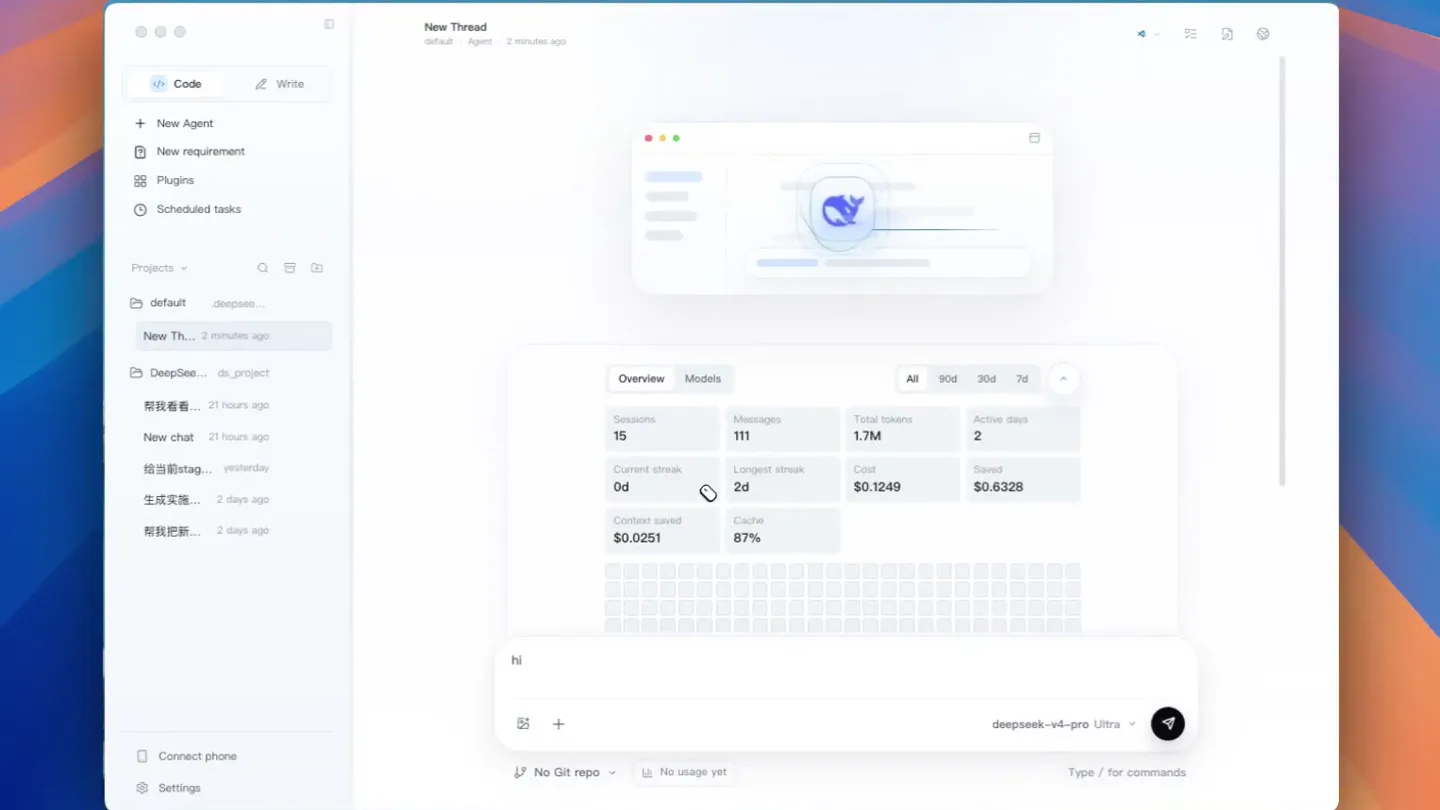
DeepSeek GUI Overview & Metrics
“(No spoken dialogue — ambient UI sounds, subtle clicks and hovers)”
- On screen
- Code, Write, New Thread, New Agent, New requirement, Plugins, Scheduled tasks, Projects, default, deepsee..., New Th..., DeepSee..., ds_project, New chat, 21 hours ago, 帮我看看..., 21 hours ago, New chat, yesterday, 生成实现..., 2 days ago, 帮我把新..., 2 days ago, Connect phone, Settings, Overview, Models, All, 90d, 30d, 7d, Sessions, 15, Messages, 111, Total tokens, 1.7M, Active days, 2, Current streak, 0d, Longest streak, 2d, Cost, $0.1249, Saved, $0.6328, Context saved, $0.0251, Cache, 87%, hi, deepseek-v4-pro Ultra, No Git repo, No usage yet, Type / for commands, You've used 1.7M tokens across 2 active days.
- Camera
- Static, top-down view of a desktop application window, with subtle UI element interactions.
- Motion
- Subtle UI element highlighting, hover states, and data visualization updates (e.g., token usage grid filling).
Feature Teaser
Detailed Token Usage & Model Insights
“(No spoken dialogue — ambient UI sounds, subtle clicks and hovers)”
- On screen
- Overview, Models, All, 90d, 30d, 7d, Tokens, 1,711,146, 2026-06-05, 1,333,895 tokens, Input (cache hit), 1,133,440 tokens, Input (cache miss), 175,061 tokens, Output, 25,394 tokens, deepseek-v4-pro, 1.6M in, 30.2k out, 1.4M hit, 204.2k miss, 95.4%, deepseek-v4-flash, 78.6k in, 389 out, 69.1k hit, 9.5k miss, 4.6%
- Camera
- Zoom-in on the 'Models' tab and a specific data visualization, then a slight pan to show details.
- Motion
- Smooth zoom and pan, tooltip reveal on hover, bar chart animation, and tab switching with a subtle fade.
Product Reveal
Initiating Agent Interaction
“(No spoken dialogue — ambient UI sounds, subtle clicks and hovers)”
- On screen
- Overview, Models, Tokens, 1,711,146, Current streak, 0d, Longest streak, 2d, Cost, $0.1249, Saved, $0.6328, Context saved, $0.0251, Cache, 87%, hi, hi.who, hi.who you, hi.who you are, deepseek-v4-pro Ultra, No Git repo, No usage yet, Type / for commands
- Camera
- Zoom-out to reveal the full application window, then a focus on the chat input field.
- Motion
- Typing animation with a blinking cursor, smooth zoom-out, and a subtle highlight on the input field.
Call to Action
Agent Response & Capabilities
“(No spoken dialogue — ambient UI sounds, subtle clicks and hovers)”
- On screen
- Running..., hi.who you are, Processing 42ms, Working..., keep typing, sends wait and go out after the current reply finishes..., Loading usage..., Processing 2.0s, Thinking..., I'm Kun — the GUI-native coding agent built into the DeepSeek GUI application. I work as a senior engineering collaborator, helping you with code, file operations, project management, and scheduled tasks. I operate directly within your workspace with read/write access and can use tools like bash, file editing, code search, and the DeepSeek GUI scheduling system. What can I help you with?, Processed 3.8s, Ask the agent..., 4.9k tokens, $0.0001, cache 99%, 1 turns, deepseek-v4-pro Ultra
- Camera
- Static view of the application, focusing on the chat interaction area as the agent responds.
- Motion
- Typing animation for the agent's response, progress indicators (Processing..., Working..., Thinking...), and dynamic UI updates showing token usage and cost.
Motion design primitives
Synthesizable in Remotion · key components of the clean-ui-agent-showcase template.
UIDataReveal
A grid of data points or cells subtly fills in or highlights, often accompanied by a numerical counter animating upwards. Tooltips appear on hover or click, revealing detailed information.
+ Code construction recipe
Use `interpolate` for cell opacity/scale, `spring` for tooltip entrance. Implement a `Sequence` to animate individual grid cells with a slight delay. Use `measureText` for dynamic number counters.
DynamicChatResponse
Text appears character by character as if being typed in real-time, followed by a progress indicator (e.g., 'Processing...', 'Thinking...') and then a full, multi-line response. New chat entries slide in from the side.
+ Code construction recipe
Utilize `typewriter` effect for text input and agent response. Animate progress indicators with `opacity` and `scale`. Use `slide` transitions for new chat bubbles and `delay` for sequential elements.
InteractiveMetricZoom
A smooth camera zoom into a specific UI element (e.g., a chart or a tab), followed by an interactive highlight or data overlay. The camera then smoothly zooms back out to a broader view.
+ Code construction recipe
Employ `scale` and `translate` properties on the main UI component for zoom and pan. Use `spring` for a natural feel. Overlay data visualizations with `opacity` and `scale` animations on mount.
Style DNA & aesthetic system
Visual aesthetic
Typography
Motion
Special effects
Pacing & rhythm
Conceptual story rhythm
- 1
Initial Overview
Purpose. Introduce the application's main interface and key metrics at a glance.
Execution. Wide shot of the application, showing the sidebar, main content area, and an overview of usage statistics. Subtle UI highlights guide the eye.
- 2
Deep Dive into Data
Purpose. Showcase the detailed analytical capabilities and data visualization features.
Execution. Zoom into specific tabs and charts, revealing interactive tooltips and dynamic data updates, demonstrating depth of information.
- 3
Agent Activation
Purpose. Demonstrate the core interaction with the AI agent.
Execution. Focus on the chat input, showing a user typing a query, followed by a clear indication of the system processing the request.
- 4
Agent Response & Capability
Purpose. Illustrate the agent's ability to understand and respond, highlighting its role as a collaborator.
Execution. The agent's detailed, multi-line response appears with a typing effect, outlining its functions and inviting further interaction.
Remix in Animatiq Studio
Master remix prompt · agent-ready
Sample remix
Objective
Launch a new AI-powered project management tool called 'TaskPilot' that integrates with existing workflows and provides predictive analytics.How the recipe adapts
The UIDataReveal primitive would be adapted to show project progress dashboards and predictive task completion rates, with individual task cards highlighting as data updates. DynamicChatResponse would demonstrate TaskPilot's AI assistant suggesting optimal task assignments or identifying bottlenecks. InteractiveMetricZoom would focus on a specific project timeline or resource allocation chart, revealing detailed insights and then zooming back out to the overall project view. The visual aesthetic would maintain the clean, functional UI, but with a slightly more vibrant color palette to reflect project dynamism, while keeping the deliberate pacing to emphasize clarity and control.Remix blueprint · clean-ui-agent-showcase
Scene durations (4 scenes, 22s)
Key Remotion components
Related Creative Tools Product Launches
Explore all Creative Tools launches →
Anthropic Labs launches Claude Design, which turns conversation into prototypes, slides and one-pagers, powered by Claude Opus 4.7.

A vibe design partner with an AI-native canvas for turning ideas into UI.

Your work tools in Claude are now available on mobile. Explore Figma designs, create Canva slides, check Amplitude dashboards, all from your phone. Give it a try: