
Chloe Park · Launch Video Breakdown: Hook, Pacing & Motion Design
DESIGN.md is how we work with agents now, but a text file is a terrible way for a human to make a visual decision. So we built our preview to give some of that control back: edit the file as text o…
Scene-by-scene timeline & spoken transcript
The Hook
Effortless Design System Creation
“(No spoken dialogue — ambient UI clicks and subtle transitions)”
- On screen
- magicpath.ai / Landing Page MagicPath, Chat, Manage design systems, Create a design system or import one from the web, a Tailwind config, or DESIGN.md, then apply it in chat., Agent, Compose, Threads, Landing Page, make a landing page, Thought process, On it — I'll build a la, Landing Page, Mono, Your landing page will, hero section, a feat, and pricing section, style., Let me know if you, layout, or add'l info, Terrain, Ask for a design, use skills, Visual edits, Opal 4.8, 50%, Create a new design system, Pick a design system from the library, or create a new one below., New Tailwind config, Use from a local Tailwind config., New DESIGN.md, Open this file to write, paste, or upload a spec., Import from CSS, Extract a design system from a website URL., Import from CSS, Paste CSS variables or a Tailwind config.
- Camera
- Static, wide shot of a desktop application interface, focusing on a modal window.
- Motion
- Subtle cursor interaction, modal window opening, and button clicks with instant transitions.
Product Reveal
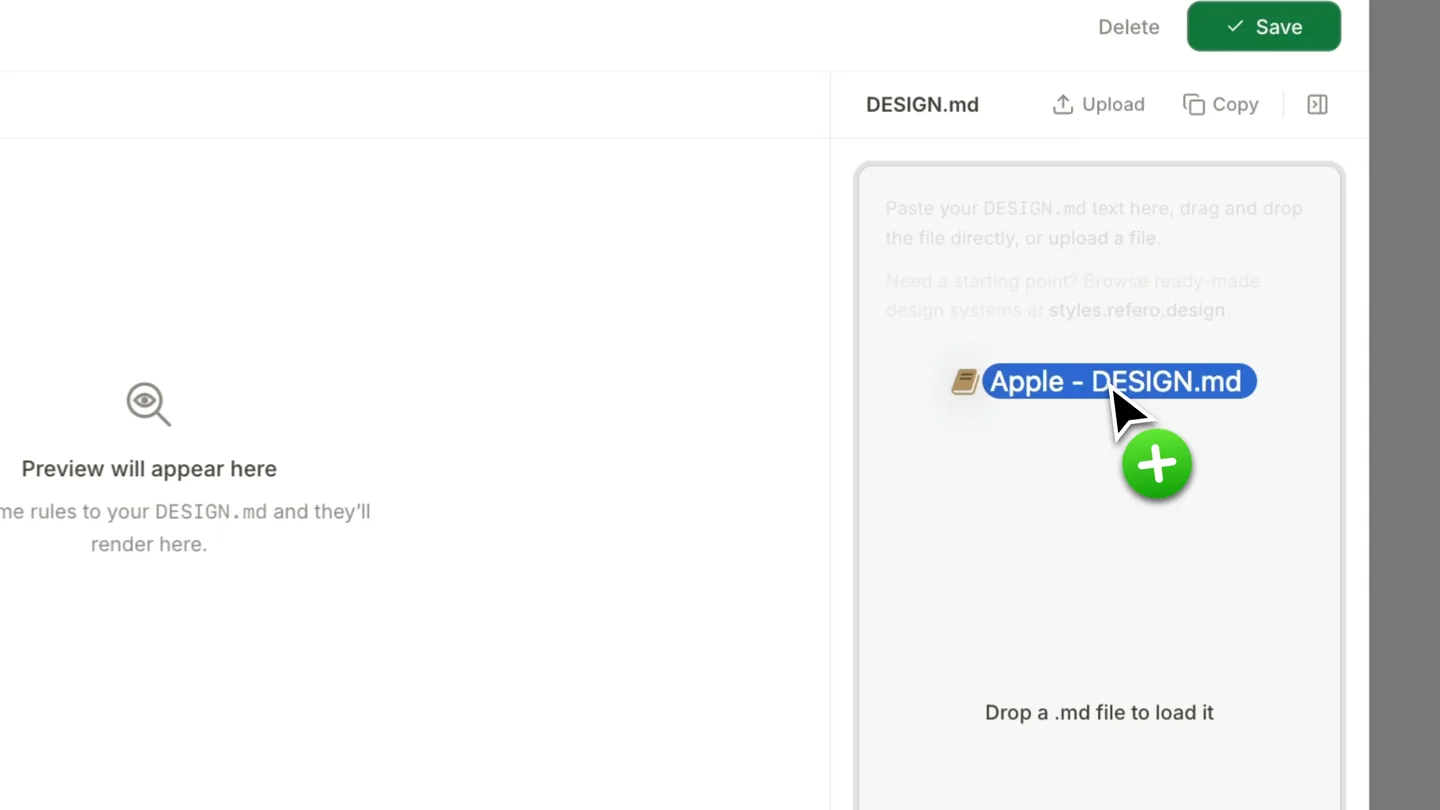
Live DESIGN.md Preview & Editing
“(No spoken dialogue — ambient UI clicks and subtle transitions)”
- On screen
- magicpath.ai / Landing Page MagicPath, Chat, Manage design systems, Apple, updated just now, DESIGN.md, Tailwind, Colors, Typography, Spacing & Radius, Components, Guidelines, Delete, Reset, Export, Save, # Apple - Style Reference, > Gallery wall at natural light —, enormous type casts shadows on a white surface, color enters only as product., **Theme:** **light**, Apple's MacBook Neo product page radiates cool luminosity — a gallery-white canvas where enormous weight-700 headlines at 80-96px dominate above feather-light body copy, creating a tension between mass and air. The page background stays #f5f5f7, one step off pure white, giving cards and content wells a surface-lift effect without any shadows. Negative letter-spacing tightens progressively with size — display headlines track at -0.022em while body text breathes at -0.003em, a signature move that makes large type feel chiseled rather than loose. The single interactive accent (#0071E3 CTA blue) appears only on the 'Buy' pill button and nav links, rationed so every appearance reads as an instruction to act. Product gradients — dark-to-citrus-green, dark-to-blue, dark-to-violet — serve as full-bleed theatrical backdrops for each color finish showcase, never decorating UI chrome., ## Tokens - Colors, Azure, #0071E3, Primary CTA button fill, active nav 'Buy' button — the sole permission-to-act color on the entire page, Cobalt Link, #0066CC, Inline text links, navigation anchor colors — slightly darker than Azure to distinguish interactive text from interactive buttons, Fog, #F5F5F7, Page canvas background, section divider bands, badge fills, Snow, #FFFFFF, Card surfaces, nav background, elevated container fills, Obsidian, #000000, Dark card variant, hero, Silver Mist, #EEEEEE, Faded pill button background, secondary text, muted backgrounds, Caution, #B64400, Badge warning text, price asterisk callouts — deep amber-orange for inline semantic alerts, Citrus Gradient, #FFD80C, MacBook Neo Citrus finish showcase backdrop — dark-to-citrus-green gradient, Indigo Gradient, #596680, MacBook Neo Indigo finish showcase backdrop — dark-to-deep-blue theatrical product gradient, Blush Gradient, #E80D0D, MacBook Neo Blush finish showcase backdrop — dark-to-magenta-violet theatrical product gradient, Citrus Finish, #FFD80C, Product color swatch — Citrus finish selector chip, Indigo Finish, #596680, Product color swatch — Indigo finish selector chip, Blush Finish, #E80D0D, Product color swatch — Blush finish selector chip, TYPOGRAPHY, SF Pro Display, SF Pro Text, Body copy, nav labels, captions, button labels, footnotes. Weight 400 at, All marketing headlines, product name lockups, section titles. Weight 700 at 80-96px
- Camera
- Zoom-in on the modal window, then a slight pan to the right to reveal more content.
- Motion
- Smooth zoom and pan, highlighting the drag-and-drop functionality and the live rendering of design tokens from a DESIGN.md file.
Feature Teaser
Dynamic Color Palette Adjustments
“(No spoken dialogue — ambient UI clicks and subtle transitions)”
- On screen
- magicpath.ai / Landing Page MagicPath, Chat, Manage design systems, Apple, updated just now, DESIGN.md, Tailwind, Colors, Typography, Spacing & Radius, Components, Guidelines, Delete, Reset, Export, Save, # Apple - Style Reference, > Gallery wall at natural light —, enormous type casts shadows on a white surface, color enters only as product., **Theme:** **light**, Apple's MacBook Neo product page radiates cool luminosity — a gallery-white canvas where enormous weight-700 headlines at 80-96px dominate above feather-light body copy, creating a tension between mass and air. The page background stays #f5f5f7, one step off pure white, giving cards and content wells a surface-lift effect without any shadows. Negative letter-spacing tightens progressively with size — display headlines track at -0.022em while body text breathes at -0.003em, a signature move that makes large type feel chiseled rather than loose. The single interactive accent (#0071E3 CTA blue) appears only on the 'Buy' pill button and nav links, rationed so every appearance reads as an instruction to act. Product gradients — dark-to-citrus-green, dark-to-blue, dark-to-violet — serve as full-bleed theatrical backdrops for each color finish showcase, never decorating UI chrome., ## Tokens - Colors, Azure, #0071E3, Primary CTA button fill, active nav 'Buy' button — the sole permission-to-act color on the entire page, Cobalt Link, #0066CC, Inline text links, navigation anchor colors — slightly darker than Azure to distinguish interactive text from interactive buttons, Fog, #F5F5F7, Page canvas background, section divider bands, badge fills, Snow, #FFFFFF, Card surfaces, nav background, elevated container fills, Obsidian, #000000, Dark card variant, hero, Silver Mist, #EEEEEE, Faded pill button background, secondary text, muted backgrounds, Caution, #B64400, Badge warning text, price asterisk callouts — deep amber-orange for inline semantic semantic alerts, Citrus Gradient, #FFD80C, MacBook Neo Citrus finish showcase backdrop — dark-to-citrus-green gradient, Indigo Gradient, #596680, MacBook Neo Indigo finish showcase backdrop — dark-to-deep-blue theatrical product gradient, Blush Gradient, #E80D0D, MacBook Neo Blush finish showcase backdrop — dark-to-magenta-violet theatrical product gradient, Citrus Finish, #FFD80C, Product color swatch — Citrus finish selector chip, Indigo Finish, #596680, Product color swatch — Indigo finish selector chip, Blush Finish, #E80D0D, Product color swatch — Blush finish selector chip, TYPOGRAPHY, SF Pro Display, SF Pro Text, Body copy, nav labels, captions, button labels, footnotes. Weight 400 at, All marketing headlines, product name lockups, section titles. Weight 700 at 80-96px, Picker, Tailwind, Opacity, Custom color, Hex, ffdc8c
- Camera
- Close-up on the color picker interface within the modal, with subtle cursor movements.
- Motion
- Interactive UI elements, color picker manipulation, and real-time updates to color swatches and hex values.
Call to Action
Tailwind Integration & Theming
“(No spoken dialogue — ambient UI clicks and subtle transitions)”
- On screen
- magicpath.ai / Landing Page MagicPath, Chat, Manage design systems, MagicPath v2, updated 1h ago, DESIGN.md, Tailwind, Colors, Typography, Spacing & Radius, Shadows, Delete, Reset, Export, Save, BRAND, Primary Foreground, HSL(218 48% 98%), Primary text color on the background., Accent, HSL(218 48% 92%), Accent surface for hover and highlights., Accent Foreground, HSL(222 2 47 44 11 2%), Text on accent surfaces., Ring, HSL(246 83%), Focus ring color., NEUTRALS, Background, #1F1F1F, Primary page background., Foreground, #1F1F1F, Primary text color on the background., Card, #1F1F1F, Card and elevated container surfaces., Card Foreground, #1F1F1F, Text on card surfaces., Popover, #1F1F1F, Popover and menu surface., Popover Foreground, #1F1F1F, Text inside popovers and menus., Secondary, #1F1F1F, Secondary surface for low-emphasis controls., Secondary Foreground, #1F1F1F, Text on secondary surfaces., Picker, Tailwind, Opacity, Custom color, Hex, fffefe
- Camera
- Static shot of the modal, with cursor interacting with color pickers and theme toggles.
- Motion
- Rapid-fire UI interactions, demonstrating quick color changes and theme switching, emphasizing the speed and responsiveness of the tool.
Motion design primitives
Synthesizable in Remotion · key components of the codeflow-collaborative-editor-launch template.
ModalReveal
A new modal window smoothly fades in and scales up from the center of the screen, presenting interactive UI elements. This is often accompanied by a subtle background blur or dimming.
+ Code construction recipe
Use `spring()` for `opacity` and `scale` properties. Apply a `backdropFilter` with `blur()` to the parent container for the background effect. Ensure `z-index` is managed for modal layering.
LiveTextHighlight
As the cursor hovers or interacts with text input fields or code blocks, specific lines or sections of text are highlighted with a subtle background color change or a soft glow, indicating active editing.
+ Code construction recipe
Implement `interpolate()` on `backgroundColor` or `boxShadow` based on mouse events (`onMouseEnter`, `onMouseLeave`). Use `useCurrentFrame()` and `spring()` for smooth transitions between states.
ColorPickerInteraction
A color picker UI element is manipulated, showing real-time updates to color swatches and corresponding hex/HSL values. The color changes are instant and visually reflected across the UI.
+ Code construction recipe
Utilize `useVideoConfig()` and `useCurrentFrame()` to drive color changes. Map frame progress to HSL or RGB values. Update `backgroundColor` and `text` content dynamically based on the interpolated color values.
Style DNA & aesthetic system
Visual aesthetic
Typography
Motion
Special effects
Pacing & rhythm
Conceptual story rhythm
- 1
Introduction to Design Systems
Purpose. To quickly introduce the core problem of managing design systems and present the tool as a solution.
Execution. Opening with a wide shot of the application, showing the 'Create a new design system' modal, immediately establishing the product's purpose.
- 2
DESIGN.md in Action
Purpose. To demonstrate the unique value proposition of using DESIGN.md for visual decision-making.
Execution. Zooming in on the drag-and-drop of a DESIGN.md file, followed by the instant rendering of design tokens and styles, highlighting the text-to-visual workflow.
- 3
Interactive Customization
Purpose. To showcase the flexibility and real-time feedback of the design system editor.
Execution. Close-ups of color picker interactions, showing immediate updates to color swatches and code, emphasizing the dynamic and responsive nature of the tool.
- 4
Seamless Integration & Theming
Purpose. To highlight advanced features like Tailwind integration and quick theme switching, reinforcing the product's power.
Execution. Rapid-fire changes to primary colors and background themes, demonstrating the ease of applying comprehensive design system changes.
Remix in Animatiq Studio
Master remix prompt · agent-ready
Sample remix
Objective
Launch a new collaborative code editor called 'CodeFlow' that allows multiple developers to work on the same codebase simultaneously with live preview.How the recipe adapts
The ModalReveal primitive would introduce new project creation or file opening. LiveTextHighlight would be adapted to show multiple cursors editing code in real-time, with different highlight colors for each collaborator. The ColorPickerInteraction would be replaced with a 'ComponentLibrarySync' primitive, demonstrating how changes to a shared UI component in one file instantly update its instances across the project and in the live preview. The overall pacing and clean UI will be maintained to convey efficiency and modernity.Remix blueprint · codeflow-collaborative-editor-launch
Scene durations (4 scenes, 29s)
Key Remotion components
Related Creative Tools Product Launches
Explore all Creative Tools launches →
Anthropic Labs launches Claude Design, which turns conversation into prototypes, slides and one-pagers, powered by Claude Opus 4.7.

A vibe design partner with an AI-native canvas for turning ideas into UI.

Your work tools in Claude are now available on mobile. Explore Figma designs, create Canva slides, check Amplitude dashboards, all from your phone. Give it a try: