
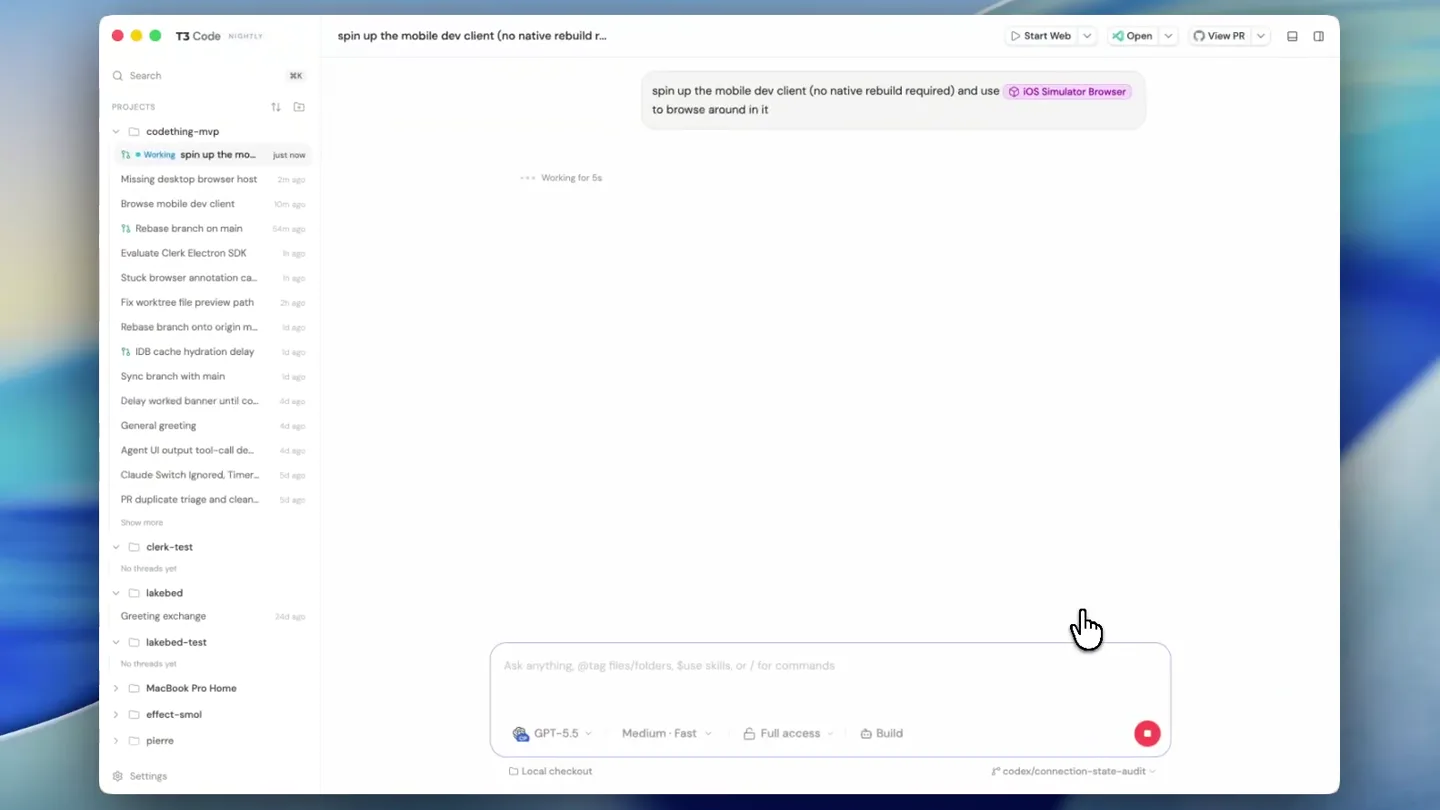
Julius · Launch Video Breakdown: Hook, Pacing & Motion Design
Desktop app has fallen a bit behind over the last few weeks as I've focused on infra and other behind the scenes stuff (more on that soon), but spent some tokens getting some new stuff in, includin…
Scene-by-scene timeline & spoken transcript
The Hook
AI-Powered Mobile Dev Client Mirroring
“(No spoken dialogue — ambient UI clicks and subtle system sounds)”
- On screen
- spin up the mobile dev client (no native rebuild required) and use iOS Simulator Browser to browse around in it GPT-5.5 Medium Fast Full access Build current checkout * codex/connection-state-audit T3 Code Mirror iOS dev client Start Web Open View PR PROJECTS codething-mvp Working Mirror iOS dev... Missing desktop browser host Browse mobile dev client Release branch on main Evaluate Clerk Electron SDK Stuck browser annotation ca... Fix worktree file preview path Rebase branch onto origin m... IDE cache hydration delay Sync branch with main Delay worked banner until co... General greeting Agent UI output tool-call de... Claude Switch Ignored, Timer... PR duplicate triage and clean... Show more clark-test No threads yet greeting exchange lakebed-test No threads yet MacBook Pro Home effect-smol piems Settings I'll use the iOS simulator browser skill as requested. I'm first checking the mobile package scripts and simulator state so I can launch the existing dev client without triggering a native rebuild. Ran command xcrun simctl list devices available | sed -n 102p <2 previous tool calls The booted simulator is iPhone 17 Pro with UDID 99E74104-2F3B-4F9C-AFE7-B6F4B085083. Next I'm checking the mobile scripts and installed app bundle so I can start Metrodev-client mode and launch what is already installed. Ran command xcrun simctl simapps 09E74104-2F3B-4F9C-AFE7-B6F4B085083 | rg -i t3codething.exp.appbundle -v <2 previous tool calls The installed dev client is com.t3tools.t3code.dev, so I can avoid the .ios scripts because those prebuild/build.fm is starting the dev-client Metro server directly from apps/mobile, then I'll launch that installed bundle against it. Metro is starting under the development app variant. While it finishes, I'm starting the simulator mirror for the same booted simulator so the in-app browser can show the real iOS frame. Working for 2s Ask anything, drag files/folders, Bose skills, or / for commands GPT-5.5 Medium Fast Full access Build Local checkout * codex/connection-state-audit Simulator - iPhone... localhost:3201 iPhone 17 Pro iOS 17.5 T3 Code ALPHA No environments connected Add an environment to load projects and start coding Add environment Tools SIMULATOR Light Clear Appearance Liquid Glass Color Filter None Reduce Motion Increase Contrast Show Borders VoiceOver AX TREE Camera Ready LOCATION + 1.53 km total PERMISSIONS Live
- Camera
- Static wide shot of a desktop application, with a mouse cursor interacting with UI elements. The camera occasionally zooms slightly to highlight specific areas.
- Motion
- Seamless UI interaction, rapid window splitting and resizing, content generation via AI, and real-time mobile simulator mirroring.
Product Reveal
AI-Assisted Code Refinement & File Management
“(No spoken dialogue — ambient UI clicks and subtle system sounds)”
- On screen
- T3 Code New thread Start Web Open View PR Human control Search PROJECTS No projects yet Ask for follow-up changes or attach images GPT-5.5 Medium Fast Full access Build Current checkout * codex/connection-state-audit Local: http://localhost:5733/ INFO (173): Waiting for 1s for help INFO (173): Running all migrations... INFO (173): Migrations ran successfully INFO (173): Listening on http://127.0.0.1:5733/ INFO (173): Agent activity publishing standby; waiting for T3 Connect link reconciliation INFO (173): provider.session.reaper.s started localhost:5733/pai/token=843N46 localhost:5733 Select Region Draw Erase Describe the change... Attach Pick a thread to continue Select an existing thread or create a new one to get started. improve this empty space <empty> 1 remove this header 1 drawing Refine empty state layout Terminal 2 Julius@Julius-MacBook-Pro codething-mvp % Working for 7s I'm using the freestone-design skill for the visual pass, since this is a UI refinement request. Then I'll patch the React components and verify in the preview. Ran command <1 previous tool calls For the empty state, I'm keeping it operational rather than decorative. A compact launcher with "New thread" and "Search" makes the empty pane useful and visually anchors the large-blank area. I'll keep the sidebar change minimal by removing only the brand wordmark row. Ran command <1 previous tool calls I've confirmed the new-thread helper already centralizes draft reuse and default project selection, so the empty state can call that instead of duplicating routing logic. Next I'm applying the component patch. Ran command <1 previous tool calls I'm editing ReactiveThreadState and Sidebar now. The empty state will become a small action surface with a subtle background treatment; the sidebar brand row will disappear in browser while Electron keeps a blank drag area. File change codething-mvp/apps/web/src/comp... Working for 57s Scroll to bottom 6:26:35 PM [client] her update /api/t /src/components/Sidebar.tsx Claude Claude Code v2.1.178 Epux 4.8 (1M context) - Claude Max ~/development/work/codething-mvp yo Claude!! Actioning. bypass permissions on (shift+tab to cycle) - PR #XSTR - esc to interrupt high / effort Files codething-mvp 5,474 files Search... cursor .gitignore devcontainer devcontainer.json .github ISSUE_TEMPLATE workflows M1 pull_request_template.md VOUCHED.td plans M1 01-shared-model-normalization.md M1 02-typed-ipc-boundaries.md M1 03-split-codex-app-server-manager.md M1 04-split-chatview-component.md M1 05-zod-persisted-state-validation.md M1 06-provider-logstream-lifecycle.md M1 07-ci-quality-gates.md M1 08-precommit-format-and-lint.md M1 09-event-state-test-expansion.md M1 10-unity-process-session-abstraction.md M1 11-effect.md M1 12-effect-new.md M1 13-provider-service-integration-tests.md M1 14-server-authoritative-event-sourcing-cleanup.md M1 15-effect-server.md M1 16-pr89-review-remediation-phases.md M1 16c-pr89-remediation-checklist.md M1 17-claude-agent.md M1 18-provider-neutral-runtime-determinism.md 03-split-codex-... utils.ts tsconfig.json package.json codething-mvp/oxlint-plugin-t3code/package.json { "name": "@t3tools/oxlint-plugin-t3code", "private": true, "version": "1.0.0", "type": "module", "scripts": { "typecheck": "tsc --noEmit", "test": "vp test run" }, "dependencies": { "@effect/platform-node": "catalog:", "@oxlint/plugins": "^1.63.0", "effect": "catalog:" }, "devDependencies": { "@effect/vitest": "catalog:", "vite-plus": "catalog:" } } codething-mvp/oxlint-plugin-t3code/tsconfig.json { "extends": "../../tsconfig.base.json", "compilerOptions": { "composite": true, "types": ["node"], "lib": ["ESNext", "esnext.disposable"] }, "include": ["**/*.ts"] } "include": ["**/*.ts", "**/*.tsx"] No active thread Pick up where you left off Choose a thread from the sidebar, start a fresh one, or jump straight to search. New thread Search
- Camera
- Dynamic camera movements, including quick pans and zooms, to follow the mouse cursor and highlight specific code changes or UI elements.
- Motion
- Rapid-fire content generation, code editing, file navigation, and AI agent interaction, all presented with a sense of speed and efficiency.
Feature Teaser
Multi-Panel Workflow & AI-Driven Insights
“(No spoken dialogue — ambient UI clicks and subtle system sounds)”
- On screen
- T3 Code Refine empty state layout 03-split-codex-... utils.ts tsconfig.json package.json Mirror iOS dev client Simulator - iPhone... localhost:3201 iPhone 17 Pro iOS 17.5 T3 Code ALPHA New project No environments connected Add an environment to load projects and start coding Add environment Tools SIMULATOR Light Clear Appearance Liquid Glass Color Filter None Reduce Motion Increase Contrast Show Borders VoiceOver AX TREE Camera Ready LOCATION + 1.53 km total PERMISSIONS Live Pick up where you left off Choose a thread from the sidebar, start a fresh one, or jump straight to search. New thread Search I'm using the freestone-design skill for the visual pass, since this is a UI refinement request. Then I'll patch the React components and verify in the preview. Ran command <1 previous tool calls For the empty state, I'm keeping it operational rather than decorative. A compact launcher with "New thread" and "Search" makes the empty pane useful and visually anchors the large-blank area. I'll keep the sidebar change minimal by removing only the brand wordmark row. Ran command <1 previous tool calls I've confirmed the new-thread helper already centralizes draft reuse and default project selection, so the empty state can call that instead of duplicating routing logic. Next I'm applying the component patch. Ran command <1 previous tool calls I'm editing ReactiveThreadState and Sidebar now. The empty state will become a small action surface with a subtle background treatment; the sidebar brand row will disappear in browser while Electron keeps a blank drag area. File change codething-mvp/apps/web/src/comp... Working for 57s Scroll to bottom 6:26:35 PM [client] her update /api/t /src/components/Sidebar.tsx Working Mirror iOS dev... Missing desktop browser host Browse mobile dev client Release branch on main Evaluate Clerk Electron SDK Stuck browser annotation ca... Fix worktree file preview path Rebase branch onto origin m... IDE cache hydration delay Sync branch with main Delay worked banner until co... General greeting Agent UI output tool-call de... Claude Switch Ignored, Timer... PR duplicate triage and clean... Show more clark-test No threads yet greeting exchange lakebed-test No threads yet MacBook Pro Home effect-smol piems Settings PROJECTS codething-mvp I'm using the browser host isn't exposing automation calls, but the mirror server is still running at http://localhost:3201. I can continue through XcodeBuildMCP for exposed controls. I'm testing the search field now. Search accepts input and shows a clear button plus keyboard close action. I'm clearing it, then I'll verify the home screen again. XcodeBuildMCP_tap <1 previous tool call After closing the keyboard, the compose button is exposed semantically. I'm tapping it to see whether it opens a new-session flow or if it is gated by the missing environment state. Image view /tmp/t3code-mobile-compose-gato... <2 previous tool calls Compose opens a "Choose project" sheet and is correctly gated by the missing environment state. I'm following the Add Environment entry point from that sheet as a first navigation. Ran command xcrun simctl is 09E74104-2F3B-4F... <1 previous tool call Working for 4s Ask anything, drag files/folders, Bose skills, or / for commands GPT-5.5 Medium Fast Full access Build Local checkout * codex/connection-state-audit
- Camera
- The camera smoothly transitions between different application panels, showcasing a multi-window development environment. It uses subtle zooms and pans to guide the viewer's attention.
- Motion
- Split-screen layouts, dynamic content loading, and interactive UI elements are animated with a focus on clarity and workflow efficiency. The transitions are quick but not jarring.
Call to Action
Seamless Integration & Future Potential
“(No spoken dialogue — ambient UI clicks and subtle system sounds)”
- On screen
- T3 Code Refine empty state layout 03-split-codex-... utils.ts tsconfig.json package.json Mirror iOS dev client Simulator - iPhone... localhost:3201 iPhone 17 Pro iOS 17.5 T3 Code ALPHA New project No environments connected Add an environment to load projects and start coding Add environment Tools SIMULATOR Light Clear Appearance Liquid Glass Color Filter None Reduce Motion Increase Contrast Show Borders VoiceOver AX TREE Camera Ready LOCATION + 1.53 km total PERMISSIONS Live Pick up where you left off Choose a thread from the sidebar, start a fresh one, or jump straight to search. New thread Search I'm using the freestone-design skill for the visual pass, since this is a UI refinement request. Then I'll patch the React components and verify in the preview. Ran command <1 previous tool calls For the empty state, I'm keeping it operational rather than decorative. A compact launcher with "New thread" and "Search" makes the empty pane useful and visually anchors the large-blank area. I'll keep the sidebar change minimal by removing only the brand wordmark row. Ran command <1 previous tool calls I've confirmed the new-thread helper already centralizes draft reuse and default project selection, so the empty state can call that instead of duplicating routing logic. Next I'm applying the component patch. Ran command <1 previous tool calls I'm editing ReactiveThreadState and Sidebar now. The empty state will become a small action surface with a subtle background treatment; the sidebar brand row will disappear in browser while Electron keeps a blank drag area. File change codething-mvp/apps/web/src/comp... Working for 57s Scroll to bottom 6:26:35 PM [client] her update /api/t /src/components/Sidebar.tsx Working Mirror iOS dev... Missing desktop browser host Browse mobile dev client Release branch on main Evaluate Clerk Electron SDK Stuck browser annotation ca... Fix worktree file preview path Rebase branch onto origin m... IDE cache hydration delay Sync branch with main Delay worked banner until co... General greeting Agent UI output tool-call de... Claude Switch Ignored, Timer... PR duplicate triage and clean... Show more clark-test No threads yet greeting exchange lakebed-test No threads yet MacBook Pro Home effect-smol piems Settings PROJECTS codething-mvp I'm using the browser host isn't exposing automation calls, but the mirror server is still running at http://localhost:3201. I can continue through XcodeBuildMCP for exposed controls. I'm testing the search field now. Search accepts input and shows a clear button plus keyboard close action. I'm clearing it, then I'll verify the home screen again. XcodeBuildMCP_tap <1 previous tool call After closing the keyboard, the compose button is exposed semantically. I'm tapping it to see whether it opens a new-session flow or if it is gated by the missing environment state. Image view /tmp/t3code-mobile-compose-gato... <2 previous tool calls Compose opens a "Choose project" sheet and is correctly gated by the missing environment state. I'm following the Add Environment entry point from that sheet as a first navigation. Ran command xcrun simctl is 09E74104-2F3B-4F... <1 previous tool call Working for 4s Ask anything, drag files/folders, Bose skills, or / for commands GPT-5.5 Medium Fast Full access Build Local checkout * codex/connection-state-audit
- Camera
- The camera maintains a steady, focused view on the application, emphasizing the seamless integration of various development tools and AI capabilities. It concludes with a subtle zoom out to reveal the full desktop environment.
- Motion
- The final segment highlights the product's comprehensive nature through smooth, deliberate UI interactions and a clear demonstration of its core value proposition. The pacing slows slightly to allow for comprehension.
Motion design primitives
Synthesizable in Remotion · key components of the dynamic-dev-workflow template.
DynamicSplitScreen
Multiple application windows or panels dynamically split, resize, and rearrange on the screen, often revealing new content or workflows. This creates a sense of a highly adaptable and powerful workspace.
+ Code construction recipe
Utilize Remotion's `AbsoluteFill` and `spring` animations for `x`, `y`, `width`, and `height` properties of individual `Window` components. Implement `interpolate` for opacity during transitions. Use `Sequence` to orchestrate the timing of each window's appearance and movement.
AITextGeneration
Text appears rapidly as if being typed by an AI, often accompanied by a blinking cursor, simulating real-time code generation or conversational AI output. This conveys speed and intelligence.
+ Code construction recipe
Employ Remotion's `Sequence` and `spring` for character-by-character or word-by-word text reveal. Use `interpolate` for cursor opacity to create a blinking effect. Text content can be dynamically passed as props to a `Typewriter` component.
InteractiveCursorHighlight
A mouse cursor moves purposefully across the screen, clicking and dragging elements, often with a subtle highlight or ripple effect on interaction points. This guides the viewer's eye and emphasizes user control.
+ Code construction recipe
Create a `Cursor` component with `spring` animations for `x` and `y` coordinates. Implement a `RippleEffect` component that appears on click events, using `interpolate` for scale and opacity. SVG filters can be used for subtle glow effects on hovered elements.
Style DNA & aesthetic system
Visual aesthetic
Typography
Motion
Special effects
Pacing & rhythm
Conceptual story rhythm
- 1
Initial Problem & Solution Tease
Purpose. Quickly establish a common developer pain point and hint at the product's ability to streamline complex workflows.
Execution. Rapid UI interactions demonstrating a cumbersome manual process, followed by a swift, AI-driven solution appearing on screen.
- 2
Core Product Demonstration
Purpose. Showcase the primary features and unique selling points of the Julius desktop app, focusing on AI integration and multi-panel efficiency.
Execution. Dynamic split-screen layouts, real-time code generation, and seamless mobile simulator mirroring, all driven by AI commands.
- 3
Advanced Workflow & Collaboration
Purpose. Highlight the product's capabilities for complex tasks, file management, and potential for collaborative development.
Execution. Detailed file navigation, AI-assisted code refinement, and interaction with an AI agent (Claude), demonstrating advanced use cases.
- 4
Seamless Integration & Call to Action
Purpose. Reinforce the product's comprehensive nature and encourage developers to explore its full potential.
Execution. A concluding sequence that ties together all demonstrated features into a cohesive, efficient development environment, ending with a clear view of the product's interface.
Remix in Animatiq Studio
Master remix prompt · agent-ready
Sample remix
Objective
An AI-powered data analytics platform that generates real-time financial reports and predictive market trends.How the recipe adapts
The DynamicSplitScreen primitive would show multiple data dashboards and report generators simultaneously. AITextGeneration would display AI-generated insights and summaries of market trends. InteractiveCursorHighlight would guide the viewer through selecting data points, applying filters, and initiating report generation, all with the same snappy, responsive feel. The color palette would adapt to a slightly darker, more analytical theme while retaining the clean UI.Remix blueprint · dynamic-dev-workflow
Scene durations (4 scenes, 65s)
Key Remotion components
Related Developer Tools Product Launches
Explore all Developer Tools launches →
xAI opens voice cloning on its API: build a custom voice in about two minutes or pick from 80+ voices in 28 languages.

Claude can now operate your Mac, opening apps, browsing and filling spreadsheets, as a research preview in Cowork and Claude Code.

Agentic CLI for coding, building apps, and automating workflows.