
Expect · Launch Video Breakdown: Hook, Pacing & Motion Design
Let agents test your code in a real browser.
Scene-by-scene timeline & spoken transcript
The Hook
CLI Initiates Problem Scan
“F*** it up, girl, put in that work.”
- On screen
- $ npx expect-cli
- Camera
- Static, close-up on terminal interface.
- Motion
- Text typing animation, rapid file list scroll, and highlight reveal.
Problem Agitation
Uncovered Code Vulnerabilities
“F*** it up, girl, put in that work.”
- On screen
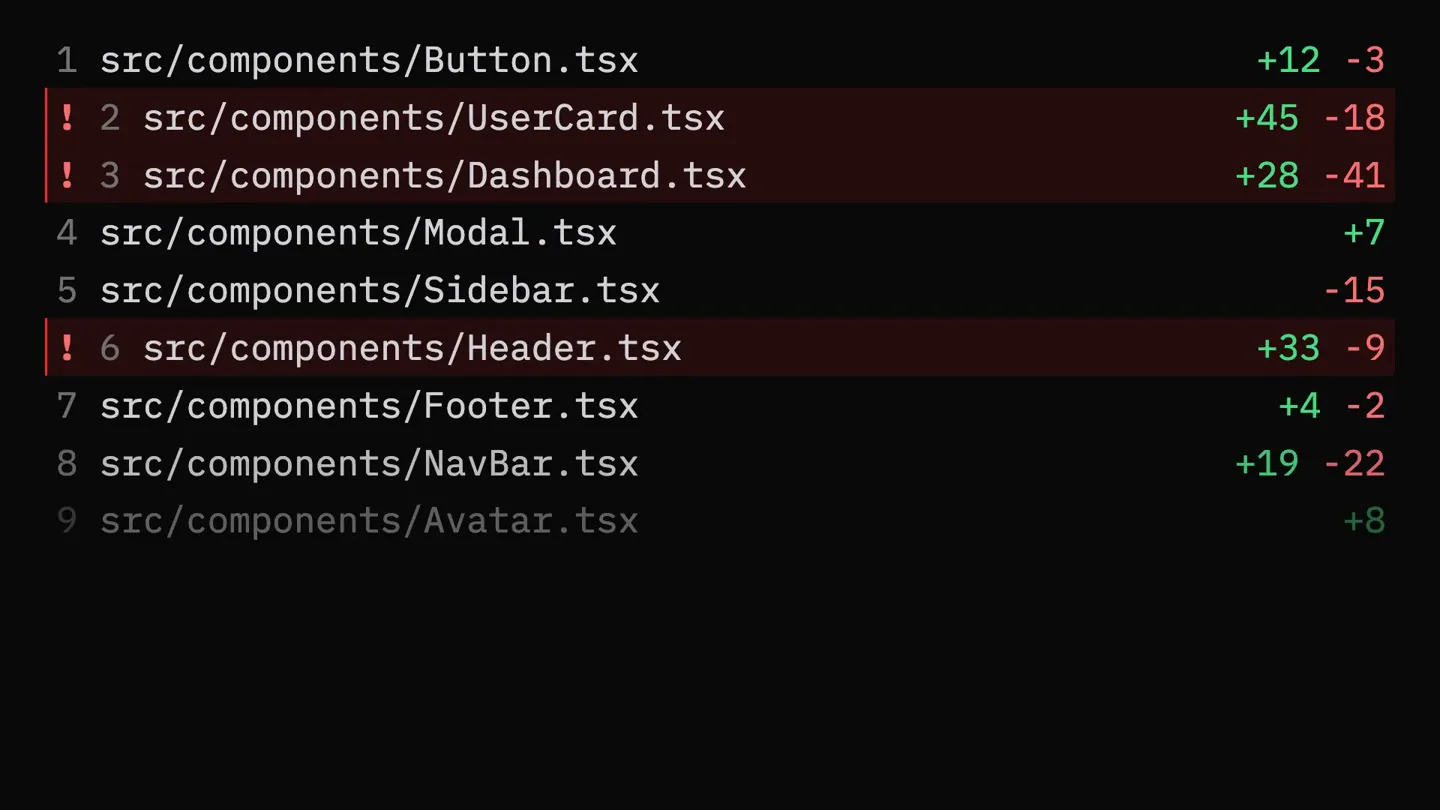
- src/components/Sidebar.tsx ! 6 src/components/Header.tsx +33 -9 src/components/Footer.tsx +4 -2 src/components/NavBar.tsx +19 -22 src/components/Avatar.tsx -6 src/components/Tooltip.tsx ! 11 src/components/Biopumi.tsx +51 -14 Untested changes src/components/Table.tsx +23 -31 2% ! 13 src/hooks/useAuth.ts +67 -12 src/hooks/useDebounce.ts +3 -1 ! 15 src/hooks/useFetch.ts +42 -27 src/hooks/useLocalStorage.ts -8 src/hooks/useMediaQuery.ts src/hooks/useClickOutside.ts +5 -3
- Camera
- Static, close-up on terminal interface, then a quick cut to a browser window.
- Motion
- Scrolling text, percentage fill animation, and a quick cut to a browser simulation with error overlays.
Product Reveal
Real-Browser Agent Testing
“F*** it up, girl, put in that work.”
- On screen
- localhost:3000 Questions? Our FAQ: Slow app X FCP exceeds 2.5s Subscribe to Newsletter Vulnerable user@example.com X CSRF missing on /subscribe Real-time dashboard Error X TypeError - undefined
- Camera
- Static, focused on a browser window simulation.
- Motion
- Mouse cursor interaction, animated error overlays appearing and disappearing, and text input simulation.
Feature Teaser
Automated Problem Resolution
“F*** it up, girl, put in that work.”
- On screen
- $ npx expect-cli init X FCP exceeds 2.5s X CSRF missing on /subscribe X TypeError - undefined 88% test coverage 100% test coverage
- Camera
- Static, transitioning from browser overlay to terminal interface.
- Motion
- Error icons changing from red 'X' to green checkmarks, and a progress bar filling to 100%.
Motion design primitives
Synthesizable in Remotion · key components of the expect-cli-dev-tool-launch template.
TerminalTypeScroll
Simulates command-line typing followed by rapid scrolling of code or file lists, with specific lines highlighted in red to indicate issues.
+ Code construction recipe
Use Remotion's <Sequence> and <AbsoluteFill> for scene management. Implement text typing with `interpolate` on `opacity` and `width` for a cursor effect. For scrolling, use `interpolate` on `translateY` for the list container. Highlighted lines can be achieved with conditional styling based on `frame` and `spring` for a subtle reveal.
BrowserErrorOverlay
A browser window simulation where a mouse cursor interacts with UI elements, triggering animated error messages and vulnerability indicators that pop up and fade.
+ Code construction recipe
Render a browser UI as an SVG or React component. Animate the mouse cursor's `translateX` and `translateY` using `interpolate`. Error overlays can be `AbsoluteFill` components with `scale` and `opacity` animated with `spring` for a bouncy entrance and exit. Use SVG filters for subtle glow effects on errors.
StatusUpdateProgress
Displays a list of status items, initially showing errors, which then transition to success states with checkmarks, culminating in a progress bar filling to 100%.
+ Code construction recipe
Use `Sequence` to orchestrate the timing of status changes. Animate the `opacity` and `scale` of checkmark/cross icons with `spring`. The progress bar can be a simple `div` with its `width` interpolated from 0 to 100% over time, with a `linear` easing.
Style DNA & aesthetic system
Visual aesthetic
Typography
Motion
Special effects
Pacing & rhythm
Conceptual story rhythm
- 1
The Setup: Initial Scan
Purpose. Introduce the problem space of untested code and the tool's initiation.
Execution. Terminal typing, rapid file list scroll with red error highlights.
- 2
The Problem: Real-World Failures
Purpose. Demonstrate the tangible impact of these code issues in a live browser environment.
Execution. Browser simulation with mouse interactions, pop-up error messages (slow app, vulnerable, TypeError).
- 3
The Solution: Automated Remediation
Purpose. Showcase the product's ability to identify and fix these problems.
Execution. Transition back to terminal, errors changing to green checkmarks.
- 4
The Resolution: Full Coverage
Purpose. Conclude with the successful outcome of using the product, achieving high test coverage.
Execution. Progress bar filling to 100% test coverage.
Remix in Animatiq Studio
Master remix prompt · agent-ready
Sample remix
Objective
A new CI/CD pipeline tool that automatically detects and fixes security vulnerabilities in Docker images.How the recipe adapts
The TerminalTypeScroll primitive would show 'docker scan' commands and vulnerability reports. BrowserErrorOverlay would simulate a dashboard showing failing builds or deployment errors. StatusUpdateProgress would then show vulnerabilities being patched and builds passing with green checkmarks and a 'secure image coverage' progress bar filling to 100%.Remix blueprint · expect-cli-dev-tool-launch
Scene durations (4 scenes, 16s)
Key Remotion components
Related Developer Tools Product Launches
Explore all Developer Tools launches →
xAI opens voice cloning on its API: build a custom voice in about two minutes or pick from 80+ voices in 28 languages.

Claude can now operate your Mac, opening apps, browsing and filling spreadsheets, as a research preview in Cowork and Claude Code.

Agentic CLI for coding, building apps, and automating workflows.