
Figma · Launch Video Breakdown: Hook, Pacing & Motion Design
Giving you tab groups so your heads don’t spin
Scene-by-scene timeline & spoken transcript
The Hook
Introducing Tab Grouping
“(No spoken dialogue — Energetic electronic score with pulsating synth arpeggios and a sub-bass drop/impact at 0:00.)”
- On screen
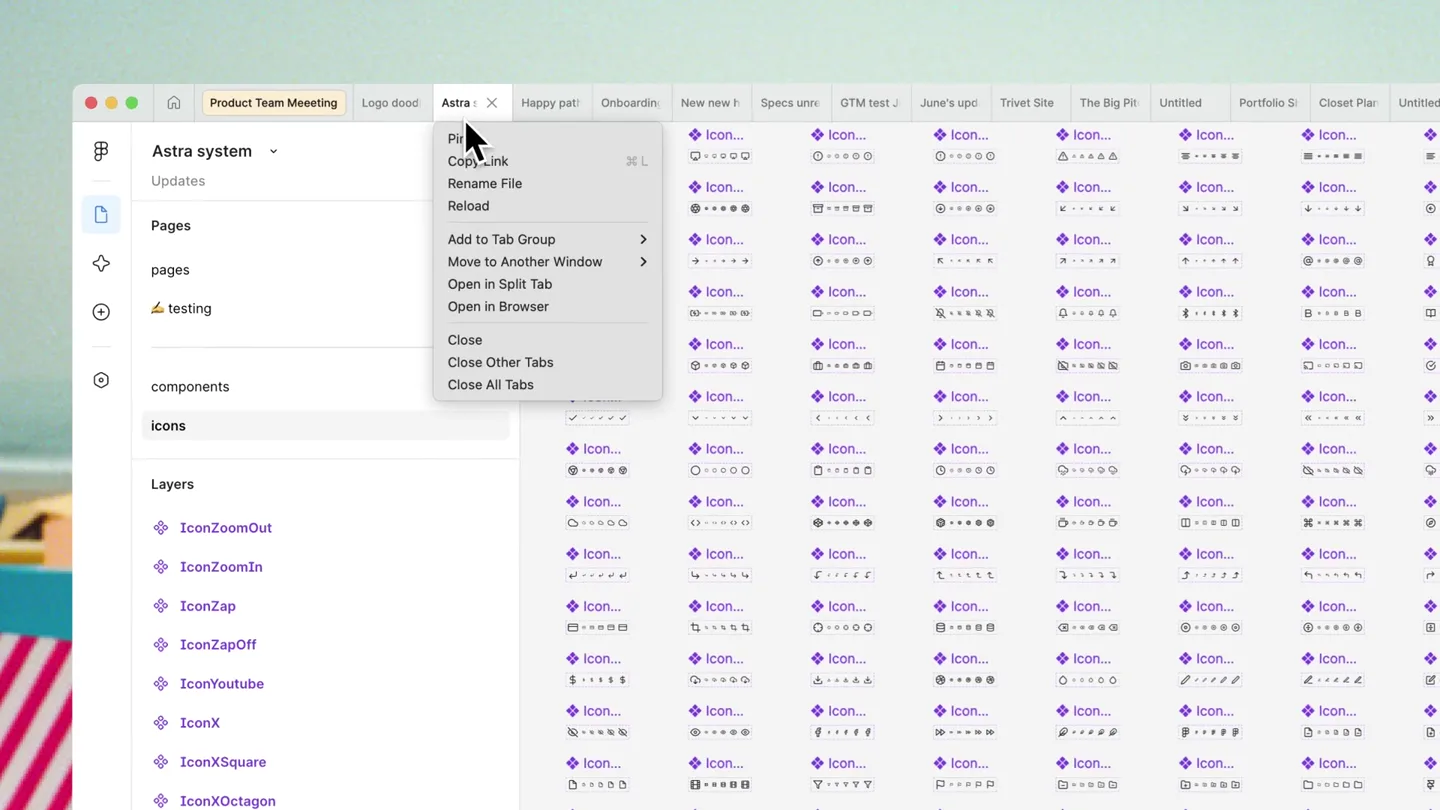
- Product Team Meeting, Logo dood, Astra system, Updates, Pages, testing, components, icons, Layers, IconZoomOut, IconZoomIn, IconZap, IconZapOff, IconYouTube, IconX, IconXSquare, IconXOctagon, IconXCircle, Pin, Copy Link, Rename File, Reload, Add to Tab Group, Move to Another Window, Open in Split Tab, Open in Browser, Close, Close Other Tabs, Close All Tabs, New Tab Group, Important, Ungroup, Delete group
- Camera
- Close-up on the Figma interface, focusing on tab interactions. The camera remains static, allowing UI elements to animate.
- Motion
- Precise UI animation demonstrating a right-click context menu, selection, and text input. Elements slide and fade in/out with smooth easing.
Product Reveal
Effortless Tab Organization
“(No spoken dialogue — The electronic score continues with a riser at 0:08, building intensity.)”
- On screen
- Product Team Meeting, Important, Logo dood, Onboardi, Astra sys, New, Happy path, Specs unread, GTM test, June's update, Trivet Site, The Big Pi, Untitled, Portfolio S, Closet Pla, Hold shift to multi-select, Tab groups, Component 1, Frame 18, Frame 4, Frame 3, Frame 19, Frame 1
- Camera
- The camera pans horizontally across the Figma tab bar, revealing numerous open tabs. The perspective is a direct, eye-level view of the UI.
- Motion
- Rapid horizontal panning and quick cuts between different tab states, emphasizing the volume of tabs and the 'Hold shift to multi-select' overlay. Tabs animate into groups.
Feature Teaser
Grouping 'Everything Else'
“(No spoken dialogue — A noticeable sweep sound effect occurs at 0:14, marking a transition.)”
- On screen
- Hold shift to multi-select, Portfolio S, Closet Pla, Untitled, Investor D, Untitled, CoLab, Untitled, Pin, Copy Link, Rename File, Reload, Add to Tab Group, Move to Another Window, Open in Split Tab, Open in Browser, Close, Close Other Tabs, Close All Tabs, New Tab Group, Product Team Meeting, Important, Happy pat, ever, everything else, Ungroup, Delete group, What do you want to make?, Describe your idea. Attach a design to guide the result., Start from an example, Tab groups, Component 1, Frame 18, Frame 4, Frame 3, Frame 19, Frame 1
- Camera
- Similar horizontal panning and close-up UI shots, demonstrating the multi-selection and grouping of tabs. The camera maintains a consistent, direct view.
- Motion
- Fluid UI interactions, including multi-selection via 'shift-click' and the creation of a new tab group. Text input animation is smooth and responsive.
Product Reveal
Visualizing Tab Groups
“(No spoken dialogue — The energetic electronic score continues, maintaining a driving rhythm.)”
- On screen
- Product Team Meeting, Important, Happy path, everything else, Specs unread, GTM test, June's up, Trivet Site, The Big Pit, Untitled, Portfolio S, Closet Pla, Untitled, Investor D, Untitled, CoLab, Untitled, What do you want to make?, Describe your idea. Attach a design to guide the result., Start from an example, Tab groups, Component 1, Frame 18, Frame 4, Frame 3, Frame 19, Frame 1
- Camera
- The camera pans across the organized tab bar, showcasing the newly created and colored tab groups. The perspective remains a direct, eye-level UI view.
- Motion
- Smooth horizontal scrolling and subtle visual cues (color changes, tab grouping) highlight the feature's benefits. The motion is clean and functional.
Call to Action
Figma: Tab Groups
“(No spoken dialogue — A final impactful sub-bass drop at 0:29 signals the conclusion.)”
- On screen
- Figma, Giving you tab groups so your heads don’t spin
- Camera
- A full-screen graphic with the Figma logo and tagline. The camera is static, presenting the final message clearly.
- Motion
- Text and logo animate in with a clean, impactful reveal, likely using a quick scale and fade-in, synchronized with the audio drop.
Motion design primitives
Synthesizable in Remotion · key components of the ui-feature-reveal-fast-cut template.
ContextualMenuReveal
A right-click context menu appears with a subtle fade and scale, followed by a hover state highlight on menu items. Sub-menus expand horizontally.
+ Code construction recipe
Use `interpolate` for opacity and `scale` transform. Implement `spring` for hover states on menu items. Sub-menu expansion can use `translateX` with `easeOutCubic`.
HorizontalTabScroll
The camera smoothly pans horizontally across a long row of tabs, highlighting individual tabs or groups as it moves. Tabs can visually 'snap' into focus.
+ Code construction recipe
Utilize `useCurrentFrame` and `interpolate` for `translateX` on the tab container. Implement `spring` for a subtle 'snap' effect when a tab group becomes active. Ensure `overflow: hidden` on the parent container.
TabGroupFormation
Multiple individual tabs visually coalesce into a single, colored tab group. This involves a slight repositioning and a change in visual styling (e.g., background color, border radius).
+ Code construction recipe
Animate `x` position, `width`, `backgroundColor`, and `borderRadius` using `spring` or `easeOutExpo`. Use `z-index` to manage layering during the transition. Text input animation can be a simple `typewriter` effect.
Style DNA & aesthetic system
Visual aesthetic
Typography
Motion
Special effects
Pacing & rhythm
Conceptual story rhythm
- 1
The Cluttered Canvas
Purpose. Establish the problem of overwhelming open tabs and the need for better organization.
Execution. Rapid succession of shots showing numerous open, unorganized tabs, creating a sense of visual chaos.
- 2
The Elegant Solution
Purpose. Introduce the tab grouping feature as the direct answer to the problem.
Execution. Clear, step-by-step UI demonstration of creating a tab group, highlighting the simplicity and effectiveness.
- 3
The Organized Workflow
Purpose. Showcase the benefits of the feature in a practical, real-world scenario.
Execution. Fluid panning across a beautifully organized tab bar, with distinct, color-coded groups, emphasizing efficiency.
- 4
The Brand Promise
Purpose. Reinforce the brand's commitment to user experience and problem-solving.
Execution. Impactful final screen with the Figma logo and tagline, summarizing the core benefit of the new feature.
Remix in Animatiq Studio
Master remix prompt · agent-ready
Sample remix
Objective
Demonstrate a new 'Smart Inbox' feature for an email client that automatically categorizes emails.How the recipe adapts
The video would open with a cluttered email inbox, using rapid cuts and horizontal scrolling to convey the overwhelming number of unread messages. Then, a ContextualMenuReveal primitive would show the 'Categorize' option. The TabGroupFormation primitive would be adapted to show emails visually sorting into 'Work', 'Personal', and 'Promotions' folders with distinct colors, using smooth transitions. The HorizontalTabScroll primitive would be repurposed to pan across the newly organized inbox, highlighting the efficiency. The final screen would feature the email client's logo and a tagline like 'Your Inbox, Reimagined'.Remix blueprint · ui-feature-reveal-fast-cut
Scene durations (5 scenes, 33s)
Key Remotion components
Related Creative Tools Product Launches
Explore all Creative Tools launches →
Anthropic Labs launches Claude Design, which turns conversation into prototypes, slides and one-pagers, powered by Claude Opus 4.7.

A vibe design partner with an AI-native canvas for turning ideas into UI.

Your work tools in Claude are now available on mobile. Explore Figma designs, create Canva slides, check Amplitude dashboards, all from your phone. Give it a try: