
el.cine · Launch Video Breakdown: Hook, Pacing & Motion Design
Figma just launched AI image editing tool.. to replace Photoshop powered by Gemini 3 with Nano Banana its so over for traditional softwares
Scene-by-scene timeline & spoken transcript
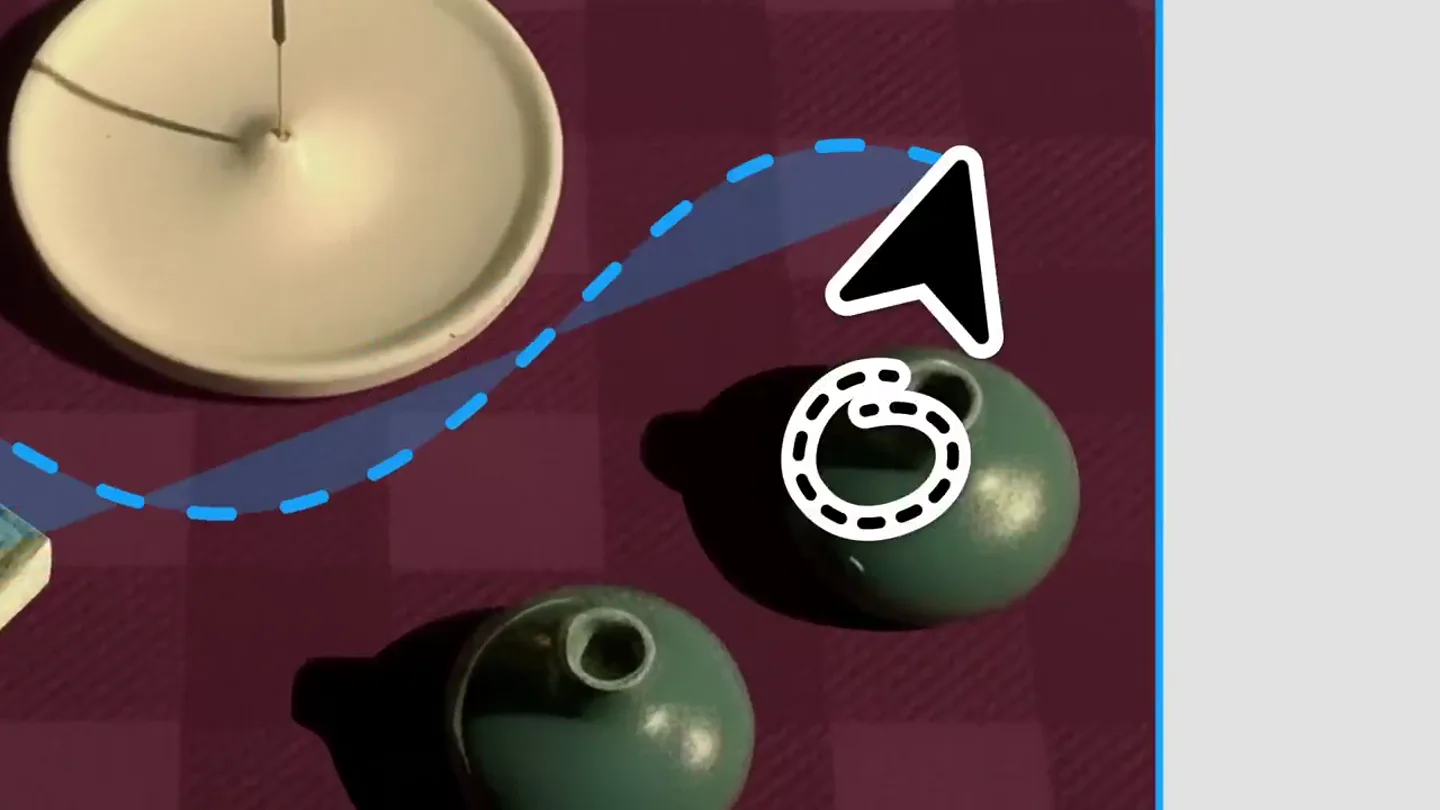
The Hook
AI Object Removal in Figma
“(No spoken dialogue — Driving, percussive electronic beat with sub-bass drop/impact and rhythmic synth pulse.)”
- On screen
- (No on-screen text)
- Camera
- Static overhead shot of a tabletop, then a slight zoom out to reveal the Figma UI.
- Motion
- Simulated mouse cursor interaction, AI selection marquee, object removal animation, UI element reveals.
Product Reveal
Dynamic Content Adaptation
“(No spoken dialogue — Rhythmic synth pulse continues with building energy.)”
- On screen
- Nilo / Home / Mobile Nilo Ceramics Incense Candles Stationery NEW Shikun Aloeswood Incense Shikun is an intricate Yamadamatsu composition, blending sharp aloeswood clarity with a refined sweet-and-sour fruit profile.
- Camera
- Static shot of a mobile product page within Figma, then a slight zoom in on the text description.
- Motion
- Simulated mouse cursor interaction, text box resizing, UI element reveals.
Feature Teaser
AI Object Isolation & Refinement
“(No spoken dialogue — High-energy audio transitions with impacts and rhythmic elements.)”
- On screen
- Nilo / Home / Mobile Nilo Ceramics Incense Candles Stationery Isolate Chad Perfect!
- Camera
- Static shot of a mobile product page within Figma, then a slight zoom in on the product image.
- Motion
- Simulated mouse cursor interaction, AI selection marquee, object isolation, text bubble reveals.
Call to Action
The Perfect Image
“(No spoken dialogue — Final impactful sound design elements with a sustained synth tone.)”
- On screen
- The perfect image doesn't exist. Erase The perfect image.
- Camera
- Static shot of white text on a black background.
- Motion
- Text reveal, AI selection marquee, text removal animation, final text reveal.
Motion design primitives
Synthesizable in Remotion · key components of the ai-ui-interaction-launch template.
AIMarqueeErase
A dashed blue marquee animates around an object, indicating AI selection. The object then smoothly fades or 'erases' from the scene, with the background intelligently inpainting.
+ Code construction recipe
Use Remotion's <AbsoluteFill> for the base image. Implement an SVG path for the dashed marquee, animating its 'stroke-dashoffset' and 'stroke-dasharray' properties. For object removal, use a mask or a series of <Img> components with animated 'opacity' and 'transform' properties, simulating an inpainting effect with a crossfade to a pre-generated clean background or a generative AI API call.
UITextResize
A text block within a UI element is selected, and a double-headed arrow icon appears, indicating it can be resized. The text block then smoothly expands or contracts vertically.
+ Code construction recipe
Render the UI element and text using <AbsoluteFill> and <Text>. Animate the 'height' property of the text container using 'interpolate' with an 'easeOutCubic' curve. The double-headed arrow icon can be a separate SVG or image component animated to appear and disappear with 'opacity' and 'scale'.
ContextualBubbleReveal
A small, rounded rectangular speech bubble containing text (e.g., 'Perfect!') animates into view next to a simulated mouse cursor, often with a slight bounce or pop effect.
+ Code construction recipe
Create a <Div> for the speech bubble with 'borderRadius' and 'backgroundColor'. Animate its 'scale' from 0 to 1 and 'opacity' from 0 to 1 using a 'spring' animation for a natural pop effect. Position it relative to the mouse cursor's animated coordinates.
Style DNA & aesthetic system
Visual aesthetic
Typography
Motion
Special effects
Pacing & rhythm
Conceptual story rhythm
- 1
The Problem
Purpose. Immediately showcase a common creative pain point: unwanted objects in an image.
Execution. A static image with distracting elements, followed by a simulated AI selection and instant removal.
- 2
The Solution
Purpose. Introduce the product's core capability: intelligent image editing within a familiar design environment.
Execution. Seamless integration of AI tools within the Figma UI, demonstrating object removal and content adaptation.
- 3
Expanded Capabilities
Purpose. Highlight additional AI features beyond simple removal, like isolation and text manipulation.
Execution. Demonstrating isolating specific objects and dynamically resizing text blocks, showing versatility.
- 4
The Promise
Purpose. Conclude with a powerful statement about the product's transformative impact on creative workflows.
Execution. A bold textual statement, 'The perfect image doesn't exist.' which is then edited by the AI to 'The perfect image.', reinforcing the product's ability to achieve ideal results.
Remix in Animatiq Studio
Master remix prompt · agent-ready
Sample remix
Objective
Launch a new AI-powered code refactoring tool that integrates directly into VS Code.How the recipe adapts
The video would open with a messy code block in VS Code. An AI selection marquee would highlight a section of code, followed by a 'Refactor' button appearing. The code would then animate into a clean, optimized version, similar to the object removal. Subsequent scenes would show resizing code blocks or isolating functions, with contextual bubbles like 'Optimized!' or 'Cleaned!' appearing. The final text would be 'Complex code doesn't exist.' transforming into 'Clean code.'.Remix blueprint · ai-ui-interaction-launch
Scene durations (4 scenes, 20.7s)
Key Remotion components
Related Creative Tools Product Launches
Explore all Creative Tools launches →
Anthropic Labs launches Claude Design, which turns conversation into prototypes, slides and one-pagers, powered by Claude Opus 4.7.

A vibe design partner with an AI-native canvas for turning ideas into UI.

Your work tools in Claude are now available on mobile. Explore Figma designs, create Canva slides, check Amplitude dashboards, all from your phone. Give it a try: