
Figma · Launch Video Breakdown: Hook, Pacing & Motion Design
Expand, isolate, erase, and vectorize images with AI—rolling out in FigJam, Buzz, and Slides.
Scene-by-scene timeline & spoken transcript
The Hook
AI Image Editing in FigJam
“(No spoken dialogue — Driving electronic score with pizzicato synths and sub-bass. Sound design elements introduce a sense of anticipation.)”
- On screen
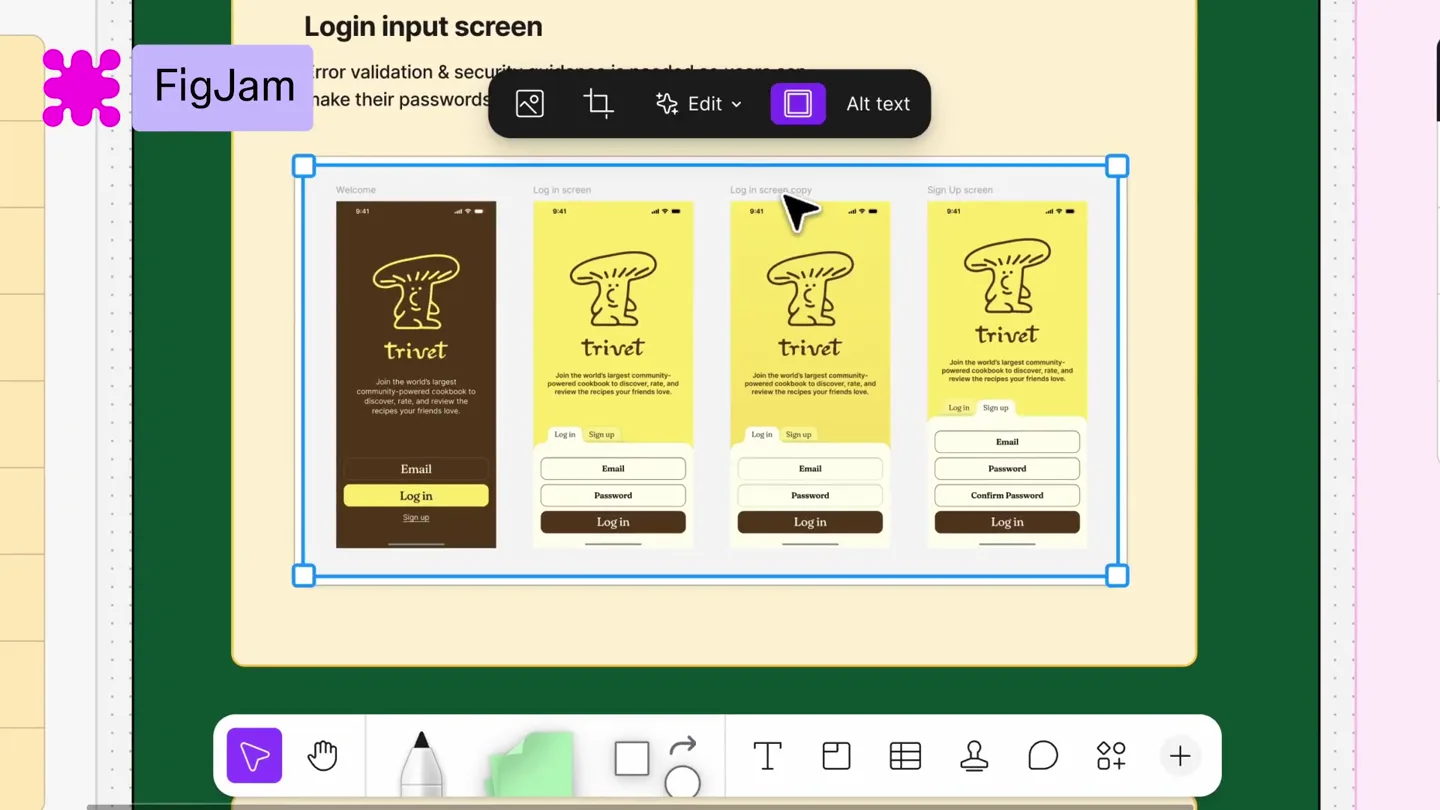
- FigJam Login input screen Error validation & security guidance is needed so users can make their passwords easier & signup faster trivet Join the world's largest community-powered cookbook to discover, rate, and review the recipes your friends love. Log in Sign up Email Password Confirm Password Task Fix login c Investigate Update CS Follow up w
- Camera
- Static overhead shot of a digital whiteboard interface, with a mouse cursor interacting with UI elements.
- Motion
- On-screen UI interaction with highlight effects, showing selection and menu navigation. Subtle cursor animation.
Product Reveal
AI Image Editing in Figma Slides
“(No spoken dialogue — Riser at 0:09 leading to a sub-bass drop/impact at 0:10. The electronic score maintains high energy with percussive synths.)”
- On screen
- Figma Slides Hello Chef Hi Chef Your friends are cooking Super Lemon Sponge Cake Mia made it ★ 4.8 / 5 Chefs to follow Veggie Florian Tomato-Habanero Salsa 2. Chop and add vegetables. Recipe Reviews Made by 8 friends trivet Select area Erase Isolate Cancel Vectorizing... Cancel Esc
- Camera
- Zoom out and pan across a digital presentation interface, revealing multiple slides and a central image being edited.
- Motion
- Seamless transition between application contexts (FigJam to Figma Slides). AI processing feedback (e.g., 'Isolating...', 'Vectorizing...') with progress indicators.
Feature Teaser
AI Image Expansion in Figma Buzz
“(No spoken dialogue — Riser at 0:20 with an impact at 0:21. The energetic electronic score continues, building momentum.)”
- On screen
- Figma Buzz Hello, Chef! Trivet Launch day April 1, 2026 Edit Expand Select area Vectorize Remove background Boost resolution
- Camera
- Close-up on a social media post interface, with a focus on image manipulation tools.
- Motion
- UI menu dropdowns and selections, demonstrating the 'Expand' feature with a visual transformation of the image frame.
Call to Action
AI Image Vectorization in Figma Buzz
“(No spoken dialogue — Final build-up with a riser at 0:31 culminating in a powerful sub-bass drop/impact at 0:32. The track maintains its high-energy, forward-moving feel.)”
- On screen
- Figma Buzz Hello, Chef! Trivet Launch day April 1, 2026 Vectorizing... Cancel Esc Edit image with prompt Remove background Boost resolution Expand Select area Vectorize
- Camera
- Continued close-up on the social media post, highlighting the 'Vectorize' function and its visual outcome.
- Motion
- Visual feedback for AI processing ('Vectorizing...') and a clear demonstration of the image transformation from raster to vector.
Motion design primitives
Synthesizable in Remotion · key components of the figma-ai-launch-template template.
ContextualMenuReveal
A context-sensitive menu appears with a subtle fade and slide animation from the clicked UI element, presenting a list of actions.
+ Code construction recipe
Use `spring` for opacity and Y-translation for a smooth reveal. Implement `Sequence` to stagger individual menu item animations. Utilize `AbsoluteFill` for the menu container and `z-index` for layering.
AIProcessingOverlay
A temporary overlay with text like 'Isolating...' or 'Vectorizing...' appears, often accompanied by a subtle loading spinner or progress bar, indicating an ongoing AI operation.
+ Code construction recipe
Render a `AbsoluteFill` component with a semi-transparent background. Animate text opacity and a rotating SVG spinner using `interpolate` and `loop` for continuous motion. Use `delay` to synchronize with backend processing simulation.
ImageTransformationHighlight
A selected area of an image is highlighted with a colored overlay, followed by a visual transformation (e.g., expansion, isolation, vectorization) that subtly animates the image content.
+ Code construction recipe
Employ `SVG` paths for dynamic selection highlights, animating `stroke-dasharray` for a 'drawing' effect. For image transformations, use `CSS filters` (e.g., `blur`, `grayscale`) or `clip-path` for isolation, and `scale` for expansion, all driven by `spring` animations.
Style DNA & aesthetic system
Visual aesthetic
Typography
Motion
Special effects
Pacing & rhythm
Conceptual story rhythm
- 1
The Interactive Hook
Purpose. Immediately engage the viewer by showcasing a core AI feature in action within a familiar Figma product.
Execution. A mouse cursor directly interacts with an image, triggering an AI-powered edit, demonstrating the 'Erase' and 'Isolate' functions in FigJam.
- 2
Cross-Product Versatility
Purpose. Demonstrate that the AI image capabilities are integrated across the Figma ecosystem, not just a single tool.
Execution. Seamless transition from FigJam to Figma Slides, showing the 'Vectorize' feature applied to a hand-drawn sketch within a presentation context.
- 3
Expanding Creative Horizons
Purpose. Highlight a powerful, creative AI feature that extends image boundaries and possibilities.
Execution. Transition to Figma Buzz, showcasing the 'Expand' feature on a photograph, visually extending its canvas and content.
- 4
Efficiency & Polish
Purpose. Conclude by reinforcing the AI's ability to refine and enhance visual assets for various applications.
Execution. Final demonstration of 'Vectorize' on a complex image within Figma Buzz, emphasizing the clean, scalable output.
Remix in Animatiq Studio
Master remix prompt · agent-ready
Sample remix
Objective
Launch 'CodeFlow AI', a new developer tool for automated code refactoring and documentation.How the recipe adapts
The video would open with a developer interacting with a code editor, using CodeFlow AI's 'Automated Refactor' feature. A contextual menu would pop up, similar to Figma's, offering refactoring options. The 'AI Processing Overlay' primitive would show 'Refactoring...' with a progress spinner. The 'Image Transformation Highlight' primitive would be adapted to highlight blocks of code, showing them visually transforming as they are refactored or expanded. The cross-product versatility would be adapted to show CodeFlow AI integrating with different IDEs or documentation platforms. The overall pacing and high-energy electronic score would be maintained to convey efficiency and innovation.Remix blueprint · figma-ai-launch-template
Scene durations (4 scenes, 54s)
Key Remotion components
Related Creative Tools Product Launches
Explore all Creative Tools launches →
Anthropic Labs launches Claude Design, which turns conversation into prototypes, slides and one-pagers, powered by Claude Opus 4.7.

A vibe design partner with an AI-native canvas for turning ideas into UI.

Meet our new browser—ChatGPT Atlas. Available today on macOS: