
Figma · Launch Video Breakdown: Hook, Pacing & Motion Design
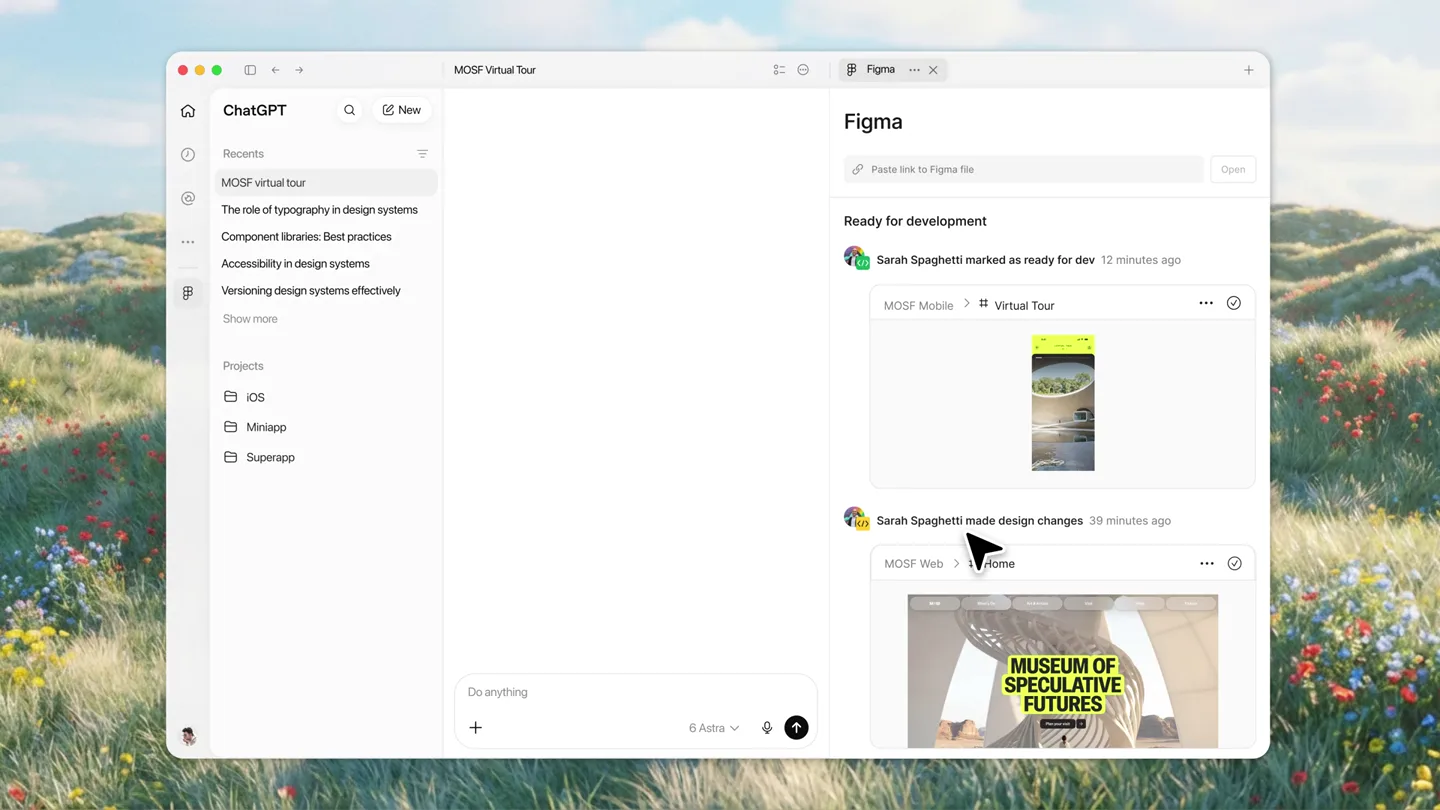
Figma Dev Mode is now in Codex, in the Figma plugin. The film shows frames marked ready for development, then implemented next to a local preview.
Scene-by-scene timeline & spoken transcript
The Hook
Figma Dev Mode Integration
“(No spoken dialogue — ambient UI clicks and subtle whooshes)”
- On screen
- ChatGPT Recents MOSF virtual tour The role of typography in design systems Component libraries: Best practices Accessibility in design systems Versioning design systems effectively Show more Projects iOS Miniapp Superapp Do anything. 6 Astra Figma Paste link to Figma file Open Ready for development Sarah Spaghetti marked as ready for dev 12 minutes ago MOSF Mobile > # Virtual Tour Sarah Spaghetti made design changes 39 minutes ago MOSF Web > # Home MUSEUM OF SPECULATIVE FUTURES
- Camera
- Static wide shot of a desktop UI, then a quick zoom into the Figma plugin panel.
- Motion
- Seamless UI navigation, rapid panel expansion, and content loading animations.
Product Reveal
Interactive Design Review
“(No spoken dialogue — subtle UI interactions and cursor movements)”
- On screen
- Tour Landing Virtual Tour Map 9:41 RE: FINISHED A COLLECTION 16 MIN • 7 ARTWORKS [ABOUT] Re: Finished is an exploration of new materials at the threshold of the everyday. Bringing together new fabrics and textiles engineered from emerging materials, the exhibition asks a deceptively simple question: how can the materials of the future shape our everyday lives today? Read more [ARTISTS] Camille Vosk Read more Jiyheon Cho Read more Dan Brady Read more Interaction Tapping the arrow opens the main virtual tour experience Comment Sara Spaghetti 6 hours ago Let's have this video play as soon as the user enters the landing page
- Camera
- Close-up on Figma canvas, panning and zooming to highlight specific design frames and annotations.
- Motion
- Smooth camera pan, interactive element highlighting (blue overlay), and comment box pop-up with typing animation.
Feature Teaser
AI-Powered Implementation
“(No spoken dialogue — typing sounds and subtle UI feedback)”
- On screen
- 3 Selected From Figma Ask anything 6 Astra Help me implement the selected Figma frames and reference my annotations for specific implementation details Virtual Tour Map Added 3 new typography tokens and 2 new color tokens. New components created: IconButton Eyebrow NavContainer TourPlayback MOSF Virtual Tour Website Open in Would you like to mark the frames as comple
- Camera
- Focus on the chat input field, then a rapid reveal of AI-generated code/component suggestions.
- Motion
- Text typing animation, list item reveal (fade-in/slide-up), and progress bar fill.
Product Reveal
Live Preview & Sync
“(No spoken dialogue — UI clicks and content loading)”
- On screen
- ChatGPT Recents MOSF virtual tour The role of typography in design systems Component libraries: Best practices Accessibility in design systems Versioning design systems effectively Show more Projects iOS Miniapp Superapp Do anything. 6 Astra Help me implement the selected Figma frames and reference my annotations for specific implementation details Tour Landing Virtual Tour Map Added 3 new typography tokens and 2 new color tokens. New components created: IconButton Eyebrow ProgressBar NavContainer TourPlayback MOSF Virtual Tour Website Open in Would you like to mark the frames as complete? Figma MOSF Virtual Tour Annotate /Users/b/Documents/ChatGPT/MOSF Prototype/index.html 9:41 Search All Technology Fashion Bio Art Sounc RE: FINISHED A COLLECTION [ABOUT] 03.06-06.16, 2026 Read more [ARTISTS] Camille Vosk Read more Jiyheon Cho Read more Dan Brad Read more
- Camera
- Split-screen view, showing the Figma/ChatGPT interface on the left and a live web preview on the right, with synchronized content updates.
- Motion
- Split-screen transition, content synchronization (elements appearing in both views), and subtle hover effects.
Call to Action
Figma + Codex Integration
“(No spoken dialogue — abstract sound design and a final 'thump' sound)”
- On screen
- (No on-screen text)
- Camera
- Abstract geometric animation, then a clean reveal of the Figma and Codex logos side-by-side.
- Motion
- Geometric shape animation, logo reveal with a subtle bounce, and a clean, minimalist aesthetic.
Motion design primitives
Synthesizable in Remotion · key components of the ai-code-review-github-launch template.
UIDialogueFlow
Simulates user interaction within a UI, including cursor movements, text typing, and dynamic content loading/unloading in chat bubbles or panels.
+ Code construction recipe
Use `Sequence` for timed events. `spring` for cursor movement and element pop-ins. `TypewriterEffect` component for text input. `interpolate` for opacity and scale changes on content reveal.
SynchronizedSplitScreen
Displays two distinct but related UI views side-by-side, with actions in one view triggering synchronized updates or highlights in the other.
+ Code construction recipe
Utilize `AbsoluteFill` with `Column` or `Row` layouts. Use `useCurrentFrame` and `interpolate` to manage the timing of content appearing in sync across the split views. Shared state or context for data updates.
AbstractLogoReveal
Abstract geometric shapes animate and transform, culminating in the reveal of product logos, often with a clean, impactful transition.
+ Code construction recipe
Employ `Path` and `Shape` components for geometric animations. `spring` for logo bounce and scale. `interpolate` for color changes and opacity fades. SVG filters for subtle glows or blurs.
Style DNA & aesthetic system
Visual aesthetic
Typography
Motion
Special effects
Pacing & rhythm
Conceptual story rhythm
- 1
Context Setting
Purpose. Establish the familiar environment (ChatGPT) and introduce the problem of manual design-to-code translation.
Execution. Opening with a wide shot of the ChatGPT interface, then zooming into the Figma plugin, showing a design marked 'ready for development'.
- 2
Problem & Solution
Purpose. Demonstrate the friction in current workflows and introduce the integrated solution.
Execution. Highlighting design annotations in Figma, then showing the user asking ChatGPT to implement selected frames, illustrating the manual effort being automated.
- 3
Feature Demonstration
Purpose. Showcase the core capabilities of the new integration in action.
Execution. AI-generated component suggestions and code snippets appearing, followed by a split-screen view of Figma designs syncing with a live web preview.
- 4
Impact & Call to Action
Purpose. Conclude with the broader vision and the seamless integration of the two platforms.
Execution. Abstract geometric animation leading to the side-by-side reveal of the Figma and Codex logos, symbolizing their powerful synergy.
Remix in Animatiq Studio
Master remix prompt · agent-ready
Sample remix
Objective
Launch an AI-powered code review tool called 'CodePilot' that integrates with GitHub.How the recipe adapts
The video would open with a wide shot of a GitHub repository dashboard, then a quick zoom into a specific pull request. The UIDialogueFlow primitive would be used to show a developer typing a prompt to CodePilot within the GitHub interface, asking for a security review. The SynchronizedSplitScreen primitive would then display the original code on one side and CodePilot's suggested fixes and explanations on the other, with changes highlighting in real-time. The AbstractLogoReveal would feature CodePilot's logo merging with GitHub's octocat icon.Remix blueprint · ai-code-review-github-launch
Scene durations (4 scenes, 40s)
Key Remotion components
Related Creative Tools Product Launches
Explore all Creative Tools launches →
A vibe design partner with an AI-native canvas for turning ideas into UI.

We heard you wanted to use Codex rate limit resets on your own time. Starting today, we’re rolling out the ability to save rate limit resets to use later. We’re starting Go, Plus, Pro, and Business
Introducing Framer 3.0 with Agents, Branching, Community, and an all-new design.