
Figma · Launch Video Breakdown: Hook, Pacing & Motion Design
Introducing Figma Sites Take your designs straight to the web. With code and AI coming soon. Source: us #Config2025
Scene-by-scene timeline & spoken transcript
The Hook
Responsive Design & Collaborative Editing
“(No spoken dialogue — Driving electronic beat with synth arpeggios and percussive stabs. High-energy audio transitions.)”
- On screen
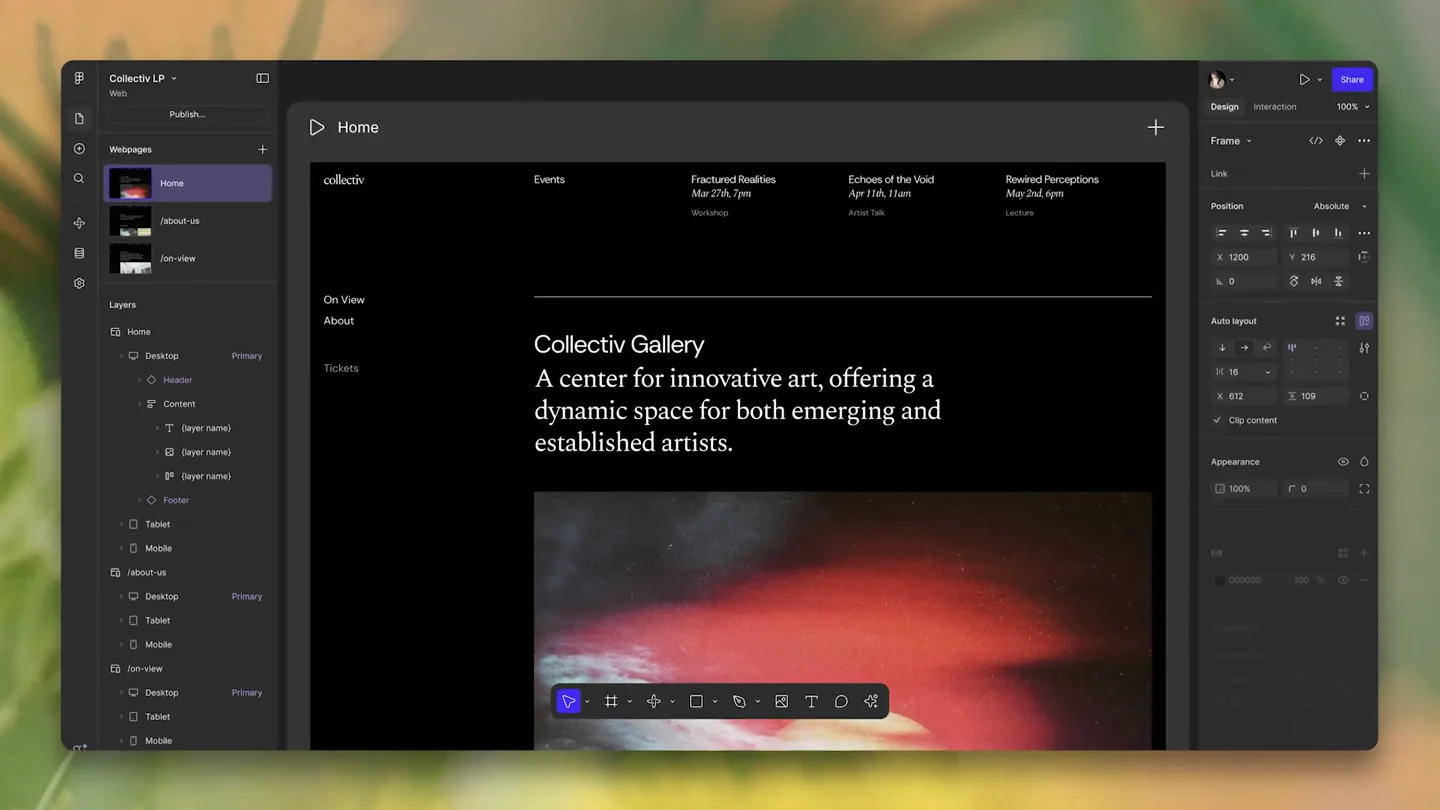
- Home, collectiv, Events, Fractured Realities, Echoes of the Void, Rewired Perceptions, On View, About, Tickets, Collectiv Gallery, A center for innovative art, offering a dynamic space for both emerging and established artists., Set your sites on something new, Desktop - Primary - 1400, Tablet - 800 - 1399, Area, Benefits, Specifications, How-to, Contact Us, Learn More, Browse everything., 78% Efficiency Improvements, 2023, 2024, All Regions 2023, Trusted by:, Logoispsum, Sabi, Mobile - 0 - 799, Whispers of Tea, Role:, Interior Design & Custom Furniture Design, Custom Furniture Design, Material Selection, Small Space Design, Services:, We transform everyday environments into quiet spaces that inspire mindful living and cultivate appreciation, Eyebrow text gives context, A bold headline that grabs attention., Your main offer, Optional second, Projects, Marquee, Direction, Speed, Infinite, Reveal, Opacity, Scale, Transition, Duration, Our studio is open for the unexpected., Available Summer 2025, Submit proposal via email, johnhartfoundation.org, Initiate Contact, F&F, Work, About, Contact, Frame & Form
- Camera
- Dynamic zooms and pans across UI elements, simulating user interaction and responsive design adjustments. Rapid cuts between different website layouts.
- Motion
- Fast-paced UI animation, responsive layout transitions, cursor interaction simulation, content reveal animations, and parallax scrolling effects.
Product Reveal
AI-Powered Code Generation & Live Collaboration
“(No spoken dialogue — Beat intensifies with more prominent synth pads and a driving rhythm. Sound design includes impactful sub-bass drops.)”
- On screen
- Describe your idea, Create an analog clock with a 1px border that tells the local time., I'm going to update the component to display an analog clock. I'll add customizable properties for size,, import React, { useState, useEffect } from, import { defineProperties } from, export default function AnalogClock, updateInterval = 1000,, secondHandColor = "red", minuteHandColor = "black", hourHandColor = "black", }) {, const [time, setTime] = useState(, minutes: 0, seconds: 0 });, useEffect(() => {, const updateClock = () => {, // Get London's local time, const londonTimeString =, Date().toLocaleTimeString("en-GB",, Whether you're a beginner looking to explore, expressive movement or an experienced dancer, ready to refine your techniques, we have classes for you!, Xi, Eric, Robin, Movement Studios., 224 Nostrand Ave, Brooklyn, NY, Move Today, Publish site, Brand Guidelines
- Camera
- Close-up on text input fields, code editor, and live preview. Camera follows cursor movements and highlights collaborative elements.
- Motion
- Typing animation, code syntax highlighting, real-time component rendering, multi-user cursor tracking, and interactive element manipulation.
Feature Teaser
Dynamic Content & Interactive Components
“(No spoken dialogue — Electronic beat maintains energy, with more intricate synth melodies and percussive layers. Risers and sweeps build anticipation.)”
- On screen
- (No on-screen text)
- Camera
- Sweeping camera movements across various website sections, showcasing image galleries, interactive maps, and dynamic data visualizations.
- Motion
- Image carousel transitions, map zoom and pan, data visualization animations (bar charts, line graphs), and interactive element states (hover, click).
Call to Action
Seamless Publishing & Community Integration
“(No spoken dialogue — Beat reaches its peak intensity with a powerful climax, incorporating all synth elements and strong sound design effects. Ends with a final impactful sub-bass drop.)”
- On screen
- (No on-screen text)
- Camera
- Zoom out to reveal the full website, then transition to a 'publish' button interaction. Final shot is a wide view of multiple users collaborating.
- Motion
- Button press animation, loading indicators, confirmation modals, multi-user presence indicators, and a final celebratory visual flourish.
Motion design primitives
Synthesizable in Remotion · key components of the figma-sites-launch-template template.
ResponsiveGridMorph
UI elements and content dynamically reflow and resize across different screen sizes (desktop, tablet, mobile) with smooth, interpolated transitions.
+ Code construction recipe
Utilize Remotion's `interpolate` for `width`, `height`, `x`, `y` properties based on a `screenSize` prop. Employ `spring` for a natural, elastic feel during layout changes. Use `measureText` for responsive typography.
CursorInteractionHighlight
A stylized cursor moves across the screen, highlighting interactive elements (buttons, text fields) and simulating typing or clicking actions with visual feedback.
+ Code construction recipe
Implement a `Cursor` component with `AbsoluteFill` and `spring` for its position. Use `Sequence` to animate cursor path. Apply `scale` and `opacity` `spring` animations to target elements on 'hover' or 'click' events.
CodeToPreviewSync
Changes in a code editor (typing, highlighting) are immediately reflected in a live visual preview, demonstrating real-time rendering and AI code generation.
+ Code construction recipe
Use `Sequence` to synchronize code text reveal (typing effect) with corresponding visual component updates. Employ `interpolate` for `opacity` and `scale` on preview elements. Consider `SVG` for dynamic UI rendering based on code output.
Style DNA & aesthetic system
Visual aesthetic
Typography
Motion
Special effects
Pacing & rhythm
Conceptual story rhythm
- 1
The Design Canvas
Purpose. Introduce the core design environment and its flexibility across devices.
Execution. Rapid cuts showcasing responsive website layouts on desktop, tablet, and mobile, with smooth transitions and cursor interactions.
- 2
Intelligent Creation
Purpose. Demonstrate the AI-powered code generation and real-time component updates.
Execution. Focus on a text input field, then a code editor, followed by the immediate rendering of a new UI component, highlighting the AI's role.
- 3
Collaborative Flow
Purpose. Showcase the multi-user editing and seamless team collaboration features.
Execution. Multiple cursors interacting simultaneously on the same design, with user avatars appearing and disappearing, indicating live presence.
- 4
Launch & Impact
Purpose. Conclude by showing the ease of publishing and the broad application of the created sites.
Execution. A 'Publish' button being clicked, followed by a montage of diverse, live websites, emphasizing the product's reach and versatility.
Remix in Animatiq Studio
Master remix prompt · agent-ready
Sample remix
Objective
Launch a new AI-driven video editing platform that automates scene transitions and color grading.How the recipe adapts
The ResponsiveGridMorph primitive will adapt to show the video editor UI adjusting for different aspect ratios (e.g., vertical for social media, horizontal for cinema). CursorInteractionHighlight will demonstrate selecting clips and applying AI effects. CodeToPreviewSync will be reinterpreted as 'PromptToPreviewSync', where a text prompt for a transition style or color grade immediately renders the effect on a video timeline.Remix blueprint · figma-sites-launch-template
Scene durations (4 scenes, 75s)
Key Remotion components
Related Creative Tools Product Launches
Explore all Creative Tools launches →
Anthropic Labs launches Claude Design, which turns conversation into prototypes, slides and one-pagers, powered by Claude Opus 4.7.

A vibe design partner with an AI-native canvas for turning ideas into UI.

Your work tools in Claude are now available on mobile. Explore Figma designs, create Canva slides, check Amplitude dashboards, all from your phone. Give it a try: