
Figma · Launch Video Breakdown: Hook, Pacing & Motion Design
Create skills with an agent inside Figma, publish them to Community, save others' skills, and try them directly via the "/" command.
Scene-by-scene timeline & spoken transcript
The Hook
AI Agent Skill Creation
“(No spoken dialogue — The track begins with a slow, evolving synth pad, creating an ethereal atmosphere. At 0:08, a subtle riser begins.)”
- On screen
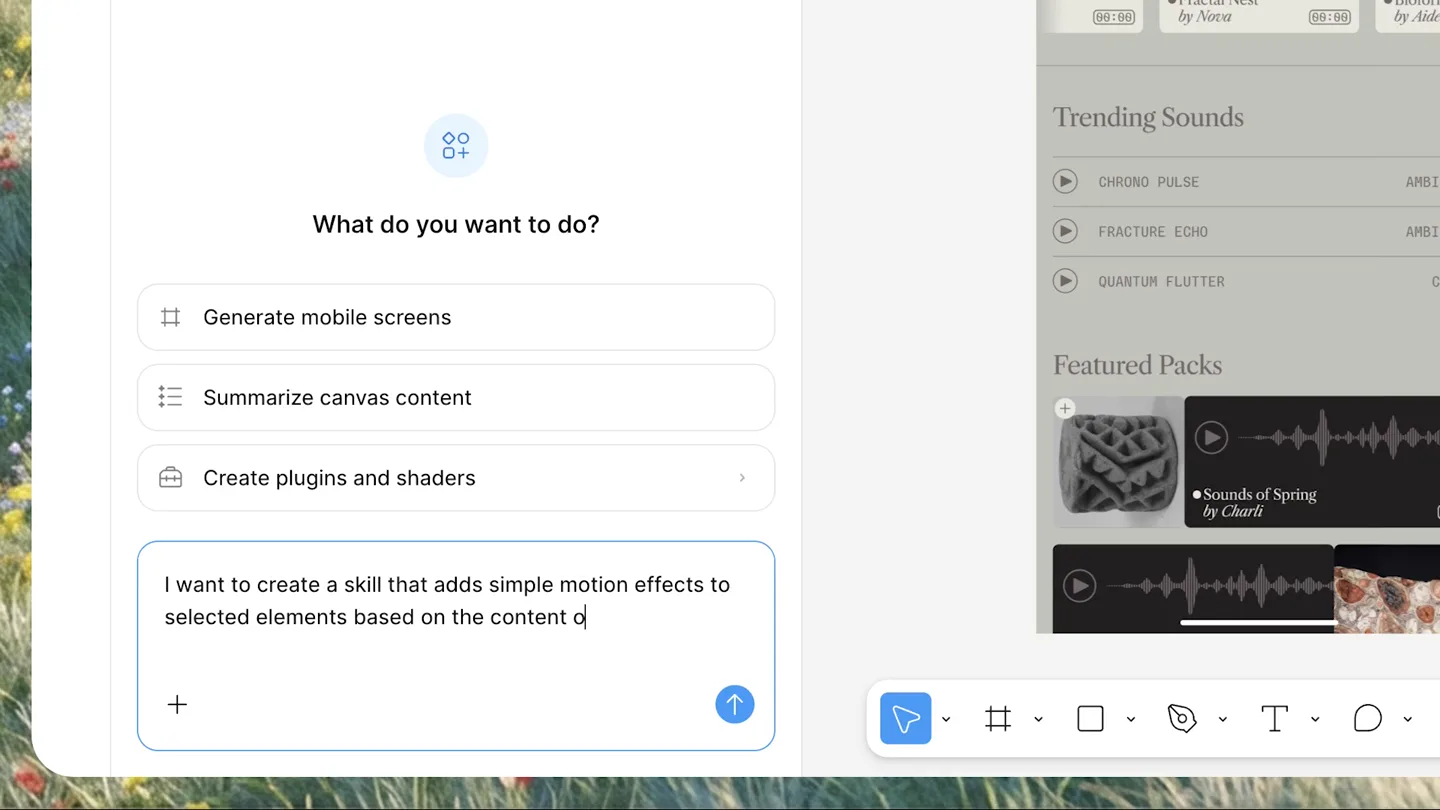
- What do you want to do? Generate mobile screens Summarize canvas content Create plugins and shaders I want to create a skill that adds simple motion effects to selected elements based on the content of each element. I'll read the relevant skills for managing custom skills and applying motion, then help you create this. Great idea! I'll draft a skill that analyzes selected elements' content and applies fitting motion effects. Here's what I'm thinking: Code block name: motion-effect description: Adds simple motion effects to selected elements # Content-Based Motion Apply simple, tast Show more motion-effect Adds simple motion effects to selected elements based on each element's content — text fades in, images scale up, buttons bounce, icons spin, etc. Use Manage Your motion-effect skill is saved! You can invoke it anytime by typing /motion-effect with elements selected. It'll analyze each element's content type — headings, body text, images, icons, buttons, cards, shapes — and apply a fitting motion effect with staggered timing. Let me know if you'd like to tweak anything or try it out!
- Camera
- Static, close-up screen capture of the Figma interface, focusing on the AI agent chat window and code generation.
- Motion
- Typing animation, smooth scrolling of chat interface, subtle UI element reveals.
Product Reveal
Applying & Managing Skills
“(No spoken dialogue — A rhythmic pulse begins at 0:10, building anticipation.)”
- On screen
- Epoch / Mobile / Browse Design Proto Frame Position X 0 Y 0 Auto layout W 430 Hug Clip content + Make it pop with /motion| Skilled commands /motion-effect Apply a simple motion effect to a selected image or vector in Figma using Figma's native motion tool. Picks a motion that semantically matches what the content depicts — a bird flaps, a car drives, a person breathes, a circle pulses. Use when the user says "animate this", "add motion", "motion-ify", "make it move", or invokes /motion-effect, especially when a Figma node is selected or a figma.com URL is shared. Only visible to you Verifying motion All the motion is in place on # Epoch / Mo . Here's what I added: • EPOCH wordmark — scales up from 92% with a fade-in for a subtle reveal • Featured Scapes — slides up 30px + fades in • Trending Sounds — same motion, slightly delayed • Featured Packs — same motion, delayed a bit more • Status bar & home indicator — gentle fades Everything is choreographed with staggered timing so the sections cascade in sequence, giving it that "pop" feel. Hit play on the timeline to preview it! How does it look? Motion was edited Play animation Current version Undo Ask for changes System/Home Indicator Opacity Position Y Featured Packs Position Y Opacity Trending Sounds List Position Y Opacity Featured Scapes Position Y 177 Opacity 100% Add images and files Attach Figma file Web search Libraries Connectors Skills Use skills Add skill Manage skills Created by RadCollabFig Your teams + motion-effect Description Apply a simple motion effect to a selected image or vector in Figma using Figma's native motion tool. Picks a motion that semantically matches what the content depicts — a bird flaps, a car drives, a person breathes, a circle pulses. Use when the user says "animate this", "add motion", "motion-ify", "make it move", or invokes /motion-effect, especially when a Figma node is selected or a figma.com URL is shared. Created by Designer Last updated August 5, 2026 Instructions 1 v # motion-effect 2 3 Apply a simple, simple motion to a selected image or vector. The motion 4 is chosen so it maps to what the content represents — a bird gets a wing 5 flap, a car drives, a logo gets a reveal. 6 7 v ## What you do 8 9 1. v Identify the selected node or how the figma.com metadata is 10 figma.com_design.context. For richer info) with the file key and 11 name in From the raw to current selection. Capture type, name, and 12 any other (similar if it is an image fill. If nothing is selected and no 13 URL is provided, stop and ask the user what needs to happen). 14 15 2. v Infer what the content depicts. (Use the node name, child 16 structure, and asset filenames to decide what's in the image or vector if 17 histograms can use smart classifier.) (Give like a card — want it to 18 'flap'? rather than 'pulsing' Edit Export Publish Delete Community / Figma skills Figma skills Research Generation Brand Design systems Handoff Review Prompt & orchestrate motion-effect Figma Community 0 5 Try in... superfuture-design-review Joey Primiani 1 2 Senior Design Review Try in... copy-that Taylor Green 0 1 Optimize your UX Writing Try in... image-audit
- Camera
- Dynamic screen capture, zooming in and out of UI elements, following cursor movements, and showcasing the timeline and skill management panels.
- Motion
- Staggered animations for UI elements, smooth cursor tracking, modal window transitions, and timeline scrubbing.
Feature Teaser
Community & Discovery
“(No spoken dialogue — A significant high-energy transition occurs at 0:15 with a sub-bass drop and a driving, arpeggiated synth melody taking prominence. This is accompanied by a consistent kick drum and snare pattern.)”
- On screen
- Skills Skills for the Figma design agent, now in Community
- Camera
- Full-screen text reveals, followed by a stylized animation of the Figma logo, then a quick cut to a UI showing skill discovery.
- Motion
- Text wipe/reveal, abstract logo animation with expanding and contracting shapes, quick cuts, and UI element fades.
Call to Action
Figma Skills Ecosystem
“(No spoken dialogue — Another subtle riser is heard at 0:28, building intensity towards the end of the track.)”
- On screen
- (No on-screen text)
- Camera
- Abstract, dynamic animation of interconnected nodes and lines, representing a network or ecosystem, culminating in the Figma logo.
- Motion
- Generative motion graphics, particle systems, smooth camera moves through abstract spaces, and a final logo reveal with a subtle glow.
Motion design primitives
Synthesizable in Remotion · key components of the ai-workflow-automator-launch template.
TypingChatReveal
Text appears character by character in a chat input field, followed by a smooth scroll of the chat history revealing AI-generated responses and code blocks.
+ Code construction recipe
Use Remotion's `Sequence` and `spring` for character reveals, `interpolate` for smooth scrolling of a `ScrollView` component, and `delay` for staggered appearance of chat bubbles.
StaggeredUICascade
Multiple UI elements (e.g., list items, cards) animate into view with slight delays, creating a cascading or ripple effect, often accompanied by subtle position shifts and opacity changes.
+ Code construction recipe
Implement with `map` over an array of UI elements, applying `spring` animations for `translateY` and `opacity` with an `index * delay` for staggered timing. Utilize `AbsoluteFill` for precise positioning.
AbstractNodeNetwork
Interconnected nodes and lines dynamically form and dissolve, representing data flow or a network, often with glowing effects and subtle camera movements through the abstract space.
+ Code construction recipe
Leverage `Canvas` or `ThreeCanvas` for custom WebGL shaders to render particles and lines. Use `interpolate` for camera position and rotation, and `spring` for node scaling and line opacity. SVG filters can add glow effects.
Style DNA & aesthetic system
Visual aesthetic
Typography
Motion
Special effects
Pacing & rhythm
Conceptual story rhythm
- 1
Problem/Opportunity Introduction
Purpose. Showcases the ease of creating custom AI skills within Figma, addressing the need for tailored automation.
Execution. Typing animation in a chat interface, demonstrating natural language skill creation.
- 2
Solution Demonstration
Purpose. Illustrates how the newly created skill is applied to a design, highlighting its immediate impact and the underlying motion timeline.
Execution. Live application of the 'motion-effect' skill on a mobile UI, followed by a detailed view of the animation timeline.
- 3
Ecosystem & Sharing
Purpose. Emphasizes the community aspect, allowing users to publish, discover, and save skills, fostering collaboration.
Execution. Transition from skill management to a 'Community' page, showcasing skill listings and discovery.
- 4
Vision & Call to Action
Purpose. Reinforces the broader vision of an interconnected skill ecosystem within Figma, encouraging engagement.
Execution. Abstract motion graphics representing a network, culminating in the Figma logo and a clear product statement.
Remix in Animatiq Studio
Master remix prompt · agent-ready
Sample remix
Objective
A user wants to create an AI agent to analyze sales data from multiple CRM platforms and generate weekly performance reports.How the recipe adapts
The TypingChatReveal primitive would show the user typing a prompt like 'Create an agent to analyze sales data from Salesforce and HubSpot, then generate a weekly performance report.' The StaggeredUICascade would display generated data insights and report sections animating into view. The AbstractNodeNetwork would visualize the interconnected CRM platforms and data streams, culminating in a report icon.Remix blueprint · ai-workflow-automator-launch
Scene durations (4 scenes, 34.5s)
Key Remotion components
Related Creative Tools Product Launches
Explore all Creative Tools launches →
Anthropic Labs launches Claude Design, which turns conversation into prototypes, slides and one-pagers, powered by Claude Opus 4.7.

A vibe design partner with an AI-native canvas for turning ideas into UI.

Your work tools in Claude are now available on mobile. Explore Figma designs, create Canva slides, check Amplitude dashboards, all from your phone. Give it a try: