
Figma · Launch Video Breakdown: Hook, Pacing & Motion Design
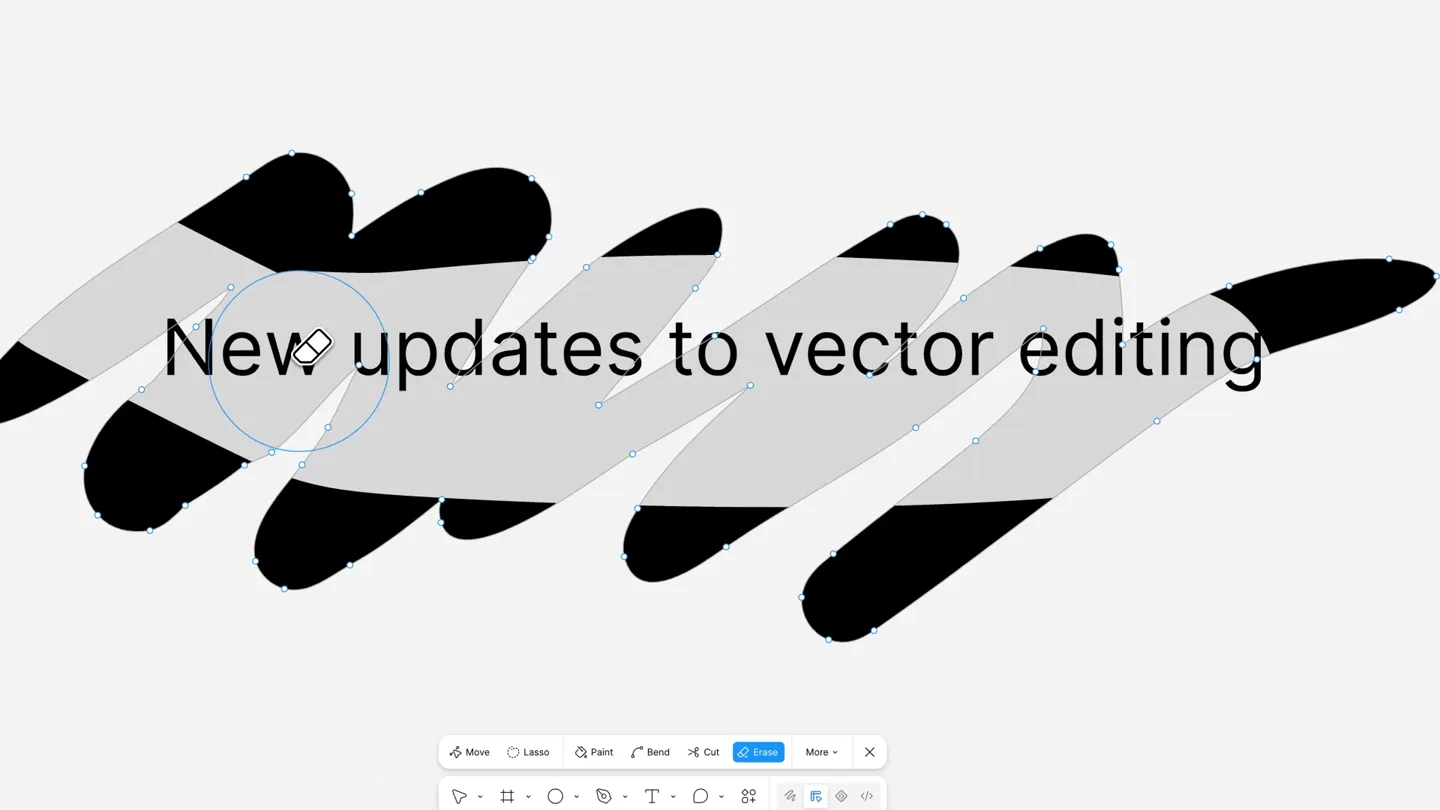
New Figma vector tools: erase a path, then fill it back up.
Scene-by-scene timeline & spoken transcript
The Hook
Introducing New Vector Editing Tools
“(No spoken dialogue — The track features a driving, percussive beat with prominent 808s and a consistent sub-bass presence. Electronic sound effects, including synth stabs, risers, and sweeps, are present. A high-energy transition occurs at 0:07 with a distinct riser and beat drop.)”
- On screen
- New updates to vector editing Erase
- Camera
- Close-up on UI elements, then a slight zoom out to reveal the full canvas. The camera remains static, focusing on the interactive elements.
- Motion
- UI element highlighting, cursor interaction, and path manipulation with a 'reveal' effect where the erased path shows a background image.
Product Reveal
Effortless Vector Shape Erasure
“(No spoken dialogue — The driving beat continues with added synth pads. The 0:07 mark features a distinct riser and beat drop, increasing the energy.)”
- On screen
- Erase any vector shape
- Camera
- Static wide shot of the canvas, allowing the user interaction to be the primary focus. The camera subtly tracks the cursor movement.
- Motion
- Interactive path erasure, revealing a background image through the erased areas. Text overlays appear and disappear with a subtle fade.
Feature Teaser
Dynamic Path Width Adjustment
“(No spoken dialogue — A notable sub-bass drop is heard at 0:17, followed by a build-up in the electronic score.)”
- On screen
- Use [ and ] to change width
- Camera
- Medium shot, centered on the vector shape being manipulated. The camera slightly zooms in to emphasize the width change.
- Motion
- Real-time path width adjustment, demonstrating the responsiveness of the tool. Text overlays provide instructional cues.
Call to Action
Intelligent Multi-Object Painting
“(No spoken dialogue — The electronic score builds up to a final impactful hit at 0:30, concluding with a sustained sub-bass.)”
- On screen
- Click to paint Click & drag to paint multiple
- Camera
- Close-up on the color picker, then a wider shot of the canvas as multiple objects are painted. The camera follows the cursor's drag motion.
- Motion
- Interactive color selection and multi-object painting, showcasing efficiency. UI elements animate in and out, guiding the viewer.
Motion design primitives
Synthesizable in Remotion · key components of the interactive-ai-photo-editor-launch template.
VectorPathReveal
A vector path is dynamically 'erased' or 'drawn', revealing a background image or texture through the manipulated shape. The path nodes and control points are visible during interaction.
+ Code construction recipe
Utilize Remotion's <Path> component with SVG clip-paths or masks. Animate the 'd' attribute of the path using `interpolate` for drawing/erasing effects. Use `spring` for cursor interactions and node highlights. Background images can be rendered within the masked area.
DynamicStrokeWidth
A vector path's stroke width changes interactively, demonstrating real-time manipulation. The path maintains its curvature and position while only its thickness adjusts.
+ Code construction recipe
Implement an SVG <Path> with a `stroke-width` property. Animate this property using `interpolate` or `spring` based on user input (simulated key presses). Ensure the path's `stroke-linecap` and `stroke-linejoin` are set for smooth transitions.
MultiObjectPaint
Multiple distinct vector objects are simultaneously selected and painted with a new color via a drag action. A visual indicator (e.g., a dashed line) connects the selected objects during the drag.
+ Code construction recipe
Render multiple SVG <Path> or <Shape> components. On a simulated 'drag' event, use `interpolate` to change the `fill` property of all selected objects. A dashed SVG <Line> or <Path> can be animated to connect the objects, indicating the drag selection.
Style DNA & aesthetic system
Visual aesthetic
Typography
Motion
Special effects
Pacing & rhythm
Conceptual story rhythm
- 1
The Interactive Hook
Purpose. Immediately demonstrates a core new feature (erasing paths) to grab attention and establish the product's utility.
Execution. A cursor interacts with a vector path, erasing a segment to reveal a background image, accompanied by a clear headline.
- 2
Feature Deep Dive
Purpose. Showcases the versatility and ease of use of the new vector tools through multiple examples.
Execution. Different vector shapes are manipulated (erased, width adjusted) against varied, engaging backgrounds, with instructional text overlays.
- 3
Efficiency & Power
Purpose. Highlights advanced capabilities like multi-object selection and painting to demonstrate productivity gains.
Execution. A color picker interaction followed by a drag action that simultaneously paints multiple vector objects, emphasizing speed.
- 4
Seamless Integration
Purpose. Reinforces that these new tools are part of a cohesive, intuitive design environment.
Execution. Consistent UI elements and cursor interactions across all demonstrations, showing the tools fit naturally within the Figma ecosystem.
Remix in Animatiq Studio
Master remix prompt · agent-ready
Sample remix
Objective
Launch a new AI-powered photo editing tool called 'PixelPerfect AI' that simplifies complex tasks.How the recipe adapts
The 'VectorPathReveal' primitive adapts to 'AIBackgroundReveal', where a selection tool quickly outlines and removes a background, revealing a new, dynamic background. The 'DynamicStrokeWidth' becomes 'IntelligentRecolorBrush', showing a brush dynamically changing the color of an object within a photo with real-time feedback. The 'MultiObjectPaint' transforms into 'BatchEnhanceDrag', where dragging a selection box over multiple photo elements applies a consistent AI enhancement or filter simultaneously. The UI remains clean, focusing on the photo manipulation, with instructional text appearing as needed.Remix blueprint · interactive-ai-photo-editor-launch
Scene durations (4 scenes, 33s)
Key Remotion components
Related Creative Tools Product Launches
Explore all Creative Tools launches →
A vibe design partner with an AI-native canvas for turning ideas into UI.

We heard you wanted to use Codex rate limit resets on your own time. Starting today, we’re rolling out the ability to save rate limit resets to use later. We’re starting Go, Plus, Pro, and Business

There's a hidden tax on every knowledge worker in the world, and nobody talks about it: The design tax. You're a strategist, a sales lead, a marketer. You were hired for what you know. But every me…