
Flyest · Launch Video Breakdown: Hook, Pacing & Motion Design
Flyest is an album of 13 creative apps. The first, Digital Rain, drops with this film.
Scene-by-scene timeline & spoken transcript
The Hook
Digital Rain Interface & Initial Interaction
“(No spoken dialogue — Pulsing arpeggiated synth melody with sub-bass line establishes an atmospheric, slightly mysterious mood.)”
- On screen
- appdrop.com UPLOAD GREY Size Density Glow INVERT PNG RECORD HIDE Drop your file here PNG or SVG
- Camera
- Static, full-screen view of a browser window displaying the 'Digital Rain' application interface. The camera is zoomed in enough to clearly show UI elements and the central interaction area.
- Motion
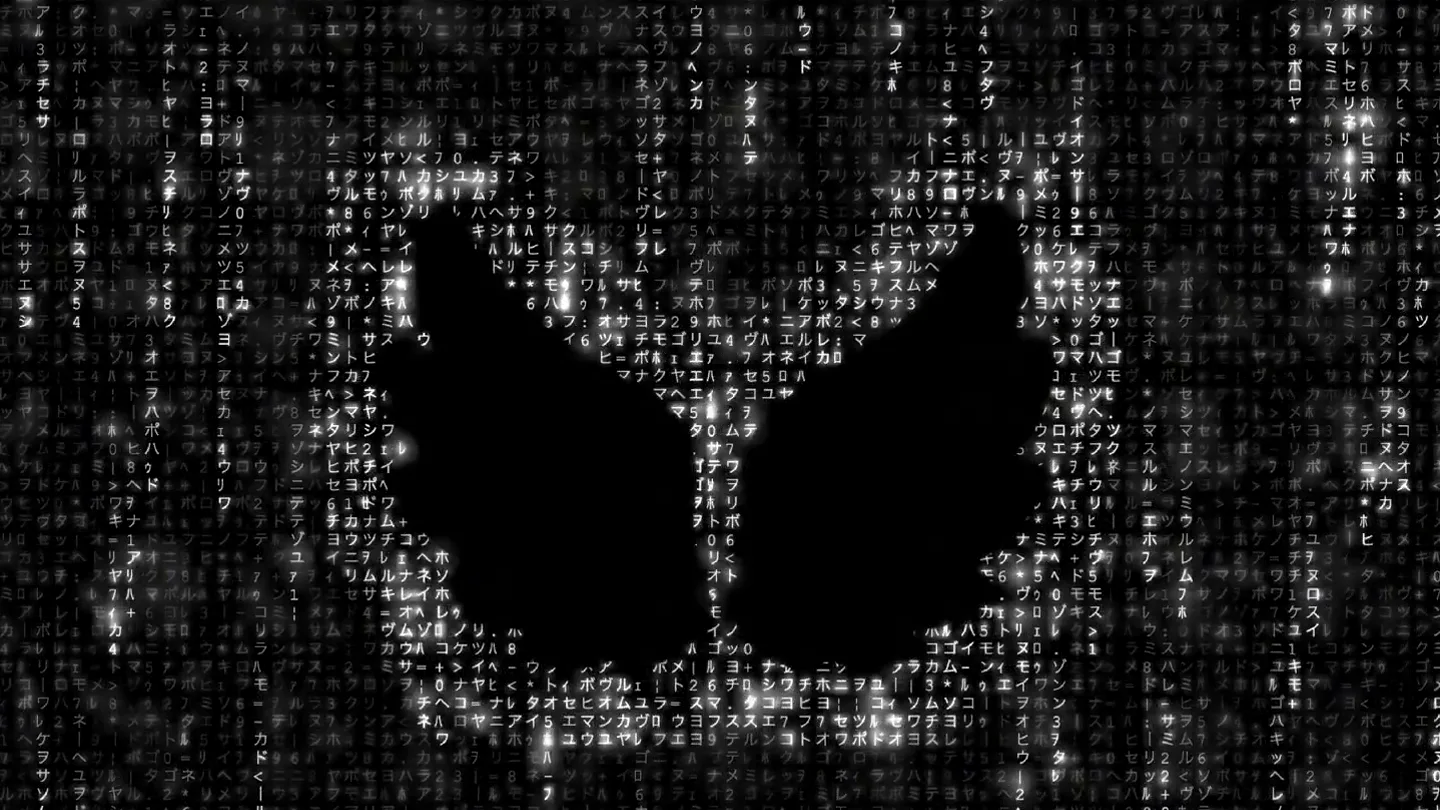
- UI interaction simulation with a mouse cursor hovering and clicking. The background features a 'Matrix'-like digital rain effect, with characters falling and forming a butterfly/angel wing shape.
Product Reveal
Color Mode Transition: Grey to Classic
“(No spoken dialogue — The consistent mid-tempo rhythmic pulse continues, maintaining the atmospheric tone.)”
- On screen
- UPLOAD CLASSIC Size Density Glow INVERT PNG RECORD HIDE
- Camera
- Static, full-screen view of the browser window. The focus remains on the application's UI and the evolving digital rain effect.
- Motion
- Rapid UI interaction with a mouse click on the 'GREY' filter, transitioning to 'CLASSIC'. The digital rain background instantly shifts from grayscale to the iconic green 'Matrix' aesthetic, revealing the butterfly/angel wing shape more distinctly.
Feature Teaser
Color Mode Transition: Classic to Disco
“(No spoken dialogue — The sustained synth pads and rhythmic pulse underscore the visual transformations.)”
- On screen
- UPLOAD DISCO Size Density Glow INVERT PNG RECORD HIDE
- Camera
- Static, full-screen view. The camera maintains a consistent perspective on the application.
- Motion
- Another swift UI interaction, clicking 'CLASSIC' to reveal 'DISCO'. The digital rain background explodes into a vibrant, multi-colored pixelated effect, showcasing the dynamic range of the app's visual filters. The butterfly/angel wing shape remains central.
Feature Teaser
Color Mode Transition: Disco to Candy & Rain
“(No spoken dialogue — The atmospheric electronic score continues its steady, engaging rhythm.)”
- On screen
- UPLOAD CANDY Size Density Glow INVERT PNG RECORD HIDE UPLOAD RAIN Size Density Glow INVERT PNG RECORD HIDE
- Camera
- Static, full-screen view. The camera holds its position, emphasizing the rapid visual changes.
- Motion
- Two quick UI interactions: 'DISCO' transitions to 'CANDY', creating a pastel, bright digital rain, then immediately to 'RAIN', which introduces a cool blue-white palette, mimicking a digital downpour. Each transition is instant and impactful.
Call to Action
Final Color Mode: Light & Product Name Reveal
“(No spoken dialogue — The ambient electronic score fades slightly, leaving a lingering sense of mystery and potential.)”
- On screen
- UPLOAD LIGHT Size Density Glow INVERT PNG RECORD HIDE
- Camera
- Static, full-screen view. The camera maintains its framing, allowing the final visual state to settle.
- Motion
- The final UI interaction, clicking 'RAIN' to reveal 'LIGHT'. The digital rain effect becomes a bright, almost ethereal white, with subtle grayscale characters. The butterfly/angel wing shape is now a luminous, central figure, concluding the visual journey.
Motion design primitives
Synthesizable in Remotion · key components of the digital-rain-ui-showcase template.
DigitalRainCanvas
A dynamic background effect where characters (Japanese Katakana, numbers, symbols) fall vertically, creating a 'Matrix'-like digital rain. Specific shapes (like the butterfly/angel wings) are revealed or masked by the falling characters.
+ Code construction recipe
Implement using a Remotion Canvas component. Render individual characters with varying opacities, speeds, and vertical positions. Use a mask (SVG or image) to define the shape where characters are visible or change color. Interpolate character colors and speeds based on selected 'mode' props.
UIModeSwitcher
A horizontal navigation bar with clickable text labels representing different visual modes (e.g., GREY, CLASSIC, DISCO). A mouse cursor animates to click these labels, triggering instant visual changes in the background.
+ Code construction recipe
Create a React component for the navigation bar. Use Remotion's `interpolate` or `spring` for the mouse cursor movement. On 'click' events (simulated by `AbsoluteFill` or `Sequence` timing), update a global state or context that controls the `DigitalRainCanvas` component's `mode` prop, ensuring instant visual transitions.
DynamicShapeReveal
A central, static shape (butterfly/angel wings) that is consistently present but visually transformed by the background digital rain's color and density changes. The shape acts as a focal point for the various visual modes.
+ Code construction recipe
Overlay an SVG or image of the shape on top of the `DigitalRainCanvas`. Use CSS blend modes (e.g., `mix-blend-mode: screen` or `multiply`) or SVG filters (`feColorMatrix`, `feBlend`) to integrate the shape with the digital rain. Animate filter properties or color values based on the active `mode` prop from `UIModeSwitcher`.
Style DNA & aesthetic system
Visual aesthetic
Typography
Motion
Special effects
Pacing & rhythm
Conceptual story rhythm
- 1
The Digital Canvas
Purpose. Introduce the core visual mechanic and the app's interface.
Execution. A full-screen view of the 'Digital Rain' app, showcasing the initial grayscale digital rain and the central butterfly/angel wing shape, with a 'Drop your file here' prompt.
- 2
Unleashing Color
Purpose. Demonstrate the app's ability to transform visuals with different color modes.
Execution. Rapid-fire transitions through 'GREY', 'CLASSIC' (green Matrix), 'DISCO' (multi-color), 'CANDY' (pastel), and 'RAIN' (blue-white) modes, each instantly changing the digital rain's aesthetic.
- 3
The Luminous Reveal
Purpose. Showcase a final, refined visual output and hint at creative potential.
Execution. The 'LIGHT' mode is activated, transforming the digital rain into a bright, ethereal white, making the central shape glow and stand out.
- 4
Product Identity
Purpose. Conclude with a strong visual statement of the app's unique output.
Execution. The final 'LIGHT' mode with the prominent, luminous butterfly/angel wing shape, leaving a lasting impression of the app's creative capabilities.
Remix in Animatiq Studio
Master remix prompt · agent-ready
Sample remix
Objective
Launch a new AI-powered music production software called 'Synthweave'.How the recipe adapts
The 'Digital Rain' background would be replaced with falling musical notes, waveforms, and code snippets. The central butterfly/angel wing shape would become the 'Synthweave' logo. UI mode switches like 'GREY', 'CLASSIC', 'DISCO' would become 'ANALOG', 'DIGITAL', 'GLITCH', 'CHILL', 'HYPER', each instantly transforming the falling musical elements and the logo's appearance. The mouse cursor would click through these modes, demonstrating the software's diverse sound design capabilities. The audio track would feature a similar pulsing synth, but with added subtle percussive elements to reflect music production.Remix blueprint · digital-rain-ui-showcase
Scene durations (5 scenes, 14s)
Key Remotion components
Related Creative Tools Product Launches
Explore all Creative Tools launches →
A vibe design partner with an AI-native canvas for turning ideas into UI.

We heard you wanted to use Codex rate limit resets on your own time. Starting today, we’re rolling out the ability to save rate limit resets to use later. We’re starting Go, Plus, Pro, and Business
Introducing Framer 3.0 with Agents, Branching, Community, and an all-new design.