
Om Patel · Launch Video Breakdown: Hook, Pacing & Motion Design
THIS GUY VIBE CODED A MAC APP THAT AUTOMATICALLY SETS FOLDER ICONS BASED ON THEIR NAMES every folder on your mac looks the same (all blue folders) you have to read every name to find what you're lo…
Scene-by-scene timeline & spoken transcript
The Hook
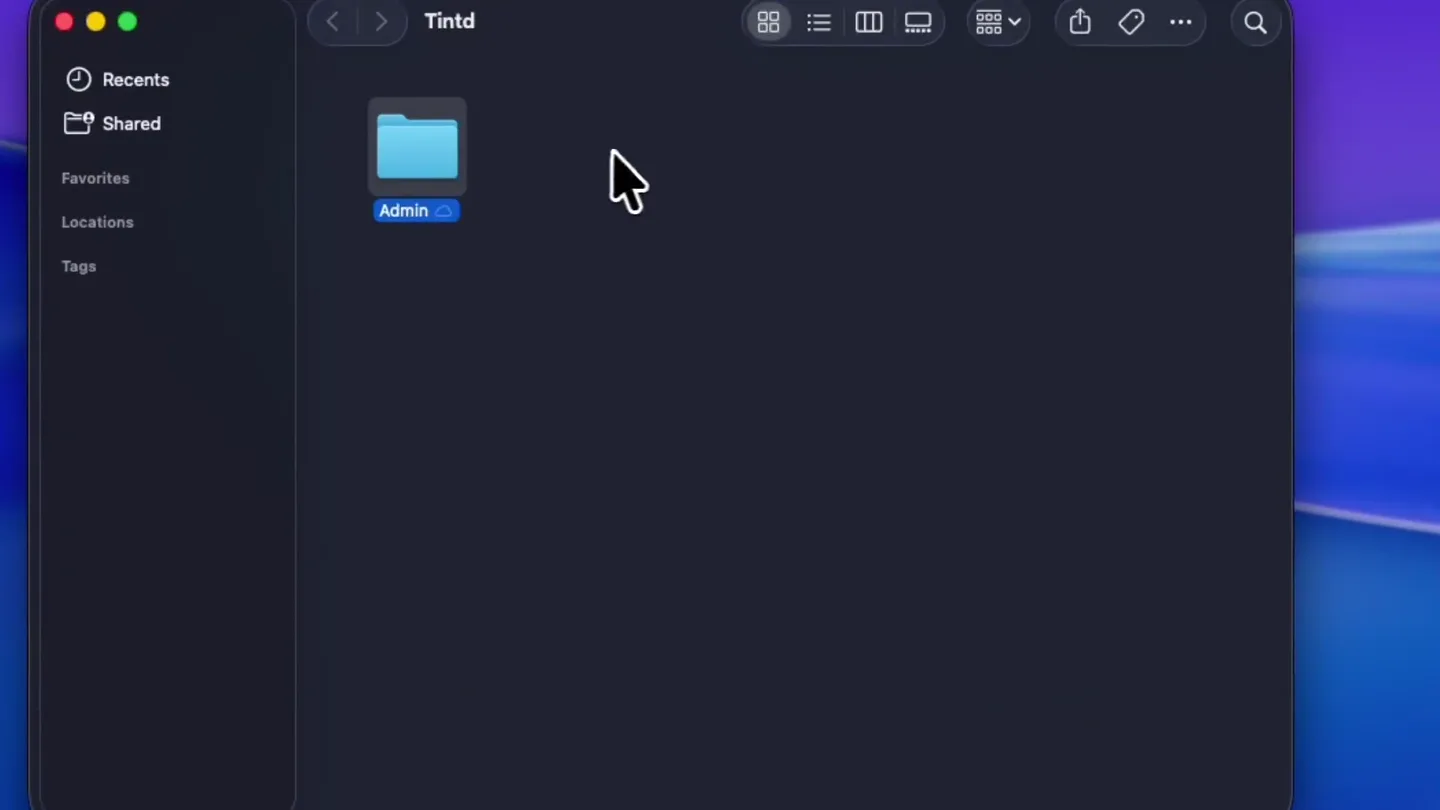
Instant Folder Icon Transformation
“(No spoken dialogue — upbeat, rhythmic background music)”
- On screen
- Tintd, Recents, Shared, Favorites, Locations, Tags, Admin, Video, Music, Photos, App, Code, Recipes, Waiting to upload
- Camera
- Static, top-down screen recording of a macOS Finder window.
- Motion
- Rapid, sequential renaming of folders with immediate, distinct icon color and symbol changes. Cursor interaction highlights the speed and automation.
Problem Agitation
The Monotony of Default Icons
“(No spoken dialogue — upbeat, rhythmic background music)”
- On screen
- Tintd 2, Admin, ChatGPT, Design, Dev, Favorites, Sales, Taxes, Travel, Recipes, Movies, Music
- Camera
- Static, top-down screen recording, showing a full window of uniformly blue folders, emphasizing the 'before' state.
- Motion
- A quick cut reveals a screen full of identical blue folders, visually reinforcing the problem of lack of differentiation.
Product Reveal
Tintd: The Icon Customization Interface
“(No spoken dialogue — upbeat, rhythmic background music)”
- On screen
- Tintd 2, Admin, ChatGPT, Design, Dev, Favorites, Movies, Music, Recipes, Sales, Taxes, Travel, Auto, Reset, Colors, Color, Icon, Details, 00BFFF, 195, 100, 50, Recently used, Presets, Change 11 icons, D9B226, 47, 70, 50
- Camera
- Static, top-down screen recording, with a new Tintd application window sliding in from the right, revealing its UI.
- Motion
- A smooth slide-in animation introduces the Tintd app, showcasing its color picker and icon selection interface. Cursor interaction demonstrates color changes in real-time.
Feature Teaser
Batch Icon Application & Confirmation
“(No spoken dialogue — upbeat, rhythmic background music)”
- On screen
- Tintd 2, Admin, ChatGPT, Design, Dev, Favorites, Sales, Taxes, Color, Icon, D9B226
- Camera
- Static, top-down screen recording, focusing on the Tintd app and the folder window.
- Motion
- A dynamic, horizontal 'wipe' animation across the folders visually represents the batch application of new icons, followed by a satisfying checkmark confirmation. The Tintd app then slides out.
Motion design primitives
Synthesizable in Remotion · key components of the tintd-icon-automator template.
InstantIconTransform
A folder icon instantly changes its color and embedded symbol upon a text input or selection, creating a dynamic visual response to user action.
+ Code construction recipe
Utilize Remotion's `interpolate` for color transitions (e.g., `interpolateColors`) and `spring` for subtle scale/bounce on icon change. SVG filters or conditional rendering of icon components based on folder name/type.
BatchIconWipe
Multiple folder icons are simultaneously updated with new colors and symbols through a horizontal, progressive 'wipe' effect, indicating a batch operation.
+ Code construction recipe
Implement a `Sequence` component with `AbsoluteFill` children for each folder. Use `interpolate` on `translateX` or `clipPath` to create the wipe effect, revealing the new icons. Stagger the animation start times slightly for a smooth, cascading reveal.
AppWindowSlideIn
A new application window smoothly slides into view from the side, revealing its interface and functionality.
+ Code construction recipe
Wrap the application window component in a `spring` animation for `translateX` or `translateY`. Use a `delay` to time its entrance after a scene cut, ensuring a fluid transition.
Style DNA & aesthetic system
Visual aesthetic
Typography
Motion
Special effects
Pacing & rhythm
Conceptual story rhythm
- 1
The 'Aha!' Moment
Purpose. Immediately demonstrate the core value proposition: instant, intelligent icon customization.
Execution. Rapid-fire folder renaming with immediate, distinct icon changes, showcasing the product's magic.
- 2
The Pain Point
Purpose. Highlight the problem the product solves: the visual monotony of default system folders.
Execution. A stark visual contrast between the colorful, customized folders and a screen full of identical blue folders.
- 3
The Solution Unveiled
Purpose. Introduce the product's interface and its intuitive controls.
Execution. The Tintd app slides in, showcasing its color picker and icon selection, with cursor interaction demonstrating ease of use.
- 4
Effortless Transformation
Purpose. Showcase the product's efficiency and impact on a larger scale.
Execution. A batch update animation across multiple folders, followed by a clear confirmation, reinforcing the product's power.
Remix in Animatiq Studio
Master remix prompt · agent-ready
Sample remix
Objective
A new AI-powered document management app called 'ClarityFlow' that automatically categorizes and tags PDFs, images, and text files.How the recipe adapts
The InstantIconTransform primitive would be adapted to 'InstantTagHighlight', where a file's thumbnail instantly changes color and displays a small tag icon upon being processed by ClarityFlow. The BatchIconWipe would become 'BatchTagApply', showing a horizontal wipe across a list of files as they are automatically tagged and sorted. The AppWindowSlideIn would introduce the ClarityFlow dashboard, demonstrating its intuitive categorization interface.Remix blueprint · tintd-icon-automator
Scene durations (5 scenes, 38s)
Key Remotion components
Related Creative Tools Product Launches
Explore all Creative Tools launches →
Anthropic Labs launches Claude Design, which turns conversation into prototypes, slides and one-pagers, powered by Claude Opus 4.7.

A vibe design partner with an AI-native canvas for turning ideas into UI.

Your work tools in Claude are now available on mobile. Explore Figma designs, create Canva slides, check Amplitude dashboards, all from your phone. Give it a try: