
Framer · Launch Video Breakdown: Hook, Pacing & Motion Design
We’re excited to introduce Tutorials, a new section in the Framer Marketplace. If you’ve mastered a complex effect or discovered a faster way to build layouts, you now have a dedicated place to sha…
Scene-by-scene timeline & spoken transcript
The Hook
Introducing Framer Tutorials
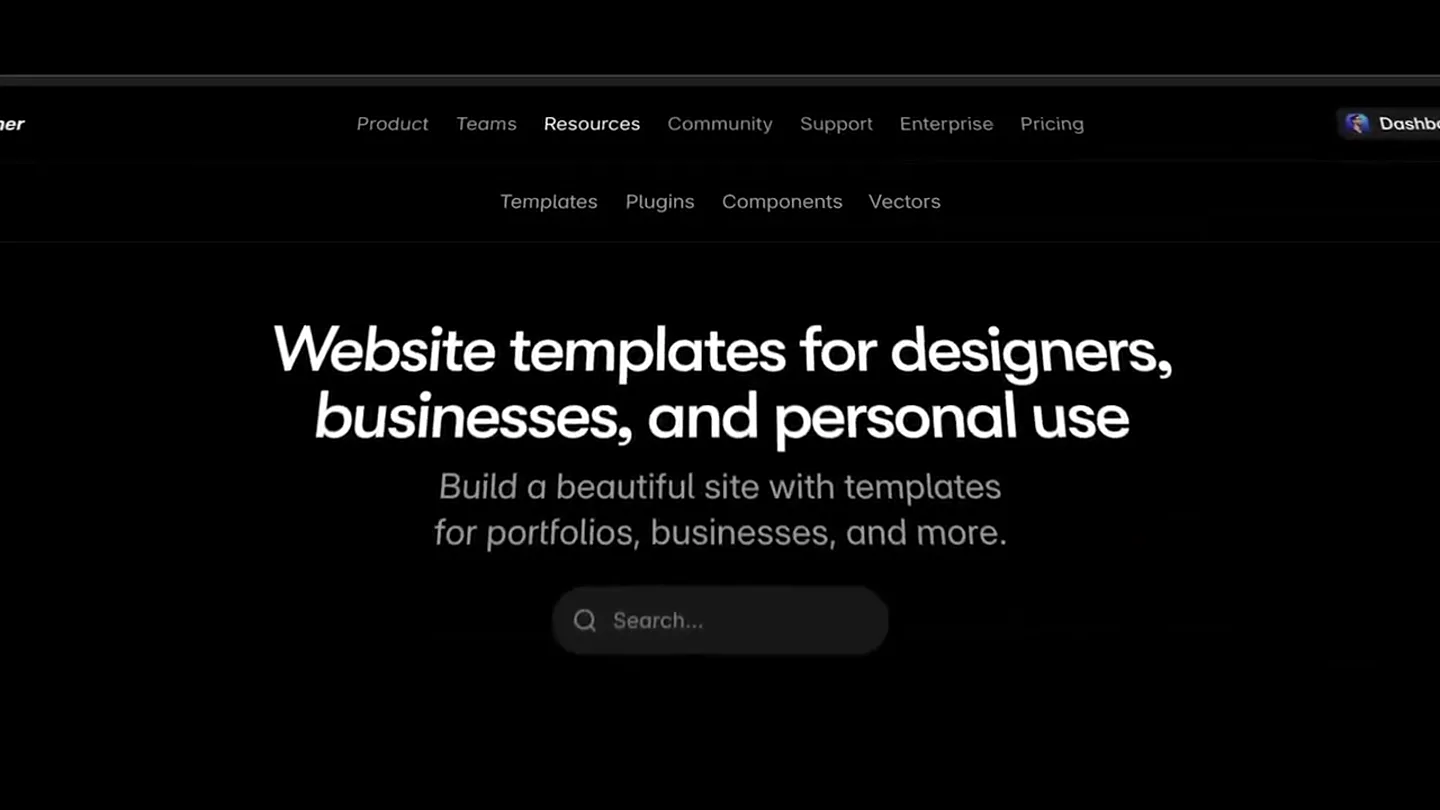
“We're excited to introduce Tutorials, a new section in the Framer Marketplace.”
- On screen
- Framer Product Teams Resources Community Support Enterprise Pricing Dashboard Templates Plugins Components Vectors Tutorials Website templates for designers, businesses, and personal use Build a beautiful site with templates for portfolios, businesses, and more. Q Search... Categories See All → Branding that you need indeed LUCAS MILLER Lessons Take Control of Your Digital Assets Lando Sullivan GREYO Bille Dovide PUREVERSALE
- Camera
- A slow, sweeping camera pan across a digital interface, revealing various UI elements and content cards.
- Motion
- Smooth 3D camera pan with depth of field, revealing UI elements in a staggered, organic motion.
Product Reveal
Browsing and Filtering Tutorials
“If you've mastered a complex effect or discovered a faster way to build layouts, you now have a dedicated place to share your knowledge and help others level up their Framer skills. You can browse tutorials by type, level, or duration, making it easy to find exactly what you're looking for.”
- On screen
- Framer Product Teams Resources Community Support Enterprise Pricing Dashboard Templates Plugins Components Vectors Tutorials Level up your Framer skills with hands-on tutorials Quick lessons to help you design, build, and launch with confidence. Q Search... Marketplace Templates Plugins Components Vectors Tutorials Type Level Duration Lessons Handoff 101 Carlos Geronimo Notionary Template Dragframe Effects Ryan Hayward Collections CMS Crash Course Ryan Hayward Component Events Fred Moon Optimization Custom locale picker Andreu Close Mobile Nav Launchly Beginner Mistakes Carlos Geronimo Beautiful Site BGs Nandi Start With Framer Design & publish websites from a blank canvas. No code needed. FINANCE Design Publish Scale The website builder we've been dreaming about. Details Andreu 6 days ago 28 views Intermediate 12m reading time The default Framer locale picker is functional, but sometimes your design demands something more unique—like a flag toggle, a custom dropdown, or a minimal text list. In this tutorial, you will learn how to build a completely custom language switcher component from scratch using Framer's native Localization features and the Set Locale interaction. Verify your locales Before building the component, ensure Framer knows which languages you are targeting. 1. Go to the Localization view by clicking the globe icon in the top bar. 2. Confirm your primary language is set (e.g., English) and add at least one secondary language (e.g., Spanish). Localization Translate Filter Glossary Settings Plugins Locales Español 0% English Site Settings My Framer Site Effects Crash Course - YouTube (HD) Transition Ease Spring Based On Physics Stiffness 56 Damping 30 Mass 1 Delay 0 Preview I have expanded rectangles. Styles Opacity 1 Visible Yes No Fill Purple Overflow Hidden Radius 36 A crash course on Framer effects. Learn basic, text & scroll effects so you can animate anything!
- Camera
- Dynamic camera movements, including zooms into specific UI elements, pans across tutorial cards, and a close-up on a dropdown menu interaction.
- Motion
- Rapid UI element transitions, interactive hover states, and smooth scrolling animations. The camera follows user interaction, highlighting key features with quick, precise movements.
Feature Teaser
Engaging with Tutorial Content
“Each tutorial comes with a video lesson, a written article, and a remix link, so you can easily follow along and apply what you've learned directly in Framer. Whether you're looking to build a custom language switcher, master Framer's CMS, or create stunning animations, our tutorials have you covered.”
- On screen
- Marketplace > Tutorials CMS Beginner Course — Master Framer's CMS in 40 Minutes This tutorial is perfect for beginners who want to understand how the Framer CMS works and how to use it to make their Details Chinonso Umeh Tutorials Marketplace > Tutorials A Site From Scratch — Build your first Framer site Open project Start With Framer Design & publish websites from a blank canvas. No code needed. FINANCE Design Publish Scale The website builder we've been dreaming about. Details Nandi 2 months ago 21 views Beginner
- Camera
- The camera smoothly navigates through different tutorial pages, showcasing video embeds, written content, and interactive 'Open project' buttons. It zooms into specific sections of the tutorial content.
- Motion
- Seamless page transitions, content reveals, and interactive button animations. The camera acts as a guide, drawing attention to the multi-modal learning experience.
Call to Action
Publish Your Own Tutorials
“And if you're a creator, you can now publish your own tutorials directly to the marketplace. Simply create a new tutorial, add your video, written content, and remix link, and submit it for review. We can't wait to see what you create. Happy learning!”
- On screen
- Creator Space Templates Plugins Components Vectors Tutorials Links Submit your learn how New Tutorial Title 0/20 Byline 0/40 Nested Links 8 things to learn Level Type Beginner Video YouTube URL Add a YouTube video to your tutorial. https://youtu.be/rdRw7sHoopQ?si=TV47zAICrC-aw9ra Thumbnail Used for smaller cards. 4:3 ratio. Minimum of 1200 pixels wide. Optimization Thumb.jpg Remix URL Add a project as supportive content for your tutorial. https://framer.remix/hpSP7uk7BVtmwo50gl Introduction 223/260 Ever seen Framer's "Optimization Warning" after publishing your site? Save Submit
- Camera
- The camera follows a user's journey through the 'Creator Space,' highlighting the 'Tutorials' section, then zooms into a 'New Tutorial' form, showcasing input fields and the 'Submit' button.
- Motion
- Guided UI interaction, form field animations, and button press feedback. The camera emphasizes the ease of content submission with clear, sequential movements.
Motion design primitives
Synthesizable in Remotion · key components of the framer-marketplace-tutorial-launch template.
UIDeepDive
A smooth, controlled camera zoom into a specific UI element or section, often accompanied by a slight rotation or tilt to add depth. This highlights details and transitions focus.
+ Code construction recipe
Use Remotion's `interpolate` for camera position (x, y, z) and rotation (rx, ry, rz) values. Employ `spring` for a natural, dampened feel on the zoom and rotation. Implement a `PerspectiveCamera` for 3D depth.
ContentCardCarousel
A horizontal or grid-based arrangement of content cards that smoothly scroll or slide into view, often with a subtle parallax effect or depth as they move.
+ Code construction recipe
Utilize `map` to render an array of `ContentCard` components. Animate `transform: translateX` or `translateY` using `interpolate` with an `easeOutCubic` curve for smooth scrolling. Apply `scale` and `opacity` changes for cards entering/exiting view.
InteractiveFormReveal
Form fields and buttons animate into view sequentially or with a staggered effect, often with a subtle fade-in and slide-up motion, responding to user interaction or narrative progression.
+ Code construction recipe
Wrap form elements in `Sequence` components with `from` and `duration` props for staggered reveals. Animate `opacity` and `transform: translateY` using `spring` for a soft, responsive entrance. Use `useCurrentFrame` to trigger animations based on timeline position.
Style DNA & aesthetic system
Visual aesthetic
Typography
Motion
Special effects
Pacing & rhythm
Conceptual story rhythm
- 1
The Discovery
Purpose. Introduce the new 'Tutorials' section and its purpose within the Framer Marketplace.
Execution. A wide, sweeping shot of the Framer Marketplace, slowly zooming into the 'Tutorials' tab, establishing context.
- 2
The Exploration
Purpose. Demonstrate how users can browse, filter, and find relevant tutorials.
Execution. Dynamic UI interactions showing filtering options, scrolling through tutorial cards, and highlighting key information on individual tutorial pages.
- 3
The Deep Dive
Purpose. Showcase the rich content within a tutorial (video, article, remix link) and its practical application.
Execution. Close-ups on video playback, scrolling through a written article, and clicking an 'Open project' button to emphasize hands-on learning.
- 4
The Contribution
Purpose. Empower users to become creators by demonstrating the tutorial submission process.
Execution. A guided walkthrough of the 'Creator Space,' filling out a 'New Tutorial' form, and the final 'Submit' action, encouraging community engagement.
Remix in Animatiq Studio
Master remix prompt · agent-ready
Sample remix
Objective
Launch a new AI-powered code generation tool, 'CodeGenius,' that integrates with popular IDEs.How the recipe adapts
The UIDeepDive primitive would be adapted to zoom into specific code snippets generated by CodeGenius within an IDE, highlighting syntax and efficiency. ContentCardCarousel would display different code generation templates or AI-suggested refactorings. InteractiveFormReveal would demonstrate the user inputting natural language prompts to generate code, with the form fields animating in as the user types. The dark-mode UI would be maintained, with bright, glowing accents for AI-generated code blocks and interactive elements, all timed to a rhythmic electronic soundtrack.Remix blueprint · framer-marketplace-tutorial-launch
Scene durations (4 scenes, 76s)
Key Remotion components
Related Creative Tools Product Launches
Explore all Creative Tools launches →
Anthropic Labs launches Claude Design, which turns conversation into prototypes, slides and one-pagers, powered by Claude Opus 4.7.

A vibe design partner with an AI-native canvas for turning ideas into UI.

Your work tools in Claude are now available on mobile. Explore Figma designs, create Canva slides, check Amplitude dashboards, all from your phone. Give it a try: